





You don't need to spend a fortune to shoot great-looking video, and some of the best affordable video cameras on the market prove how much you can achieve without breaking the bank. While smartphones have become remarkably capable in recent years, a dedicated video camera can take your filmmaking to another level, offering larger sensors, better stabilization, improved audio, more intuitive controls, and, in some cases, the freedom to change lenses. These are the features that can make a genuine difference to the quality of your footage, while giving you far more creative control over the finished result.
Having spent years shooting video and testing cameras across just about every price point, I know that spending more doesn't automatically mean getting better results. What matters is finding a camera that suits the way you shoot, whether you're creating content for YouTube, experimenting with filmmaking, producing travel videos, or simply looking for something more capable than your smartphone.
Every camera featured in this guide has been tested and reviewed by the Digital Camera World team, with each model put through its paces in real-world shooting conditions. We look beyond the specifications to see how these cameras actually perform, paying particular attention to image quality, autofocus, stabilization, handling and reliability. After all, there's little point having impressive video specifications if a camera is frustrating to use when you're out shooting.
Naturally, cameras at this end of the market aren't going to offer every advanced feature found in professional cinema systems or the best vlogging cameras, but that doesn't mean you have to compromise on creativity. In fact, some of these affordable options are remarkably capable, offering more than enough performance to produce fantastic-looking footage while leaving you with money to invest in lenses, microphones, or other accessories.
To help you make the right choice, I've also included some practical buying advice at the end of this guide, explaining the different types of video cameras available and the features that are genuinely worth paying attention to. And if you're working with an especially limited budget, it's also worth checking out our guide to the best cheap cameras for even more affordable options.

Jon spent years writing features, news, reviews and other photography content for publications such as Amateur Photographer and What Digital Camera. With his additional experience for outlets like Photomonitor, this makes Jon one of our go-to specialists when it comes to all aspects of photography, from cameras and action cameras to lenses and memory cards, flash diffusers and triggers, and gimbals, and much more besides.
The best budget video cameras you can buy in 2026
Why you can trust Digital Camera World Our expert reviewers spend hours testing and comparing products and services so you can choose the best for you. Find out how we test.
Best budget action camera

✅You want strong stabilization that keeps handheld footage smooth without extra gear.
✅You want long recording times with improved battery life compared to older action cams.
❌ You want built-in zoom or interchangeable lenses, which action cameras simply don’t offer.
❌ You want the smallest, lightest action camera possible, as the Action 4 is slightly chunkier than some rivals.
The Osmo Action 4 was my choice (and, to be fair, many others) as the best action camera – the one that comfortably beat GoPro off their top spot at their own game. Unless you're especially excited by swappable lens modifiers, then GoPro actually hasn't really caught up with this camera yet, while DJI has moved onto the Action 5 Pro which means this brilliant device is now often found for a very tempting price.
The main reason DJI moved ahead of GoPro is the larger image sensor, making it unarguably better in low-light situations. But, you may ask, GoPro has 5.3K to DJI's 4K? Well, since you're likely to end up viewing 4K, that is moot. The sensor at 1/1.3-inch means there is more area to collect light. Physics is on its side! If you like going in caves, or, frankly, shooting video indoors.
It's easy enough to see that on a spec sheet, but that comes across when I tried darker scenes with the image stabilization turned on – whether it's the better sensor, better electronic image stabilization, or both it's hard to know, but it's clear.
Video-wise, you'll also see video seems more natural rather than over-saturated, perhaps helped by the dedicated sensor. The camera also has the D-Log M flat profile, which makes color grading easy (especially if you're matching with drone footage).
In terms of attaching, the camera doesn't have fold-out clips; instead it has a clip that magnetically aligns (and is strong enough for motorcycling) so you can more easily attach and detach it (though you might find yourself wanting more of the magnetic attachments).
Read our full DJI Osmo Action 4 review for more depth.
Best cheap stabilized camera

✅You want one of the most compact gimbal-style cameras that’s genuinely pocketable.
✅You want great stabilization for walking shots without needing extra rigs.
❌You want interchangeable lenses — the fixed lens limits flexibility.
❌You want the best low-light performance possible, which larger-sensor cameras handle better than this.
A stabilized pocket gimbal camera can be an excellent way to increase the production value of your videos on a budget – as you get the benefits of both a camera and a gimbal in one package!
Using multiple optical axes to physically compensate for the movement of a camera, a gimbal allows you to introduce smooth camera movements into your footage, and shoot on the move without getting unpleasantly juddery shots. While the DJI Osmo Pocket 3 is arguably the standard to bear right now, if you're on a budget, my recommendation goes to the Feiyu Pocket 3.
Producing reliably decent footage, the Feiyu Pocket 3 boasts effective stabilisation that pairs well with its 16mm equivalent lens, giving you a wide and broad view that's ideal for vlogging.
Its battery life is brilliant, as we discovered in our full testing, and there are some fun slow-mo features that our reviewer had a good time playing with. Design-wise, it offers the unique option of a fully wireless connection, meaning the gimbal handle can be detached and used with your phone if you'd like.
With a smaller sensor, lesser accessory ecosystem and more limited set of video options than DJI's Osmo Pocket 3, the Feiyu Pocket is definitely a lesser option. However, at an RRP of $329 to DJI's $519, it is a significantly cheaper proposition, and will suit the budget-conscious vlogger or filmmaker looking to shoot stabilized footage.
Read our full Feiyu Pocket 3 review for more details
Best cheap action camera

✅You want reliable waterproof performance straight out of the box.
✅You want a simple, user-friendly interface that’s easy to pick up and shoot.
❌You want best-in-class image quality — it won’t match higher-end action cams in detail or dynamic range.
❌You want premium low-light performance, which more expensive cameras handle better.
There are loads of budget action cameras out there, but it can be a minefield of false economy. Just because something is cheap, doesn’t mean it’s worth it! However, the Akaso Brave 7 LE is the best cheap action camera that justifies its cost.
With 4K 30p video (no 60p, but still not bad), it can capture footage of good-enough quality for most purposes, and it even squeezes in something the GoPro Hero 8 Black is missing – a front-facing selfie screen for bloggers.
The stabilization system, while not a patch on GoPro’s, does the job just fine and makes the camera much more usable hand-held. As we said in our review, this is “a great value action camera for all-round use.”
Read our full Akaso Brave 7 LE review for more details
Best budget camcorder

✅You want steadier handheld video without a gimbal thanks to excellent built-in Optical SteadyShot stabilization.
✅You want clear, reliable autofocus that keeps moving subjects in focus.
❌You want a compact, pocketable camera — this is bulkier than action cams and mirrorless options.
❌You want interchangeable lenses for creative flexibility.
When it comes to video, sometimes I just want something straightforward and hassle-free, and that's where the Sony AX43 camcorder comes in perfectly for me. Many of the budget camcorders from the top manufacturers have been discontinued in recent years, but this one is a sensible price - and the cheapest that I'd recommend.
I really appreciate its powerful 20x optical zoom lens, which offers great versatility for shooting wildlife or sports - or just for picking out a face in a crowd.
What I love about camcorders is that they are designed solely for shooting video - so they strap to your hand like a glove making them simple to shoot with. Sony's Intelligent Auto Mode provides really impressive results, and and in our test we only rarely found it necessary to delve into the many manual override options available in the menu system.
A drawback of this budget model is that lack of an eyelevel viewfinder - so you have to use the flip-out 3in LCD screen for framing, which can cause problems when trying to shoot in bright light.
Impressively, however, this model has a built-in headphone socket for checking the sound as you record - and another input for a microphone (which is a highly recommended accessory to get if you want the best audio).
Read our full Sony AX43 review
Best budget point and shoot

✅You want a super-zoom camera that lets you reach faraway subjects without swapping lenses.
✅You want a truly pocketable design that’s easy to carry on trips or everyday shooting.
❌You want advanced manual video controls for creative shooting — this is a more basic, automatic-oriented camera.
❌You want the strongest low-light performance, as small sensors in super-zooms are limited in dim conditions.
If you're after a point-and-shoot camera with incredible zoom capabilities, look no further than the Canon PowerShot SX740 HS – with its focal range equivalent to a full frame 24-960mm!
It has a 20.3MP 1/2.3-inch sensor and an LCD screen, which can be flipped to face the front making it perfect for selfies. What we love about this, is that unlike bridge cameras with bigger zooms, this really is a pocket-sized camer.
It has a maximum continuous burst shooting rate of 10fps, and it can also film video in 4K. (The Canon PowerShot SX730 HS can be found slightly cheaper if you don't need 4K video and it still has Full HD recording.) The image quality and autofocus performance on this camera is pretty good, and overall I rate this as an excellent camera for the price.
Read our full Canon PowerShot SX740 HS for more details
Best budget 4K mirrorless
✅You want a lightweight mirrorless camera with excellent photo and video versatility.
✅You want strong 4K video quality with clean detail and color straight out of camera.
❌You want the deepest battery life for long, uninterrupted shooting sessions.
❌You want professional-grade controls and customisation right out of the box — this leans more toward enthusiast than pro.
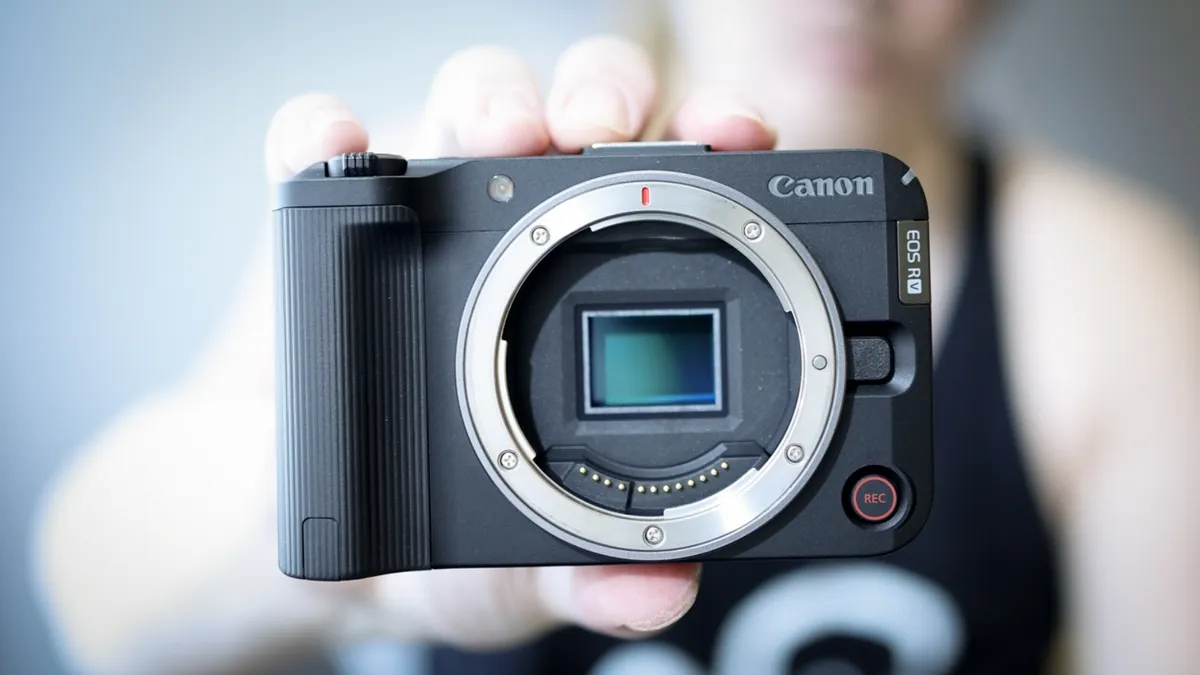
The APS-C component of Canon's EOS R family have long been solid choices for budget and mid-price video options – but the EOS R50 V is the first member that is predominantly geared towards video.
With the 'V' in the name signifying its status as a vlogging camera, the EOS R50 V is a capable rejig of the popular EOS R50 beginner camera, only with handy features like uncropped 4K 30p (60p and 50p are available with a crop), 10-bit 4:2:2 and C-Log 3.
The design is also much more video oriented, eschewing a viewfinder in favor of a vari-angle screen, and including tally lamps on the front and rear to make it clear when you're recording.
Also, it may sound simple, but one of my favorite design touches (and James concurs in his first-look review) is the big red record button on the front. It just makes the camera such more immediately operable, and helps you feel like you're using a proper video camera rather than a mirrorless photographer's camera with video added as an option.
It's not the cheapest member of the EOS R family – that honor belongs to the EOS R100. However, I think the level of video-specific functionality offered by the EOS R50 V means you get much better value for money if your main interest is video, and if you can afford the slight extra outlay, it's definitely worth it.
Read our first-look Canon EOS R50 V review for more details
Best budget beginner camera
✅You want a compact, lightweight mirrorless camera that’s easy to carry everywhere.
✅You want intuitive controls and a friendly menu system that’s great for beginners.
❌You want professional-level video features like 10-bit recording or advanced codecs.
❌You want the longest possible battery life for extended shoots without frequent battery swaps.
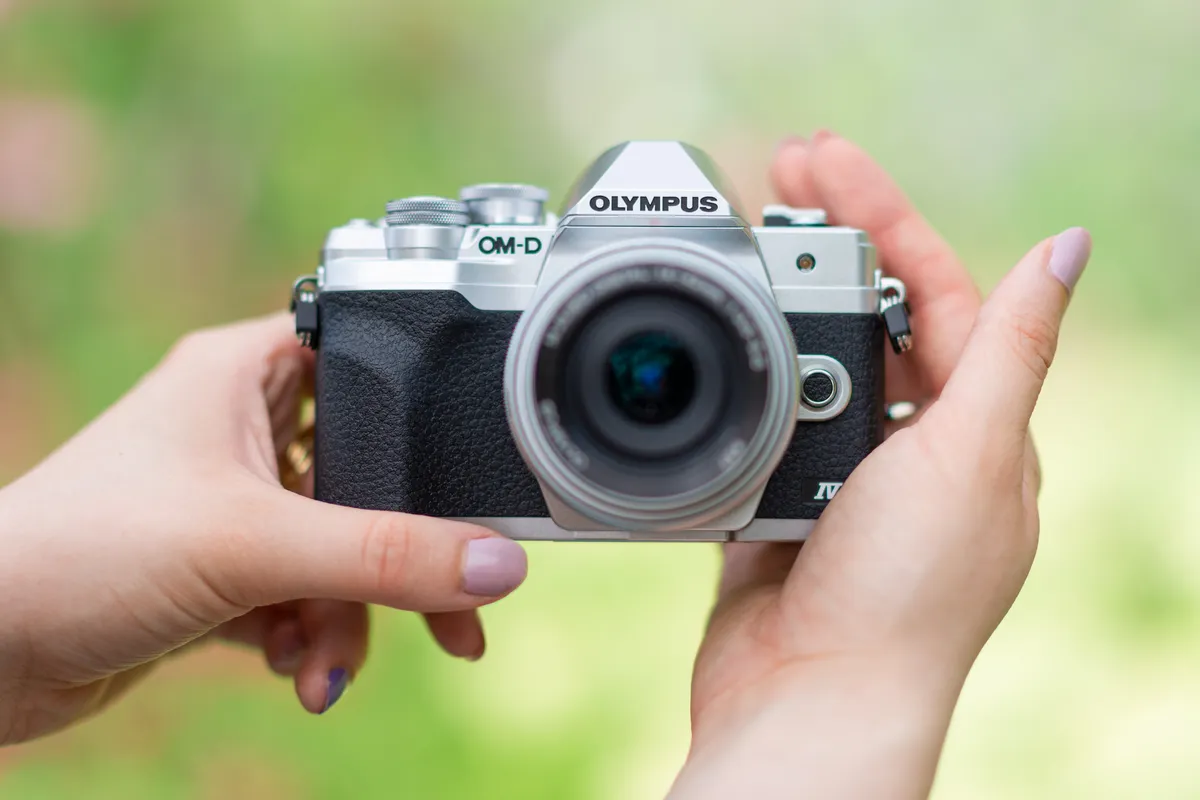
Another beginner-friendly Micro Four Thirds camera option, the Olympus OM-D E-M10 Mark IV is a hugely stylish camera that also has video tech where it counts. Capable of shooting 4K video at 30p, it also boasts Olympus’s 5-axis stabilization system, which is one of the most capable on the market, and makes it super-easy to get smooth footage shooting handheld.
You’ve also got a flip-down screen for vlogging purposes, making it easy to film yourself, and the autofocus on the E-M10 IV is reliably accurate. We would have liked a mic port, but given that this is a more expensive camera anyway, budget users likely won’t be springing extra cash for a microphone. It’s a capable all-in-one video setup.
Read our full Olympus OM-D E-M10 Mark IV review for more details
Best budget 8K gimbal

✅ You want incredible 8K video on a budget: With 8K recording at 30fps and a 1-inch sensor, the Luna Pro delivers impressive video capabilities without the premium price tag.
✅ You want the freedom of remote control: The detachable 2-inch OLED control centre lets you monitor and control your footage remotely, opening up exciting new filming possibilities.
❌ You want interchangeable lenses: The fixed-lens design is wonderfully convenient, but it limits your options if you want to experiment with different focal lengths and specialist optics.
❌ You want proper optical zoom: Unlike the Luna Ultra, the Pro has no dedicated telephoto lens, meaning zooming is entirely digital.
The Insta360 Luna Pro is, in my opinion, one of the most exciting affordable video cameras on the market, and for the price, I genuinely think it's the best around. What makes it so impressive is just how much technology Insta360 has managed to squeeze into such a small, portable package. You're getting a 1-inch sensor capable of recording stunning 8K video at 30fps, alongside 4K at up to 120fps, Dolby Vision HDR and 10-bit I-Log recording. These are seriously impressive specifications for a camera costing just $599.99 / £469, and whether you're filming YouTube videos, travel content or something more ambitious, the image quality and creative possibilities are fantastic.
However, what really makes the Luna Pro stand out for me isn't just its video capabilities, but how incredibly user-friendly it is. The detachable control centre, complete with its beautiful 2-inch OLED touchscreen, is an absolute game-changer, allowing you to control the camera remotely while seeing exactly what you're filming. Combine that with the intuitive physical controls, dedicated zoom switch, and built-in gimbal stabilization, and you've got a camera that makes capturing professional-looking footage feel almost effortless. It's the kind of camera you can pick up and start enjoying immediately, regardless of your experience, and that simplicity is a huge part of its appeal.
Of course, there are a few compromises at this price. Unlike the more expensive Luna Ultra, the Pro doesn't have a dedicated telephoto camera, so you're relying on digital zoom, while extended recording in 8K can occasionally cause overheating. But for most people, these are relatively minor drawbacks when you consider everything else on offer. Having 8K video quite literally at your fingertips, wrapped up in a compact, beautifully designed camera that's genuinely fun to use, is something special. If you're looking to take your filmmaking beyond a smartphone without spending a fortune, the Insta360 Luna Pro would be my first recommendation.
Read more: Insta360 Luna Pro review
Best cheap cinema rig

✅ You want an affordable cinema-style camera: With 8K recording, 10-bit colour and interchangeable lenses for just $699 / £599, this is one of the most affordable ways to build a serious filmmaking rig.
✅ You want the freedom to change lenses: The Micro Four Thirds mount allows you to experiment with compatible manual-focus lenses, giving you creative control that traditional GoPro cameras simply can't offer.
❌ You want reliable autofocus: The Mission 1 Pro ILS is entirely manual focus, which can make filming moving subjects considerably more challenging.
❌ You want a complete filmmaking setup straight out of the box: The $699 / £599 price doesn't include a lens, and additional accessories can quickly increase the overall cost.
If you've ever wanted to get into more serious filmmaking but have been put off by the cost of professional cinema cameras, the GoPro Mission 1 Pro ILS might be exactly what you've been looking for. In fact, I'd go as far as saying this is one of the cheapest ways to get your hands on a genuinely capable 8K cinema-style camera with interchangeable lenses. At just $699 / £599 for the body, you're getting a 1-inch sensor capable of recording incredible 8K video at 60fps, 8K open-gate recording at 30fps, 10-bit colour and GoPro's GP-Log2 profile for greater flexibility when colour grading. Add a Micro Four Thirds lens mount into the equation, and suddenly you've got a remarkably affordable little filmmaking rig that offers creative possibilities you simply wouldn't expect at this price.
What I particularly love about the Mission 1 Pro ILS is that, despite its more professional ambitions, it still feels very much like a GoPro. Anyone who has used one of the company's action cameras will immediately recognise the familiar touchscreen interface, straightforward controls and incredibly compact design. It's essentially the GoPro experience we've all come to know, but with the added freedom of interchangeable lenses, allowing you to experiment with different perspectives, create beautiful background blur and achieve a much more cinematic look. You also get GoPro's excellent HyperSmooth stabilization, impressive slow-motion capabilities and a body small enough to squeeze into places where traditional cinema cameras simply wouldn't fit.
Of course, there are compromises, and the biggest is that this is an entirely manual-focus camera, with no support for electronically controlled lenses that rely on focus-by-wire technology. The 1-inch sensor also struggles compared with larger sensors in low light, while heavier lenses require additional support, adding to the overall cost of your setup. But for filmmakers who are comfortable focusing manually, these limitations are relatively easy to work around. What you're left with is a tiny, incredibly versatile cinema-style camera that delivers outstanding 8K video, interchangeable-lens flexibility and that unmistakable GoPro simplicity, all at a price that makes serious filmmaking more accessible than ever.
Read more: GoPro Mission 1 Pro ILS review
What to look out for
Buying an affordable video camera usually involves a few compromises, so focus on the features that will have the biggest impact on how you actually shoot. These are the main specifications and features worth considering before you buy.
Resolution: This determines how much detail your footage contains and is measured in pixels. For most buyers today, 4K is the minimum worth aiming for in a capable video or vlogging camera, and every model featured in this guide can record in 4K or higher.
Frame rate: This refers to how many frames the camera records each second. For everyday filming, 30p is perfectly adequate, while 60p makes motion look smoother and offers more flexibility in post-production. Frame rates of 120p or above are especially useful for slow-motion footage, although they are more of a bonus than an essential feature at this price point.
Zoom range: A useful zoom range can make a big difference for run-and-gun shooting, allowing you to change your framing quickly without moving position. Camcorders generally offer the strongest built-in zoom capabilities, while compact and action cameras are often more limited. Action cameras usually rely on a fixed wide-angle lens, whereas mirrorless cameras give you the freedom to change lenses and add a more powerful zoom, although this will increase the overall cost.
Waterproofing: If you plan to shoot around water, in bad weather, or during outdoor adventures, weather protection is worth paying close attention to. Action cameras and rugged compact cameras are usually the strongest options here, with many capable of being submerged without the need for an additional waterproof housing.
Stabilization: Good stabilization can make handheld footage look significantly smoother, particularly when you are filming while walking or moving. A separate gimbal can help, but it also adds extra cost and equipment to your setup. A camera with effective built-in stabilization, or a compact gimbal camera such as the Feiyu Pocket 3, can therefore be a much more convenient all-in-one solution.
Articulating screen: A fully movable display is especially useful if you regularly film yourself or work alone. Many video-focused cameras, including the Canon EOS R50 V, adapt the traditional photography-camera design by prioritizing a vari-angle screen over a viewfinder, making them much better suited to vlogging, presenting and self-recording.
How we test
How we test cameras
At Digital Camera World, we believe the best way to test a camera is to use it exactly as its intended audience would, which is why our testing process varies depending on the type of camera we're reviewing. For mirrorless cameras, we combine extensive real-world shooting with controlled laboratory testing, giving us a clear understanding of both practical performance and technical capabilities. Our lab assessments measure resolution, dynamic range, and signal-to-noise ratio, using industry-standard ISO resolution charts and DxO Analyzer equipment to evaluate image quality and noise performance across the ISO range.
When it comes to camcorders, compact video cameras, and action cameras, our approach is much more focused on real-world use. We take each camera out into the field, shooting in a variety of environments and lighting conditions to see how it performs when it really matters. We pay particular attention to video quality, stabilization, autofocus, handling, and ease of use, as well as how reliably each camera performs during everyday filming. After all, impressive specifications mean very little if a camera struggles to deliver when you're actually using it.
Having tested and reviewed hundreds of cameras over the years, our team has an extensive understanding of what separates a genuinely great video camera from one that simply looks good on paper. That experience allows us to compare each new model against its competitors and recommend cameras based on their actual strengths, weaknesses, and overall value for money.
Find out more about how we test and review at Digital Camera World.
Compare prices
