





You don’t need to spend a fortune to produce great-looking video. The best budget vlogging cameras are capable of delivering impressive, professional-looking footage without the cost of a full-scale video setup, making them ideal for YouTube, TikTok, and just about any other social platform. I’ve put together this guide to help you find an affordable camera that still gives you the features, flexibility and image quality you actually need.
Every camera included here has been fully tested and reviewed by our team. There are plenty of cheap cameras on the market, but a low price doesn’t automatically make something good value, so I’ve focused only on models that we know can deliver reliable results. There’s plenty of variety too, with mirrorless cameras, compacts, 360-degree cameras and a few more unusual options that are particularly well suited to creating content on the move.
You can scroll to the bottom of the page to see the criteria I used when choosing the cameras for this guide, while each entry also links through to our full review, where you’ll find more detailed testing, performance impressions and sample footage. If your budget stretches a little further, it’s also worth taking a look at our guides to the best cameras for filmmaking and the best cameras for vlogging.

As a long-time DCW contributor and former editor, Rod has tested plenty of budget vlogging cameras. The models on this list represent his top picks that will provide a terrific vlogging platform without costing the earth.
The best budget vlogging cameras in 2026
Why you can trust Digital Camera World Our expert reviewers spend hours testing and comparing products and services so you can choose the best for you. Find out how we test.
Best all-round budget vlogging camera

A compact camera can be a great choice for the budget-conscious vlogger. There’s no need to spend extra money on lenses — you’ve got everything you need from the moment you open the box. The best vlogging compact you can buy right now is the Canon PowerShot V1. With its 1.4-inch sensor, it has an immediate image quality advantage over most compacts, which tend to use 1-inch sensors, and its raft of vlogging-focused features make it a capable all-rounder that’s going to get the job done in the vast majority of vlogging situations. There are cheaper options on this list, but if your budget stretches to the V1 (which, let’s keep perspective, is much more affordable than a cine camera or full-frame mirrorless) then I’d say it’s worth it.
With a 16-50mm zoom (17-52mm when shooting 4K 30p in 16:9) covers pretty much exactly the range you’re going to be using in vlogging, allowing you to cram loads into the frame at the wide end, and zoom in on details at the long end. A built-in fan ensures that recording sessions don’t get curtailed by overheating — James tried to overheat the thing in bright blazing sunshine, and couldn’t — and the autofocus is reliably sticky, locking onto eyes and faces in exactly the way you want it to.
Extra features like image stabilisation, built in ND filters and an attachable wind muffler for the microphones all add up to a camera that can handle the majority of situations you’re likely to throw at it. The 4K video looks great, coming with a crop when shooting in 60p, but the oversampling that’s enabled by the larger sensor makes a hell of a difference to the quality. It's just a brilliant vlogging toolbox, giving you everything you need to produce great, slick-looking video.
Read our full Canon PowerShot V1 review for more.
Best budget vlogging camera for beginners
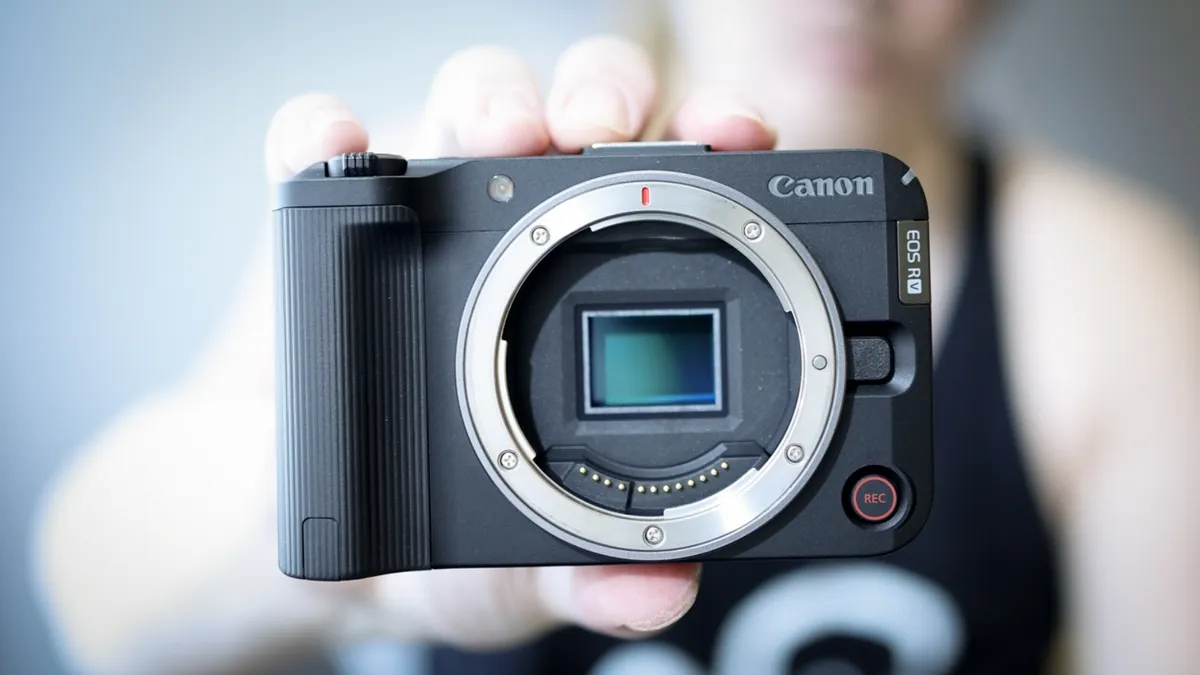
The original EOS R50 is a great little camera for photographers who want a slimmed-down and affordable version of the high-end professional cameras in the EOS R series. The EOS R50 V essentially does the same thing but for video shooters, redesigning the body to be a bit more video-friendly and packing in a few features borrowed from Canon’s EOS Cinema range. The result is one of the best kinds of cameras for beginners – the kind that gives you room to grow.
With a big unmissable red ‘record’ button non the front, and a tally lamp to make it clear when it’s recording, the EOS R50 V feels a lot more like a proper video camera than the rest of the smaller-sensor EOS R family. It ditches the viewfinder to keep the body as small as possible, and without a lens, it can practically fit in a pocket.
While the EOS R50 V is fairly easily to use straight out of the gate, once you’re confident with the basics, you can start diving into more advanced features like Look Files, timecode, zebras, false color, log profiles and more. Its 4K footage looks great (it’s oversampled from 6K) and the Dual Pixel CMOS II autofocus has proved brilliantly reliable in our testings, locking onto human, animal and vehicle subjects alike with impressive tenacity.
The lack of in-body stabilization is a shame – I’d say the most essential next purchase after you’ve got your EOS R50 V and a lens is a gimbal. When APS-C rivals from specialists like Fujifilm all offer this feature, it does feel like something's missing. Otherwise though, I think this is some of the best value for money beginner vloggers can get right now.
Read our full Canon EOS R50 review
Best budget vlogging camera with 6K

It used to be the case that high-resolution 6.2K video was something you'd only be likely to see in professional or advanced enthusiast cameras. However, the pocketable new Fujifilm X-M5 turns that on its head, boasting not just 6.2K, but open-gate 6.2K, meaning it uses the full width of its sensor to capture the image.
This is pretty significant and should put the X-M5 high on any budget vlogger's list of considerations. While you generally won't actually need to produce 6.2K content very often, if ever, the extra level of flexibility this provides for cropping into your footage makes you much more versatile and gives more latitude in the edit.
The X-M5 is very clearly tilted towards vloggers – it has a dedicated vlogging menu, and also makes it easy to capture footage in a range of aspect ratios – perfect if you need to post content on different social platforms like TikTok and YouTube. As a Fujifilm X camera, the X-M5 has access to a stable of truly excellent lenses – though there are fewer cheap options in the X-mount stable than in other brands', it must be said.
The camera is so pocketable that those with large hands may even find it a bit fiddly. But for many vloggers, particularly those who want portability without compromising on quality, it's likely going to find itself very welcome indeed. It earned the full five stars in our review, not just for being a technically proficient vlogging camera, but also for being just downright fun to use.
Read more: Fujifilm X-M5 review
Best 360°

Depending on what kind of vlogging you plan to do, a 360° camera might actually be your best bet – even if you don't plan to make 360° content. As the name implies, 360° cameras capture everything around them, with two back-to-back fisheye lenses. In the edit, you can then pick out a slice of this huge area and export it as a standard 'flat' video in a regular aspect ratio. This way, you don't have to worry about framing in the moment – you simply record everything, and frame later.
The flexibility of the 360° footage means you can also simulate camera movements, instructing your editing software to slowly pan from one area of the footage to another, for instance. Insta360 produces a selection of great cameras in this mold, but one of the best for users on a budget is the Insta360 X4 Air.
Even though it's slimmed down compared to the flagships, the Insta360 X4 Air still produces great-looking 8K footage. It's not the best in low light, as Adam noted in our review, but if you do most of your recording during the day, you'll find it to be a responsive and good-quality vlogging camera. 360° footage takes a little more time and effort to process, but Insta360's software is very streamlined – and it can take a lot of the stress and hassle out of the shoot.
Read our full Insta360 X4 Air review
Best for travel

This palm-sized release from Canon is a clever little camera specifically designed for vlogging. You may notice that it doesn't look all that much like a regular camera, and that's because it's not. It's built to be held in the palm and pointed towards the user, allowing them to easily see themselves on the screen while recording themselves one-handed. You know, the way vloggers do!
The focal length of the fixed lens – 18mm for stills, 19mm for video – is pitch-perfect, giving you a nice wide field of view for getting yourself in the frame, whether you're holding the camera or propping it on a table. And there's no need for a tripod if you're doing the latter, as the clever design of the PowerShot V10 means it can be entirely freestanding.
In terms of video quality, James was impressed by the V10 in our full review. Its Full Auto mode generally does well, choosing sensible settings for balanced exposures. The 4K and Full HD quality is perfectly fine, and sound quality from the built-in mics also impresses, even without attaching the optional wind mufflers (sadly sold separately).
If you want a snappy, responsive vlogging camera that's inexpensive and can be taken with you everywhere – the Canon PowerShot V10 is an excellent choice. Its form factor is actually designed for the needs of vloggers, and it's one of the easiest cameras to just pick up, use, and get great results.
Read our full Canon PowerShot V10 review
Best vlogging camera for lens choice
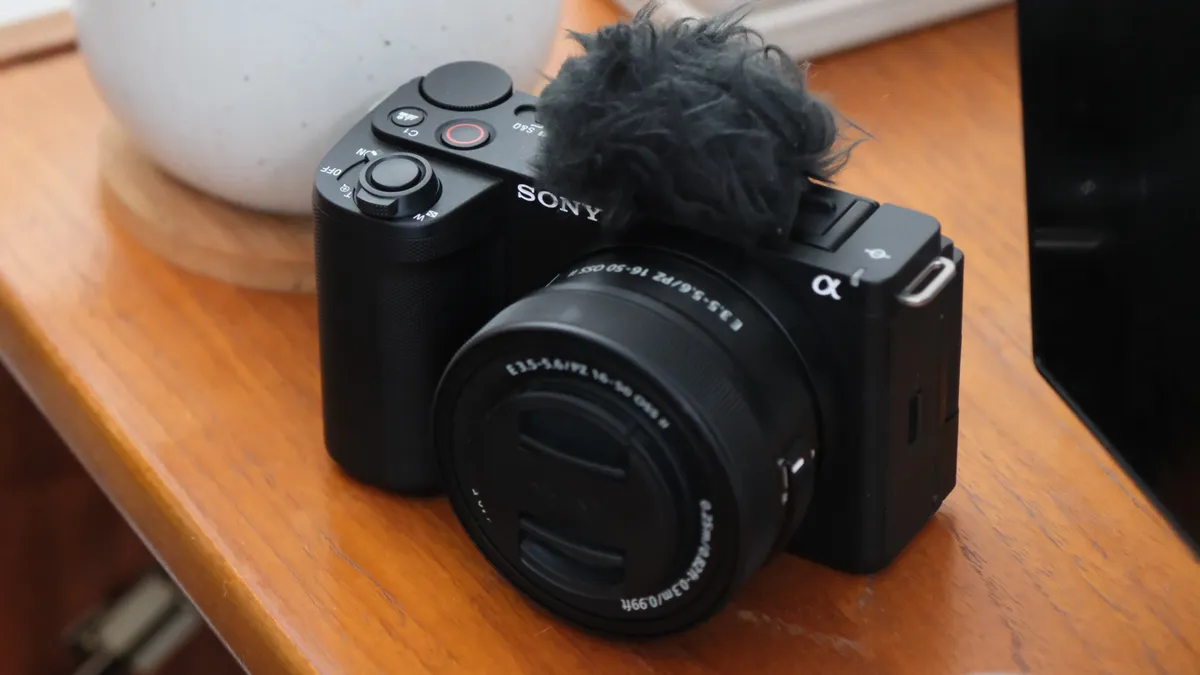
The Sony ZV-E10 II is designed as an upgraded vlogging camera with enhanced features for video content creators. It shares the same sensor and processor as the Sony a6700, ensuring high-quality images, but its primary focus is on video rather than photography.
The camera offers impressive video capabilities, including 4K30p without cropping and 4K60p with only a minimal 1.1x crop, making it versatile for vloggers. Notable features include the "Cinematic Vlog" mode, utilizing Sony’s S-Cinetone for outstanding footage straight from the camera, and the option to record in S-Log with 10-bit color for flexible post-production editing.
Additionally, the product showcase focus feature provides seamless autofocus between the subject and background, which is beneficial for vloggers showcasing products.
While it lacks 4K120p, this isn't a significant drawback considering its price point. It's worth noting that extended 4K recording may cause overheating, so it's more suitable for shorter video sessions.
Overall, the ZV-E10 II is an excellent option for vloggers seeking a compact, feature-rich camera at an affordable price.
Read more: Sony ZV-E10 II review
Best value vlogging camera

This baby Lumix is remarkably powerful and extremely good value for money. Unlike many rival budget vlogging cameras, this one has a viewfinder and a very good one at that. The Lumix G100D also has access to a wide range of Micro Four Thirds format lenses from Panasonic, Olympus, Laowa, and others, and these lenses are typically a little bit cheaper and lighter than those of other systems.
New vloggers will enjoy the simplicity of the Lumix G100D. It makes it easy to capture high-quality video and stills with its approachable button layout. Even people uninterested in the technicalities of capturing great-looking videos will be able to get results with this camera.
There are just a couple of downsides that stop the Lumix G100D from taking the top spot. First, Panasonic's DFD autofocus system is just not quite as smooth as the hybrid systems from other makers; second, if you shoot in 4K it does come with a crop factor that reduces the angle of view.
See our full Panasonic G100D review
Best fixed lens budget vlogging camera

If you're after a vlogging camera but don't want to faff with investing in lenses, the fixed-lens Sony ZV-1F might just be the answer. While a fixed lens camera can be limiting it can also take away a lot of financial stress and you won't feel like you have to constantly invest or change lenses - instead, you learn to adapt and shoot with what you've got. It's aimed at an amateur vlogger who wants to have a dedicated camera for content creation instead of just relying on a phone.
It does have the edge when it comes to 4K video footage, even if the quality of the stills lets it down a bit. It's perfect for run-and-gun scenarios as you can set it up and start shooting quickly and it's so easy to use you can pass it among friends to make sure everyone has some airtime.
Sure this camera doesn't have some of the bells and whistles of other mirrorless cameras but if you're after high-quality 4K video for social media wrapped up in a pocket-sized compact camera, you'll be hard-pushed to beat the price of the ZV-1F.
Read our full Sony ZV-1F review
Best cheap gimbal camera for vlogging

Since a gimbal is such an essential part of a serious vlogger's setup, it can make cost-effective sense to get a gimbal camera, which provides built-in 3-axis optical stabiliser that enables super-smooth footage to be captured even while the camera operator is moving. The ur-example is definitely the DJI Osmo Pocket 3, but if it's out of your budget, this affordable option from Feiyu may be of interest.
Indeed, even if it weren't obvious from the looks, the name 'Feiyu Pocket 3' makes it extremely unsubtle what product this camera is aping. Still, it does bring some originality to the table, not just in its price tag which is half that of the DJI version, but also in its detachable head that can be used completely separately from the handle, with a smartphone standing in for the screen via wireless connection.
Of course, compromises have to be made for a cheaper camera, and the Feiyu Pocket has more pixels crammed onto a smaller sensor than the DJI Osmo Pocket 3, and this does have an impact on video quality, particularly in low light. In our testing, Dan found that the footage was perfectly fine in good light, but lacked the dynamic pop you get iht the Osmo Pocket 3.
Still, the slow-motion works well, and one feature that really impressed in Dan's testing was the battery life – this thing lasts and lasts, and you can comfortably get a good day's shooting out of it.
Read more: Feiyu Pocket 3 review
best mainstream gimbal

The DJI Osmo Pocket 4P feels like one of the biggest upgrades to DJI’s pocket gimbal camera range in years. It keeps the compact, highly portable design that made earlier Pocket models so popular, but adds a second camera, pairing a 20mm equivalent wide-angle lens with a 60mm equivalent telephoto option. That extra focal length makes the Pocket 4P far more versatile, particularly for portraits, pieces to camera and situations where you want more natural background compression without relying on digital zoom.
Video performance is equally impressive, with up to 4K 240fps recording, 10-bit capture and DJI’s D-Log 2 profile giving creators plenty of flexibility. Mechanical gimbal stabilisation remains one of the Pocket’s biggest advantages over a smartphone, while ActiveTrack 8.0 and reliable autofocus make it especially useful for solo creators. Despite the larger dual-camera setup, the Pocket 4P remains impressively portable, with a bright 2-inch touchscreen, built-in storage, microSD expansion, and direct support for DJI’s wireless microphones.
There are still a few quirks, including a slightly fiddly joystick, limitations on where D-Log 2 can be used, and a noticeable transition when switching between the two physical cameras. However, none of these issues seriously detract from what DJI has achieved.
The addition of the 60mm camera turns the Pocket concept into a much more complete filmmaking tool, making the Osmo Pocket 4P one of the most compelling options yet for vloggers, travelling creators and solo filmmakers who want serious video capability in a genuinely pocketable package.
Read more: DJI Osmo Pocket 4P Review
How to choose the best budget vlogging cameras
When choosing a budget vlogging camera, there are a few key features that are worth prioritizing if you want something that will remain useful as your content develops.
4K video is now effectively the baseline for modern content creation. Even if most of your videos are ultimately uploaded in Full HD, shooting in 4K gives you much more flexibility when editing. You can crop into the frame, recompose shots, and create digital zooms without sacrificing as much image quality, while the extra resolution also helps future-proof your footage.
Interchangeable lenses can also make a big difference. Most of the cameras on this list are mirrorless models, which means you can change lenses depending on what you are shooting. That gives you far more creative control than a fixed-lens camera, particularly when it comes to focal length, depth of field, and low-light performance. There are some excellent compact options too, including cameras specifically designed with vloggers in mind.
A vari-angle screen is another essential feature. If you are filming yourself, you need to be able to see your framing while standing in front of the camera, so a display that flips forward can make the whole process much easier. It is also useful when shooting from high or low angles.
Finally, look for a camera with a microphone input. Built-in microphones can be fine for casual use, but audio quality becomes increasingly important as your videos become more polished. Being able to connect an external microphone gives you far better control over sound and means you will not outgrow the camera quite so quickly.
How we test the best budget vlogging cameras
How we test cameras is by using them in both real-world shooting scenarios and carefully controlled lab conditions.
For budget vlogging cameras, we test things such as how well the image stabilization works when we are shooting on the move, how fast and accurate the autofocus is, whether it can track human and animal eyes and faces, and how easy it is to color grade the video afterward when shooting in V-Log for example.
Shooting in real-life environments, we make short films and clips that put the camera's features through their paces. We also measure a camera's proficiency against its price – does it offer vloggers genuine value for money, or can you spend less elsewhere to get better functionality and video quality?
Compare prices

