







Digital Camera World Verdict
The Instax Mini Link+ offers sharper images and more accurate colors than earlier film-based printers. But, that also means it's a pricier model than older options and doesn't feel quite as retro. If you want to print text or favor sharper shots over a softer retro look, the Mini Link+ is an easy choice.
Reasons to buy
- +
Sharp prints
- +
Excellent color
- +
Easy to use
- +
Strap compatible
Reasons to avoid
- -
Pricier than older versions
Why you can trust Digital Camera World Our expert reviewers spend hours testing and comparing products and services so you can choose the best for you. Find out how we test.
Portable photo printers are trending – and among my favorite types are the printers that use not ink and paper, but real instant film. And Fujifilm has a new printer that levels up prints on film: The Instax Mini Link+.
The Instax Mini Link+, announced on January 13, is an update designed to better handle putting text and designs on instant film. I’ve tried out a handful of Fujifilm’s previous printers, including the Link 2 and Link 3, so I had to test out the new Link+.
Fujifilm Instax Mini Link+: Specifications
Film type |
Instax Mini |
Pixels |
800x600 dots |
Compatible formats |
JPEG, PNG, HEIF, DNG |
Prints per charge |
100 |
Dimensions |
86.7 mm x 33.4 mm x 128.0 mm / 3.41 inches x 1.32 inches x 5.04 inches |
Weight |
240g / 8.5 oz |
App compatibility |
iOS, Android |
Fujifilm Instax Mini Link+ Review: Price
The Instax Mini Link+ retails for $169.99 / £129. That’s about AU$253 / CA$236. Availability is estimated for early February 2026 in the US and from January 28 in the UK. Pre-orders have already opened, including at B&H in the US and London Camera Exchange in the UK.
That makes the Link+ sit a bit higher than the Link 3, which makes sense, as the Link+ is designed to be a more high-end photo printer.
Fujifilm Instax Mini Link+ Review: Design and Handling

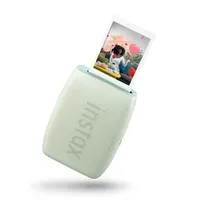
The Instax Mini Link+ design omits the curves of the Link 3 and returns to a boxier design with clean lines and a bit of an industrial feel. My first thought when I pulled it out was that the look reminds me a bit of an oversized ink cartridge. A pretty ink cartridge, perhaps.
The sides have raised lines with a bit of an art deco feel, the front has a small Instax logo and screws, and the back a matching logo. The design feels a bit more retro industrial than the bright colors and rounded corners of the Link 3.

One change I really love is that there are two loops that can be used to add a strap to the printer. A nice, thick wrist strap with a metal buckle is included in the box. This makes it easier to carry around.
Like with other Instax printers and cameras, loading the film pack is fairly easy. A door at the back opens the film compartment. The cartridge slots in the space; just match up the yellow on the cartridge with the yellow on the printer. Shut the door, the protective sheet will spit out, and you’re good to go.
The only controls on the side are the on/off button and a second button that checks the battery life by flashing a small light to indicate how much battery remains. On the opposite side, a small door opens to reveal the USB-C charging port.
Fujifilm Instax Mini Link+ Review: Performance

Using the app, the Link+ can spit out photos from your phone. This applies to both photos taken on the smartphone itself, as well as photos taken with a different camera and transferred to the phone, so long as they are JPEG, PNG, HEIF or DNG files. So yes, you can print photos from your Fujifilm mirrorless too (or your Canon, Sony, Nikon, etc., brand doesn’t matter here.) The printer can also pull stills from videos to print as well.
The app houses a few basic edits, as well as options to print with frames or collages. You can rotate, crop, choose from four filters, or add a bit of text. For the most control, you’ll want a dedicated photo editing app, but there are a few basic edits built right into the printer’s app.

An unusual new feature is that the printer can also print directly from Pinterest. This can be a fun way to post those inspirational quotes overlaid with a photo that are so popular on the social platform. The ability to print someone else’s photos may have some photographers irked with copyright concerns, though the small size does feel more like a thumbnail than a true print.
The printer’s most significant update is that it’s a bit better at printing out text than earlier models. Now, Instax Mini film is credit-card-sized, so the text does still have to be a fairly significant size to print. But, headline-sized text is nice and crisp.
The colors on the instant film prints also feel more true to the digital file than older Instax printers. The printer handles colors very well. That’s a great thing – though on the flip side, if you want your photos to look like retro instant film, you may want to add a retro filter first. The printer doesn’t get the same retro look as Instax’s cameras can.
There are some slight color changes due to using real film. One shot, for example, had a magenta tint to the clouds that wasn’t on the digital file. Printed photos also feel a bit warmer than the digital files, favoring a bit more orange tones.
Fujifilm Instax Mini Link+ Review: Verdict

The Instax Mini Link+ has the best print quality out of all the instant film printers that I’ve tried, including the Link 3 and Link 2. While there are a few changes going from digital to instant film, colors feel closer to the digital original, and both subjects and text are a bit sharper.
Of course, the better print quality means the prints don’t feel quite as retro as using one of Instax’s cameras rather than a printer. If it’s a retro look that you’re after, try an Instax camera over a printer.
The upgraded quality comes at a cost, however – the Link+ is priced a bit higher than the Link 3. If you want the sharpest prints or want to print text at all, the Link+ is the best choice. But, as someone who uses the Link 3 often, I don’t feel an overwhelming need that I have to upgrade when my old one is working just fine.
Pre-orders are open in the US with early February availability and in the UK with late January availability.
Fujifilm Instax Mini Link+ Review: Alternatives
You may also like
Browse the best portable photo printers or the best instant film cameras.

