
Digital Camera World Verdict
The Elgato Video Capture could be described as the idiot-proof solution for digitizing analog video. With its own software package, it streamlines the process of capturing, trimming and sharing your footage – in a manner that may be over-simplified to those who prefer to fiddle with codecs and resolution settings, but will likely appeal to the majority of users who just want a simple, efficient transfer solution.
Reasons to buy
- +
Plug-and-play operation
- +
Software guides you through process
- +
Built-in editing and sharing tools
Reasons to avoid
- -
More expensive than DigitNow rival
- -
Output is USB 2.0
Why you can trust Digital Camera World Our expert reviewers spend hours testing and comparing products and services so you can choose the best for you. Find out how we test.
There are a lot of cheap devices out there promising to allow you to easily digitize analog video footage from old formats like VHS or 8mm cassette. The Elgato Video Capture sticks out for being a bit more expensive than the competition, despite looking functionally identical to a lot of it. Despite this, it’s a popular choice. How come?
The simple answer is convenience. The Elgato Video Capture comes with its own tailored software designed to streamline the process of digitizing video. Whereas many other capture devices will require you to download third-party software like OBS and mess about with video codecs (and, not infrequently, manually update your USB drivers while swearing at your computer), the whole pitch of the Elgato is that it’s a plug-and-play digitizing device for analog video, one that basically anyone can use.
Is convenience worth the extra outlay? There’s only one way to find out – I loaded up my Canon camcorder with 8mm tape and shot some footage to digitize with the Elgato Video Capture.

Specifications
Inputs |
RCA, S-video, SCART (adapter included) |
Output |
USB 2.0 |
Max video resolution (output) |
852 x 480 |
Video format |
H.264 or MPEG-4 |
Compatibility |
PC, Mac, iPhone, iPad |
Recommended software |
Elgato Video Capture |
Price & availability
The Elgato Video Capture is available in the US and UK, for around $79 / £72. This is quite a jump from other capture devices, with similar options being available for around the $40 / £40 mark, and standalone devices with their own screens going for around $80 / £69. As we’ve already discussed, you’re essentially paying a premium for ease of use.
Design
I usually try to review products on their own merits without comparing them too much to others on the market. However, I recently tested the DigitNow Video Capture, and it is hard to ignore that the Elgato and DigitNow Video Captures are, externally, exactly the same, down to the lengths of their cables.

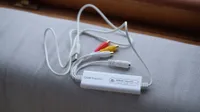
It’s a slim white box containing a capture card, with RCA and S-video inputs on one side, and a USB 2.0 output on the other. So, all my comments and criticisms on the DigitNow Video Capture also apply here. I like that the device is simple, portable, and comes bundled with the necessary cables, including a SCART adapter for VHS players. I don’t like that the output is the outdated USB 2.0 standard, meaning I have to use a USB dock to connect it to my Mac Mini. Come on guys – we’re firmly in the USB-C era.

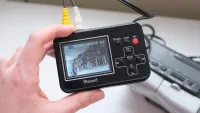
And once again, this means that the Elgato Video Capture needs a computer in order to work, unlike standalone recorders with screens such as the DigitNow Full Media Recorder, which records directly to a card and has its own battery.
Performance
So, as we know, the Elgato Video Capture’s key selling point is that bespoke software – and I have to say, I was very impressed. Once I’d downloaded Elgato Video Capture (the software, which has the same name as the product) to my Mac, it instantly recognised the device and was ready to record.

You start by naming your video and optionally inputting how long it is. You’re next given options to select with regard to your video dimensions – you can pick 4:3 or 16:9 – and whether your input is S-video or RCA. After that, the software will do a quick audio test, and if everything’s working as it should, you’ll proceed to the record interface, which is delightfully simple. Hit the big red button to record; hit it again to stop.
One thing I like is that you can set the software to stop recording after a certain time limit if you know how long the footage is you want to capture – meaning you don’t have to babysit it. As with all of these simple video-capture devices, it plays and records in real time. So, if you have an hour-long home movie to digitize, the capture will take an hour.
Once you’re done recording, the next screen is an editing interface. It’s nothing complex – you can’t cut clips together or insert transitions – but for the simple task of trimming the ends off your clip, it’s perfect.

This done, your footage automatically saves to your hard drive, and the software will even publish straight to YouTube if you want it to. Lovely.
What you gain in simplicity, you lose in versatility. The software doesn’t offer the reams of codec and resolution options you’ll get with a third-party recording program like OBS or PotPlayer. You can capture 4:3 footage with a resolution of 640x480, or 16:9 footage with a resolution of 852x480, and you can optionally mute the audio. That’s pretty much it.
On PC you can apparently use the Elgato Video Capture with OBS, but the makers have confirmed it won’t work on Mac, and I only had a Mac for this test. Frankly though, the convenience of the Elgato software is a big part of what you’re paying for – if you want to use OBS, you might as well get the cheaper DigitNow Video Capture.
You can see the results of the Elgato Video Capture yourself in the sample video. The noise in the audio was present in the original recording, and isn't a product of the digitization process.
Verdict
I’ve tested a few different analog video capture devices now, and I have to say that if I were now faced with a mountain of camcorder tapes or VHS cassettes to digitize for myself, the Elgato Video Capture is the device I would reach for. That software is so smooth and polished that it just takes so much of the work out of the process. I can set up my capture, leave it alone while it records for the appropriate amount of time, trim the ends off if needed, and then an oven-ready, shareable MP4 file will drop neatly onto my hard drive.
However, if I were buying one of these devices, it’d be hard to ignore the fact that the less streamlined but otherwise very similar DigitNow Video Capture is half the price. I found that device trickier to get working, with different third-party software needed for capturing and editing. But ultimately, the end result was the same.
If you want a smooth, easy capturing process and have a bit more to spend, go with the Elgato. Whereas if you’re on a tight budget, and don’t mind doing a bit more tinkering with software (or, indeed, prefer to do so), then the DigitNow Video Capture will suit you better.
Features |
The included software makes the Elgato Video Capture a wonderfully smooth solution for digitizing analog video. |
4/5 |
Design |
The USB 2.0 output remains an annoyance, and means you may have to insert a dock or other adapter into the process. |
2.5/5 |
Performance |
Buttery-smooth, in solid quality. There’s not much scope to fiddle with settings, but for most users, there doesn't need to be. |
4/5 |
Value |
Pricier than very similar rivals. Whether it’s worth it depends how highly you value ease of use. |
3/5 |
Alternatives
See our full guide to the best VHS to DVD converters

