
Digital Camera World Verdict
The Vantrue Nexus 5S is a premium, featured-packed 4-channel dash cam with front, rear, and dual cabin/interior cameras. Its primary, forward-facing camera captures good quality video in all lighting conditions, and the rear-facing camera is equally competent - something that definitely isn't always the case with front+rear dash cams. Image quality from the dual cabin cameras isn't quite on par with the two main cameras, but cabin footage is still useable, even when the interior of your car is almost completely dark. If you regularly ride share, then the cabin cameras will likely provide welcome peace of mind and will justify the price of the Nexus 5S. However, their other advertised benefit - giving '360-degree' exterior video coverage - doesn't quite work out in real-world use.
Pros
- +
Great front and rear cam quality
- +
Cabin cameras are well integrated
- +
Smooth app functionality
- +
Competative pricing
Cons
- -
Questionable value from cabin cameras
- -
Not 4K
- -
No touch screen
Why you can trust Digital Camera World Our expert reviewers spend hours testing and comparing products and services so you can choose the best for you. Find out how we test.
In an effort to stand out from the crowd, dash cam manufacturers are offering systems with an increasing number of cameras. Vantrue's Nexus 5S doesn't just have forward-facing and rear-facing cameras, it also has two interior/cabin cameras, making it a 4-channel dash cam.
The inclusion of two cabin cameras isn't just useful for taxi or ride-share drivers wanting to protect their personal safety; both cameras have a wide 160-degree field of view, so they can see through the side windows of your vehicle to capture vital footage of a side impact or side swipe collision.
If you're worried all this means your car will be filled with more cameras than a subway station, rest easy. Vantrue has integrated one cabin camera into the front camera unit, and the second cabin camera is housed in the rear camera module, so there are only two physical camera units to install.
Vantrue Nexus 5S: Specifications
Resolution (front) |
1944p (2592 x 1944) |
Resolution (rear) |
1440p (2560 x 1440) |
Resolution (cabin, backward facing) |
1080p (1920 x 1080) |
Resolution (cabin, forward facing) |
1080p (1920 x 1080) |
HDR |
Yes |
GPS |
Yes |
Wi-Fi |
Yes |
Parking mode |
Yes, optional hardwire kit required |
Vantrue Nexus 5S: Features
All four Nexus 5S cameras use Sony's latest Starvis 2 image sensors. These have been designed specifically for surveillance and dash cam implementation and promise excellent low light video quality, plus they're HDR-capable so should cope better in the kind of harsh, high-contrast lighting you encounter frequently while driving. The sensor in the front-facing camera has a maximum 2592 x 1944 resolution, while the rear-facing camera operates at QHD (2560 x 1440) resolution. The cabin cameras are both 1080p.

The forward-facing cabin camera housed within the rear camera unit shows the backs of the vehicle occupants, while cabin camera inside the front camera unit is aimed at the faces of the vehicle's occupants. In daytime the cabin cameras record normal color footage, but they also have the ability to switch to infra-red (black and white) mode during night-time driving. So it doesn't matter if your vehicle cabin is almost completely dark; the cabin cameras will still record detailed video. An ambient light sensor positioned in the front camera automatically switches both cabin cameras to infra-red mode when it detects low ambient light.

In addition to high-end image sensors, the Nexus 5S is packed with extra features. There's voice control, built-in GPS to track vehicle location, speed and mileage covered, and fast 5GHz Wi-Fi connectivity for rapid video clip downloading to your phone. Pretty much any dash cam will stay recording for a few seconds after vehicle power is cut, in order to record crucial footage in the event of a crash. But where most dash cams achieve this with a small lithium battery, the Nexus 5S maintains its power with a super capacitor. This is a more reliable solution in extreme hot or cold environments, and it's said to have a longer overall lifespan.

Another key feature is 24/7 parking monitoring. The cameras will automatically wake if motion or impact is detected, then record 10 seconds of video from before the detected movement and 30 seconds after it. This can help protect your vehicle from potential vandalism or theft attempts, as well as car park collisions. Alternatively, the cameras can be configured to record continuously at a low video bit rate or frame rate to conserve memory card space and vehicle battery life. If you want to use any form of parking monitoring, the Nexus 5S (like any other dash cam with parking monitoring) will need to be hard-wired to your vehicle's 12 volt battery. This requires an optional wiring kit from Vantrue, plus the knowledge of how to modify your vehicle's wiring.
Vantrue Nexus 5S: Design & Handling
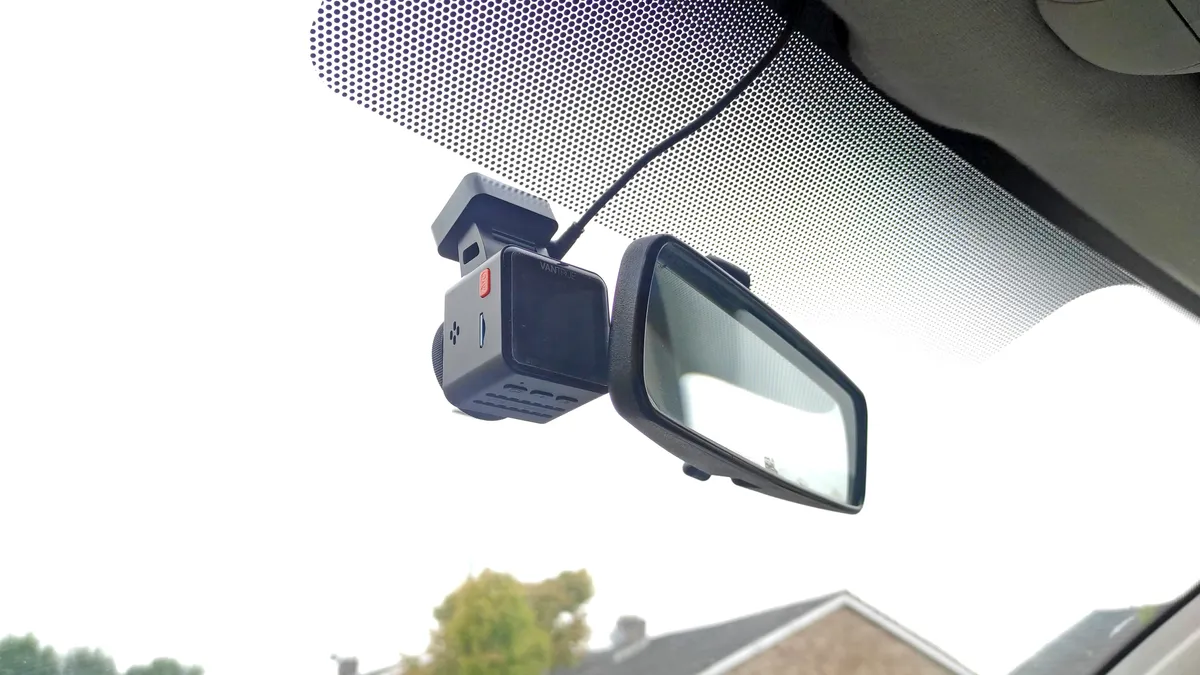

I've been using a Vantrue E1 in our family's second car for several years. It's a compact, front-only dash cam. By comparison, the Nexus 5S' front camera is much larger - roughly three times wider than the E1. Depending on your car's rear-view mirror location, and if your screen has any tint strip at the top, it can be tricky to find a suitable mounting position for the camera where it won't block your forward vision or be distracting. This is made more difficult as you can't place the camera too close to the rear-view mirror, or else it could block the rear-facing (ultra-wide angle) cabin camera's line of sight. And don't forget that the forward-facing camera also needs to be positioned within the swept area of the windscreen wipers, further limiting its positioning options.

Vantrue provides everything you could need to install the Nexus 5S, right down to adhesive hooks to keep the cabling tidy if you don't fancy trying to hide it behind your car's interior trim panels. The rear camera unit is linked by a 6-meter long USB-C cable which should be long enough for even the largest cars. Vantrue uses USB-C connections at each end, rather than proprietary connectors, which is handy should the supplied cables ever need replacing.

Only the front camera unit requires a dedicated power supply (the rear unit is powered by that single USB link with the front cam). This takes the form of a standard car power adapter that plugs into a 12v/cigarette lighter socket. The adapter has a fixed cable that supplies the front camera with power, but it also features a USB-A socket so you can still charge another device from your 12v outlet.

The Nexus 5S can be controlled via four on-board physical buttons (the screen is not touch sensitive). These work well, and the camera's menu interface is easy to navigate. Alternatively, you can adjust settings or play back recorded footage using the Vantrue mobile app. This connects to the camera via fast 5GHz Wi-Fi, enabling smooth video playback and fast footage downloads should you need to download a crucial recording immediately after a collision. The app can also display driving data over a customized time period, including distance travelled, elevation change, and speed statistics.

Vantrue Nexus 5S: Performance
But regardless of how many extra features are crammed into a dash cam, what matters most is video quality, as that's what your insurers or the authorities will see. I set my front-facing camera to a slightly lower 2560 x 1440 resolution, rather than the maximum 2592 x 1944. The difference in horizontal resolution is negligible, and the extra vertical resolution at 1944p is unnecessary - you'd simply capture more of your own dash board and the sky.

In daylight, footage from the main front-facing camera is very good, with plenty of dynamic range providing decent highlight and shadow clarity. Number plate definition is good for cars directly ahead, and if you freeze a car driving towards you, most of the time its plate will also be readable.

Night driving is a much tougher test of any dash cam, as they all use very small image sensors which can struggle in low light. The Sony IMX675 sensor in the front camera performs well in the dark though, with minimal image noise. Detail well resolved, and passing number plates are just about visible when you freeze the video.


Some front and rear dash cams have a specced-up front camera, but the rear cam is a token effort. That's not the case here, as the Nexus 5S rear camera uses the exact same type of sensor as in the front camera. Consequently image quality is equally good, so if you are unlucky enough to be rear-ended, the offending vehicle's plate should be easily visible before impact, even in the dark.


Both cabin cameras use lower resolution, 1080p Sony IMX662 sensors. Recording quality is less detailed than that from the main cameras, but not by much. I found the backward-facing cabin camera to give pretty decent daytime results, managing to capture interior detail without over exposing detail outside the car.


My forward-facing cabin camera appeared to have some sort of minor focussing issue that manifested as slight horizontal motion blur, even when the vehicle was stopped, although footage was still reasonably clear. Hopefully this issue is confined to my particular camera.
The cabin cameras automatically and reliably switch to infra-red mode when ambient lighting gets too low and then shoot in black and white. Image quality does get noticeably softer though, and don't expect to see much outside your car's windows.
I'm afraid I didn't test the parking mode recording of the Nexus 5S, as I do not want to mess with my car's electrical system. I have no doubt that the camera would perform as advertised though, as the impact detection worked reliably when my car was in motion, triggered by each and every pothole I drove through on my poorly-surfaced local roads (the sensitivity of the impact detection is adjustable).
Vantrue Nexus 5S: Verdict
I've been impressed by the Vantrue Nexus 5S. Its primary, forward-facing camera captures good quality video in all lighting conditions, and the rear-facing camera is equally competent - something that definitely isn't always the case with front+rear dash cams.
Image quality from the dual cabin cameras isn't quite on par with the main two cameras, but cabin footage is still useable, even when the interior of your car is almost completely dark. If you regularly ride share, then the cabin cameras should provide peace of mind. As for the advertised 360-degree coverage of what's outside your vehicle - well, yes, they technically do, but once you factor the large blind spots caused by a car's window pillars, exterior coverage from the cabin cameras isn't great. And at night, very little will be visible through the car's side windows.
It's also worth remembering that the front camera unit is quite large, so depending on your vehicle, it could be tricky to position it so both its front camera and cabin camera can each capture an unobscured view.
As for longevity, I've been using the Vantrue E1 dash cam for over 3 years with no issues whatsoever. Hopefully the Nexus 5S is built to the same standard.
Should you buy the Vantrue Nexus 5S? Ultimately its appeal rests on its cabin cameras, as there are plenty of front+rear (2-channel) dash cams available with similar specs for less money. If you regularly ride share and need to record the inside of your vehicle, then the Nexus 5S a compelling option that performs well and offers decent value for money. But if this was my money, I'd probably spend the same cash on a 4K front and rear 2-channel set-up, or save a few bucks and ditch the cabin cameras.
Alternatives
At the time of writing the Nexus 5s costs $400/£340. The Thinkware Q850 is around the same price, but it only has a single cabin camera, and it's a separate unit. It also requires an additional multiplexer box to manage the separate camera channels, so it's not as convenient as the two-unit Vantrue solution.
The 70mai T800 is another triple camera option like the Q850, again with a single cabin camera, though its front and rear cameras are both 4K. 70mai's pricing is comparable to the Nexus 5S, so you'll need to really value that second cabin camera to choose the Vantrue option.

