Digital Camera World Verdict
I really like how the ScanSnap iX2500 can merrily munch through piles of paperwork quickly and efficiently, with a 100-sheet auto document feeder, an add-on guide adapter for small, thin receipts, automatic skew correction, and the ability to scan double-sided pages in a single pass. The 5-inch color touchscreen makes it simple to use and it has good supporting software, as well as Wi-Fi and Bluetooth connectivity, plus a neat companion app.
Pros
- +
Intuitive touchscreen interface
- +
Single-pass 2-sided scanning
- +
Receipt guide adapter
- +
USB, Wi-Fi, Bluetooth
Cons
- -
Extending paper trays expand size
- -
No flash drive socket
- -
No Ethernet connectivity
Why you can trust Digital Camera World Our expert reviewers spend hours testing and comparing products and services so you can choose the best for you. Find out how we test.
I can still remember a lot of buzz around the ‘paperless office’, all the way back in the early 1990s. Here we are 35 years later and there’s still a whole lot of paperwork doing the rounds, not only in the office but also dropping into our physical, real-life mailboxes. Physically filing it all away can be an inconvenient chore so why not just scan it and shred it instead? That’s an idea that certainly isn’t lost on Ricoh. While I was writing this review I noticed the ScanSnap iX2500 selling in some world regions, complete with a bundled shredder. Either way, the iX2500 aims to make it as quick and easy as possible to scan all your paperwork and store it on your computer, mobile device or in the cloud.
Ricoh itself barely needs an introduction, being one of the leading global manufacturers of office printers and related technology. With my more mainstream Digital Camera World hat on, I have to mention that it’s also the parent company of Pentax digital cameras. Back to the device on test, the ScanSnap iX2500 aims to be one of the best scanners for home and small office use.

ScanSnap iX2500: Specifications
Scanner type |
CIS x2 |
Max resolution |
600dpi (1200dpi interpolated) |
Max speed |
45/90 ipm (simplex/duplex) |
Auto document feeder |
100-sheet |
Light source |
RGB LED |
Operating system |
Windows 10/11, Android, macOS 10.15>, iOS |
Interface |
USB-C (3.2), Wi-Fi, Bluetooth |
Power supply |
100-240V AC |
Dimensions |
292x161x159mm / 11.5x6.3x6.3in |
Weight |
3.5kg / 7.7lb |
ScanSnap iX2500: Price
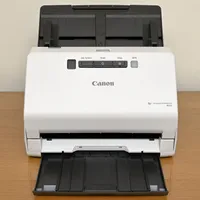
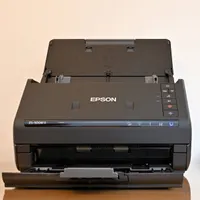
The ScanSnap iX2500 sells for around $400/£366/AU$705, which puts it in the same ballpark as the Canon imageFORMULA R40, which is a similar type of document scanner although the Canon lacks a touchscreen and Wi-Fi connectivity, both of which are featured in the ScanSnap. There’s also the similarly priced Epson WorkForce ES-500WII which does have built-in Wi-Fi, but again lacks a touchscreen and has comparatively rudimentary pushbutton controls. That makes the ScanSnap look potentially very good value.
ScanSnap iX2500: Design & Handling
Typical of the breed, this desktop document scanner has a small footprint of about 12x6 inches. As usual, the amount of space required grows considerably when you extend the paper trays for actually using the scanner, most noticeably at the front where the output tray is situated. Even so, the ScanSnap is impressively compact considering that the slanting top panel features a built-in 5-inch color touchscreen rather than just a small row of relatively basic pushbuttons.

Available in black or white to suit your personal preference, or to match various other tech that’s sat on your desk, the scanner looks and feels well built. I’d expect nothing less from a company that majors on relatively large office and production printers. Flipping up the main paper input tray reveals an auto document feeder with adjustable guides that can accommodate page widths of up to 8.5 inches, in stacks of up to 100 sheets of standard-thickness plain paper.

Although ostensibly a document scanner, the ScanSnap can take other media in its stride. As well as being able to handle mixed batches of documents, receipts and photos, it comes complete with an add-on paper guide for relatively small and thin receipts, reducing the risk of paper feed errors. Further help is at hand in this respect from automatic skew correction and optional photo carrier sheets which are available to buy in various sizes.

The scanning mechanism itself is based on a CIS (Contact Image Sensor) reader and a tri-color RGB LED light source. In fact, the scanner actually doubles up on image sensors, so that it can scan the front and back of double-sided documents in a single pass. That effectively doubles the regular scanning speed of 45ppm (pages per minute) for single-sided documents to 90ipm (impressions per minute) for double-sided paperwork.

Naturally, one of the biggest drawbacks of a paper-based document is that it can physically only be in one place at any given time. That can be a real problem if the place in question is somewhere other than where you are. To maximize access for scanned documents, the ScanSnap can scan direct to smart devices via Bluetooth and its companion ScanSnap Go app, as well as having built-in Wi-Fi. Accessibility for scanned paperwork is further boosted by the ability to scan direct to pretty much any cloud based service of your choosing. It can even automatically turn phone numbers and email addresses into clickable links, neatly removing another hurdle from the flow of productivity. The flipside is that the scanner lacks a USB socket for scanning direct to a flash drive, and there’s no port for wired Ethernet.

ScanSnap iX2500: Performance
Performance boils down to speed, quality and reliability. Putting the last of those first, I found the ScanSnap to be very dependable throughout my testing. I didn’t experience a single paper jam or misfeed, when using various thicknesses and sizes of paper, from banners right down to thin and relatively tiny till receipts. What’s more, the anti-skew system worked very well, ensuring that scans were kept on the straight and narrow.

As for speed, the ScanSnap lives up to or even exceeds its claims of 45ppm for single-sided documents and 90ipm for double-sided documents, nudging up towards 47ppm in my tests. That holds true at different scanning resolutions of 150dpi, 200dpi and 300dpi for color pages and 300dpi, 400dpi and 600dpi for monochrome pages, as dictated by ‘normal, better, best’ quality modes. In the highest ‘excellent’ quality mode, output slows down to around 13ppm, at resolutions of 600dpi for color and 1200dpi for mono.

Another facet of performance in terms of speed is the start-up time. In its normal configuration, there’s a wait of less than 10 seconds after switch-on, whether you’re using a USB or Wi-Fi connection. That shrinks to about 3 seconds when you’re connected to a computer via USB, and 6 seconds for Wi-Fi in ‘Fast’ mode, if you don’t mind standby power rising from 1W to a still very low 1.4W. Suffice it to say the ScanSnap won’t keep you waiting around twiddling your thumbs.
Bundled software includes a long-trusted veteran of the scanning world, ABBYY FineReader optical character recognition, as well as Kofax Power PDF Standard. The following gallery shows a selection of screengrabs from the Windows-based ScanSnap Home app.


For accuracy, I found that the scanner gave pretty much faultless optical character recognition for a wide range of regular fonts. That’s partly thanks to the quality of the bundled software, which includes ABBYY FineReader optical character recognition and Kofax Power PDF Standard. Searchable PDF documents are on the menu of output choices, which can be a real bonus for scanning lengthy, multi-page paperwork. You can also send financial scans direct to accounting software. To save time and effort, you can set up default destinations and formats for quick scan options, available through the touchscreen or from the companion app on your smart device.

The ScanSnap iX2500 isn’t really designed to be a photo scanner but it’s tempting to use it if you have the likes of shoeboxes full of old photo prints that you want to digitize. Taking advantage of the ADF and JPEG output option, the scanner is certainly fast for tackling stacks of photos, in my tests taking less than a second per 6x4-inch photo print. A4 photo prints are scanned at the same speed as mono and color documents. I’d say that photographic quality is sufficient for scanning snapshots but that tonal range and color accuracy isn’t the best for high-fidelity photo scanning, at least compared with specialist flatbed photo scanners. You’re also likely to get far superior photographic quality from one of the best film scanners, if you have the original transparencies or negatives.
The following gallery includes three scans taken from 6x4-inch color photo prints and saved as JPEGs.


ScanSnap iX2500: Verdict
There’s a lot less paperwork flying around nowadays than there was a few decades ago but there’s still enough to cause an inconvenience. I’m impressed that the ScanSnap iX2500 can digitize even lengthy multi-page single-sided and double-sided documents in super-quick time, automatically and with the minimum of fuss and bother. Similarly, there are quick and easy options for turning physical paperwork into searchable PDFs on your computer or smart device, or scanning them directly to the cloud so that you can access them from pretty much anywhere and everywhere.
I also like that the ScanSnap can take on anything from long banners to skinny little till receipts, and that features like ‘anti-skew’ keep everything on the level. Best of all, and unlike in similarly priced scanners from the likes of Canon and Epson, the ScanSnap features a 5-inch color touchscreen for intuitive standalone use, as well as Wi-Fi and Bluetooth connectivity. All in all, it’s a great bit of kit.
Features ★★★★★ |
Compared with various similar document scanners, the iX2500 boasts additional useful features including a color touchscreen and Wi-Fi connectivity. |
Design ★★★★★ |
The design is stylish and compact, as well as having impressive build quality and an intuitive onboard interface, plus a good companion app for smart devices. |
Performance ★★★★½ |
The ScanSnap tackles scanning tasks with an excellent turn of speed, especially for double-sided originals which it can scan in a single pass, along with excellent accuracy. |
Value ★★★★★ |
The list price of the ScanSnap is similar to that of the equivalent Canon and Epson scanners but with its color touchscreen, built-in Wi-Fi and supporting software, it’s exceptional value. |

Alternatives