
Digital Camera World Verdict
While it can require some coaxing to get working, once it's up and running the DigitNow Video Capture is a reliable and faithful means of digitizing your analog video from VHS or DVD, with tons of file format and codec options. Just be aware that you might need a USB 2.0 adapter…
Reasons to buy
- +
Small, portable and affordable
- +
Range of format and codec options
- +
Records media as it’s playing
Reasons to avoid
- -
Can be a headache to get working
- -
Output is USB 2.0
Why you can trust Digital Camera World Our expert reviewers spend hours testing and comparing products and services so you can choose the best for you. Find out how we test.
Converting analog media like VHS or 8mm camcorder tapes into digital files can be a surprisingly tricky thing. After all, when these analog devices were designed, few people imagined that someone might someday want to plug them into a computer. However, the converter market has swelled in recent years with a range of capture cards and media recorders that can bridge the analog-digital gap – one of the most popular of which is the DigitNow Video Capture.
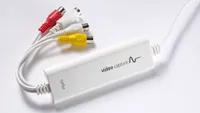
A capture card encased inside essentially a USB dongle, with RCA and S-Video cables hanging off one end, the DigitNow Video Capture is a device designed to do a single job. There’s no screen, no independent memory card slot, no internal battery or anything like that. It’s very simple – and consequently, is one of the more affordable analog video digitization options on the market.
But there are plenty of cheap electronics out there not worth the asking price. So, let’s see how the DigitNow Video Capture measures up.

Specifications
Inputs |
RCA, S-video, SCART (adapter included) |
Row 0 - Cell 2 |
Output |
USB 2.0 |
Row 1 - Cell 2 |
Max video resolution (output) |
Full HD 1920 x 1080 |
Row 2 - Cell 2 |
Max video frame rate (output) |
30p |
Row 3 - Cell 2 |
Listed compatibility |
PC, Mac, Android |
Row 4 - Cell 2 |
Recommended software |
PotPlayer, OBS |
Row 5 - Cell 2 |
| Row 6 - Cell 0 | Row 6 - Cell 1 | Row 6 - Cell 2 |

Price & availability
The DigitNow Video Capture is available both directly from DigitNow and from third-party retailers such as Amazon. Its stated RRP is $60 / £46 / AU$ 91, though discounts seem to be common, and you probably won’t have trouble getting it for around $/£20 less. There are capture devices with their own screens that are a good deal more expensive than this, so it is on the budget end of the scale.
There are cheaper rivals too – this is a market quite saturated with cheap products from brands you’ve never heard of – but sometimes it’s worth paying a bit more to get a device you’re confident will work.
Design
You could hardly ask for a device more bare-bones than this one. The DigitNow Video Capture simply functions as a conduit between an analog media player and a computer – nothing more than that. You’ve got your input in one end, your capture card in the middle, and your output at the other.

Input-wise, you’re limited to good old yellow-red-white RCA, as well as S-video. In the box, there’s an RCA to RCA cable included, as well as a SCART adapter for use with certain VHS players. DigitNow also threw in a couple of blank CDs. Why not, eh?
The output, disappointingly, is USB 2.0. I know this is a throwback piece of tech, but come on. The majority of new computers – including all of my Macs – don’t even have the old-style USB socket anymore! Best invest in a USB dock if you’re going to be using this with a computer that came out in the last few years.

There’s no built-in screen like there is with some video converters. While this keeps the size and cost down, it does mean the device has no independent functionality at all – if it’s not plugged into your computer, it’s a brick.
Performance

The DigitNow Video Capture is billed as working with Mac and PC. I tried it with both, and managed to get it to work in both cases – something that isn't always assured with these kinds of cheap electronics. On Mac, once I'd downloaded the OBS Studio recording software, I was able to get it to find the device via USB.
On a PC, it was trickier. It absolutely was not ‘plug and play’, and required me to go through and manually update the device drivers – but eventually it did work. Either way, once you download one of the software options – on PC, I went with PotPlayer – and plug up your input device, you’ll be able to see and hear your tape, VHS, DVD or whatever else playing. In either case, you'll be able to set parameters, quality and codecs for your footage.
The device records video as it’s playing. This means, if you have thirty hours’ worth of home movies to digitize, it’s going to take thirty hours. I tried digitizing a few different video sources, including some old DVDs and some test footage shot on an 8mm camcorder. All of it came out looking and sounding like it did at source, with audio and video in sync, and it was handy to be able to reconfigure the capture parameters for the different formats I was working with.

Verdict
The DigitNow Video Capture is a one-trick pony – but it performs its one trick perfectly well. Once you’re up and running, you can simply set your media to play, set the device to record, and end up with a 1080p video in a range of file formats. There doesn’t seem to be perceptible quality loss in the capture process, and the fact that you can just set it up and leave it to its own devices means you can keep a long digitization project running in the background while you get on with other things.
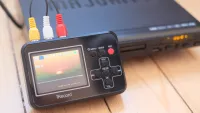
If you're someone who isn't very computer-savvy, and your eyes glaze over at phrases like 'update USB drivers', I'd perhaps recommend going with a more self-contained capturing device like the DigitNow Full Media recorder, which has a screen and doesn't need to be connected to a computer in order to work. You don't get nearly as many options, and there's a 640 x 480-pixel ceiling on the resolution of your footage, but the setup is very simple, and it doesn't tie up your computer.
Features: |
Not many – but there don’t need to be many. This is a device designed to do one job, and it does it well. |
3.5/5 |
Design: |
While it’s pleasingly portable, the USB 2.0 output means you may need to use a dock or adapter. |
2.5/5 |
Performance |
You may have teething troubles. But once you get it working, the video conversion offers solid quality. |
3/5 |
Value: |
On the affordable end of the scale. Not the cheapest, but in a market swimming with anonymous crap, it’s worth going with a known name. |
3.5/5 |
| Row 4 - Cell 0 | Row 4 - Cell 1 | Row 4 - Cell 2 |
Alternatives
See our full guide to the best VHS to DVD converters

