Digital Camera World Verdict
Some scanners are good for small, close-up jobs. Others excel at large scale. The Miraco covers both of these tasks and does so very well. It's very accurate, easy to work with, and being self-contained means you can scan and edit your meshes on the unit. Not being tethered to a computer, while retaining the ability to manage a job on location, is huge, and Revopoint has done an excellent job with the Miraco. Plus, the build quality is top-notch, and the screen is clear and bright with very responsive touch input.
Reasons to buy
- +
Standalone scanning
- +
Captures color as well as geometry
- +
Excellent accuracy levels of detail
- +
Easy to use interface
Reasons to avoid
- -
Limited battery life
- -
It’s a hefty investment
Why you can trust Digital Camera World Our expert reviewers spend hours testing and comparing products and services so you can choose the best for you. Find out how we test.
3D scanning has become relatively mainstream for digital creators and the more niche areas of engineering and design in recent years. The market is pretty full, with options of all kinds, from those that aim to capture small objects using a turntable to models that can capture far larger subject matter. They all operate in a similar way, using an array of cameras, sometimes with colour capture too, alongside some clever software, turning that data into usable geometry that can be taken further and incorporated into different projects, be that as a game asset or as a model for an architect or engineer.
The biggest problem facing a lot of these devices is twofold. Firstly, they tend to be locked into a specific scale, being good at capturing only the large or the small. Secondly, the majority of 3D scanners need to be tethered to a computer. This is for transfer, which is fine, but also for utilizing the computing power to process the data into a usable mesh.
Revopoint's Miraco changes that, as it is a complete standalone device designed to process in the unit itself, as well as capture objects large and small. Having used many 3D scanners, I was very curious to find out whether the Miraco could fulfill the dream of capturing whatever I wanted without needing to be constrained by cable length, so I spent some time getting to grips with it, and this is what I found.
Revopoint Miraco: Specifications
Camera resolution |
50MP |
Internal storage |
256GB |
Display |
2k AMOLED |
Software |
Revo Scan 5 on PC, Mac and Linux |
Accuracy |
0.02mm |
Revopoint Miraco: Price
The $1,599 / £1449 / AU$2,539 asking price is not a small amount of change, for sure, but it’s absolutely worth every penny for those who need to scan a variety of objects, especially if that is out of the office and includes different scales. The hardware is impressive, as is the software, making this the ideal candidate for pretty much every scanning task you can throw at it.
Revopoint Miraco: Design & Handling

The Miraco ships ready to go. There’s no setup involved as it is a standalone device. That said, it does come with a number of accessories. There’s a turntable and tabletop tripod (to scan smaller objects), a set of marker stickers, a power adapter and USB-C cable, alongside a very nice canvas carry case, documentation, and even a bust model you can use for your first scan.
The Miraco feels excellent in the hand, with comfortable grips at the sides and easy-to-reach buttons. The touch-sensitive screen is a 2K AMOLED display, and while I’m not sure of the brightness specifications, it is plenty bright enough to use outdoors. It also flips 180°; Revopoint sells this as a 'selfie mode', which is good, but it could also make it easier to scan in tricky-to-reach areas when you still need to keep a firm grip on the scanner.
Controls are essentially a single power button on one side and a capture button, where you’d normally find a shutter button on a camera. All other controls are operated using the touchscreen, which is very responsive. I didn’t once find myself jabbing at it, hoping it would register my intentions.
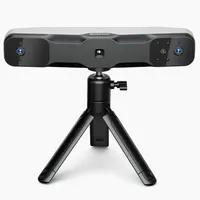
The array of lenses and sensors sits across the upper front face, making this a natural-feeling device to operate, as it feels much like a DSLR, just a little broader. It’s around the size of an iPad Mini, but with some added thickness.
The quality of fit and finish is excellent. Materials feel nice to touch, and the device has a confidence-inspiring sturdiness. I wouldn’t want to drop it, but I'm sure it will provide excellent service life. The only slight weak point is the battery. It charges quickly with a 65-watt supply, to around 80% in half an hour, which is great, but the upper limit is two hours of scanning. I didn’t quite experience that much, getting closer to an hour and a half, but that was during my intensive testing. Two hours is adequate but nothing mind-blowing, so if you’re going to scan on location, I’d highly recommend taking a USB-C battery bank with you.
There are two models available, both identical in form factor, processing power, and scan quality. The difference is that the base model has 16GB of RAM, while the pro model has 32GB. In real-world terms, that does as you’d imagine, doubling the capacity of frames you can capture. Both share the same 8-core 2.4 GHz chip and 256GB SSD.
Revopoint Miraco: Performance
Okay, so let’s talk about how this thing actually works. As mentioned, almost all control is done via the touchscreen, but that’s no good if the user experience isn’t up to scratch. Fortunately, Revopoint has done a stellar job with this. The interface is clean, easy to navigate, and logically laid out. To the left are the depth and colour views, with the screen dominated by the live scan view, where you can keep an eye on the geometry being captured. Above that is a graph that helps you scan from the optimum distance, which changes based on your choice of object scale.
Many scanners require a lengthy setup procedure involving lots of calibration, but that isn’t the case here. The Miraco is ready to go as soon as you unpack it.
There are two main scanning methods. The first is one-shot, where you take a single frame scan. You can add to the resulting geometry by taking further scans to build up the entire model. This is handy in situations where you might need to get yourself into an awkward position and don’t want to worry about scanning things while you move. Then there’s continuous scanning, where you move the Miraco around the subject matter, and this is ideal for turntables, people, or larger objects like cars.
Continuous scanning on the Miraco runs at up to 15fps, and there’s an indicator on the screen to show you the current frame rate. My average was 12-14, which is a good result. The results of the two modes are slightly different, but both are highly accurate, and you’ll struggle to see any real-world negatives from one to the other. We are talking under a tenth of a millimeter here. Impressive stuff.
Accuracy aside, many scanners fall short when it comes to certain areas, like dense shadows, overhangs, and so on, as well as finding it hard to deal with certain materials, which is why there are surface sprays that aid accurate capture. I’m not a fan of these sprays. While they do the job just fine, it’s not always ideal to spray an object. The Miraco, while not perfect in very shadowed areas or when scanning high-gloss plastics, handled most things well. Where possible, I used a small video light to help the scanner out, and that did a good job; it is far easier to deal with and needs no cleanup.
Some objects, especially larger ones like cars, can cause issues, as those gently curved expanses have little detail. Revopoint supplies a set of markers for this, which really do help in capturing good fidelity of the object. They peel off well, too, and can be easily reused.

The main benefit of the Miraco is that a single device handles everything from scanning to export, and it has to be highly praised for this. Reviewing the scans feels almost magical. Once your geometry is ready, you can view the model, either as a mesh or in full color. Simple gestures on the screen enable you to twist and turn the model to ensure you’ve captured all the details, and it’s easy to rectify any problem areas.
Oh, and that color is glorious. The camera is a 48MP device, and while I couldn’t find any color gamut info, it does an excellent job. It works best in well-lit situations, but you’ll want that for scanning anyway.
One handy trick, accessed by a single tap in the main view, is base removal. Click this, and the Miraco will automatically not scan your tabletop. This makes editing your mesh much easier than having to make selections and delete parts manually.
Speaking of editing, once your scan is done, you can edit it directly on the Miraco, fusing pieces together, removing unwanted elements, and then saving a mesh for use elsewhere. The interface is very simple, but the tools are powerful and work very well. You can even go into your saved library and join different models together. I’m really impressed by the editing system, which makes it as fast to get results that you can use as it would be to do the same task in a desktop app. Good work, Revopoint!

Once you are happy with your scan, you can export it for use in your projects, and there’s a useful set of options for this, including STL, FBX, OBJ, and PLY, so no matter what software you’re taking it into, or even if you aim to 3D-print a replica, you can do so with ease. Transferring your files is done via the USB-C cable and happens very fast. You will need the Revo Scan 5 software, which is available for PC, Mac, and Linux. It’s a free application.
Now, the meshes generated can be quite dense, not ideal for things like game assets, so I would recommend taking them into something like Blender to decimate the mesh, and if you want to take that a step further, you could make the model more animation-friendly by remeshing. If, however, you just need to make a render or share the file, then your job is done. Charge the Miraco and be ready for the next job.

Revopoint Miraco: Verdict
The Miraco is a fantastic scanner, capable of incredible accuracy and excellent color rendition, creating genuinely usable meshes for a variety of applications. What’s best is that it does this all within one self-contained unit, with no need for cables and the associated problems that can lead to. While not the cheapest scanner on the market, it’s a great investment, and I highly recommend it.
Features ★★★★★ |
A fantastic all round scanner, capable of accurately handling any job. |
Design ★★★★★ |
It's a neat, compact device, which is very easy to work with. |
Performance ★★★★★ |
Can handle massive amounts of data with ease. |
Value ★★★★½ |
It's not cheap but it is well worth the outlay. |
Alternatives