Digital Camera World Verdict
If you need to scan items from small to medium-sized and with very fine levels of detail, then the Three is an excellent option. Not needing to invest in a separate computer means more savings, as well as providing a neatly portable setup. The results are impressive and consistent, making this a fantastic scanner for everyone from hobbyists to engineers or for archival purposes.
Reasons to buy
- +
All-in-one solution
- +
Excellent build quality
- +
Impressive resolution
- +
Intuitive interface
Reasons to avoid
- -
Slightly glitchy WiFi
- -
File sizes can be big and processing times slow
Why you can trust Digital Camera World Our expert reviewers spend hours testing and comparing products and services so you can choose the best for you. Find out how we test.
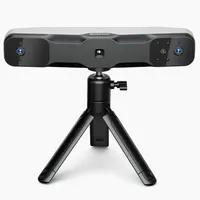
I’ve used many 3D scanners, and one thing always bugs me: the frustration that often arises from setup, which usually requires a laptop or phone to be tethered to the scanner and installing software. Matter and Form (MAF) developed the Three scanner to do away with that, housing all the computational hardware inside the scanner body, so all that is needed is a web browser to control the entire scanning process. You will still need something with a browser, of course, but the Three is OS agnostic, so whatever you have to hand will work.
Scanners exist for a wide variety of use cases, and none cover all the ground. In the case of the Three, the aim is very much for scanning smaller objects. The Three comes with a turntable to aid in this, so I’ve set it up and spent some time to see how good the results and the experience are, and how it compares to the best 3D scanners on the market.
Matter and Form Three: Specifications
Camera resolution |
13MP |
Internal storage |
16GB |
Max scan resolution |
37 microns |
Operating system |
Browser-based operation |
Turntable capacity |
20lbs |
Matter and Form Three: Price
With a list price of $1499.99 in the USA, the Three is a hefty investment, but it can often be found for significantly less. Even at the higher price, I’d suggest it should be on your shortlist due to its build quality and performance. If you’re budgeting for a complete setup, keep in mind that with most other options you’ll need to factor in a computer of some kind, but the Three does all the computation internally, which could mean a decent saving.
Matter and Form Three: Design & Handling
There’s been a slow adoption by tech companies of supplying gear in semi-rigid cases over the last few years, and while this is a good thing, they are not made equal, with some not even able to house all the parts of a given device. Matter and Form ships the Three in a pretty rigid case, which feels very premium and is a custom-fit to carry the entire setup, which I really appreciate. Nothing rattles around or slips out of place in transport.
Everything you need is contained in the case, including the scanner unit, WiFi antenna, tripod, calibration boards and stand, documentation, and the power adapter with locking terminals for different countries. Everything is very well made indeed, even the tripod, which is often a cheap, flimsy affair. Worthy of mention is that the power cord is 10 feet long, making this usable in many environments without the need to run extension cables. It’s a small thing, but one that I really welcome.
There are two calibration boards, with a pattern of glyphs used to ensure accuracy, as well as the larger one that serves a second purpose I shall get to shortly.
The main unit feels quite weighty, no doubt partly due to its housing of all the computing hardware in addition to the scanning components. Yes, that’s right. No need to tether to a desktop or laptop, or even a phone. All you need is something with a web browser. I love this approach, as it means less to carry, store, or travel with. Good move!
This may have led to a finicky setup, dealing with an on-board computer, but MAF has developed a pretty sleek process, where you pop the larger calibration board on the stand, mount the scanner on the tripod, connect it to the turntable (by a very nice magnetic connector), screw in the antenna, and power it up. The scanner projects menus onto the board, and you simply follow the instructions to get set up, using whichever device you want to use. This is done using the IP address you’re given and works really well. I found the connection pretty stable, with only the odd hiccup. On first launch, the projection will run you through a tutorial, so you can get up to speed.
Once you’re set up, you can very easily access the Three without the need to use the projection again. Simply connect from your chosen browser, and off you go. All smooth and easy.

Matter and Form Three Performance
I adore the browser-based approach to operating the Three; however, it is worth noting that your browser choice may affect your experience. I couldn’t get it to work using Edge. It’s a browser I rarely use personally, and I'm not sure it’s widely used either, but I feel it's worth mentioning, as it is listed as compatible on the MAF site. Every other browser I tried worked just fine. Do pay attention to your device's display resolution too. I tested it on all kinds, and they all work okay, but I felt somewhat handicapped by my iPhone, which required a lot of scrolling around. My preference is an iPad or a laptop, where you can see everything all at once using Safari or Chrome.
Before scanning, a calibration process is needed, but don’t be put off by that, as it is quick and easy. The scanning process is pretty intuitive, too. You pop your target object onto the turntable and adjust a few settings in the software, mostly specifying the number of scans and the exposure. When it comes to the number of scans, I found the sweet spot to be five or six. Unlike some scanners, which use a single, constant moving scan, the Three takes a set of still scans, which are then stitched together automatically to produce the final mesh. Both methods work well, but I found this to be more predictable.
For complex objects or those with overhanging portions that the scanner can’t see, you can flip the object and take further scans to capture these other areas, which the Three’s software then stitches together, and it does it really well.
Like most scanners, the Three can struggle a little with very underlit areas or objects that are painted black, but adjusting the exposure to compensate works well to counter this.
When setting the number of scans, you can choose to scan only a portion of the full 360 degrees. This is a handy option that will save both processing time and file size when scanning objects where the back isn’t needed, and can be adjusted from 1º up to the full 360º.
It’s almost inevitable that the scanned geometry will have some gaps in it, but not to worry, as the Three’s software can handle that for you, too.

So, what are the results actually like? I’m truly impressed with the Three's output. I think this is due, in part, to the pair of Sony 13-megapixel cameras that it uses, which far exceed not just the resolution but the quality of the sensors used in so many 3D scanners. These cameras also have autofocus, ensuring optimum results.
The actual fidelity of the Three goes right down to 37 microns for smaller, closer scans, although this drops off to (a still very respectable) 114 microns when scanning from around two feet away. This means fine details scan pretty much perfectly, edges retain sharpness, and all but the very finest surface textures are picked up.
What’s more impressive is that these details are stitched seamlessly when doing multi-part scans. Now, this brings me to a slightly frustrating element, although it can be managed. The scans can be quite dense, which is necessary for good results, but it does mean files get quite large, slowing down processing. In these situations, I found that the turntable rotation gave a lot of overlap, and more data was captured than is really needed. In these cases, I was able to delete some scans while preserving the coverage of the object and freeing up space. This gets easier as you scan more and learn the best settings. It’s not a deal-breaker by any means and is completely manageable, but waiting for processing can be annoying at first.
I said earlier that the Three is meant for smaller objects, and while that is true, it is relative, to a degree. The camera coverage and autofocus can capture objects up to two meters away, but some detail is lost at that distance. I’d be most comfortable scanning objects up to around 30 centimetres across, so, basically, if it will fit on the turntable, you’re good to go. That turntable can take a good amount of weight too, so if there’s masonry or metalwork you need to capture, it will take it, up to a maximum load of 20 pounds.

Matter and Form Three: Verdict
The experience of scanning using the Three is a really positive one. It makes the entire process simple, but doesn’t skimp on performance. The details it can capture are very impressive indeed, and for anything up to a couple of feet in size, this is my new go-to 3D scanner.
Features ★★★★★ |
Three is fully self contained and has everything you need, except a browser. |
Design ★★★★★ |
Nice materials, sturdy construction and ease of use make the design excellent. |
Performance ★★★★★ |
Processing time can be lengthy in some cases, but results are excellent. |
Value ★★★★½ |
The list price is on the high side, but look out for price reductions. |
Alternatives