
Digital Camera World Verdict
With up-to-date connectivity and a range of inputs, the ClearClick Video2USB is a more modern-feeling analog-to-digital video converter than many of its market rivals. If you’ve got old VHS or camcorder tapes you want to convert to digital files, this is an efficient way to get it done.
Pros
- +
USB-C connectivity
- +
RCA, S-video and HDMI inputs
- +
1080p video output
Cons
- -
Video colors a bit drab
- -
No SCART adapter included
Why you can trust Digital Camera World Our expert reviewers spend hours testing and comparing products and services so you can choose the best for you. Find out how we test.
Lots of devices used to convert analog video to digital are pretty much one trick ponies. The ClearClick Video2USB adds an extra trick to the repertoire – as well as the standard RCA and S-video inputs used to connect up VHS players and camcorders and the like, it also has an HDMI input, and can be used for live-streaming.
A fairly simple plug-and-play device, the ClearClick Video2USB pretty much does what the name implies; it takes a video signal, and outputs it via a USB connection. Able to work with Windows, Mac and Linux operating systems, it sits at the fairly premium end of a market that’s quite saturated with a lot of cheap options.
Is it worth the extra outlay? I resolved to find out, so I shot some new footage on 8mm tape using my trusty Canon UC8000 video camcorder, and set about converting it to a digital file with the ClearClick Video2USB.

Specifications
Inputs |
RCA, S-video, HDMI |
Output |
USB-C |
Max video resolution (output) |
1080p |
Video format |
MKV, MOV, MP4 |
Compatibility |
Windows, Mac, Linux |
Software |
OBS |
Price & availability
The ClearClick Video2USB is currently available at a price of $69.95 / £62. This is fairly standard for plug-and-play video capture devices of this kind; it’s cheaper than the $79 / £72 Elgato Video Capture (which comes with its own software), and more expensive than the simple DigitNow Video Capture, which can generally be found for around $40 / £35.
One thing that’s worth noting again, as with the ClearClick Video2Digital Converter 3.0, is that if you’re outside the US, shipping is very expensive when you buy directly from ClearClick. In the UK, I was quoted £39 for a delivery time of 7-10 days, or £39 for a glacial delivery of 20-40 days. The Video2USB is available on Amazon UK for usual shipping costs, so that should definitely be the play if you’re outside the US.
Design
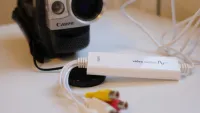
A lot of the different brands of video converters look like they’ve rolled off the same factory line – the Elgato and Digitnow Video Captures are externally identical to the millimetre – so it’s nice to see the ClearClick Video2USB arrive with its own identity. An oblong box colored in a rather fetching shade of blue, it’s well set up to perform its one job. Video goes into the ports on one end, and comes out of the USB cable on the other.
Let’s talk about the cable first, because it’s the bit that really excited me upon opening the box. USB-C! Sure, a USB-C connector may not seem like much to get excited about in the year of our lord 2026, but so many of these devices come with antiquated USB 2.0 connections, and as a Mac user, I have resented the amount of time I’ve had to spend fussing around with USB docks in order to test them. Delightful. There is also a USB-C to USB converter in the box, in case you’re still living in the previous decade.

On the other end, we have the ports selection. As is standard for analog video converters, we have the familiar red, white and yellow of RCA ports, and the circular S-video port. One thing to note is that the Video2USB doesn’t come packaged with a SCART adapter the way many converters do, so you’ll need to source one if you’re using a VHS player with a SCART connection. What it does have, however, is an HDMI input, supporting its second function as a livestreaming device. Bear in mind that the HDMI port will not support the ingestion of video from copyrighted or content-protected sources.

I have no complaints on the design of the ClearClick Video2USB – it’s a simple device that does what it needs to. The box itself is small and portable, and the USB-C cable offers plenty of length should you need it. The box does get quite warm in use, but that’s fairly normal for USB devices of this kind, and I was never concerned by it.
Performance
Above: sample digital video file made from a camcorder using the Video2USB unit
The ClearClick Video2USB works through third-party capture software – the manufacturers recommend OBS, and I can endorse that recommendation. I connected it up to my Mac; the relevant drivers quietly installed themselves; the software recognised the converter instantly; and with that, I was ready to go.
The footage you’re converting will appear on the screen as you’re playing it, and you can start and stop recording as you like. The conversation happens in real-time as the media plays – so, as ever, the digitization of an hour-long video will take an hour.
I set the software to record my camcorder footage at a resolution of 640x480, in the default MKV format, and it accomplished the task with no issues. Audio and video were in sync. I will say that I tested this device alongside the much more expensive ClearClick Video2Digital Converter 3.0, and the video I captured using that device – from the exact same camera and tape, in pretty much the exact same place – is noticeably richer in colour and more vibrant. Compared to others on the market, video capture from the ClearClick Video2USB looks a little pale and washed out.
The software does offer the option to use higher resolutions, up to 1080p, but realistically given that most analog video sources will be in an aspect ratio of 4:3, all you’re going to do is unpleasantly stretch it to fit. These higher resolutions are far more useful for those who are recording via the HDMI port. Also, if you don’t want to work with MKV, you can switch the player to record an MP4 or MOV file instead – I did so with no problems.

Verdict
I find the ClearClick Video2USB to be very likeable indeed. It gets the job of analog-to-digital video conversion done with minimal fuss, and the addition of an HDMI input gives it more utility than many of the other very single-minded converters on the market. Other converters did give me slightly richer-looking footage from the same tape, with more vivid colors, but the ClearClick did a fine enough job.
It’s priced well – a bit more expensive than a lot of the cheap crap in this market sector, but you get the reassurance of a trusted brand and up-to-date features like USB-C connectivity.
Features |
Offers a broad but not overwhelming range of resolution and file format options for digitizing analog video. |
4.5/5 |
Design |
USB-C connectivity and an HDMI input makes this a much more modern-feeling device than the competition. |
4.5/5 |
Performance |
Does what it needs to very reliably, and is easy to set up and use. |
4/5 |
Price |
At the pricier end of this market sector, but worth it for its more modern feature-set. |
3.5/5 |
Alternatives
Check out our full guide to the best VHS to DVD converters

