Digital Camera World Verdict
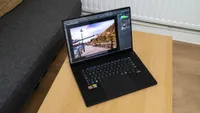
The Asus ProArt PX13 GoPro Edition is a lot of laptop squeezed into a small space. You’ll pay a lot for the privilege of owning one, and it’s not going to appeal to everyone, but for the right person it will be the ideal mobile video workstation that’s just as much at home connected to an enormous external monitor and super-fast SSD storage as it is being used to edit the latest action camera footage from halfway up a mountain.
Pros
- +
Very well specced
- +
Bright screen
- +
Well built
Cons
- -
60Hz refresh rate
- -
Quite expensive
- -
Only average battery life
Why you can trust Digital Camera World Our expert reviewers spend hours testing and comparing products and services so you can choose the best for you. Find out how we test.
The GoPro action camera has been a staple of the outdoor photography and videography scenes for quite some time, enabling bungee jumpers, shark divers and volcano spelunkers to document their exploits without needing to lug large camera bodies and lenses around with them. Being able to edit this footage in the field is a huge advantage, as waiting until you get home can try the patience of even the most hardened extreme sports enthusiast, and there's nothing more important than getting that footage out on the internet as soon as possible.
Asus’ original PX13 was well-received when it arrived back in 2024, and this GoPro edition absolutely supercharges it, pumping the specs sky high to create a compact workstation laptop that can tear through video and Photoshop tasks and potentially beat the latest MacBook Pros at their own game. Will it be one of the best laptops for video editing? The signs are all good.
Specifications
CPU |
AMD Ryzen AI Max+ 395 |
NPU |
AMD XDNA (up to 50 TOPS, 126 TOPS in total) |
GPU |
AMD Radeon 8060S |
Memory |
128GB LPDDR5X |
Screen |
13.3 in 3K OLED 100% DCI-P3 Touchscreen |
Storage |
2TB NVMe M.2 SSD |
OS |
Microsoft Windows 11 Home 64-bit |
Ports |
1x USB 3.2 Gen 2 Type-A, 2x USB4, 1x HDMI 2.1, 3.5mm audio |
Connectivity |
Wi-Fi 7, Bluetooth 5.4 |
Size |
298 x 210 x 16 mm (approx) |
Weight |
1.4kg (approx) |
Price & Availability
This is a laptop that will set you back $3,999 or £2,999. That’s an awful lot for something so small and specialised, and you can get powerful gaming laptops or a MacBook Pro with an 18-core M5 Pro CPU and 64GB of RAM for the same sort of cash. You do get a lot of processing power (and a lot of RAM) for your money, however, and it may well be an essential buy for a group of videographers looking for an editing solution they can take with them wherever they go.
Design
It’s unclear how much input GoPro had in the design of the PX13 GoPro Edition, but the camera company’s footprint is light. It comes in a strap-fastened case that’s both GoPro and ProArt branded, and there's also a softer carrying case with the ProArt logo on it. On the laptop itself, you won’t find GoPro apart from one logo on the back and another on the F8 key, which, when pressed, will summon the GoPro Player software for playback, trimming, and export of files from all the company’s cameras. The keyboard backlight is also a soft cyan colour rather than the usual white, which also ties in with the company’s identity.


There are some grooves cut into the back of the laptop’s lid, but that’s all that’s new compared to the original PX13 - it’s still a black rectangle, and all the other changes are on the inside. This is a good thing, because Asus’ portable workstation is well-equipped, with a pair of USB4 ports that are good for hooking up to all kinds of fast external storage, docks, and external screens, and the OLED touchscreen is nice and bright, though a little bit shiny and reflective if you’re working near strong artificial lights. It’s a shame it only has a 60Hz refresh rate, as GoPro’s cameras are capable of producing much more than that, and it would be nice to play it back, but that’s probably what the full-size HDMI 2.1 port is for, connecting to a large external screen with a higher maximum framerate and playing back on that.
Particularly notable is the trackpad, which has a section at the top left that acts as a dial. Older ProArt laptops actually had a physical control here, but now we get a touch-sensitive circle you can twiddle your finger on to adjust brush sizes, zoom in and out, move sliders around in something like Lightroom, or just about anything else you can think of, customised in the Asus software.

Otherwise, this is a well built 13in laptop. It’s not trying to be a thin and light model, so it weighs a bit more than something like a MacBook Air, and can feel a bit chunky as a result. This is easily forgivable, however, when you consider how uncompromising this mobile workstation is in terms of its performance. It feels remarkably small if you’re carrying it about, however, especially if you’re used to larger 15- and 16-inch models.
Performance
Asus hasn’t held back with its choice of components in the PC13 GoPro Edition. The 16-core AMD Ryzen AI Max+ 395 is an absolute sledgehammer, with a powerful integrated GPU that’s almost as good as some discrete Nvidia chips and beats Apple’s efforts in benchmark tests.
In the Geekbench 6 benchmark, which works both the CPU and GPU hard with a range of tests, the PX13 GoPro edition scores well. Its Ryzen AI Max chip is up there with Intel’s Core Ultra 9, and is just behind Apple’s M5 in the multi-core CPU score, though it falls behind a bit when just a single core is used.

The GPU, which is especially powerful for an integrated model, posts a score that’s not too far away from that of Nvidia’s GeForce RTX 4060, a lower mid-range card from 2023 that’s still relevant today (you could certainly play games on the PX13 GoPro Edition if you wanted to, though more recent GeForce cards will outclass it), and handily beats the graphics capabilities of the base-model M5. The extra graphics cores in the Pro and Max models of the M5 may well propel them past this score, but they’ll also increase the cost of a Mac using them.
For video editors, the inclusion of that GPU will be the most interesting thing about the laptop. Scrubbing through multi-track timelines and complex sequences remains fluid and responsive, while export times will also be cut as GPU effects take less time to render. Having 128GB of RAM will help speed up complex workflows too, though at a time when the cost of memory is being pushed up by the demands of AI data centres, having this amount looks like a serious luxury. It means an editor can comfortably run Premiere Pro, After Effects, and maybe even Photoshop simultaneously alongside browsers, and even carry out on-device AI model processing, without needing to close and re-open apps because they’re slowing the PC down.

Battery life, while improved over the original PX13, which used an Nvidia GPU and therefore sucked more power, tops out at only about six and a half hours. That’s fine, and will get you through many edit sessions, but doesn’t come close to that offered by laptops like the MacBook Pro or Lenovo Yoga Slim 7 15 Aura.
Final Verdict
The choices Asus and GoPro have made for the PX13 GoPro edition make a lot of sense if you’re building a mobile workstation for photo and video editing. The enormous amount of RAM, backed by strong CPU and GPU performance, makes it a smooth and responsive laptop to use in editing apps, and also as a general-purpose PC for whatever else you need to do. The high level of connectivity means you can set it up with external SSDs and monitors at the heart of a desktop setup only to whip it away when you need to head into the field for filming, and there's real value in that. The major downside of the PX13 GoPro Edition is its high price, though this has become par for the course for highly specced laptops, especially those with so much RAM.
Features ★★★★☆ |
A well-specced mobile workstation with good connectivity and a bright, colourful screen. It’s compact, easily portable, and can summon GoPro’s software at the press of a button. |
Design ★★★★☆ |
Not a departure from the way every other laptop is designed, but the PX13 GoPro edition is well built and looks professional, with a cyan backlight that can make it stand out. |
Performance ★★★★★ |
The strong multi-core performance of the AMD CPU, and its attendant integrated GPU, mean you’re getting the kind of performance that would once have required a separate graphics chip. Add this to the massive dollop of RAM, and it’s a highly competitive device for running all kinds of photo and video apps, including those that use AI models. |
Value ★★★½☆ |
The PX13 GoPro edition is certainly an investment, and not for the casual user. RAM prices are currently on a high, and 128GB it may feel like overkill. You may be able to pick up a gaming laptop for much less money, but with only 32GB of RAM you can run into slowdown when handling large video files. If the GoPro Edition has what you need, then it will be worth the expense. |
Overall |
★★★★½ |
Alternatives