Digital Camera World Verdict
I was so taken with the original HP FilmScan 5” Touch Screen Film Scanner when I reviewed it that I spent the following weekend transferring entire shoeboxes crammed with 35mm negatives and transparencies, revitalizing them for the digital age after they’d been lying dormant in my attic for the last 30 years. The new 7” edition is even better. I love its bigger touchscreen that now comes with a tilting mechanism and that it adds an HDMI port for plugging into a widescreen TV. It’s not cheap to buy but this HP scanner is wonderfully simple to use and makes light work of what could be an arduous chore.
Pros
- +
Quick and efficient
- +
Lifelike picture quality
- +
Simple touchscreen operation
- +
Accepts a variety of film sizes
Cons
- -
Fine detail can be a little lacking
- -
Pretty pricey to buy
- -
No rotation for portrait-orientation pics
Why you can trust Digital Camera World Our expert reviewers spend hours testing and comparing products and services so you can choose the best for you. Find out how we test.
People say that family photos serve to capture and keep treasured memories. That’s true if you go to the time and effort of mounting them in photo albums and actually look through those albums once in a while. Maybe I’m lazy or disorganized (or both) but until recently, I had countless strips of processed film that had been buried away in shoeboxes for decades, never seeing the light of day. They certainly weren’t jogging any memories, treasured or otherwise. The HP FilmScan 5” Touch Screen Film Scanner changed all that.
Aiming to be one of the best film scanners and certainly one of the easiest to use, the HP FilmScan 5” inspired me to digitize my back-catalog of filmstrips and slides. And if you’re one of the resurgent breed of photographers shooting some the best photographic film on one of the best film cameras, or just getting snap-happy with one of the best disposable cameras, the HP FilmScan 5” has a lot to offer. But as of now, the new and improved, bigger and better HP FilmScan 7” offers even more, at fairly little extra cost.

HP FilmScan 7” Touch Screen: Specifications
Power source |
USB-C |
Image sensor |
13MP CMOS |
File format |
JPEG |
Resolution |
13MP (22MP interpolated) |
Film type |
135, 126, 110, 50mm slides |
Screen |
7-inch color tilting touchscreen |
Interfaces |
USB-C, SD card slot, HDMI |
Dimensions (WDH) |
175x120x116mm / 6.9x4.7x4.6” |
Weight |
509g / 18oz |
HP FilmScan 7” Touch Screen: Price
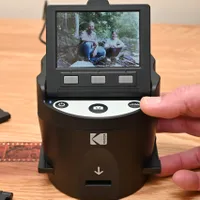
Kodak Slide N Scan Digital Film Scanner which currently sells for around $190 / £155 with a 5-inch screen and $210 / £165 for the 7-inch model, although neither of the Kodak models features a touchscreen. That gives a bit of perspective to the pricing of the HP FilmScan, which is $229 / £175 for the 5-inch and $259 for the 7-inch (pricing in other regions TBA). Cutting to the chase, or at least to the bottom line, the HP is a bit more pricey but in my experience, it works better and delivers superior results. The phrase ‘pay your money and take your choice’ springs to mind.
HP FilmScan 7” Touch Screen: Design & Handling
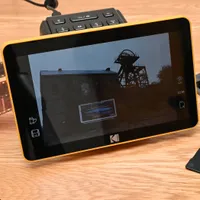
I like touchscreens, up to a point, the main plus point being that they can endlessly adapt their content to give context-sensitive menus that are easy to navigate, with choices that are equally simple to select. The bigger 7-inch touchscreen of this HP makes it more of a joy to use than its 5-inch sibling, as well as giving a grander experience when reviewing pictures in playback mode. Better still, the screen has a tilting mechanism, rather than the fixed angle of the 5-inch model. This enables you to set the screen at the optimum angle for operating the scanner, as well as for viewing pictures afterwards, especially if you’re positioning the scanner on a tabletop, shelf or cabinet to use it as a digital photo frame.

Like I said, I like touchscreens up to a point. However, if you need to simply press a button to make something happen, especially if it’s the same thing time after time, I don’t think you can beat a real, physical pushbutton or dial. Case in point – I have to navigate a whole bunch of touchscreen menus in my car’s ‘infotainment’ system, just to turn the heater on, as there are no quick and easy buttons and dials for the task. I sometimes feel like I’m more likely to crash than to get warm. The moral of the story is that I’m glad the HP has physical buttons on its top panel for switching the scanner on and off, and for capturing each successive scan. Simple!

Talking of simple, there’s a USB-C port and a supplied cable for powering the scanner from a mains adapter (not supplied) or from a computer. With the latter, you can also download scans from the HP. There’s no Wi-Fi nor Bluetooth for wireless connectivity, which I don’t mind in the least – not least because the whole scanning process is self-contained, based around that useful touchscreen and additional top-panel buttons.
As with the 5-inch model, there’s an SD memory card slot for storing captured scans and, as with the power supply, you’ll have to supply your own card. An extra interface that you don’t get on the 5-inch model is that the 7-inch adds an HDMI port. That comes in very useful if you want to go large on your viewing with a widescreen TV – the video output is in 16x9 format.

Although a film scanner by name, the HP doesn’t ‘scan’ film in the conventional way of traversing and reading media in a line by line fashion. Instead, there’s a white LED light source that illuminates the entire frame of film, and a 13-megapixel image sensor that basically takes a photo of your whole film frame in one momentary capture. It’s literally, lights, camera, action.

Catering to pretty much any photographic medium that you’re likely to have stashed away in your shoeboxes (or a more dedicated storage facility) there’s a holder for 50mm mounted slides and adapters for strips or individual frames of 135, 126 and 110 format film. You actually use the hinged slide holder for all the various film formats, as it also acts as a carrier for the three alternative film adapters.
Scanning slides is a simple matter of inserting the first one, scanning it, then inserting the next slide which pushes the previous one out through the exit door. The film adapters are similarly simple to use, enabling you to push and pull strips of film through the adapters to scan photos on a frame by frame bases.

Touchscreen scanning choices include selecting the film type from transparency, negative or black & white, as well as the film format/size and scanning resolution. There’s also access to editing controls for brightness, contrast and color, which can come in very handy for correcting exposure and color balance issues in your film originals. The automatic exposure and color settings work well but sometimes it’s nice to give things a little tweak for best effect. More options include creative cropping, by way of selecting the active scanning area.

Scanning film isn’t the whole story. The HP works equally well as a viewer for browsing negatives and transparencies, courtesy of its generously large 7-inch touchscreen. Moreover, once you’ve actually scanned film instead of just inspecting it, you can use the Gallery option to view the resulting digital images on the same screen. And again, an upgrade over the 5-inch model is that you can also hook the 7-inch up to a widescreen TV via its HDMI port, for a truly large-screen viewing experience. Either way, gallery viewing is on a frame by frame basis, or you can choose an automated slideshow. See anything you don’t like and you can just hit the Delete icon.

One of the main advantages of digital photos compared with frames of film or even physical prints, is that they’re so much easier to share. As I mentioned, the scanner doesn’t have any wireless connectivity built in, but it’s easy to hook it up to a computer via its USB-C port for downloading scanned images, or you can eject the SD memory card and plug that into any other device of your choosing.
HP FilmScan 7” Touch Screen: Performance
Aiming high in terms of performance, the HP’s scanning prowess is based on a high-quality white LED light source, an f/3.5 lens with seven optical elements, and a 13-megapixel CMOS image sensor. Dust can be a devil with film scanning so it pays to make sure your originals are as dust-free as possible before scanning them, and a cleaning wand is supplied as part of the kit for attending to the innards of the machine itself.

The HP is no slouch when it comes to scanning speed, which worked out at a smidge over 2 seconds per frame during my tests with 35mm film. The limiting factor is how fast you can manually feed slides or frames of film on a strip into the machine, but practice makes perfect as well as ramping up the operating speed. I found that digitizing entire rolls of film only took a few minutes each.

In terms of quality, I was impressed that scans of my Kodak Kodachrome 64 transparency film retained the vibrant color rendition of the originals (cue the Paul Simon song). As I said of the 5-inch model, I found the color quality, brightness, contrast and dynamic range noticeably better than from the Kodak Slide N Scan Digital Film Scanner.

Rather than limiting my scanning tests to my beloved Kodachrome from the 1980s, I also digitized photos that I’d taken on old Fujifilm Superia 400 and Kodacolor VR100 color negative film stock, as well as images captured on Ilford XP1 400 black & white negative film. Color rendition was very good for both types of color negative film, and there was plenty of drama and tonal range in the black & white scans. All in all, the HP did a very good job, although outright quality and the retention of very fine detail and texture can’t match that of a more ‘professional’ dedicated film scanner.

The native scanning resolution is 13 megapixels but you can opt to upscale them to 22-megapixel images. Software interpolation can be notoriously second-rate but the results in this case are pretty good, without diagonal lines taking on a noticeably jagged appearance and images as a whole not looking blotchy or pixelated.

Sample images
The following gallery comprises the HP’s scans of a number of photos that I took back in the mid-1980s on Kodak Kodachrome transparency film, while working in the country of Swaziland (now Eswatini).


HP FilmScan 7” Touch Screen: Verdict
The HP FilmScan 7” Touch Screen Film Scanner is not the finest film scanner in the world. In terms of resolution, sharpness, retention of fine detail and texture, dynamic range, color rendition and more besides, photo quality is no match for the kind of results that I’m now used to getting when shooting images with one of the best digital cameras. But then again, that’s not really surprising.
What I did find when using the HP is that scanning even large bathes of film or mounted slides is quick, easy and highly effective. The larger touchscreen with its new tilt mechanism, plus the additional HDMI port are both good reasons to go for the newer 7-inch model instead of the original 5-inch version. Picture quality is virtually identical from both HP scanners, and much better than I’ve seen from some other similarly priced film scanners. The results are definitely good enough that I’ll actually keep the digitized photos and come back to them time and again for future viewing. For keeping ‘treasured memories’ in my mind rather than in a shoebox, that’s exactly what I want from this type of scanner.
Features ★★★★★ |
Upgraded features include a tilt mechanism for the larger 7-inch color touchscreen and an HDMI output port for viewing on a widescreen TV. |
Design ★★★★★ |
The design is stylish and functional, with an intuitive color touchscreen interface combining with physical pushbuttons. Build quality feels good and the scanner is nicely finished. |
Performance ★★★★☆ |
Scanning frames of film in about 2 seconds, the HP is as fast as you can feed it with film or mounted slides. Picture quality is very appealing although there’s a little room for improvement. |
Value ★★★★☆ |
The HP certainly isn’t the cheapest film scanner on the market but it’s very good value for a standalone, self-contained unit that’s so good in terms of features, handling and quality. |

Alternatives