Digital Camera World Verdict
I like that the Polaroid Hi·Print 3x3 Photo Printer outputs decent quality 3x3-inch square prints in about a minute a pop. It’s a very sociable device, being fully mobile and working over Bluetooth, so you can make real photo prints from your mobile phone at parties, get-togethers and any other occasion, for sharing with family and friends. It’s well made, nicely finished and pretty good value at the price. However, print quality lags a little behind that of good photo inkjet printers.
Pros
- +
Battery powered, works anywhere
- +
Simple Bluetooth connectivity
- +
Fully enclosed paper trays
- +
Doubles as a physical photo frame
Cons
- -
Only makes 3x3in photos
- -
No Wi-Fi or USB connectivity
- -
Print quality isn’t entirely fabulous
Why you can trust Digital Camera World Our expert reviewers spend hours testing and comparing products and services so you can choose the best for you. Find out how we test.
Every self-respecting photographer or fan of all things retro has heard of Polaroid. The company shot to fame nearly 80 years ago, unleashing its first instant camera on a very appreciative world.
Instant cameras have made a comeback, with models from Fujifilm's Instax line-up leading the way (we especially like the Instax Mini 12) and Polaroid’s own Polaroid Flip and Polaroid Go Generation 2 vying for your attention.
Even so, the vast majority of us take most or all of our snapshots on our camera phones these days. Sure, you can share digital photos via many and varied social media channels – but they lack the physical presence of a real photo print. That’s where this little Polaroid mobile printer comes in.
The Polaroid Hi·Print 3x3 Photo Printer that I’m reviewing here is the middle sibling in a family of three. It sits between the smaller Hi·Print 2x3 and the larger Hi·Print 4x6. As you’ve probably surmised, these three printers make 3x3-inch, smaller 2x3-inch and larger 4x6-inch photo prints, respectively.
The smallest and largest models make rectangular prints with a typical postcard aspect ratio, whereas the 3x3 is the only one that makes square prints, more ideal if you feel it really is hip to be a square.
Running on its own internal Li-ion battery pack and connecting to your mobile phone via Bluetooth, it aims to be one of the best portable photo printers as well as one of the best iPhone printers (but will also work with Android phones).

Polaroid Hi·Print 3x3: Specifications
Inks/type |
Dye-sublimation CMY |
Max print size |
3x3-inch |
Max print speed |
50 seconds |
Max print resolution |
291x291dpi |
Power source |
Internal Li-ion battery |
Display screen |
None |
Interfaces |
Bluetooth (USB-C for charging only) |
Dimensions |
103x131x30mm / 4x5.2x1.2in |
Weight |
390g / 13.8oz |
Polaroid Hi·Print 3x3: Price
As a portable dye-sub photo printer, the Polaroid Hi·Print 3x3 Photo Printer is a little more expensive than the popular Canon Selphy QX20, but there’s very little in it.
It’s also only slightly pricier than the smaller Hi·Print 2x3, the 3x3 costing around $120 / £100 / AU$192 compared with the 2x3 at $110 / £90 / AU$174. The larger Polaroid Hi·Print 4x6 is more expensive again, at $150 / £130 / AU$261.
Deals are generally available as ‘starter sets’ that include extra consumables instead of a single small-volume pack.
Running costs are based on packs of paper and dye-sub strips that come in self-contained, all-in-one cartridges. These cost $25 / £23 / AU$44 for 30-packs of 3x3 materials, $17 / £16 / AU$30 for 20-packs of smaller 2x3, and $40 / £35 / AU$70 for 80-packs of the largest 4x6 refills, catering to each of the printers in the line-up.
Again discounts are generally available if you buy in bulk, but the standard price per print for 3x3-inch photos works out to around $0.83 / £0.77 / AU$1.47. That’s not exactly cheap and, again, a little pricier than the Selphy QX20 (which produces smaller 2.7-inch square prints or 21.x3.4-inch rectangular prints, on peelable sticker paper).
Polaroid Hi·Print 3x3: Design & Handling
At the heart of the Polaroid Hi·Print 3x3 Photo Printer is dye-sub (short for dye-sublimation) technology. It’s a good choice because, unlike with inkjet printers, there’s no liquid ink to slosh around or get spilled when you’re on the move with your mobile printer.
It’s often advertised as being ‘lab quality’ and, although the results don’t tend to be as good as from the best inkjet photo printers, they’re certainly a lot better than from Zink (Zero-ink) printers like the Canon Ivy 2 / Zoemini 2.
Parts of the process in dye-sub printing involve specialist sheets of photo paper, each of which pass through the printer four times in total. During each pass, a thermal process applies successive layers of cyan, magenta and yellow dye, followed by a protective glossy (or typically semi-glossy) coat during the final pass.
Unlike with an inkjet printer, where droplets of different colored inks need to be placed adjacently rather than on top of one another, the dyes in dye-sub printing can be overlaid. The consequence is that they require a much lesser printing resolution to achieve the same level of detail.

As with pretty much every portable gadget that you buy for any purpose these days, the first thing you need to do is charge up the battery. The battery in question for the Polaroid is an internal Li-ion pack which remains inside the printer at all times.
Charging is courtesy of a USB-C socket on the back of the printer. A charging cable is supplied but you’ll have to source your own mains adapter for charging the battery, which takes about an hour if the battery is flat to start with.
That’ll give you enough juice to create about 20 prints before you need to recharge the battery again.

The next step in the ‘getting ready’ process is to insert the cartridge that holds the sheets of paper and the dye ribbon. The cartridges come in a sealed plastic wrapper and once you’ve removed that, all you have to do is pull down the hinged flap on one side of the printer and plug in the cassette.
It really couldn’t be any quicker or easier, and is a whole lot more straightforward than messing around with ink cartridges.

Once the paper / dye cassette is loaded, it’s tempting to crack on and start printing. A pushbutton on the side of the printer acts as the on/off switch, and there’s also a status lamp just next to it.
However, there are no computer drivers available for the printer so you can’t do anything meaningful until you download and install the free app (for Apple or Android) onto your phone or tablet.

The app enables you to print shots taken with your phone’s camera, or from collections of photos in the cloud to which your phone has access.
A variety of templates are available within the app, for the likes of collages and journals, along with a selection of graphical frames. Once you’ve selected a photo you can adjust its brightness, contrast and saturation if you feel the need, then you’re good to go.
The status is shown on your phone’s screen for each successive pass of the paper, which partially exits the printer and is drawn back in for each of the four passes. The gallery below shows some sample screenshots from the app, as it goes about its business.


After the paper is partly ejected for the final time, complete with protective coating, you can pull it fully out and start enjoying it. As with most dye-sub stock, the paper has a blank strip along the bottom, which is required for paper handling as it traverses back and forth through the printer on its four passes.
You can leave the strip attached if you want to write a caption on it for your photo, or simply tear it off so that you’re left with a 3x3-inch square sheet. The strip is perforated to enable a clean separation.

Polaroid Hi·Print 3x3: Performance
Polaroid claims that the printer can output each photo print in less than 50 seconds. In my tests, each print took about a minute to produce, and that’s counting any preceding Bluetooth handshaking between the mobile phone and the printer. Even so, the whole process only takes about 70 seconds from start to finish.
I was a little frustrated that I couldn’t seem to select two or three images from folders in my Google Photos gallery to print in one go. Instead, it’s a bit of a chore navigating to the requisite folder from scratch for each and every single, successive print.

Image quality is pretty good, with decent color rendition, brightness, contrast and tonal range. There’s not quite as much wow factor as when creating prints with one of the best inkjet photo printers, and the paper is more like semi-gloss than full-on glossy.
Even so, results are pleasing for everything from portraits, which have natural-looking skin tones, to landscapes and other images that are rich in color and contrast.

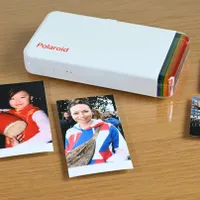
Some gadgets work as ‘digital photo frames’ for displaying images and playing slideshows. That’s not possible with this printer, unsurprisingly. What you can do, however, is to remove the clear panel on the top of the printer, take out the rainbow color card, and replace it with one of your own 3x3-inch photos.
Stand the printer on its end it then acts as a physical photo frame, so that you can have it on display rather than just keeping your prints and the printer itself stashed away in a drawer.

Polaroid Hi·Print 3x3: Verdict
I’m all for creating real, physical photo prints. I maybe wouldn’t go as far as some photographers, who say that printing is the final step that’s absolutely necessary for creating a photographic image. But I do think there’s a lot to be said for a print as a physical entity that you can hold in your hand, pass around with family and friends, stick into a scrapbook or put on display.
The speed and quality of the printer are pretty satisfying, as I’d expect from a modern dye-sub printer. The built-in rechargeable battery and Bluetooth connectivity, as well as the compactness of the printer, make it ideal for using anywhere and everywhere.
It’s particularly good for making and sharing prints at social gatherings and events. All in all, it’s a bit of fun with a serious side, making it a useful gadget that’s good value at the price.
Features ★★★★☆ |
Useful features include a built-in Li-ion battery, Bluetooth connectivity and fully internal paper transport with no extending paper trays. However, you can’t print from a computer. |
Design ★★★★☆ |
The design is a little too chunky and hefty to comfortably fit in a spare pocket but it’s quite compact nonetheless. The ability to use the printer as a photo frame for its own photos is a nice touch. |
Performance ★★★★☆ |
Prints take just over a minute to create and are of pleasing quality. They’re not a match for the best photo inkjet prints but still look good and should last well. |
Value ★★★★☆ |
The Polaroid is pretty good value to buy and the same goes for its refill packs of dye and paper. |

Alternatives