




What better time for Adobe to announce that 85% of Sundance filmmakers use Adobe Creative Cloud tools, as well as major new updates to Premiere and After Effects, than the week of the Sundance Film Festival? That’s right, the bastion of independent filmmaking kicks off on Thursday, and Adobe is a recurring theme in the filmmakers’ productions.
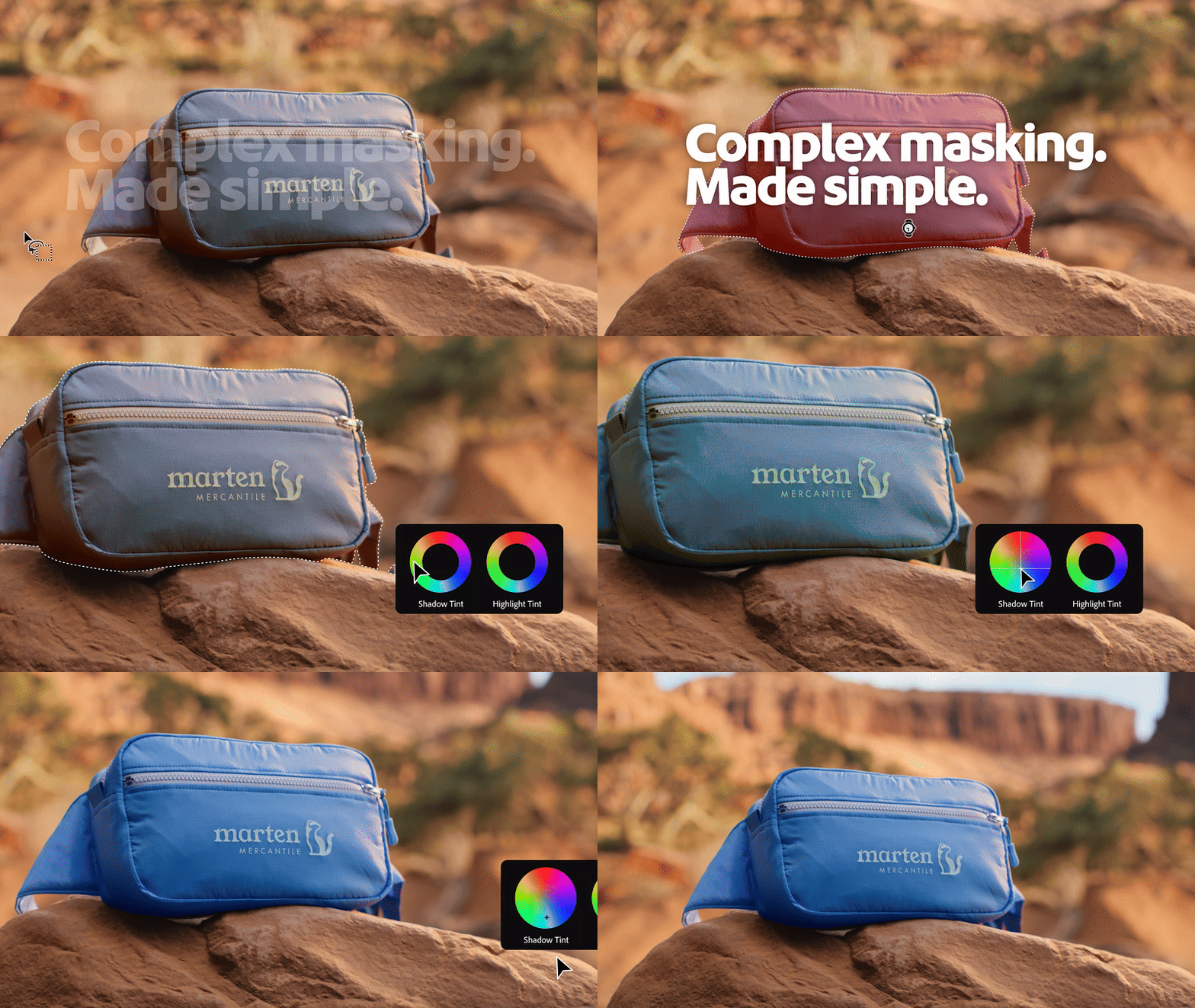
The broad strokes of the creative software behemoth’s updates are designed to make post-production faster and more intuitive by way of, you guessed it, artificial intelligence. At the front of the pack is Premiere’s new AI-powered Object Mask, which would make Photoshop’s Magic Wand tool blush. This feature was in public beta, but is now available for all Premiere users.

With the tool selected, you simply hover over the scene in question, and colored overlays instantly highlight individual objects and people. What’s more impressive is that a selected mask will then track a moving subject. Perfection isn’t always guaranteed, of course, so you can still use fast lasso and rectangular editing tools to refine your selection. However, anyone who’s ever spent time rotoscoping will know that this is a tool with the potential to dramatically speed up workflow.
Adobe has also redesigned Premiere’s Shape Masks, with Ellipse, Rectangle, and Pen all allowing you to work with effects such as blur and relighting, while Adobe rates these tools’ tracking at 20x faster than previous versions of the software. They can be added via the toolbar, resized, moved, rotated, and feathered, while Adobe says that it’s redesigned Bezier curves for smoother customization. Crucially, you can mix multiple masks with different blending modes.

And indeed, during a demo, I got to see Adobe’s Jason Druss using Shape Masks and Object Masks in tandem to quickly color grade the sky, while removing the faces of two subjects that encroached on the original mask. When cutting out a fanny pack and animating it with a new motion-camera transition to fly towards the screen, he said: “As the fanny pack, not only comes out, but we can see the motion blur attached to it (...) if you want to accomplish work like this, you need to be a really, really advanced video editor.”
That’s not all, you can track bi-directionally and anchor masks to any object within the frame. Adobe says it has also implemented live tracking previews, as per community feedback. But what happens when you make manual adjustments? Well, a new Frame track-editing mode is designed to mitigate the need to manually adjust each keyframe, with the software taking adjustments and applying them accordingly.
Firefly Boards and Premiere have been brought closer together, too, with the ability to import multiple assets into Premiere with a single click. Similarly, the new Adobe Stock integration allows users to browse, preview, license, and import over 52 million clips within Premiere itself. Frame.io will also enjoy greater integration with Premiere, thanks to the presence of the new V4 panel (currently in beta).
Adobe After Effects 26.0


Adobe After Effects has also benefited from a raft of updates. Native 3D Parametric Meshes looks like a great addition for newcomers, while speeding up the workflow of seasoned creators. They allow you to create and combine a plethora of shapes, with new Spot and Parallel shadows said to boost the realism of a scene.
Adobe says that over 1,300 Free Substance 3D Materials can be applied to both native and imported meshes. I got to see materials applied to meshes in real-time during a demo with Adobe’s Victoria Nece, and as somebody with no 3D-modeling experience, the simplicity of this looked very appealing. So too did After Effects’ new Variable Fonts, with the ability to animate typography using keyframes, expressions, and up to eight axes per layer.
Finally, After Effects benefits from an enhanced vector workflow, with the ability to import SVG files directly into the software (commonly used in Adobe Illustrator). On the subject of Illustrator, gradients and transparency settings are preserved when converting Illustrator layers into shape layers.
You might also like...
Check out the best video editing software and the best photo editing software. Looking for a hardware upgrade? Here are the best MacBooks for photo editing.

