Digital Camera World Verdict
The Xiaomi Pad 8 is an interesting tablet because it’s reasonably priced for a highly portable device aimed at productivity. With some impressive specs that take it far beyond entry-level models, it’s fantastic for a range of tasks on the go, including entertainment, work, and basic creative tasks, but it's certainly no replacement for a laptop. But what makes it work well is that it’s much smaller, lighter, and portable than a laptop, so if you add the Focus Pen Pro and Pro Focus Keyboard, it becomes a laptop alternative with less processing power and less screen real estate.
Reasons to buy
- +
Slim and lightweight
- +
Respectable performance
- +
Competitively priced
Reasons to avoid
- -
Xiaomi HyperOS 3 isn't the best skinned version of Android
- -
Accessories drive up cost
- -
Not a laptop replacement
Why you can trust Digital Camera World Our expert reviewers spend hours testing and comparing products and services so you can choose the best for you. Find out how we test.
Xiaomi has built a strong reputation for delivering flagship-grade hardware at competitive prices, and the Xiaomi Pad 8 is a great example of this approach. However, this isn’t the flagship model, and the Pad 8 sits just below the Xiaomi Pad 8 Pro. But rather than being in competition, these devices offer slightly different performance in a near-identical package at different price points.
Powered by the Snapdragon 8s Gen 4 processor, 8GB RAM, and offering a 3.2K 144Hz 12-bit display, the Pad 8 is a tablet that comes with an impressive spec sheet, given its price. That said, it’s not the must budget conscious 11-inch tablet available, but it is a tablet that can be used for a wide range of tasks.
The Pad 8 can straddle the line between consumer entertainment and productivity; it handles everyday tasks like streaming, gaming, and browsing without breaking a sweat, but with the optional Focus Keyboard and a suite of Xiaomi HyperAI features baked into HyperOS 3, alongside WPS Office, it also works well as a compact and mobile workstation.
But whether the Pad 8 fully delivers on that promise in practice is something we'll dig into throughout the review. The question always has to be, is it one of the best tablets for photo editing? This is much more demanding than simple entertainment and typing, so these two types of productivity never go hand-in-hand.

Xiaomi Pad 8: Specifications
Display |
3.2K / 3200x2136px / 345ppi / 800 nits peak brightness |
Processor |
Snapdragon 8s Gen 4 |
RAM |
8GB LPDDR5X |
Operating system |
Xiaomi HyperOS 3 |
Battery & Charging |
9200 mAh / Up to 45W |
Storage |
128GB / 256GB |
Front camera |
8MP / 1/4in sensor / 1.12μm pixel size / f2.28 |
Rear camera |
13MP / 1/3.06in sensor / 1.12μm pixel size/f/2.2 |
Dimensions |
9.88x6.81x0.22in / 251x173x5.75mm |
Weight |
17.1oz / 485g |
Xiaomi Pad 8: Price
The Pad 8 was released on 28 February 2026 and was immediately available on the Xiaomi website and Amazon. It’s available in two configurations, with the entry-level model packing in 8GB of RAM and 128GB of storage for £399, while the 8GB/256GB model costs £449.
This makes it less expensive than the more powerful Xiaomi Pad 8 Pro, but it’s still priced higher than the average entry-level tablet. To be fair, this is much more than that based on the specs on offer. The Focus Pen Pro and Pro Focus Keyboard add to the overall price at £89 and £179 respectively, if you need them, and we’ll cover these a little more later.
Xiaomi Pad 8: Design & Handling

The Xiaomi Pad 8 features a sleek design with an undeniably premium look and feel for what’s priced reasonably for an Android tablet aimed at productivity. The Pad eight measures 9.88x6.81x0.22 in / 251x173x5.75mm and weighs 17.1oz / 485g.
This is standard ground for 11-inch tablets, so nothing out of the ordinary here, and when paired up with a case or one of the keyboard cases, it becomes a much more portable device than a laptop. The Pad 8 is also available in Gray, Blue, and Pine Green.
The screen, like for all tablets, is the heart of the device, and the 11.2-inch, 3.2K 144Hz display doesn’t disappoint. The 3200x2135px resolution with a 345ppi pixel density produces a clear image with deep blacks, although the reflective screen, like with all tablets, does pick up reflections. It is nice and bright for working in brighter conditions, though.


The 3:2 ratio screen offers up to 800 nits of brightness alongside a 12-bit color depth, DCI-P3 support and adaptive HDR. To give 800 nits some context, many video monitors offer around 1000 nits of brightness to allow for outdoor use. Then there are some eye care certifications thrown in for good measure. I can’t argue with these, and they’re most welcome, but they’re not something a mere mortal can test with their eyes alone.
The Pad 8 handles entertainment, web browsing and gaming without skipping a beat, but this is a tablet that’s aimed at productivity so it should be able to do much more. Workstation mode is aimed at providing a PC-like experience where you get a taskbar and can have several windows open at once. It’s certainly better than a standard tablet mode and a Bluetooth keyboard, but I’m not convinced it could stand up against a laptop in terms of processing power, comfort or screen size.


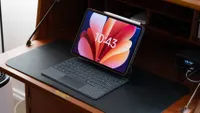
That said, the Pad 8 is much smaller and lighter, even when paired up with one of the two keyboard cases that are available. Both create a floating tablet effect, which is great for angling the tablet and looks stylish, but they do add to the cost of the overall package. The Xiaomi Pad 8/8 Pro Keyboard is the budget option at £119, while the Xiaomi Pad 8/8 Pro Focus Keyboard is the premium option and costs £179.
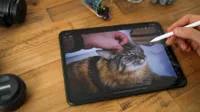
The latter has a trackpad and backlighting, both of which make productivity tasks much more efficient. The backlighting comes on automatically in low-light, which is a great feature. Then there’s the Xiaomi Focus Pen 2, which is fantastic for drawing and photo editing, but this will set you back an additional £89. This offers 16,384 pressure sensitivity levels, pinch control for shortcut functionality and haptic feedback.
The pen also neatly attaches to the edge of the tablet magnetically, where it charges wirelessly, ready for use. Whether or not you truly need it comes down mostly to whether you intend to use the Pad 8 as a pen display for drawing. Otherwise, it’s nice to have but certainly not essential.

Xiaomi Pad 8: Performance
Setting up the Pad 8 is as straightforward as any other Android device, offering a completely manual set-up, or you can use a nearby device to make things even quicker and easier. I used my Samsung Galaxy S23 Ultra to do this, and it streamlined the process tremendously.
Under the hood, the Pad 8 is powered by the Snapdragon 8s Gen 4 Mobile Platform, built on a 4nm process, paired with 8GB of RAM. The result is a noticeably snappy and responsive device that handles multitasking, media, and gaming with ease. I also installed Adobe Lightroom Mobile and Photoshop Express for on-the-go editing, and the Pad 8 handled these tasks well.
I was typically only editing small 12MP Raw files and tested a larger 24MP Raw file, which the tablet had no trouble with whatsoever, but this was with a fairly clean/uncluttered tablet. After a few months of use, as more storage is used, with apps installed and uninstalled, devices often slow down a little, and in this situation, it’s difficult to say how the Pad 8 might perform more labor-intensive tasks, such as photo and video editing.

The tablet runs Xiaomi HyperOS 3, which provides a clean and fairly intuitive interface that's easy to navigate, whether you're new to Android or not. I’m not much of a fan of Xiaomi HyperOS 3 myself and find it clunkier than other skinned versions of Android I’ve used. But like with most versions of Android, there is plenty of scope for customization, and you can, with some time, find the settings you need, because they’re not always easy to find, to make the operating system work even better for you.
The cameras represent a step up from more budget-focused, lower-end tablets. The rear camera features a 13MP sensor capable of 4K video at 30fps, while the front-facing camera is 8MP and handles 1080p at 30fps. As tends to be the case, the rear camera produces noticeably sharper and more detailed results than the front, but the front-facing camera is more than adequate for video calls, which is where most people will use it most.

Where things get a little more interesting is in the software; Xiaomi's HyperAI brings a practical set of AI tools to the camera and gallery, including object removal, generative image expansion, AI Bokeh for adding background blur and an AI Art feature that can turn rough sketches into finished-looking images in seconds. These features work exceptionally well for personal images, but they’re not of a professional quality.
Audio is good, but not the best I’ve heard from a tablet. The quad speakers with Dolby Atmos support deliver a sound that's clear, reasonably well-balanced, and genuinely enjoyable for music and films alike, although, as with most tablets, those looking for deep bass will still find themselves reaching for their headphones to enjoy improved sound quality.
Battery life is great, and the 9200mAh battery easily covered me for a day’s use with a mix of streaming, browsing, and light productivity. 45W fast charging makes top-ups quick and easy when needed, although the tablet doesn’t come with a 45W charger – this is sold separately – but there’s no reason why you can’t use a third-party fast USB charger if you already have one. I hooked the Pad 8 up to my 100W USB charger during testing.
Xiaomi Pad 8: Verdict
The Xiaomi Pad 8 is an interesting tablet because it’s reasonably priced for a highly portable device aimed at productivity. With some impressive specs that take it far beyond entry-level models, it’s fantastic for a range of tasks on the go, including entertainment, work, and basic creative tasks, but it's certainly no replacement for a laptop.
What makes it work well is that it’s much smaller, lighter, and portable than a laptop, so if you add the Focus Pen Pro and Pro Focus Keyboard, it becomes a laptop alternative with less processing power and less screen real estate.
This is a tablet that sits in a strange place – it’s not as powerful as the Xiaomi Pad 8 Pro, but it’s more expensive than a true budget tablet. It’s too much for purely entertainment, but it will never replace your laptop. For me, the Pad 8 is a useful device for keeping up with work, entertainment, and minor creative work on the move, when paired with the Focus Keyboard, when you need or want to travel extra light.
Features ★★★★☆ |
Great screen and good sound although not a laptop replacement as claimed. |
Design ★★★★★ |
Great build quality and a slick design. |
Performance ★★★★☆ |
Performs as yuou'd hope and expect for the specs, but it's not as powerful as the Pad 8 Pro. |
Value ★★★★☆ |
For a productivity tablet, the Pad 8 is reasonably priced. |
✅ Buy it...
- You would like a more budget focused productivity tablet.
- You’d like a tablet that can cover multiple uses.
🚫 Don't buy it...
- You only want a basic entry-level model.
- You need the processing power and screen size of a laptop.
Alternatives