Digital Camera World Verdict
The Xiaomi Pad 8 Pro is Xiaomi’s most convincing productivity tablet yet. It’s slim, powerful, and with the Focus Pen Pro and keyboard, it edges into laptop territory. Performance is excellent, and the display strikes a great balance for portable work. But Android tablet software still holds it back with some inconsistent app scaling and a more fiddly OS. It’s not quite a laptop replacement – but it’s getting closer.
Reasons to buy
- +
Slim and lightweight design
- +
Excellent Snapdragon 8 Elite performance
- +
Excellent keyboard and pen accessories
- +
Really nice 3.2K display
Reasons to avoid
- -
Android app scaling still inconsistent
- -
Keyboard setup is top-heavy on lap
- -
Some bloatware
Why you can trust Digital Camera World Our expert reviewers spend hours testing and comparing products and services so you can choose the best for you. Find out how we test.
Xiaomi has been steadily refining its tablet line over the past few generations, and the Xiaomi Pad 8 Pro is positioned by Xiaomi as a “PC-level productivity” device. It pairs flagship silicon with a redesigned version of HyperOS 3 and a new Focus Pen Pro and Focus Pro Keyboard, in the hopes of being more than just a Netflix machine.
The Pad 8 Pro sits above Xiaomi’s standard Pad 8 and follows on from the Pad 7 Pro, bringing major silicon upgrades thanks to the Snapdragon 8 Elite, 3.2K 144Hz display, AI-powered photo editing tools, and improved workstation-style multitasking.
For creatives, it needs enough ooph for editing RAW files on the go, running creative apps, video editing, and working on the move. On paper, it competes with premium Android tablets and even flirts with entry-level laptop territory when paired with Xiaomi’s Pro Focus Keyboard – but ambition and execution aren’t the same. So can the Tab 8 Pro compete to be one of the best tablets for photo editing?

Specifications
Price (Launch) |
8GB+256GB: £529 |
Processor |
Snapdragon 8 Elite |
RAM |
8GB+256GB; 12GB+512GB |
Screen |
11.2-inch 3:2 LCD; 3200×2136 345ppi resolution; 144Hz refresh rate; 800 nits peak brightness |
Rear Camera |
50MP, 1/2.76" sensor; 1.28μm pixels; f/1.8, PDAF |
Front Camera |
32MP, 1/3.6" sensor; 1.22μm pixels; f/2.2 |
Battery & Charging |
9,200mAh; 67W wired charging |
Operating System |
HyperOS 3 (based on Android 16) |
Size |
251.22 × 173.42 × 5.75mm (tablet only) |
Weight |
485g (tablet only) |
Price & Availability
The Pad 8 Pro starts at £529 for the 8GB/256GB version and £599 for the 12GB/512GB model (other regions TBC).
It isn't cheap, but it comes in far below the iPad Air with similar storage. Although Apple's machine does have iPadOS's more robust ecosystem. Compared to rivals in the Android space, it undercuts Samsung's S11 tablet whilst offering mostly comparable specs.
Once you add the Focus Pen Pro (£89) and Pro Focus Keyboard (£179), you’re approaching laptop money, but if you're looking for a tablet, that's not really the point.
Design
At just 5.75mm thick and weighing 485g, the Xiaomi Pad 8 Pro is impressively slim for a productivity-leaning tablet. In the hand, it feels manageable; I can comfortably hold it one-handed for reading or sketching without the keyboard attached, and the 11.2-inch footprint strikes what I think is a genuine sweet spot between portability and usable workspace. It’s large enough to edit photos or run two apps side by side without feeling cramped, but not so big that it becomes cumbersome in a bag.
The rear panel has a metallic finish that looks clean and understated. If I’m being honest, it’s bordering on a little bland, but it’s inoffensive and professional. The only visual interruption is the camera bump, which is surprisingly tall given there’s just a single average camera and flash. It doesn’t ruin the design, but it does feel oddly disproportionate.

Build quality overall is strong. The chassis feels rigid with no flex. For buttons, there is a volume rocker that sits along the top edge and is easy to reach in both portrait and landscape, and the power button houses a fingerprint reader.
The sensor itself is quick and reliable, unlocking the tablet pretty much instantly. Face unlock is significantly faster and more convenient for casual use, but as usual, it can’t be used for secure authentication in banking apps or locked folders. It still only seems to be Google that has cracked secure facial recognition with just a camera.
Audio is handled by a quad-speaker setup, and for a tablet this slim, it performs pretty well. There’s a decent stereo spread thanks to the four drivers, making Netflix and YouTube surprisingly immersive. Bass is predictably limited, but dialogue is clear, and the volume is more than adequate for a small room.

Display
The 11.2-inch 3.2K display is one of the highlights of the Pad 8 Pro. It’s sharp, vibrant, and, crucially for creative work, well balanced. Colours look bright and accurate in the default mode, though there’s a Vivid option if you prefer more punch. I found the white balance slightly warm out of the box, but Xiaomi gives you a decent level of control over the white balance in the settings to fine-tune colour temperature, which I always appreciate.
At 144Hz, scrolling feels silky smooth, whether scrubbing through a video or just browsing the web. Brightness is perfectly fine indoors and in most shaded outdoor scenarios, though it’s not particularly bright at peak levels. Under harsh sunlight, you may find yourself wishing for a little more.
There are also useful eye-care features, including a reading mode and adaptive colour adjustments that respond to ambient lighting. For long editing sessions or late-night writing, these genuinely help reduce strain.

Keyboard & Accessories
There are a few optional accessories to turn the Pad Pro 8 from a tablet into something much closer to a laptop replacement.
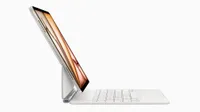
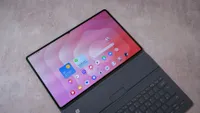
The Pro Focus Keyboard is undeniably similar to Apple's floating Magic Keyboard, but it's a great design. Build quality on the keyboard is excellent: it has a soft, kinda leathery finish on the outside and a felt lining on the rear to protect the tablet. It looks good, professional and understated, but premium.

However, the keyboard is fairly heavy, and once attached, the whole setup becomes much closer to laptop weight. It is also noticeably top-heavy. On a desk, that’s not an issue, but on a bed or your lap, the balance can shift backwards, and I did have the tablet tip over once or twice. The hinge also has a somewhat limited range of motion, which restricts how far back you can tilt the screen.
Key spacing is compact, but I quickly adapted, and I could type at nearly normal speed. That said, I’m not entirely convinced it replaces my MacBook keyboard for full-time work; it’s excellent for travel and light productivity, but extended writing sessions still feel more comfortable on a traditional laptop.
Attachment is handled magnetically, with pogo pins transmitting data and power. The connection is secure and snaps into place satisfyingly, with no Bluetooth pairing fuss required.

The Focus Pen Pro follows a familiar minimal design language; there are only so many ways you can design a stylus, and this one leans into the clean, Apple Pencil-like aesthetic. It feels good in the hand, with accurate tracking and reliable palm rejection. Writing and sketching are smooth and responsive, though it still doesn’t quite replicate the tactile resistance of paper.
I particularly like the squeeze shortcut, which can quickly open a drawing canvas, take a screenshot, or start a screen recording. Both squeeze and touch controls can be reassigned, and in supported apps, swiping can adjust tool size. Charging is handled magnetically via a dedicated spot on the tablet, keeping things tidy and cable-free.

Cameras
Tablets are not really serious photography tools, and the Xiaomi Pad 8 Pro doesn’t attempt to change that, delivering a setup that’s just practical enough.
On the rear, there’s a 50MP main camera. In use, it’s very much fine. It’s more than capable of scanning documents, capturing whiteboards in meetings, or taking quick reference shots when your phone isn’t to hand.
Detail is respectable in good light, but there’s noticeable sharpening applied to images, which gives photos a slightly over-processed look when viewed at full resolution. It performs reasonably well indoors in medium lighting, which is realistically where most tablet photography happens, but it lacks the quality I’d expect from even a mid-range smartphone.

The 32MP front-facing camera is the more important sensor on a device like this, and thankfully, it’s a strong performer. Video calls are clear and sharp, with solid HDR performance that kept my face well-exposed even against bright windows or overhead lighting.
Performance
Powered by the latest Snapdragon 8 Elite Gen 5 chip, I expected the Pad 8 Pro to be a decent performer, and in everyday use, it's extremely quick. Swapping between apps, editing photos, streaming video, and switching multiple browser tabs all felt fluid and responsive. I didn’t encounter any noticeable slowdowns during my time with it.
For editing, exporting 100 DNG files to JPEG in Lightroom took around 40 seconds, which is very respectable. A 10-minute edit in CapCut exported in roughly four minutes – again, impressive. For editing photos on the go or short-form video work for social, it has more than enough grunt.
The 8 Pro runs on HyperOS 3 based on Android 16, and for the most part, I like it. The interface looks modern, animations are smooth, and navigation is fairly intuitive. That said, there is some pre-installed bloatware, which feels slightly at odds with the premium price.
Multitasking is easy on the Pad 8 Pro, though Xiaomi doesn’t do a great job of explaining it. You can run split-screen apps, open floating windows, and enable Workstation Mode for a more desktop-style layout. However, there’s very little onboarding to guide you through these features, and I suspect some users won’t realise what it is capable of.

With this said, though, I still hesitate to suggest Android tablets as genuine productivity machines to compete with laptops. I can get work done here, but the OS is a little more fiddly, and I can’t quite move anywhere near as quickly as I can on my MacBook. Everything just takes that little bit longer.
Xiaomi's Workstation mode is one of the best attempts at a desktop-like experience I have used on an Android tablet; the windowing is functional and easy to use and jump between for multitasking. However, that said, app scaling in windows can be quite inconsistent, and some websites' content can’t adapt to the window sizes, which breaks the illusion of a true laptop replacement. None of this is necessarily Xiaomi's or the Pad 8 Pro's fault; it's just the reality of using a screen size between a phone and a laptop. I wish Xiaomi included some more UI scaling options in settings, as this might have gone some way to solving some of these issues.

The Pad 8 Pro has plenty of AI built in. Google’s Gemini features, including Circle to Search and Gemini Live, are present, and Xiaomi’s own photo Gallery app offers a number of AI features. AI Bokeh and skin retouching are effective without being overly aggressive, and tools like AI Expand and Eraser do a good job, but aren't class-leading. They are solid at detecting subjects, but generated areas can look slightly pixelated compared to the original image.
Battery life has also been good. After several hours of streaming, browsing, and word processing spread over two to three days, I was still sitting at around 20%. And when you do need to plug in, 67W charging is fast.
Final Verdict
The Xiaomi Pad 8 Pro is an excellent Android productivity tablet. It’s thin, powerful, and well designed, with excellent performance in creative apps. The display is great quality and at 11-inches hits a portability sweet spot between functional and cumbersome.
For just watching movies on a plane, it is overkill; however, if you are set on a tablet as a laptop replacement, it's hard to recommend a better Android option at this price point. Although for the full experience, I'd also invest in the accessories, especially the Focus Pro Keyboard, which, of course, adds further expense.
I still find Android’s ecosystem a little limiting as a true laptop replacement. App scaling and desktop workflows aren’t as polished as I need for a work machine. That said, while I couldn’t replace my laptop with it, I could absolutely travel with just the Pad 8 Pro.
Design ★★★★½ |
An impressively slim, premium-feeling tablet with a strong display and excellent accessories, though the keyboard setup is slightly unbalanced. |
Cameras ★★★☆☆ |
Functional and clear for video calls and document scanning, but nothing more. |
Performance ★★★★☆ |
Flagship-level speed with excellent export times and smooth multitasking, but held back by Android’s ecosystem. |
Value ★★★★☆ |
Competitive for the hardware on offer, though accessories push the total cost into laptop territory. |
Overall |
★★★★☆ |
Alternatives