Digital Camera World Verdict
The Huion Kamvas 22 (Gen 3) sets a new benchmark for large entry-level pen displays and provides a pleasant surprise in terms of specs and performance. Built quality isn’t as good as higher-end Huion models, but it’s respectable and realistically expected at the attractive price point. The on-screen image is clear and sharp, while the 8-bit color depth brings photos and illustrations to life. It’s not the best pen display from Huion, but it’s the largest you’ll get at this price point.
Reasons to buy
- +
Fantastic price
- +
Smooth and precise input
- +
Factory color calibrated
Reasons to avoid
- -
Too large for use on the move
- -
Requires a lot of desk space
- -
No controller included
Why you can trust Digital Camera World Our expert reviewers spend hours testing and comparing products and services so you can choose the best for you. Find out how we test.
Long gone are the days when a professional-level pen display would cost you an arm and a leg. Thanks to innovative Chinese manufacturers, including Huion, who started out making graphics tablets, you can pick up high-quality pen displays for impressively attractive prices. The Huion Kamvas 22 (Gen 3) is a 21.5-inch model that comes in at a price that surprises even me, and I’ve reviewed quite a few pen displays.
We’ll go into much more detail throughout the review, but what I can say now is that it’s easily the best drawing tablet and best tablets for photo editing and photographers based on specs and price alone. With its 2.5K resolution, a 137 PPI pixel density, and a pen with 16,384 pressure levels with 60 degrees of tilt recognition, the Kamvas 22 is snapping at the heels of higher-spec pen displays in some, but not all areas.
This is a pen display that works seamlessly with both Windows and macOS, offering an ergonomic design thanks to the adjustable stand on the back of the device. It’s also the perfect pen display for photographers, illustrators, 3D modelers, animators, video editors, and designers. The biggest drawback for some people, however, may be the size of the Kamvas 22. It’s not small and requires quite a lot of desk space, and it’s certainly nowhere near as portable as 12-inch models.

Huion Kamvas 22 (Gen 3): Specifications
Resolution |
2.5K (2560x1440px) |
Brightness |
250 nit |
Colour gamut |
99% sRGB, 90% Adobe RGB, 94% Display P3, 99% Rec. 709 |
Display colors |
16.7m (8-bit) |
Pen sensitivity |
16,384 levels |
Screen dimensions |
21.5in / 18.72x10.53inches / 475.39x267.40mm |
Dimensions |
20.78x12.78x0.63–1.44in / 527.7x 324.7x16-36.7mm |
Weight |
3.6kg / 7.93lbs (with stand) |
Huion Kamvas 22 (Gen 3): Price
The Huion Kamvas 22 Gen 3 was released in early March 2026 and costs just $599 / £649 / AU$999. Sure, it’s not the cheapest available, but for such a large pen display, it’s incredibly well-priced and will naturally attract those looking for the largest drawing area/screen they can afford on a budget.
In the box you get an adjustable and detachable stand, a Battery-free Pen PW600L, a Pen Holder cables, a power supply and other accessories. A nice touch is the calibration report that shows you the results of the factory calibration of the Kamvas 22.
Huion Kamvas 22 (Gen 3): Design & Handling
There’s no getting away from the fact that as soon as you get into the region of 20 inches, pen displays become large beasts that will eat up as much desk space as they can. The Kamvas 22 is no exception in this regard, and you’ll need a full-size office desk or a large working area to accommodate it alongside your computer.
I appreciate that dimensions aren’t always the easiest to visualize, but this beast sits at 20.78x12.78x0.63–1.44in / 527.7x 324.7x16-36.7mm, with a weight of 3.6kg / 7.93lbs including the stand. So, not only will you need that large workspace, you’re unlikely to want to carry the Kamvas 22 around if you work in different locations. To be fair, this isn’t marketed as being a portable pen display.

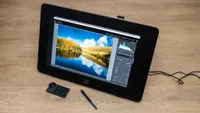
The overall design is fairly minimalist, for which I have no complaints because it makes the Kamvas 22 fit seamlessly on any desk or in any environment. It simply looks and feels like a 21.5in monitor that you can lay flat or tilt back at a number of angles using the adjustable stand. The stand can also be removed to reveal a VESA-compatible mount, allowing you to attach the Kamvas 22 to monitor mounts attached to your desk.
On the back, you’ll also find a bay of connectors: power USB-C and HDMI. This is neatly covered by a back shell to keep cables and your workspace tidy, and is held in place magnetically. The Kamvas 22 will connect to Windows and macOS computers and works perfectly when the Huion driver is installed. You can use the USB-C cable to connect the pen display to your Mac or the HDMI cable to connect the pen display to your PC.


The next feature on the back is one you’ll either love or hate: ambient lighting that runs around the back in a rounded rectangle. The idea behind this is to create atmosphere and complement the workspace, but only you can be the judge of whether it’s useful or not. For me, it’s fine, but not something I’d want to have on if the work was color critical. For this, there are two modes: Monochrome Mode provides 12 colors, while Breathing Light Mode provides lighting effects.
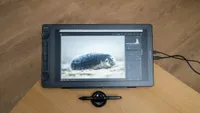
Like other large huion pen displays, there’s a slot on the top of the device where you can attach the pen holder, which grips your pen securely and conveniently when not in use. Alternatively, you could use the included desktop pen stand. This also comes with 10 spare pen nibs inside and unscrews to reveal them. With these, it’s unlikely you’ll need further replacements for years to come.

Huion Kamvas 22 (Gen 3): Performance
I found photo and video editing using the Kamvas 22 comfortable and intuitive, and enjoyed working directly on images for greater precision. The use of a pen also feels much more natural than a mouse and reduces the risk of RSI. Use of the pen is smooth thanks to the 90Hz refresh rate of the screen and 16,384 pressure levels with up to 60-degrees of tilt recognition.
This also delivers a huge amount of pressure control, where lighter and harder strokes are thinner and thicker, respectively. This is, of course, alongside brush control within the software you’re using. The Battery-free Pen PW600L is comfortable to hold thanks to its size and silicone grip, plus there are three customizable buttons on the side. The pen uses Huion's PenTech 4.0, which is their latest pen technology and helps to provide a smooth drawing experience overall.
Moving on to the screen, which is undoubtedly the key area of a pen display, this offers a 2.5K resolution of 2560x1440px and a 18.72x10.53inches / 475.39x267.40mm that equates to a 21.5in screen size. This can display up to 16.7m colors (8-bit), while maximum brightness is 250 nits. The latter may not sound bright, and it’s not when you’re talking about a screen for outdoor use, but this is really for indoor use, so it’s perfect.

The screen itself is made of Canvas Glass 2.0 with anti-glare and anti-sparkle. This absolutely works because when photographing the Kamvas 22 under continuous lighting, the on-screen image remained visible. The screen also achieves color gamuts of 99% sRGB, 90% Adobe RGB, 94% Display P3, 99% Rec. 709, as well as having a black & white mode.
A higher level of Adobe RGB would be better for photography, but 90% is still pretty good for the cost of the device. It’s also factory calibrated, and is claimed to achieve an average color accuracy of ΔE < 1.2. The factory calibration report is included.
The Kamvas 22 doesn’t come with a Huion Keydial mini Bluetooth controller or Huion Keydial Remote, which are customizable button and dial controllers for accessing software tools and shortcuts. There are also no controls or buttons on the Kamvas 22, either, beyond the power button.
This naturally helps to keep the price down, but for me, I like using my keyboard to access shortcuts, so the absence of a wireless controller wasn't an issue. You can, of course, purchase one separately if you would like one.
Huion Kamvas 22 (Gen 3): Verdict
The Huion Kamvas 22 (Gen 3) sets a new benchmark for large entry-level pen displays and provides a pleasant surprise in terms of specs and performance. Built quality isn’t as good as higher-end Huion models, but it’s still pretty good and realistically expected at the attractive price point.
The on-screen image is clear and sharp, while the 8-bt color depth brings photos and illustrations to life. It would be much better if the color gamut of the screen were larger, but it’s still pretty good, not to mention it’s the largest pen display you’ll find at this price point. If you want big on a budget, this could be the pen display for you.
Features ★★★★☆ |
Simple features, but you have what you need and can buy a wireless controller seperately. |
Design ★★★★☆ |
Minimalist and clean design with decent build quality. |
Performance ★★★★☆ |
Precise input and a large 21.5in 2.5K screen. |
Value ★★★★★ |
For a pen display of this size, the pricing is competitive. |
✅ Buy this if...
- If you would like a large pen display that’s not super expensive.
- If you don’t need or want a wireless controller or any shortcut buttons.
🚫 Don't buy this if...
- If you don’t have enough desk space for a large pen display.
- If you need a pen display that you can travel with easily.
Alternatives