Digital Camera World Verdict
The Feiyu Phone Rig for iPhone enables you to capture gimbal smooth moves in an instant (without waiting for a gimbal to power up). You can also shoot with it hands-free, though the lack of a ball head on its mini tripod limits your compositional choices. The option to capture ProRes footage to its built-in SD card reader will be exciting for some (though it’s not an essential feature for most social media content creators). I’m tempted to file the built-in cooling fan under ‘gimmick’, but to be fair, I only got to test it in cold British weather, where the fan was unnecessary.
Reasons to buy
- +
Built-in fan cools smartphone
- +
Offers external storage for large video files
- +
Dual handle stability
- +
Shoe mounts and threads for adding accessories
- +
Offers passthrough charging
Reasons to avoid
- -
Large iPhones can’t be flipped to vertical orientation
Why you can trust Digital Camera World Our expert reviewers spend hours testing and comparing products and services so you can choose the best for you. Find out how we test.
Feiyu (or FeiyuTech) is a China-based company that is well known for camera stabilisers such as the Feiyu Scorp 3. Unlike a gimbal with its motorised tilt, roll, and pan arms, the Feiyu Phone Rig Pro relies on the human operator to keep the phone level and smooth. The Feiyu Phone Rig Pro is marketed as an iPhone rig, but given that it has a universal clamp and a USB-C cable, it should also prove useful for those using Android phones.
Modern smartphones use a physical sensor-shift OIS (optical image stabiliser) system to help keep a handheld iPhone’s footage looking smooth. This involves rapidly moving the sensor in the x, y, and z axes to counteract camera shake. They also use software solutions to crop into the footage and reposition it frame by frame to counteract shake (especially if you engage an iPhone’s Action mode when shooting video). So, why would you need to mount your modern iPhone in a rig like the Feiyu Phone Rig Pro? There are several compelling reasons…
For starters, the sensor-shift technology designed to keep your iPhone’s footage looking gimbal smooth isn’t applied when shooting with a modern iPhone’s Ultra Wide camera, so that will look smoother when shooting with a cage-mounted iPhone. Another reason to mount your smartphone in a rig/cage is that the wider handles that bolt onto the sides of the rig’s smartphone grip move your hands further apart. This wider two-handed grip enables you to perform smoother moves such as pans, tracks, tilts, and cranes. If you held the phone in both hands, it would be more susceptible to micro movements and a tilted horizon due to your hands’ closer proximity.
Another bonus of using a rig is that, unlike a more expensive gimbal, it won’t run out of power in mid-shoot or start shaking if your smartphone is not perfectly balanced. To date, I’ve tested six rigs/cages for Digital Camera World, and the Feiyu Phone Rig Pro boasts a couple of unique features, as I’ll explain in this review.

Specifications
Spec Title |
Spec |
Weight |
90g/1.08lb |
Dimensions |
310 x 149 x 50mm |
Material |
Aviation grade aluminium alloy |
Compatible phone |
iPhone 15 Pro/Pro Max, iPhone 16 Pro/Pro Max, and iPhone 17 Pro/Pro Max |
Mounting options |
Arca-Swiss quick-release plate |
Battery |
Built-in 1300m Ah battery offers 40 min life |
Price
At the time of writing, the FeiyuTech Phone Rig Pro has dropped from its recommended retail price of $149/£149 to $119/£119, which is a significant price cut. This is slightly cheaper in price than the similarly specced SmallRig Universal Phone Video Rig Kit, which retails at £156, and that slightly more expensive rig ships with an LED that slides into the rig’s cold shoe mount. However, the Feiyu Phone Rig Pro does offer the unique option of enabling you to capture footage while shooting with your iPhone directly to a memory card slotted into the rig’s shaft, so you don’t need to clog up your smartphone with huge video files. So if you want to shoot in ProRes format, then this makes the Feiyu Phone Rig Pro a more attractive purchase.
Design and handling
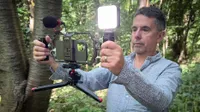
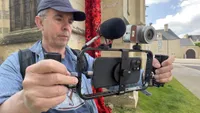
At first glance, the Feiyu Phone Rig Pro looks and behaves like a classic smartphone rig/cage. The main rig and grips consist of an aviation-grade aluminium alloy, so it’s relatively light to carry and manoeuvre (weighing in at 70g/1.08lb, which is much lighter than a gimbal/stabiliser). The two handles screw into each side of the rig, offering you a secure dual-handle grip. Each handle offers the option to add extra kit to the rig in the form of six 1/4” screw holes. The base of the main rig has an Arca-Swiss quick-release plate, so you can slide the rig into third-party tripods. The rig also ships with a mini tripod that enables you to stand it on a surface or collapse the tripod to give you another handle for single-handed shooting when the side handles are detached.
Your iPhone is attached to the rig by a spring clamp, so it should fit any iPhone model. The clamp can be rotated so that you can switch between shooting horizontally (landscape-oriented video clips) and vertically (portrait-oriented video clips). We did have an issue with this design feature, as I’ll explain in the Performance section. The central grip has a handy cold-shoe mount at the top, which is handy if you want to slide in an LED or a mini shotgun mic.


Another unique design feature is the presence of a memory card slot in the main body of the rig. If you connect the built-in rig’s cable to your iPhone’s USB-C socket, you can record ProRes or Log footage directly onto an SD card slotted into the rig (though you will need to use an SD card cable to digitise at a fast enough speed, or your footage could suffer from jerks and pauses!). Oh, the rig’s cable enables you to charge your iPhone while it’s mounted on the rig. When shooting video, I often find that my iPhone battery drains quite quickly, so this pass-through charging capability is a very welcome feature.
The rig’s sprung iPhone clamp offers a unique design feature that I've not encountered in the other smartphone rigs/gages. It has a built-in mini fan that rests directly against the body of your smartphone. When shooting video, an iPhone can begin to run hot, especially in direct sunlight! I have had an iPhone become temporarily disabled due to overheating when shooting video in Tunisia, so the fan could prove useful in the right circumstances. However, overheating wasn’t an issue when I tested the Feiyu Phone Rig Pro in the 4ºC temperature of the English Lake District in January, so I can’t vouch for the efficacy of the Feiyu Phone Rig Pro’s built-in cooling fan, but it might save the day for some hot weather smartphone shooters.

Performance
To test the Feiyu Phone Rig Pro, I took it to the Lake District in the UK to document a family enjoying the location’s beautiful hills and lakes. I popped my iPhone 16 Plus into the rig’s expandable universal phone clamp, and it sat there nicely and securely. I attached the supplied USB-C cable to the iPhone so that it would benefit from being charged by the fully charged rig’s internal battery. You can see that the rig is fully charged by a series of vertical status lights. I pressed the fan button on the rear to power up the little cooling fan at the rear of the rig, but given the 7º temperature of the Lake District, I turned this off, so I could devote the rig’s power to keep charging my iPhone.
I could have used the rig’s built-in cable to capture ProRes footage directly to the memory card plugged into the shaft of the rig, but this would have been overkill as I tend to shoot in standard definition 1080 HD for most of my video projects to save storage space on my external video editing hard drive and most of my footage is consumed via social media platforms so doesn’t need to be shot in ProRes. I’d already tried recording ProRes to an SD card plugged into the rig, but the footage was too jerky. This was because I hadn’t used a card capable of writing ProRes footage quickly on the fly.
I attached the two support handles on either side of the rig and screwed the supplied mini tripod onto its base. The handles can be a bit loose and ‘rattly’ if you don’t tighten them enough, and they benefited from the occasional re-tightening during the shoot. The mini tripod can be collapsed into a stick that provides the option to hold the rig by one hand. Normally, I might use a gimbal to document this sort of activity, but gimbals can be a bit less robust than a cage/rig that has no moving parts. As I walked along country roads, I could let the rig dangle by one hand, ready to sweep it up and start filming with a two-handed grip, a subject within seconds of noticing a suitable subject (such as passing cyclists). With a gimbal/stabiliser, I’d need to power it up when I wanted to use it, missing sudden video opportunities.
The combination of the rig’s widely spaced handles and my iPhone 16 Plus’s built-in hardware/software stabilisers meant that I could capture gimbal-smooth moves without using a gimbal. Having my phone mounted in a rig encouraged me to perform a range of camera moves, such as crouching below a bush and slowly standing, while craning up to reveal the majesty of the distant mountains. I also found it easy to perform smooth sideways and forward tracking shots to capture a wide range of camera moves that would give visual variety to the video that supports this review.
As I was also filming spaniels enjoying their walk, I was able to set the iPhone 16 Plus to Slo-Mo mode. The rig’s dual grip meant that I was easily able to pan and tilt to track their every move (without having to change the gimbal to a suitable mode such as Pan Tilt Follow or Pan Tilt).
Towards the end of the walk, we headed back to the car through winding country lanes. I decided to get experimental and set the iPhone’s Camera app to Time-lapse mode. I then gripped the rig by both handles and walked behind my friends, attempting to keep them in the centre of the frame for a few minutes. This became more challenging when we went off-road, and I had to hold the rig by one handle while darting my gaze between the iPhone’s screen to check composition while watching out for hazardous tree roots as we headed downhill. I wasn’t expecting any of the Timelapse footage to be usable, but as you’ll see from the supporting video, the resulting hyperlapse was super smooth, and on the winding roads it looks like footage captured from a camera mounted on a motorbike!

Verdict
I found the Feiyu Phone Rig Pro to be surprisingly useful and effective. When filming video on my iPhone, I shoot to edit, so I try to capture a wide range of camera moves such as pans, cranes, tilts, and tracks. Having the rig dangling in my hand throughout my set shoot meant that I was ready in an instant to capture a sudden video opportunity - which makes the Feiyu Phone Rig Pro a more useful tool for documentary filmmakers than a gimbal would be (and unlike a gimbal, you don’t need to worry about the Feiyu Phone Rig Pro running out of battery power!). As you’ll see from my supporting video, the rig’s widely spread handles enabled me to make smooth moves.
I did encounter a couple of snags. The mini tripod that slots into the base of the rig isn’t that useful as it doesn’t have an adjustable ball head. You can’t tilt your rig-mounted iPhone when the rig is resting on its tripod on the floor. However, you can attach the rig to a third-party mini tripod that does have a ball head thanks to the 1/4" screw thread at the base. The smartphone clamp can be rotated so that you can shoot horizontally or vertically. However, due to the large size of my iPhone 16 Plus, I couldn’t get it to rotate to a vertical orientation (which isn’t a major problem, as I prefer to shoot video in landscape orientation anyway).
Features ★★★★★ |
An innovative cooling fan, pass-through charging for your iPhone and an SD slot for lossless video capture help make this handheld rig stand out from the crowd. |
Design ★★★★☆ |
The aviation-grade aluminium component keeps the Feiyu Phone Rig Pro robust yet highly manoeuvrable. Shame that the tripod lacks a ballhead and it won’t go vertical with a larger iPhone. |
Performance ★★★★★ |
Thanks to its widely spaced dual handles you can use the Feiyu Phone Rig Pro to perform gimbal smooth moves without running out of battery power. |
Price ★★★★☆ |
More expensive than some rig/cages but it does boast unique features such as memory card storage, pass-through charging and the nifty cooling fan! |
Alternatives