Digital Camera World Verdict
If you’re looking for a cheaper alternative to heavy-lifting gimbals such as the DJI RS4 Pro, then the Hohem MT3 Pro is worth considering, and novice stabiliser users will appreciate the camera balance diagnostic tools in the 1.4” detachable remote control display. Smartphone users will enjoy the extra shooting modes provided by the Hohem Joy app (such as programmable moves in timelapse sequences), while mirrorless camera users can make a range of tilts, pans and tracks with little effort, especially when gripping the additional Dual Twist Handle. However there was the occasional twitch with the pan motor that made some shots less than perfect.
Pros
- +
Effective AI tracking with any camera
- +
Detachable remote and composition monitoring
- +
Increased functionality with Hohem app
- +
Accommodates mobile and mirrorless cameras
- +
Pro accessories such as focus/zoom motor
Cons
- -
Flops when doing a POV roll with a mirrorless camera
Why you can trust Digital Camera World Our expert reviewers spend hours testing and comparing products and services so you can choose the best for you. Find out how we test.
I’m a fan of Hohem’s line of camera stabilisers (or gimbals), having tested and reviewed five models for Digital Camera World, starting with the Hohem iSteady MT2 back in 2023. Most of the gimbals in the Hohem iSteady range target the needs of smartphone content creators, though the original MT2 could carry a payload of a mirrorless camera and lens up to the weight of 1.2kg, and the new MT3 Pro has a maximum payload of 2.5kg.
It has been interesting to see the Hohem iSteady range evolve, and a key stage in this evolution appeared in July 2024, in the shape of a detachable remote control panel (that enabled you to tilt and pan the gimbal from a distance) on the iSteady V3. This detachable remote control panel got a major upgrade with the release of the Hohem iSteady M7 in March 2025, as you could now transmit a live video feed from the built-in camera on the gimbal’s front-mounted AI tracker to the detachable remote’s display. This useful feature enabled you to compose your shots more easily, especially when operating the tripod-mounted gimbal from a distance.
Fast forward to 2026, and the original iSteady MT2 has had several major upgrades, incorporating handy gadgets such as the detachable video-monitoring remote control panel introduced with the M7. The latest Hohem stabiliser is available in two versions - the Hohem iSteady MT3 and the Hohem iSteady MT3 Pro. At first glance, the main difference is that the Pro kit ships with extra accessories, such as a Spot Mini Motor. This mounts onto the gimbal to enable you to adjust focus and zoom via the wireless remote. A gear ring, motor holder, and cable are also included. However, there are other differences between the Pro and standard versions of the MT3, as we’ll explain.

Specifications
Display |
1.4-inch LCD full-color detachable touchscreen remote |
Mechanical Range |
Pan: 360° rotation |
Compatible phone width |
58 to 90mm |
Connectivity |
USB-C / Bluetooth |
Payload |
2.5Kg, 5.51lbs |
Weight |
1.07 Kg, 2.36 lbs |
Battery Life |
20 hours |
Dimensions |
338 x 150 x 199 mm Unfolded |
Price
The MT3 Pro is currently available for preorder from $449, while the non-pro version - the iSteady MT3 - costs $329.99. If you shoot on a variety of cameras, from smartphone to mirrorless, then the Pro version is worth considering, especially if you want to control a mirrorless camera’s zoom or focus settings via the Pro kit’s Spot Mini Motor and gear ring. The iSteady MT3 Pro can also carry a heavier payload of 2.5Kg, 5.51lbs, compared to the cheaper iSteady MT3’s capacity of 1.4kg (3.1 lbs). So if you only shoot on a smartphone or action camera (or tend to shoot with your mirrorless camera set to auto focus), then you can save yourself just over $200 by going for the cheaper MT3.
Design & Handling
The newly released Hohem iSteady MT3 Pro and the cheaper Hohem iSteady MT3 differ in their build as well as their accessories. The Hohem iSteady MT3 has a maximum payload of 1.4kg (3.1 lbs), so you might think twice about buying it if you want to carry a mirrorless camera and a heavy lens that weighs close to that payload limit. The Hohem iSteady MT3 Pro can shift a camera/lens payload up to a weight of 2.5Kg, 5.51 lbs, so I felt confident that it could smoothly carry my Sony A7 and a Sony FE 1.4/24 GM lens, which weighed in at 1.05kg - well below the stabiliser’s maximum payload threshold.
At the time of writing, I’ve tested 25 gimbals for Digital Camera World, varying from the smartphone-friendly Insta360 Flow 2 Pro to the heavy-lifting DJI RS4 Pro. I like shooting with smartphones because you can usually clamp your device in the gimbal and start shooting! With a heavier mirrorless or DSLR camera, you need to balance the payload on the stabiliser. This involves the time-consuming process of separately adjusting the pan, tilt, and roll axes of the stabiliser so that the camera is perfectly balanced. If the camera/lens payload isn’t balanced correctly, then this puts stress on the gimbal’s tilt, pan, and roll motors, which can cause a stabiliser to judder and shake instead of giving you smooth tilts, pans, and rolls.

It took me around 10 minutes to balance my Sony A7 on the Hohem MT3 Pro. This is about average when it comes to balancing a mirrorless camera on a stabiliser (once you know what you’re doing!). To get an axis arm balanced perfectly, you have to move its arm by a few millimetres. The pan and roll arms on the MT3 Pro were quite stiff to adjust, so I would often overshoot when trying to make alterations in tiny increments. The tilt arm, however, has a handy cog wheel that I could rotate until this axis was perfectly balanced. It would be nice to have similar wheel controls on the roll axis, especially for faster balancing.
Once you’ve manually balanced a camera on the MT3 Pro, you can use the 1.4” display’s auto calibration menu to check that the payload is balanced correctly. You also get a handy colour-coded diagnostic display that shows you if the tilt, pan, or roll axes are being strained by an incorrectly balanced payload. This is a very welcome design feature as there’s nothing more annoying than a gimbal starting to judder when you’re filming a model (and paying them by the hour!). I’m happy to say that I had no issues with the gimbal’s performance once I’d spent time balancing it.


A common mistake when using gimbals is to forget to unlock the tilt, pan, and roll axes before shooting. The MT3 Pro’s three axes each have physical sliders that you need to push to unlock them, so it’s possible you might forget to unlock one of them, leading to the gimbal not performing correctly. The DJI RS4 Pro has motorised axes locking/unlocking, so it’s ready to shoot without you having to manually check each axis, but that costs around $200 more than the Hohem iSteady MT3 Pro. As they say, you get what you pay for, and automatically unlocking axes on a gimbal is a luxury item that you shouldn’t really need once you get used to unlocking them manually.
Performance
To test the Hohem iSteady MT3 Pro, I took it to London’s Barbican Centre, a location with plenty of towers and corridors that made it perfect for performing a wide range of stabiliser-powered cinematic tilts, pans, and tracks. I was also there to test a wireless microphone (review to follow), and I planned to do that by interviewing Maryna about her job as a full-time model (Insta @gluecklichmarinalp).
I planned to use the Hohem iSteady MT3 Pro to capture cutaway clips of Maryna trundling her suitcase full of clothes to the location and then performing a range of poses in different outfits. Maryna was booked for the shoot at 9:00 am, so I arrived at 8:00 am, which gave me plenty of time to rebalance my Sony A7 and Sony FE 1.4/24 GM lens on the MT3 Pro.
I used a prime lens because its wide f1.4 aperture would enable me to capture great-looking shots in low light and provide an attractive background bokeh to complement my model. I also used a prime lens because it couldn’t zoom in or out. When adjusting a lens’s focal length, it changes the way the camera is balanced on the gimbal, so you’d need to rebalance the payload every time you zoom in or out. To get closer to Maryna, I simply tracked (or dollied) forward. Because my lens was a prime lens with no zoom function (and I was shooting on auto-focus), I didn’t need to add the kit’s supplied Spot Mini Motor and gear ring to the stabiliser and camera during my test shoot.
Normally, when I shoot a model in the Barbican Centre, I don’t get moved on by security. This is because I tend to use a smartphone, which has a less ‘pro’ photographer profile. However, I have been asked to move on a couple of times at the Barbican when using a tripod. On this shoot, I was worried about being interrupted because I was shooting a pro model with a more serious-looking mirrorless camera and stabiliser rig, but the two-hour shoot went smoothly - even when filming in the private interior of the Barbican Centre, with its beautiful brutalist architecture as a backdrop to my posing model.
I found it very liberating to capture footage on the gimbal-mounted Sony A7. I was able to toggle easily between shooting modes by tapping the M button on the control panel. PTF (Pan, Tilt, Follow) enabled me to frame the top of a tower, tilt down to introduce Maryna, and then pan to follow her as she trundled her trolley full of outfits towards the shoot location. The horizon stayed perfectly level during the tilt and the pan.

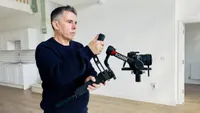
The Hohem MT3 Pro ships with an attachable bidirectional Dual Twist Handle. This gives you a better and more stable two-handed grip in the gimbal. I especially enjoyed attaching it in briefcase mode so I could easily perform low-to-high angle crane shots while tracking my walking subject using the (PF) Pan Follow mode. I also experimented with the POV (Point of View) mode. This adds a roll to the pan and tilt to capture a more organic floating look. However, I found that my payload was just too heavy, and the camera would flop down when the gimbal tried to roll it. POV with a smartphone is smooth and gliding, but the Hohem MT3 Pro couldn’t perform this move, despite the 1.046 Kg payload weighing in at far lighter than its maximum 2.5. On the plus side, I rarely want the camera to roll, as I like to keep my horizon nice and level.
Another disappointing discovery on my test shoot related to the gimbal’s ability to let me swap from shooting in a horizontal (landscape) orientation to a vertical (portrait) one. I was easily able to slide the quickly releasing plate out of the gimbal and re-insert it so the camera was printed vertically. However, the camera would then slowly droop forward due to the fact that I couldn’t screw it tightly enough onto the Hohem’s tripod plate. Now, this could be a fault of the Sony camera’s thread or the gimbal plate’s screw. I don’t know for sure, but I failed to shoot any social media-friendly vertical reels. Personally, this wasn’t a big issue as I tend to shoot horizontally in 4K and then crop the footage in post if I need a vertical version.
As I said earlier, I tend to use gimbals to carry smartphones. The combined weight of the 1.046 Kg Sony camera payload and the 1.07 Kg was heavier than I was used to, but with the additional sling handle and the main grip, I could easily perform a wide range of moves with little effort.
I appreciate that describing gimbal-powered camera moves isn’t that helpful, so do check out my supporting video that shows a range of the MT3 Pro’s moves in action (once you’ve watched the advert at the start!). While most of the camera moves are relatively smooth, I did notice some micro ‘twitches’ on occasion, which is something that’s far less noticeable or prevalent when using a smartphone on a Hohem stabiliser.
A key strength of all Hohem gimbals is their ability to be deployed on their mini tripod so that you can get them to pan and tilt the camera using the gimbal’s built-in AI tracker. I asked Maryna to make an OK gesture to trigger AI tracking, and the gimbal smoothly tilted and opened to follow her every move. She then made the palm-up gesture to stop the tracking process and walked out of shot. Despite having to pan and tilt a relatively heavy payload, the Hohem iSteady MT3 Pro did a smooth job, worthy of a human camera operator.
Verdict
The Hohem iSteady MT3 Pro enables you to ‘run and gun’ with your mirrorless camera in any location, making it almost effortless to perform a wide range of professional camera moves such as pans, tilts, and tracking shots. The addition of pro accessories such as the Dual Twist Handle makes it even easier to manoeuvre (especially if you want to perform low to high-angle crane shots). The detachable remote control with a built-in video feed is also very useful in helping you compose shots (especially if you’re tracking a model while walking backwards down a flight of stairs), and it's a nice design touch that this remote can also be mounted on the end of the Dual Twist Handle for easier access to changing modes, for example.
This is the first time I’ve tested a Hohem gimbal with a mirrorless camera, and I found that the camera moves weren’t always as smooth as those performed with a smartphone. The occasional ‘twitch’ of the pan motor meant that some shots weren’t quite as smooth as I’d have liked, so this loses it half a star. And I was disappointed that my camera dropped when in vertical orientation. But as you’ll see from my supporting video footage, I was able to perform a range of pro camera moves while filming a model making hers!
Features ★★★★☆ |
The Hohem iSteady MT3 Pro ships with a detachable handle that makes it easier to perform pro camera moves, plus a motor enables manual control over focus or zoom on a mirrorless camera. |
Design ★★★★☆ |
The joystick, touchscreen panel and video display can be detached to use as a remote control when the Hohem iSteady MT3 Pro is mounted on its tripod legs. |
Performance ★★★½☆ |
Some moves were not always as smooth as we’d have expected, though the remote’s live video feed enables you to compose shots with more precision. |
Value ★★★★☆ |
It costs around $100 more than the base iSteady MT3 model, but this does give you the essential sling handle and the option to control mirrorless zooms or focus via the gimbal |
Overall |
★★★★☆ |
Alternatives