Digital Camera World Verdict
Pros
- +
AI tracking
- +
Vertical or horizontal orientation
- +
Effective supporting app
- +
Affordable price
Cons
- -
No touch screen control
- -
Doesn’t ship with a carry case
Why you can trust Digital Camera World Our expert reviewers spend hours testing and comparing products and services so you can choose the best for you. Find out how we test.
Stabilisers like the Feiyu Scorp-C2 are designed to keep your camera’s horizon level as you perform a wide range of handheld pans, tilts, and low-to-high angle tracking shots. They also enable you to shoot tripod-steady handheld shots without the burden of having to carry and set up a classic tripod (though you can rest a stabiliser on its own mini tripod and perform smooth pans and tilts using its built-in joystick). Unlike the handheld cages and rigs, gimbals have three motorised arms that enable you to pan, tilt, and roll your camera smoothly. The downside of using a gimbal is that you need to balance your camera and lens (the payload) carefully before each shoot. An unbalanced payload puts strain on the stabiliser’s motors, which can cause camera shake (or even force the gimbal to shut down to protect its motors!). With a cage/rig, you are the motor, so no time-consuming balancing is required.
I’ve rested and reviewed a few Scorp gimbals for Digital Camera World, starting with the Feiyu Scorp Mini, followed by the Scorp 2. All the gimbals in Feiyu’s Scorp range share one key design feature - a hooked sling handle that looks like the tail of a scorpion - hence the branding ‘Scorp’. I’m a big fan of this design feature as it enables me to easily glide the gimbal-mounted camera very close to the ground to follow a subject and then crane it up to head height in one smooth motion. To enjoy a smartphone-friendly version of the Scorp, check out my review of the Scorp Mini 3 Pro.

FeiyuTech Scorp-C2: Specifications
Mechanical Range |
Pan: 360° rotation Roll: 320° Tilt: 320° |
Payload |
3.5 kg / 7.7 lb |
Battery Life |
20 hours |
Connectivity |
USB-C / Bluetooth |
Compatible phone width |
58 to 90mm |
Display |
Fixed Non-Touchscreen OLED |
Dimensions |
10 x 2.6 x 2.6" / 299 x 253 x 66 mm (Folded) |
Weight |
2.91 lbs / 1.32 kg (without Tripod) |
FeiyuTech Scorp-C2: Price
Back in September 2025, I tested and reviewed the Scorp 3, which was capable of carrying payloads of up to 3.5 Kg for the price of around $400/£439. The newer Scorp-C2 can also carry payloads up to 3.5 Kg, but at the far more affordable price of $250/£269. I was therefore intrigued to discover how the Scorp-C2 differed compared to its more expensive cousin and whether its reduced price would equate to inferior performance in functionality and features. Cut to the chase - in my test, the Scorp-C2 outperformed its more expensive cousin when it came to making a wide range of smooth camera moves.
FeiyuTech Scorp-C2: Design & Handling
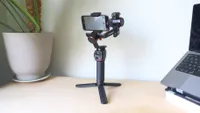
As you’d expect from its name, the Scorp-C2 is an updated version of the original Scorp-C. The newer model features several improvements to its design, such as a more effective built-in face tracking module. The Scorp-C2’s AI tracking module version 4.0 delivers a 15% wider field of view than its predecessor, and it can track your face up to a distance of 18 metres away. The Scorp-C2’s mounting camera platform is more spacious, too, which makes it easier for you to mount your DSLR/mirrorless camera on the gimbal.

Like the more expensive Scorp 3, the Scorp-C2 can also handle lens and camera payloads up to a weight of 3.5 Kg, whereas the older Scorp-C could only cope with 2.5kg. My Sony A7 and lens weighed in at 1.046kg, so it was well within the Scorp-C2’s 3.5kg carrying capacity. Saying that, I used the same payload on the Hohem iSteady MT3 Pro, which can carry a maximum of only 2.5 KG, and the Hohem found it a bit of a burden, especially when trying to roll the camera - check out my review: (Link to be added on publication). As you’ll see from the Performance section, the cheaper yet more powerful Feiyu Scorp-C2 had no trouble putting my Sony A7 through moves that the more expensive Hohem iSteady MT3 Pro found challenging.
So we’ve already established that the cheaper Scorp-C2 can carry the same payload as the more expensive flagship in the Scorp range - the Scorp 3. This Scorp-C2 affordability is made possible by removing some of the high-end features found in the Scorp 3, such as the option to detach the end of the sling handle and use it to remotely control the Scorp 3’s pan, tilt, and roll axes. Another missing feature in the Scorp-C2 is the absence of the touch-sensitive display found on the Scorp 3’s handle.

Personally, I didn’t miss the absence of touchscreen controllability on the Scorp-C2. I preferred toggling between its PF, PTF, and FPV shooting modes by tapping its physical mode button - more on these modes in the Performance section. You can see which mode has been selected on a much smaller LCD display at the rear of the handle, and status lights on the gimbal's shaft also indicate the chosen mode. The control wheel on the side of the gimbal can be configured by a physical button to enable you to fine-tune a tilt, roll, or pan with a physical twiddle. I usually assign the roll axis to the control wheel as this enables me to ensure that the horizon is always level.
The touchscreen on the more expensive Scorp 3 enables you to access menu features such as performing a calibration to make sure that the camera is balanced correctly. With the Scorp-C2, you can access all these sub-menus via the Feiyu Scorp app, so in effect, you have touchscreen control courtesy of your iPhone. The app is great, and it shows you exactly how successfully you’ve balanced the camera using colour-coded indicators for each axis. As long as each axis displays a green value, you’re good to go.
Balancing a gimbal is always a challenge, but it’s an essential part of the shoot. The Scorp-C2 has a handy control dial that enables you to balance the tilt arm with precise incremental control. It’s a shame that the other axes don’t benefit from this easy-to-adjust feature, as I’ll explain in the next section.

FeiyuTech Scorp-C2: Performance
To test the Scorp-C2 stabiliser, I took it (and my Sony A7) to London’s Tower Bridge. The upper metal walkways crossing the Shad Thames street make a suitably cinematic backdrop to testing the stabilizer’s different modes. For foreground interest, I’d hired an Italian model/actress (Insta: @Antonia_sabato) to make some moves that I could follow with my camera mounted on the Scorp-C2.
On any shoot, I tend to arrive early, especially when shooting with a gimbal. As my model was paid by the hour, I didn’t want to waste time trying to balance a gimbal after she had arrived, so I popped into Starbucks and set the gimbal onto its mini tripod to begin the balancing process. The little balancing control wheel that I mentioned in the Design section made it quick and easy to balance the tilt axis, but the roll axis was very stiff to adjust, so this took more to-ing and fro-ing until I could get it balanced. On the whole, though, it took me around 10 minutes to balance my payload on the Scorp-C2, which is pretty good going, and when calibrating the gimbal via the Feiyu Scope app on my iPhone 16 Pro, I had a reassuring range of green balance indicators for the Pan, Tilt and Roll axes, so I was confident that the gimbal would perform well during the shoot.
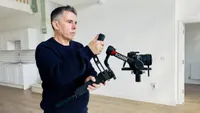
I then met up with Antonia (whom I hadn’t worked with before), and since the tide was currently rising in the Thames, I decided to film her on the river’s rocky ‘beach’ with Tower Bridge as a spectacular backdrop. Luckily, Antonia was wearing sturdy boots rather than pointy heels, so she was able to negotiate the slippery, mossy steps leading down to the beach. I popped the Scorp-C2 into PTF mode. This enabled me to tilt the Sony A7 to follow Antonia with a tilt as she walked down the steps and then pan with her as she started her stroll along the rocky beach. The sling handle (and the extra handle produced by the closed mini-tripod) gave me a good two-handed grip on the gimbal, and I was able to glide it smoothly to follow Antonia, without any wobbles or bumps caused by walking over the slippery and uneven terrain. I can describe my camera moves in detail, but I strongly suggest that you watch the supporting video that accompanies this review, as you’ll see how effective the Scorp-C2 is in a variety of locations.

We then headed to the Shad Thames street (as seen in the TV show Doctor Who and the first Highlander movie back in the 1980s). Here, I was keen to try out the Scorp-C2’s FPV mode, which, unlike the other modes, enables you to roll the camera as well as pan and tilt it. This is great for POV (point of view) shots that mimic the more organic moves of a person as they look around their environment. It performed these POV shoots nice and smoothly, as you’ll see in my supporting video.
The control unit on the Scorp-C2’s handle has three buttons designed to help you roll the camera when it is held horizontally. Many gimbals call this ‘Inception’ mode after the spectacular rotating corridor fight sequence in the movie of the same name. I tend to view this mode as a bit gimmicky, but since I had the three buttons to play with, I went for it! The central button causes the camera to tilt forward (and parallel with the ground). The other two buttons enable you to trigger a continuous rolling action (either clockwise or counterclockwise). You dimply tap a button to change the speed of the rotation. I enjoyed tracking Antonia from the front and behind while she walked, while the camera rolled. I was then able to cut between the two angles as she rotated in the frame, creating a dynamic and disorienting walking sequence. Go on, check out the video!
After a successful London shoot, I returned home to digitise and edit the footage. I then set up the Scorp-C2 in my local woods to test out the AI tracking module. While mounted on its mini tripod, the Scorp-C2 was able to smoothly pan and tilt the camera to follow my every move (even when I tripped and fell over a tree stump!). I was impressed at how quickly the Scorp-C2’s AI tracker recognised and responded to my hand gestures. Most gimbals tend to place you in the centre of the frame, which is fine for most talking to the camera scenarios. However, you can usually make a re-frame gesture that enables you to offset your position so that you’re standing frame left or frame right (which is handy if you want to gesture towards a particular background landmark, for example). I’ve struggled in the past to get some gimbals to recognise this ‘re-frame’ hand gesture, but the Scorp-C2 gave a reassuring three green flashes every time I made the gesture, so it gets a big thumbs up in relation to its AI tracker.
Oh, one last point! Normally, when shooting with a mirrorless camera mounted on a gimbal, I don’t bother to wire it up to the camera via a USB-C cable so that I can trigger the shutter button via the gimbal. However, the Feiyu Scorp smartphone app made it very easy to link the Scorp-C2 to my Sony A7 via Bluetooth. I then enjoyed being able to trigger video recording by pressing the tactile red record button on the gimbal's handle.

FeiyuTech Scorp-C2: Verdict
I thoroughly enjoyed testing the Scorp-C2 because it worked! I liked the fact that I could trigger different modes quickly by using a physical button (and the Feiyu Scorp smartphone app enabled me to dig deeper into sub menus that customised things such as motor follow speed). I’d previously used the same Sony A7 payload to test the Hohem iSteady MT3 Pro, but that stabiliser couldn’t roll my camera without drooping. The Scorp-C2 happily tilted, panned, and rolled my gear effortlessly, which means I’d favour it for a future creative shoot. As a solo shooter who needs to walk and talk to camera, I also appreciated how the updated AI module tuned the Scorp-C2 into a skilled camera operator who could smoothly follow my every move.
Features ★★★★★ |
An updated Ai tracker helps keep you in the picture, and the quick release mount enables you to switch from shooting in horizontal (landscape) to vertical (portrait) orientation in a few seconds. |
Design ★★★★☆ |
Like other Scorp models, the Feiyu Scorp-C2’s handle boasts the hooked-shaped (scorpion tail) design that enables low angle moves, |
Performance ★★★★★ |
The Feiyu Scorp-C2 carried my 1.046 Kg payload smoothly and effortlessly, making it a ‘go to’ gimbal for professional shoots. The Ai tracking was impressive too. |
Value ★★★★★ |
The Feiyu Scorp-C2 has the same heavy-lifting ability (up to 3.5 Kg) as the flagship Scorp 3, but it costs considerably less. |
Alternatives