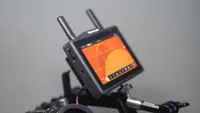
Digital Camera World Verdict
For any filmmaker out there who has being pining for a small, affordable and intuitive solution to wireless video transmission, the Vcore could be just the ticket. It takes advantage of the tech you already own, in a reliable, consistent and easy manner. It might not quite break any records in range but it's plenty good enough for almost all users and I'd highly recommend it.
Pros
- +
Excellent build quality
- +
Lots of versatility
- +
Ships with various mounts
- +
Reliable wireless connection
Cons
- -
SDI would be nice
Why you can trust Digital Camera World Our expert reviewers spend hours testing and comparing products and services so you can choose the best for you. Find out how we test.
Video transmission systems are used to send your camera's output to a different location without the need for cables that can get in the way, cause trip hazards, and take up valuable space. Many options are available for this, with varying degrees of performance and features, and most mean fitting one device to your camera, with the feed being viewed on a field monitor of some kind.
While having the option to use dedicated video transmission systems and field monitors is great, sometimes that just means more tech to ferry to and from a shoot, store, insure, and so on, when in actual fact you could take advantage of devices you already own and carry with you. Hollyland, developer of the fantastic Pyro systems, has taken this idea and run with it, with their new Vcore transmitter, which can send your videos to smartphones and tablets. It can also be paired with the Pyro, promising a versatile piece of gear.
Having used the Pyro, I had my expectations set pretty high, but read on to find out how I got on.
Specifications
Range |
100m |
Internal storage |
DS card |
Inputs |
HDMI 1.4 and USB-C |
Max output |
4K 30fps |
Camera control |
Yes, via HollyView app |
Price
$219 / £177 might not be a trifling amount, but it does bring wireless video down to a level that is attainable for many more users than other systems that require dedicated monitors and receivers.
Design & Handling
Although the box is small, you get a lot in it. First up is the main unit, which is built from very high-quality plastics. This unit has a metal cold shoe on one side and a cold shoe mount on the other, for attaching to the camera. There areUSB-C in and out ports, a full-size HDMI 1.4 input port, and a rubber door covering a full-sized SD card slot. The bottom edge has a ¼ 20 threaded mounting point. Finally, there’s a small but very crisp and easy-to-read OLED display, a power button, and a multi-function button. Everything is easily accessible, feels nice to the touch, and the buttons, while having a very short throw, give a nice positive click.
I’m also a fan of the antennas here. Unlike some devices, which sport larger screw-in antennas, the Vcores are part of the main unit. They poke out less than an inch, keeping the footprint small and meaning there are fewer things to lose.
Alongside the main Vcore, you get a cold shoe to thread adapter, a phone holder, and a magnetic hold for those using their magnetic smartphones mounted on the main unit.
The magnet is very strong and helps my iPhone Pro Max stay in place with ease. No amount of vigorous shaking would dislodge it. Similarly, the sprung phone mount, for those without the magnetic option, is far superior to others I’ve used. Its slight soft-touch finish aids here, and it feels nice and sturdy. It also folds pretty flat, so storing it is less of a hassle.

Performance
The setup procedure for the Vcore is smooth and hassle free. Download the HollyView app first, switch on the Vcore and hit the multifunction button once to enter pairing mode, then connect to its wifi network on your phone and you’re done. Alternatively you can connect to the app using the USB-C cable, which is fine for on-camera use but obviously doesn’t work for remote viewing. For my first test, using a Sony A7r4, I was doing a piece to camera, so having the ability to check framing, focus and exposure from my mark made things far more efficient. The signal is strong and stable which is key but there’s a lot more to like.
First up you can use the app for simply viewing the footage as you shoot and, being on a portable device means you can put it pretty much anywhere, or hand it off to an AC or another team member. That alone is worth the asking price.
Things get even more interesting when you look at camera control. You can record and stop, all from your phone or tablet. For solo shooters this is a massive boon but do check compatibility before you purchase, as not all makes are supported. My Sony camera worked just fine but my Blackmagic Design Pyxis didn’t play ball. If you are covered then the ability to wirelessly start recording could be a big deal for you. It certainly makes my life easier.

On top of this you can use an iPhone to record Prores footage from your camera,a neat trick which I think will be appreciated by many. 422, 422HQ, 422LT and 422 Proxy options are all available, making your phone a mean video recorder too.
Hollyland could have made this a simple consumer/prosumer device so it’s really good to see they have designed the Vcore to grow with you, or enable it to fit into a larger existing setup. The Vcore can be integrated into a Pryo setup just as easily, connecting to multiple devices at one, so if you need a monitor for a director, another for a client and one for an AC, you are good to go.
You might be worried about the video quality but there’s more to love there, with 4k 30 transmission with negligible lag. All while being able to record proxies to the internal SD card (you’ll need to buy one separately) or on your phone.
I was very impressed by the range of the Pyro transmitters but worried that the Vcore, at this price, might be less reliable and, while the range isn’t as great at 100m, it is a robust signal that can penetrate solid walls and I haven’t once experienced an issue with stability.
While this review isn’t about the app, it is worth pointing out that HollyView is pretty fully featured. It has all the things you might expect, like a gallery section, with folders for organising not just your proxies but images too, so all you photographers can keep things in order. There’s a plugin for Capture One too.
For use as a field monitor you get all you could need for everything covering focus and exposure assistance. There’s false colour, zebras, peaking, guide lines for various aspects and, seeing as it’s based on an interface you use every day, interacting with it is a doddle.

Verdict
I can't praise the Vcore enough. My only gripe is that it is HDMI only and even that is being slightly unfair, as you wouldn't expect that at the price this comes in at. It's an impressively versatile piece of equipment, solidly built and that performs admirably. Combine it with your favourite handheld device and you're on to a winner.
Features ★★★★★ |
The Vcore features everything you could need. |
Design ★★★★★ |
Compact and sturdy and thoughtfully designed |
Performance ★★★★☆ |
The range is less than the Pyro but otherwise performance is excellent |
Value ★★★★★ |
You get a lot for your money. |
Alternatives