If you have accidentally reformatted a memory card or deleted a photo you meant to keep, don’t panic. In many cases, photo recovery software can help recover lost images before they disappear for good.
When a camera or computer reformats a memory card or hard drive, it does not always wipe the data straight away. More often, it removes the file index, making the storage appear empty and allowing new files to be written over the old ones. The same is often true when you manually delete an image: the file may still be there, but only until fresh data replaces it.
Photo recovery software works by scanning beyond that missing index, looking for traces of lost files and attempting to rebuild them. The process can take a little time, depending on the size of the card or drive and how much data has been lost, but once complete, the software will usually show you a list of files that can be recovered, letting you choose what to restore and where to save it.
The most important thing is to act quickly. As soon as you realise a mistake has been made, stop using the memory card or drive immediately. Taking more photos or saving new files increases the risk of overwriting the lost images, which can make recovery much harder, or even impossible.
Photo recovery software is available for both Windows and Mac, and some options can recover files directly from a camera connected via USB. Many programs offer free versions with limited recovery features, while full access usually requires a paid upgrade. If the images are important, that cost can be a small price to pay.
Whether you have lost holiday photos, professional images, or treasured family pictures, the right recovery software can give you a valuable second chance.
The best data recovery software in 2026
Why you can trust Digital Camera World Our expert reviewers spend hours testing and comparing products and services so you can choose the best for you. Find out how we test.
Best for workflow

This recovery software has an incredible ability to resurrect deleted images and digital media wiped during a card reformat. It can recover all common image, video and audio file formats from a memory card, as well as your computer's hard drive, SSD or an attached USB drive.
Don't expect the software to work miracles and restore images from a card that's since been fully overwritten with new data, but otherwise Stellar Photo Recovery has the potential to rescue you from most data loss scenarios, and with incredible ease. Three versions of Photo Recovery are available: Standard, Professional, and Premium.
Standard will get you the software's essential data recovery features and should be enough for most users. The Professional option adds photo repair features, while the Premium package adds photo and video repair functionality.
Read our full Stellar Photo Recovery review
Best for power


EaseUS Data Recovery Wizard Pro is far more than just a photo recovery solution - it can get you out of most data loss scenarios, from an accidentally reformatted memory card to a corrupted operating system install, RAID failure, or virus damage.
The software is effortlessly easy to use, with a wizard-driven interface (hence the product name) that's clear, attractive, and very well tailored to beginners. Both Windows and Mac versions are available, with a one-month license costing $69.95 - ideal if you only need a one-off data recovery.
For the chronically unlucky, a one-year license costs $99.95, while a lifetime upgrade license will set you back $149.95. There's even a free version that'll let you recover up to 2GB of data. Just bear in mind that VAT is charged on top of these prices where applicable.
Read our full EaseUS Data Recovery Wizard Pro review
Best for budget
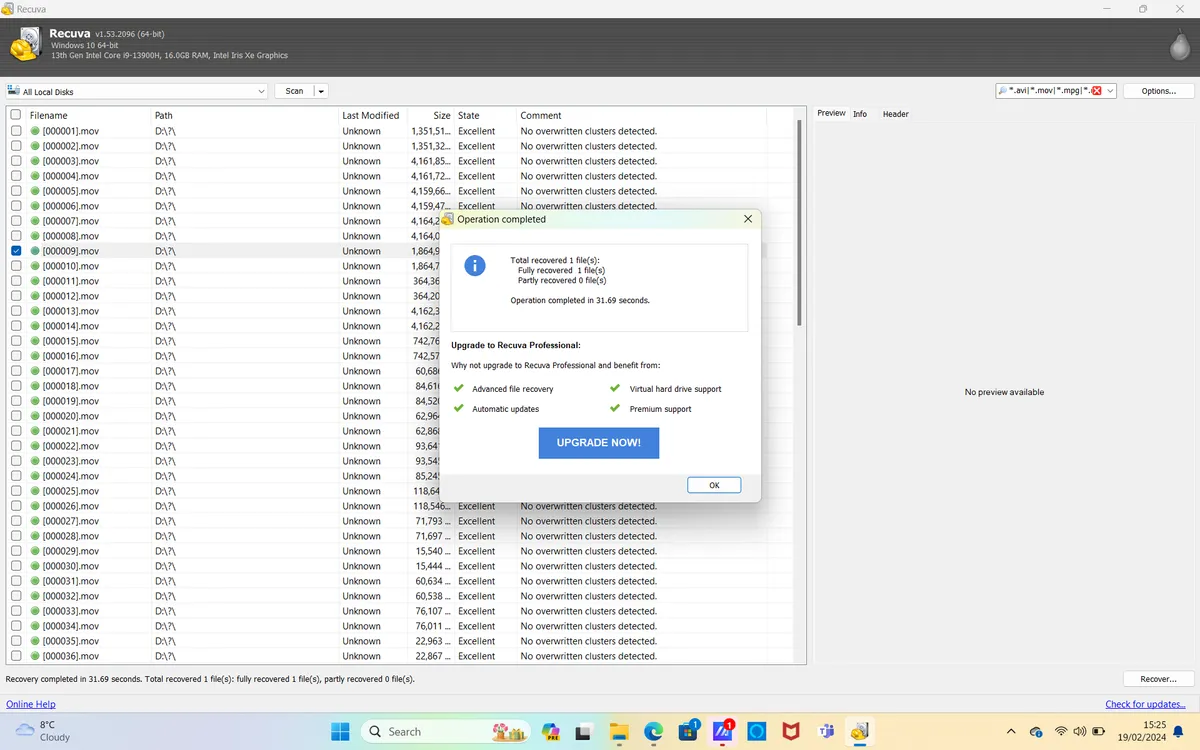
Recuva is made by the same company that produces the longstanding and popular CCleaner app for removing unnecessary file clutter from your PC or Mac. Recuva uses a similar interface design, which is great if you're already familiar with CCleaner, but it's otherwise slightly less slick than some of the other options on this list.
The software can recover all types of file, whether they've been previously deleted or lost on a damaged, corrupted or reformatted memory card, hard drive or USB drive. If you'd rather intentionally delete files as opposed to recover them, there's even a secure delete option to permanently obliterate digital data - useful if you want to sell a used memory card or hard drive.
Recuva is available in free or Pro flavors, with the latter getting you virtual hard drive support, automatic updates and premium support, and all for a bargain price.
Read our full Piriform Recuva review
Best for CD recovery


Power Data Recovery will perform all the usual data recovery tricks, like recovering a mistakenly formatted memory card, SSD or hard drive, as well as undeleting all types of accidentally deleted files or recovering files after a virus attack.
What's more, if you dig out an old recordable CD or DVD of images and find it won't load properly, Power Data Recovery can even scan this and attempt to recover corrupted data. The scanning process isn't the fastest, but the software is simple to use, with discovered files organised conveniently by file type. Only Windows computers are supported, though MiniTool has teamed up with Stellar Data Recovery to offer a Mac solution.
Power Data Recovery comes in monthly, yearly and lifetime subscription options, for $69, $89 and $99 respectively - the lifetime option being particularly competitive on cost.
Read our full MiniTool Power Data Recovery review
Best for features


Ontrack's EasyRecovery is available in several versions, all of which will recover files from corrupt, damaged, deleted or reformatted drives, whether the drives be memory cards, USB sticks, hard drives and SSDs. Both Windows and Mac computers are supported, and the interface, despite having plenty of advanced options, is well designed and easy to navigate.
The most basic version of EasyRecovery is free, but with a 1GB file recovery limit. You'll really need at least the Home edition to get unlimited file recovery, and it's price competitively with competing recovery packages. The Professional package adds options for recovering from CDs and DVDs.
EasyRecovery Premium does all this and is also able to repair corrupted photo and video files - it's also well priced for the features it offers. There are also two further versions for IT technicians.
Read our full Ontrack EasyRecovery review
Best for simplicity

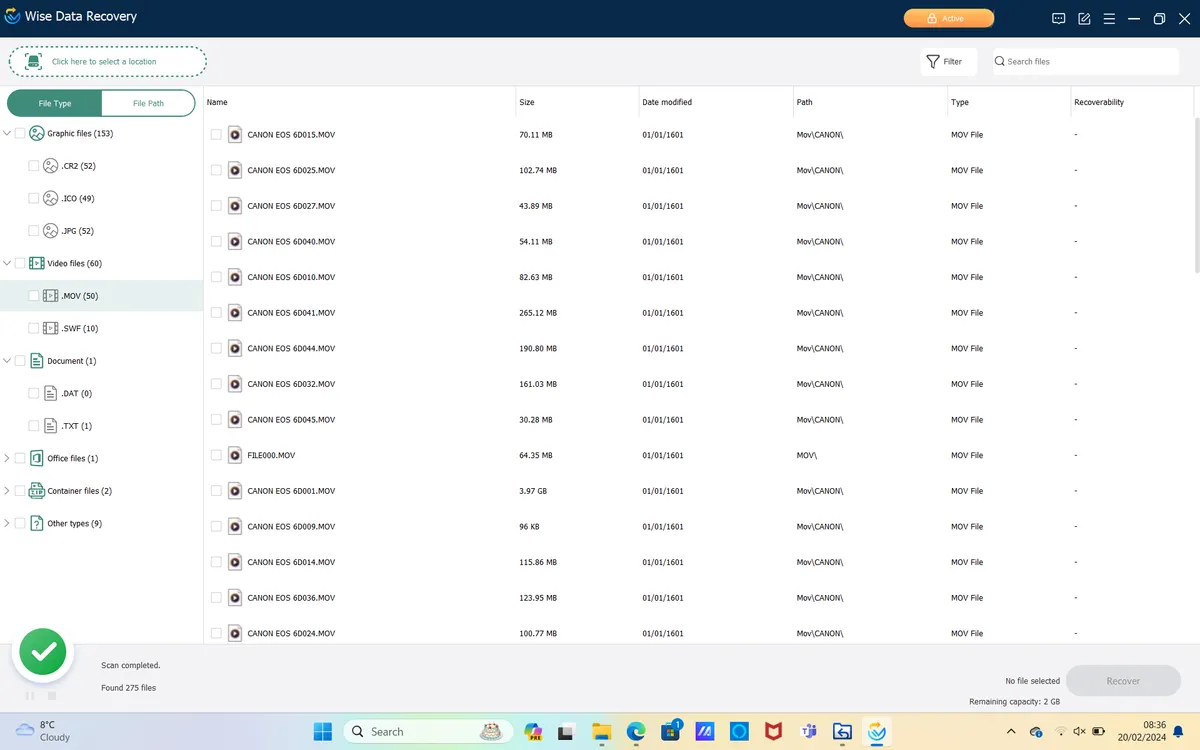
You can't get data recovery software that's much easier to use than this. There isn't even a wizard process to go through - the small app simply loads straight to its main interface, you select the drive you want to scan, and set the process in motion.
Quick scan is indeed fast, but not much use for finding deleted/formatted files - you'll need to perform a deep scan to unearth lost images and video. There's also an option to set up keyword filters so you can recover specific files, rather than having to search through all the discovered files on a card/drive.
A traffic light system then indicates the quality of the files that have been found, and therefore the likelihood of recovering them successfully. Wise Data Recovery is Windows-only and is free if you only use its Quick Scan function, but this isn't very powerful. You'll really need to upgrade to the $45 Pro version to recover deleted files or from formatted disks, and this also gets you automatic updates and tech support.
Read our full Wise Data Recovery review
How to choose the best recovery software
Choosing the right backup and recovery software comes down to a few important factors, beginning with where your lost data is stored and what you need to recover. Different programs offer different levels of support, so it’s worth selecting software that matches the file types, memory cards, drives, or devices you are working with.
It’s also important to think about the software’s interface and how easy it is to use. If you are new to data recovery, a program with a guided wizard can make the process much simpler. More experienced users, however, may prefer software that offers deeper settings, more control, and greater flexibility throughout the recovery process.
What is the difference between bare-metal and granular recovery?
The bare-metal recovery option is perfect for restoring your entire system to new hardware, while the granular recovery alternative allows you to restore specific files.
What is point-in-time recovery?
This type of recovery allows users to restore data from a specific point in time, making it ideal for addressing issues that arose at that moment.
How we test recovery software
We take the time to explore all the recovery options offered by each piece of software, testing their speed and effectiveness. Additionally, we evaluate the overall workflow and interface to assess how user-friendly it is.

