Digital Camera World Verdict
The Redmi Pad 2 Pro is one of the most affordable prosumer tablets on the market right now. With a premium build quality, large display, and reasonable processor, the tablet is a perfect companion for photographers who crave utility alongside a more dedicated workstation. It also houses a massive 12,000mAh battery for extended work sessions.
Reasons to buy
- +
Smooth 2.5K display
- +
Reasonable performance for the price
- +
Premium build quality
- +
Impressive battery life
Reasons to avoid
- -
Slow charging speeds
- -
Poor LCD quality at acute viewing angles
- -
Basic cameras
- -
Includes bloatware
Why you can trust Digital Camera World Our expert reviewers spend hours testing and comparing products and services so you can choose the best for you. Find out how we test.
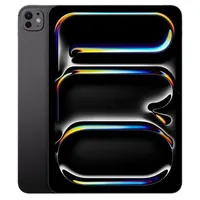
The Redmi Pad 2 Pro offers a large display with medium to high-end specs but without the price tag often associated with professional tablets. With stiff competition from the likes of the Apple iPad Pro and Samsung Galaxy Tab S11 Ultra, the Pad 2 Pro offers just enough high-end features to be considered pro-level while keeping the overall cost relatively low.
It provides a significantly larger and smoother display than the base iPad or Samsung FE models, making it the most cost-effective big-screen option on the market. As a result, it's providing stiff competition against the budget alternatives that currently sit in our guide to the best tablets for photo editing and photographers.
The Snapdragon 7s Gen 4 can handle light video editing in apps like LumaFusion or CapCut, but professional creators will be left craving more firepower. What the Pad 2 Pro lacks in raw power, it more than makes up for in its sheer endurance and screen-to-price ratio.
The bottom line is that the tablet serves fantastically as a workflow companion rather than a primary editing workstation. The 12.1-inch 10-bit display is excellent for reviewing high-resolution photos, and making basic edits with the expandable storage option being ideal for offloading 4K footage.

Specifications
Processor |
Qualcomm Snapdragon 7s Gen 4 (4nm) |
RAM / Storage |
6GB RAM + 128GB storage or 8GB RAM + 256GB storage |
Screen |
12.1-inch IPS LCD, 2.5K (2560 x 1600px) |
Rear Camera |
8MP, f/2.0 |
Front Camera |
8MP, f/2.3 |
Video |
1080p at 30fps (Front and Rear) |
Battery |
12,000mAh |
Size |
279.8 x 181.7 x 7.5mm (11.02 x 7.15 x 0.30 in) |
Weight |
610 g |
Price
The Redmi Pad 2 Pro sits within the mid-range segment of the market, aiming to set itself apart with a large 120Hz display and a 12,000mAh battery. The base model (6GB/128GB) typically costs $329.99/£269, although it's often discounted, at times as low as £169. The superior model (8GB/256GB) costs $399/£299.
At these prices, the Redmi Pad 2 Pro is an affordable tablet with a reasonable level of performance. This sets it apart from the super budget-friendly alternatives, which would struggle with creative applications.
Design
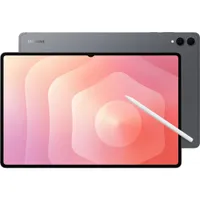
The Redmi Pad 2 Pro boasts a set of high-end materials alongside a premium aesthetic that means you'd be forgiven for thinking you're holding an iPad. That's quite the claim considering its budget-friendly price. These types of tablets often utilize cheap plastics that lack rigidity, but Redmi has opted for a unibody metal construction that gives it a super solid construction. I even tried bending the display, and there was no hint of warping.
The aluminum chassis is designed with rounded edges and beveled sides, which results in an incredibly pleasant natural feel in the hand. This is even more impressive given its physical dimensions. 12-inch tablets are oftentimes heavy and bulky, but the Pad 2 Pro manages to strike a balance between offering a large surface area and a slim profile. At just 7.5mm the tablet feels super slimline, even when the keyboard is connected.

At the front there's an 8MP 1/4-inch, f/2.28 camera that is capable of recording 1080P video at 30fps. Then at the rear, Redmi provides an 8MP 1/4-inch, f/2 camera for 1080p video. That means whether you're utilizing the selfie or rear camera, you'll get full HD results. Better cameras exist, but if you're looking for a respectable set of lenses that integrate into the functionality of a tablet, then Redmi's offering is pretty respectable.
Moving onto ports, it becomes clear that Redmi has designed the device with a focus on utility and expandability. There's a USB-C port for charging and connection and, more surprisingly, a 3.5mm headphone jack. Considering many tablet and phone manufacturers have jettisoned the option, it's novel to see Redmi choosing to keep it. I'm a fan, though, as it allows me to keep that USB-C port free and use the dedicated audio port for audio editing and monitoring. With that in mind, there's also a quad-speaker system that delivers a balanced stereo experience.
Content creators will also love the dedicated microSDXC slot, allowing for storage expansion up to 2TB. Despite at least 128GB of onboard storage, users will quickly find spare space is in short supply. The frame also supports magnetic attachment for the Redmi Smart Pen, turning the side of the tablet into a docking station for the accessory.

Display
I absolutely love the 12.1-inch IPS LCD panel. It's bright (600 nits), clear, and so vibrant that any content, whether that be work or entertainment-related, jumps off the screen. At this price point you can't expect an AMOLED screen with its deeper blacks and higher contrast, but I was impressed by what the Redmi Pad 2 Pro was capable of.
The panel supports Dolby Vision with support for over 1.07 billion colours. It also features wet touch technology, which means its touch functionality still works when there's water on the screen. Don't get too close to the swimming pool, though, as it only has an IP53 rating.
It's certified by TÜV Rheinland for eye comfort, featuring Low Blue Light and Flicker Free certifications. I can testify to what a difference this makes for remaining physically comfortable during extended sessions of use.
The screen goes beyond a typical full HD resolution and offers up 2.5K (2560 x 1600 pixels), which is ideal for delivering extra clarity whether editing photos, monitoring footage, or streaming movies. It's also got an aspect ratio of 16:10, which I particularly appreciated when browsing long documents and working on large spreadsheets.
The 12.1-inch size is just about enough to work on without a second screen, although that would obviously be ideal, especially for enhanced productivity. That being said, I often found myself working with two apps side-by-side and found it boosted my workflows.
One of the details that sets this tablet apart from budget alternatives is the fluid 120Hz adaptive refresh rate. This means that scrolling is super smooth, animations are clearly presented, and gaming is responsive. I didn't test the tablet with gaming in mind, but on paper it certainly delivers for the hobbyist gamer.

Tablet Performance
As you can tell from the Geekbench scores, the Snapdragon 7s Gen 4 processor struggles compared to the Snapdragon 8 Elite Gen 5 found in the OnePlus 15 and the Gen 4 in the Samsung Galaxy S25 Ultra. This performance difference, albeit between a tablet and two smartphones, just shows the gulf between flagship devices with the latest processors and this budget-friendly tablet from Redmi.
These results and my own experience of photo and video editing on the device confirmed my expectation that this tablet would only suffice for light creative duties and was light years away from replacing my dedicated workstation. No surprises there.
| Row 0 - Cell 0 | Redmi Pad 2 Pro (Snapdragon 7s Gen 4) |
OnePlus 15 (Snapdragon 8 Elite Gen 5) |
Samsung Galaxy S25 Ultra (Snapdragon 8 Elite Gen 4) |
GeekBench 6 CPU (Single Core) |
1239 |
3527 |
2853 |
GeekBench 6 CPU (Multi Core) |
3306 |
10848 |
9448 |
GeekBench 6 GPU (OpenCL) |
3620 |
23949 |
17929 |
As disappointing as that sounds, we've got to be realistic. At only $300 / £229, the Pad 2 Pro was never going to deliver enough power for anything remotely demanding, but that doesn't mean it's destined for the pile of tablets that no one wants.
In fact, I actually really enjoyed using it. Having installed Lightroom and Photoshop Express, I found the tablet to be a reliable companion for basic editing on the go, showing off my work, and performing productivity tasks such as replying to emails and editing documents.
I was able to review, organize, and cull images with ease so that when I stepped back into my office, I could fire up my MacBook Pro for more serious edits. My only issue relating to workflow was that this is an Android tablet, so the process of media transfer and syncing wasn't as smooth as using an iPad.
The tablet boasts a huge 12,000mAh battery, which means I was able to take it to meetings without needing to worry about carrying a charger with me. The reality of having a less power-hungry processor also meant that the battery didn't drain anywhere near as quickly as some flagship alternatives.

Verdict
The Redmi Pad 2 Pro is a high-value alternative to more expensive professional tablets. By offering a premium unibody metal construction and a massive 12.1-inch 2.5K display, it successfully mimics the look and feel of flagship devices like the iPad Pro at a fraction of the cost. While it lacks the AMOLED technology found in top-tier competitors, its 120Hz refresh rate and 600-nit brightness set it apart from other budget tablets.
In terms of performance, the Snapdragon 7s Gen 4 processor is the tablet's primary compromise. While it handles everyday productivity, document editing, and light creative tasks with ease, it lacks the firepower required for professional photo or video editing. However, what it loses in raw speed, it gains in efficiency; the combination of a less power-hungry chip and a massive 12,000mAh battery results in exceptional performance.
Ultimately, the Redmi Pad 2 Pro is best viewed as a versatile workflow companion rather than a primary workstation. Its inclusion of a microSDXC slot for 2TB of expansion and a rare 3.5mm headphone jack underscores its utility for photographers and content creators who need to cull, review, and organize media on the go.
Features |
Limited dedicated features with very basic cameras 4 |
Design |
Premium build with large LCD display 4.5 |
Performance |
Middling performance but expected given the price 4 |
Value |
Amazing value for a prosumer tablet 5 |
Overall |
★★★★☆ |
Alternatives