Digital Camera World Verdict
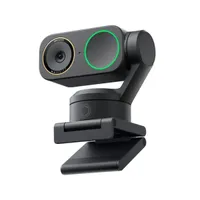
Like the DSLR it proudly claims to mimic, the YoloCam S3 is a bit chunky compared to other modern alternatives, and the software is essential for good results, meaning plug-and-play isn't really an option. If you're prepared for that, though, the results are astounding in comparison to most other webcams.
Reasons to buy
- +
A 4K webcam with DSLR-like settings
- +
Color balance options to match Sony or Canon cameras
- +
Plays well with OBS and streaming
Reasons to avoid
- -
Needs software installed to be trusted
- -
No physical subject tracking
- -
No microphone
Why you can trust Digital Camera World Our expert reviewers spend hours testing and comparing products and services so you can choose the best for you. Find out how we test.
Built-in webcams are simply not good enough for those with serious quality ambitions – there are compromises made on cost and physical size to fit them into laptop lids. YoloLiv fully understood that when they announced that their YoloCam S3 was "the closest you can get to a DSLR," but did they achieve their goal – and were there any trade-offs in the process?
In my review I look at all the possible needs, but as an expert reviewer of premium webcams, there are several key areas that will come up, and several targets – a spoiler: you'll need to decide which matters most to you!
High-quality webcams can be useful for streamers, on platforms like Twitch or any of the many others. You can build a better relationship with followers if they can more easily connect with you, and clearer, sharper images help. Similarly, meetings on platforms like Zoom can benefit from better images – but here plug-and-play setup is usually more crucial too.
DSLRs, by the way, are a bit of historical category altogether – but are definitely associated with 'proper' – so let's find out who the YoloCam S3 is (and isn't) for...

Yolocam S3 Price
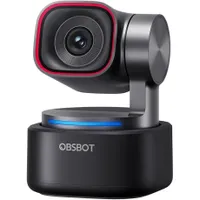
In this area, the $219 / £209 camera is priced broadly competitively with premium 4K webcams from Insta360 and Obsbot, however both of these will offer gimbal-based tracking for similar money while the Yolo seems happier to rest on its heavy magnetic grip and the soft background of a larger sensor. For many this will be a practical versus visual choice.

Yolocam S3 Specifications
Maximum resolution |
4K / 30 |
Sensor size |
1/1.28-inch |
Focus |
PDAF |
Digital Zoom |
4x |
Tripod? |
UNC 1/4-20 on magnetic mount |
Audio |
- |

Build and handling
If you're a serious video-maker or photographer and someone tells you a device is DSLR-like, you're immediately suspicious. DSLRs are, after all, a technology which has had its day. The term lingers on amongst the wider public because they don't replace their cameras, even every ten years, and because 'Mirrorless' doesn't sound quite as cool, but if you're shopping for a new pro camera it'd be an odd choice not to get a mirrorless one.
DSLRs, though, were what introduced many to the concept of consequence-free experimentation with settings, and that's very much how YoloLiv seem to have approched their concept – a camera with a large image sensor so settings can be tweaked, and an app (for Mac or PC) that allows them to be adjusted.

More than allows, I'd say. Requires. When I first plugged in the camera it was recognised by the system (I use a MacBook Pro M4). I could select it from the list of cameras in all the usual apps, like Zoom, or the built-in FaceTime camera. So there is a basic 'plug-and-play' via USB, but the picture at first was surprisingly bad.
Only after I installed the app was I able to take charge of the settings, though there were a few disappointments. While the Mac recognised the camera, and OBS did (which I used to record the review below), it didn't appear in Final Cut Pro as a camera to record 'live' with.
Other software alluded to by YoloLiv was 'Picasso Resolve' (wonder where they got the idea for that name) which can, apparently, achieve live color grading in a manner similar to DaVinci Resolve. This wasn't tested because it's "Coming Soon" on the Mac.

The camera doesn't have to be clipped over a laptop – the meaty metalic clip also boasts a tripod mount so you can screw it into a support and position it as you choose (it of course works with relatively light supports, like those used for action cameras).
For the most part build is OK, though I did accidentally drop it a couple of times and what I assume is the paintwork near the corners and on the rim of the lens has small chips. Operation seems unaffected.
The promotional materials also boast that the device does not suffer from overheating issues, but it's fair to say that after a few hours it was one of the warmest parts of my computer setup.
Performance
The camera's performance is something of a mixed bag, I think I encountered some frustrations (it didn't like what it kept complaining was a USB 2 grade cable even though it worked just fine for me Insta360 Link 2 Pro, for example, and the default image – for me at least, on the review model – was a concern.
On the plus side, with the app open, I had little trouble getting the image I wanted as you'll see in the video (yes, I know I need a haircut...).
Above: sample video captured with the YoloCam S3
On the plus side, the camera's focus was well-behaved and relatively quick. AF is an essential with a camera like this with a larger sensor because the f1.85 aperture at 24mm EFL can give a decent depth of field effect (soft focus background).

The software (again, you'll need to run it and then store the settings to the camera) also offers the opportunity to choose settings for you by AI.

Overall verdict
If your goal is streaming, or recording pieces to camera for YouTube on a low budget, then this camera is an astoundingly good choice. You will need to spend a bit of time setting things up – but then you always do, don't you? To get the studio or your recording location right.
Looked at that way, adding in some controls we're familiar with as creators (what YoloLiv call 'DSLR-like') is a good thing, but if you're doing a lot of meetings on the move and just want something you can trust you'll need to go to the settings app every time and that's a delay I wouldn't really want to add every time. Sometimes you'll be in a rush and want it to just work.
Some webcam creators will also value other features which aren't here, like automatic pan/tilt tracking (a gimbal).
So this is a great device, for a quite specific niche of creator. If that is you, I think you'll appreciate its quirks. It's definitely cheaper than using a serious compact camera like the Sony ZV-E10 and streaming from it
Features ★★★★☆ |
No premium webcam without a gimbal can get every star here, but in terms of creativity options for a fixed camera there is little to complain about at all, especially for streaming. |
Design ★★★☆☆ |
There's nothing wrong with the design; it's simple and it has everything it needs. Coatings could be of better quality. |
Performance ★★★☆☆ |
When you get it right, the image quality is stand-out, and the AF is quick and smart. I might have been unlucky, but the need to keep going back to the software to adjust settings meant I knew this wouldn't be my 'everyday' webcam. |
Value ★★★★☆ |
If you intend to use this camera for its intended niche, then this is great value – it has the potential to save you hundreds and deliver an impressive image. Compared to all premium webcams, though, you can get more features for a similar investment. |
Alternatives