







Digital Camera World Verdict
Though there are slightly brighter projectors out there, if you're looking for home cinema, or something equivalent, this is awe-inspiring. The design and styling is stunning, Epson's use of Google TV is pleasing, and the system balances discretion with quality.
Reasons to buy
- +
Product design in a class above
- +
Bose speaker produces clear dialogue
- +
Built-in mood lighting is cool without being too much
Reasons to avoid
- -
Brightness not the highest at this price
- -
Sound could be louder
Why you can trust Digital Camera World Our expert reviewers spend hours testing and comparing products and services so you can choose the best for you. Find out how we test.
Projectors are a growing product category for creatives because they've got a lot cheaper and – perhaps more importantly – they've got a lot better. Epson, one of the more established brands, can now offer a very portable device (yes, this one I'm reviewing here) which can display 4K natively so whatever you create, you can see to pretty optimum standards. moreover you can take it and display it to folks while only needing to carry a small box (assuming a white wall is provided).
Home cinema or a display for gaming enthusiasts is likely the main market, but portability is a useful addition for this projector, which is designed to display on a screen or surface at up to 150-inches.
Epson has targeted quality rather than the biggest stats (there are plenty of competitors who will happily suggest they can display at 200-inches), so the question in this review is do you want to go for Epson – a brand with many years in the game and which has made quality a big part of their pitch, or would another brand serve you?
I have tried a lot of projectors recently – including the Epson – so here is what I think:
Pricing
Although the launch price was higher, as I write this review a few months after I first tested the new model, the 4K model is generally available for $999 or perhaps less if you know where to look.
Specifications
Resolution |
4K |
Throw ratio |
1.2 |
Brightness |
1,000 lumens |
Light |
LED / 3LCD |
Weight |
8.8 pounds / 4kg |
Display tech |
HDR 10, HLG |
Size |
9.7 x 7.5 x 7.5 inches |
Epson Lifestudio Flex EF-72: Build and handling
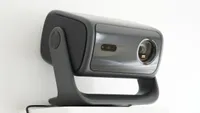
The construction of this projector is where it really stands out from anything else I've ever tried. Sure, I've tested massive big feeling devices that are clearly built to dominate, but this is by far and away the highest quality seeming projector I've encountered that is designed to sit in the room with you.
Given that, realistically, almost all portable projectors are going to end up sitting in the room with you (and a fan will end up running inside them), that should be a consideration!

The design has LED light display under the main unit, which can be changed with a tap on the top, or turned off altogether with a long press. This could have been over the top, but has been integrated with style and I really liked as a feature.

As for the build in general, it has become relatively commonplace among projectors to include a large gimbal arm around the whole projector housing, increasing the physical size.
Epson, in the past, has created black cube-like projectors which Star Trek fans might have associated with the Borg (aliens with cube-shaped ships to the uninitiated), but this time the cube seems to have managed chic.

Epson has, rather than copying the gimbal approach (which is very practical) come up with a more compact alternative – a single column in the center of the device. The designers didn't even let this interfere with the appearance when the projector was at a relatively level angle, by providing a simple blanking plate to match the appearance of the speaker grille which appears to go all the way around the projector.

By basing the projector on the Android TV system which has spread like wildfire through the consumer projector market, Epson has delivered another projector with a sophisticated but easy-to-use operating system that can do most of the operations you'd imagine.
The design is completed with a host of other small refinements. One I liked was the fact the power connection port was recessed, so if you keep your projector near the wall, you won't end up forcing the cable into a nasty bend.
This kind of thoughtful touch – like the blanking plate – are appreciated, but don't seem to have stopped Epson having a bit of modern fun with features like the LEDs. Bravo.
Epson Lifestudio Flex EF-72: Performance
While the image brightness isn't as high as some other projectors tested recently, that shouldn't be an issue for home movies, especially in the long dark winter nights (or anywhere you can close the curtains). 1,000 is bright but not the brightest.
The speed the EF-72 was able to perform operations was tasks was not a problem for me, and in general I have no issues with Google's TV platform. Doing everything via Wi-Fi is convinient (once I've tracked down that password!)

Auto keystone correction worked well, and the audio from the 'Audio by Bose' speaker system built in was certainly enough to fill the ordinary rooms that I tested the system in.
The image is created by 4K pixel shifting, but seemed sharp. All the key apps worked (Netflix, Disney Plus, Apple TV+ and Amazon Prime Video) (and in the UK Channel 4 but not BBC iPlayer, which rarely seems to get on with Google TV on projectors I test.)
Sound can pass Atmos out via the HDMI eARC, but the 10W internal speaker (2x 5W in fact) is pretty handy too. For the most cinematic picture, use the settings to choose Cinema or Natural modes would be my advice, by the way.

Epson Lifestudio Flex EF-72: Overall Verdict
There was a time when I'd just advise you to look for the highest number of lumens (ANSI lumens – compare like with like), but if we're in the 1,000 territory that isn't where we're aiming. This is all about home theatre and a room where not too much light is coming from outside but, given there are many environments where we can control the light, why not invest in a projector which has its own qualities – style, image sharpness and the like? A coffee table projector.
The Epson Lifestudio is a winner in these categories, and you only have to look at it to see whether you think it'll seem at home on your coffee table in a way that quite a lot of big, heavy, noisy boxes might not.
For that reason, I went into this review a little cautious – wondering if this was going to be a bit of "style over content" and came out really wanting one of these devices for myself! The projector's compact portability and performance is very appealing, and for the scenarios I use projection in – evening light – a few hundred lumens would make little difference, while having something that looks this good and performs this well would be noticed!
Small design touches – the recessed power socket – as well as major ones like the single pillar design – make it easy to see why it has won design awards.
Features ★★★★☆ |
Good quality picture with a range of adjustments, and clever portability features. Would have preferred true native 4K, but hard to argue with the quality here. |
Design ★★★★★ |
Hands-down the most beautiful coffee table projector I have ever encountered, with lots of small refinements as well as the overall design elegance on show. |
Performance ★★★★☆ |
Though the Epson picks up high performance marks for adjustment and quality, sound is just good. |
Value ★★★★☆ |
If you're paying for style, this is a fine choice. If you're looking for the maximum brightness for the spend, there are other choices. |
Alternatives
How I test
When I test projector I use several different test surfaces because no one does the same thing all the time, right? I have a dedicated projection screen – a 100-inch pull-down type – and I also use a white-painted wall. Reflected light, after all, is what cinema is all about. I also test on a light gray-painted wall to see how it copes with less-than-ideal conditions; this projector, for example, promises to be able to compensate for imperfect paint and in general life is a lot easier, especially with a portable projector, if you can use a wall!
I also conduct what I call the 'coffee table test', putting the projector on a table at an awkward angle from the wall. This is important to check the automated keystone correction.
I also always test by connecting to a MacBook to see how typical monitor images look – after all, this is a photography & video site! The appearance of type (black on white, white on black, etc.) and typical sample photos as well as standard tests like the color bars, and a selection of video clips with dark backgrounds, fast motion, and other key criteria are all important.
Finally, I also like to declare it "movie night" and see whether the device works with friends and family. My girlfriend's input is always interesting too, different pairs of eyes might feel differently about projector effects.

