Digital Camera World Verdict
A low cost of entry is a good thing, and you get a surprisingly sharp and detailed image. In exchange, there are some compromises to be made, from a short power cable and an inflexible bucket-like design, to ineffective auto features like focusing.
Reasons to buy
- +
Crisp, sharp 1080P image looks good at around 75-inches
- +
Supports most main streaming apps
Reasons to avoid
- -
Very noisy
- -
Autofocus is a misleading name
- -
Keystoning is only partial
Why you can trust Digital Camera World Our expert reviewers spend hours testing and comparing products and services so you can choose the best for you. Find out how we test.
This portable projector is for someone who wants to watch their own, or other people's, streaming creations anywhere – with just a single cable (plugging the projector into the wall for power).
It uses Wi-Fi (or HDMI) to source it's image, and offers plenty of flexibility – essentially a portable screen for spaces which aren't filled with light from other sources. It's quite an appealing proposition and, in recent years, the number available has increased dramatically.
We look for image quality, built-in speakers, the responsiveness of the operating system, and everything else about the actual experience of using the device. My usual testing approach is to try it out as a portable display device and as a home cinema.
Price
The Putbecy P6 projector is, at heart, a 1080P projector for around £159.99 which is not too bad, but this kind of price for this kind of specification list and brightness level is not entirely unheard of. What you're doing is making something which is very definitely a budget choice in terms of specs – but not everyone uses projectors that often, and if a sense of fun matters more than the feature list, this might be fine.
Specs
Resolution |
1080P (stated) |
Speakers |
2 x 5W |
Range |
1.2m |
Focus |
Controlled by remote |

Build and Handling
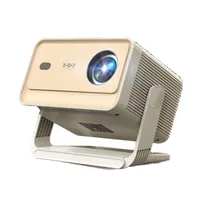
With the design styling of a bucket with slots down the side, the P6 has an optimal viewing angle of 15-degrees which it achieves if you pull out a foot in the base, which (after a software update) it will make clear on startup.
Included in the box with the device is a remote control, and, like modern competitors, it will connect using WiFi. There is no 'Android TV' here, though, but a cut-down equivalent called Lilac OS. Or at least there was – its name seemed to change with software updates.
Regardless of the superficial details like name, the experience for streaming TV fans is superficially similar to Google's – once you've given it your Wi-Fi code you can download apps (Netflix, Disney+, Apple TV, YouTube etc.) to connect to your preferred streaming services.

There is also a remote control which brings the ability to focus remotely. I wouldn't quite characterise this as 'autofocus' in the manner of a modern projector – it absolutely does not do the job for you. What it does do is let you do it at the push of a button – or two (up and down) – and a motor is turning the mechanics.
There is also no auto-keystoning in the sense that more sophisticated devices might offer it. The projector can compensate for the lean applied by that 15-degree foot which can pop out of the bottom, which is a great start, but were you to lean the projector forward (as I also did in my tests, and many people do from shelves or tall furniture) it doesn't know what to do at all. Similarly an offset angle (from the side of the screen) is beyond the system.

Connectivity is at the base and rear, which is fine for this 'dustbin' design, and there is a sensor for the remote on both sides. The presence of a 3.5-inch jack is a handy touch for those with cinematic ambitions and neighbours, too.

While I was a little surprised to be 'reduced' to manual focus for the projector, the remote didn't make it at all difficult, and is a decent size with all the controls I've come to expect from streaming TV services, and, though a little more laggy than some, it was no worse than early Fire Sticks or, indeed, many quite pricey Smart TVs (my early Sony Bravia Android TV gave up the ghost after about a decade recently, and it was certainly very laggy by modern standards by the time the last day came!)
Performance
On the plus side, in relatively low light on a reflective surface (white wall or, ideally, a prorector screen) is surprisingly bright and colored at the kind of range that I felt safe testing the device.
The impression of 1080P detail is achieved without fringing, and things only seem blown right in the top few per cent of the highlights. (But to be honest with you, I'm also struggling to be sure I'm looking at a native 1080P image – the same documentation that promised that also said "low noise").
When I used a full 100-inch projection screen, things did take a turn for the worse. The projector does not seem to live up to the given brightness claims (which, presumably, equate to around 1,400 ANSI lumens – though I've read specs of a more convincing 200 ANSI lumens elsewhere for very similar devices!)

Another issue is the internal cooling, which is achieved with a noisy fan. This has an impact on the sound which, despite the Dolby sound, means you'll find the 60-70dB of sound I tested coming from that fan will compete and sometimes seem to win against the two five watt speakers.
This is always a bit of an issue with portable projectors, but seemed to be more of an issue with this than many.
Overall verdict
Ultimately, you'll get a good picture on the wall from this device if you can place it near a power socket (or don't mind running an extension), but you'll have to handle a laggy operating system, a noisy fan, and merely adequate brightness – certainly not up to daytime use.
Are there better projectors out there? Definitely. Many feature gimbal designs, which (if you don't mind the slight inelegance) are alot more adaptable, and some will even get you something a lot closer to 4K. This will downsample a 4K stream to 1080P, so it could be worse – 1080P is OK, but a more convincing brightness would allow you to use a bigger screen. Even in the budget category, I have tested the Xgody N6, and that brings a variant of the gimbal into the budget category.
But this is often available for very little money. You could definitely display photographs or videos to a large size with it for a lesser investment and, thanks to the tripod screw, photographers would be especially well placed to mount it anywhere. So it is not without its possibilities.
Features ★★★☆☆ |
With focus being manually controlled by the remote, and a (manual) keystone adjustment, this isn't the dark ages, but it feels a bit manual. |
Design ★★★☆☆ |
There is a likeable simplicity to the design, and the fold out stand is handy. |
Performance ★★★☆☆ |
I wavered over a fourth star here as the image quality actually impressed me, but the volume of the fan makes it hard to love, and the OS is noticeably laggy. |
Value ★★★★☆ |
Despite all my complaints, this is still a functional device and the price would have floored me only a few years ago. Value it can certainly lay claim to. |
Alternatives