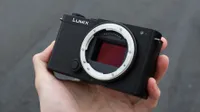
Early Verdict
The Sigma FP2 is a camera that manages to be both incredibly appealing and occasionally frustrating. Its tiny, beautifully minimalist body houses a capable 24.5MP full-frame sensor, excellent image quality, and some genuinely impressive video capabilities, including 6K open-gate recording. I love the idea of such a capable camera being this small, and Sigma has made some welcome improvements over the original fp. However, the lack of IBIS, a built-in viewfinder, and a substantial grip makes the FP2 less practical than more conventional alternatives. If you prioritize portability and filmmaking flexibility, though, there's very little else quite like it.
Reasons to buy
- +
Incredibly compact full-frame body
- +
Excellent photo and video quality
- +
6K open-gate recording
- +
Built-in storage
Reasons to avoid
- -
No IBIS
- -
No built-in viewfinder
- -
Awkward with larger lenses
- -
Limited screen articulation
Why you can trust Digital Camera World Our expert reviewers spend hours testing and comparing products and services so you can choose the best for you. Find out how we test.
Sigma has always done things a little differently when it comes to cameras, and while most manufacturers seem happy to follow a familiar formula, Sigma has been responsible for some of the more interesting and unusual designs of recent years. The Sigma BF is perhaps the most obvious example of this, but the original Sigma fp was another camera that challenged what a mirrorless camera needed to look like.
The Sigma FP2 continues the original fp's philosophy of packing as much photographic and filmmaking capability as possible into the smallest body Sigma can manage. This latest generation brings a new 24.5MP partially stacked full-frame sensor, improved autofocus, a tilting screen, more internal storage, and substantially upgraded video capabilities, including 6K open-gate recording.
The FP2 is an L-Mount camera, which means it has access to lenses from Sigma, Panasonic, Leica, and other members of the L-Mount Alliance. It also shares some of its core appeal with the Panasonic Lumix S9 and Sony ZV-E1, two other relatively compact full-frame cameras that aim to appeal to photographers and video creators who would rather not carry around a bulky camera body.
However, I think the closest alternative in terms of capabilities is actually the Panasonic Lumix S1 IIE, which offers a similar set of specs but in a much more traditional mirrorless camera body.
The FP2 is a particularly interesting option for anyone looking for one of the best cameras for filmmaking, especially where weight and size matter, although Sigma is also positioning this as a capable hybrid camera for stills photography.
The question is whether all those impressive specifications can make up for the compromises required to fit everything into such a small package.

Specifications
Lens mount |
L-Mount |
Resolution |
24.5MP full-frame partially stacked CMOS |
Processor |
Not specified |
ISO |
100–102,400 (expandable down to ISO 6 for stills) |
IBIS |
No |
Max burst speed |
20fps electronic shutter; no mechanical shutter |
Video |
6K 60fps open-gate; 6K 30fps ProRes RAW; 4K 120fps cropped |
Screen |
3.15-inch, 2.1-million-dot tilting touchscreen |
Viewfinder |
Optional EVF-21: 0.5-inch OLED, 5.76 million dots, 0.88x magnification |
Storage |
1x SDXC UHS-II, 70GB internal storage, external USB SSD support |
Battery |
2,200mAh BP-91, approximately 370 shots |
Dimensions |
112.8 x 69.9 x 41.8mm / 4.4 x 2.8 x 1.6 inches |
Weight |
376g / 0.83lb body only; 460g / 1.01lb with battery and SD card |
Price
The Sigma FP2 will be available from November 11, 2026, with prices starting at $2,199 / £1,899 for the body only. There are also two bundle options, with the FP2 and the optional EVF-21 viewfinder costing $2,699 / £2,399, while a kit with Sigma's 50mm f/2 DG Contemporary lens costs $2,749 / £2,419.
Pricing puts the FP2 in an interesting position, as there aren't many cameras that offer exactly the same combination of size, features, and expandability.
The Panasonic Lumix S9 is substantially cheaper and has many of the features that I would want in an everyday full-frame camera, including excellent image stabilization, although it lacks some of the FP2's more advanced video options.
Meanwhile, the Lumix S1 IIE is closer in price, especially when discounts are considered, but offers a more substantial camera body, a built-in electronic viewfinder, a fully articulating screen, and IBIS.
I think the FP2 offers good value if your priority is having the smallest possible camera with a respectable full-frame sensor and serious video capabilities. However, you're paying a premium for that miniaturization, and if size isn't one of your main priorities, there are arguably more practical cameras for the money.
Design & Handling
The first thing that struck me about the Sigma FP2 is obviously just how small it is. I already thought the Panasonic Lumix S9 and Sony ZV-E1 were impressively compact full-frame cameras, but the FP2 manages to be smaller than both, although it is a little deeper and boxier in shape.
Sigma has stuck to the same fundamental design as the original fp, with a simple rectangular body that looks more like a tiny cinema camera than a conventional mirrorless camera. There's very little in the way of unnecessary styling, and the overall design is almost aggressively minimalist.
I think it's a very, very cool-looking camera. However, looking good and being comfortable to use are two very different things.

There is essentially no grip on the front of the FP2, with Sigma instead opting for a completely flat surface. Around the back, there's a tiny rubber thumb rest, but it's not especially substantial, and there isn't much else in the way of molding to help you get a secure hold of the camera.
I own a Panasonic Lumix S9, and one of the first things I did after buying it was get a grip extension. I think I'd have to do exactly the same with the FP2, although that somewhat diminishes the appeal of having such an impressively small camera in the first place.
With a small prime lens attached, the FP2 is a great street and travel setup. I paired it with a compact Lumix 40mm prime, and the combination was incredibly easy to slip into a small sling bag, although it's not quite pocketable.
Unfortunately, larger lenses are another matter. I tried using the FP2 with my Lumix 24-60mm f/2.8, but it shifts the balance to make the camera very front-heavy, and more uncomfortable to hold. I found myself needing two hands on the camera at pretty much all times.

There is no builtin viewfinder, so the optional EVF-21 is – in my opinion – an essential accessory for photographers. This attaches to the side of the FP2 using USB-C and provides a 5.76-million-dot OLED viewfinder that can tilt upwards by 90 degrees.
I had a brief opportunity to try this viewfinder at the FP2 launch event, and I was impressed with its image quality. It's also smaller than the viewfinder offered with the previous generation, although it still adds quite a substantial amount of bulk to the camera.

So with no built-in EVF, you'll likely be relying much more on the screen. Sigma has made one of the biggest improvements over the original fp by introducing a tilting screen. The 3.15-inch display can tilt upwards by 90 degrees and downwards by 45 degrees, making it much easier to shoot from high and low angles.
It's a welcome addition, but I wish Sigma had gone a little further. The screen doesn't flip forward for filming yourself or taking self-portraits, and while a full vari-angle screen would make the tiny camera larger, I would have loved something like the tilting mechanism on the Fujifilm X-E5, which can fold all the way up and over the top of the camera.
Screen quality is otherwise excellent, with a sharp and clear picture that makes composing and reviewing images a pleasure. Unfortunately, I found the maximum brightness a little limiting in direct sunlight, and on particularly bright days in Lisbon where I was testing the camera, I struggled to see the screen clearly. As I didn't have the EVF at the time of testing, that made shooting less precise – and less enjoyable.


The camera's controls are relatively straightforward. On the top are two control dials, a two-stage shutter button, a dedicated video recording button, and a switch for moving between still and cine modes. I really like the tactile feedback from the dials, which have a reassuring click and feel robust.
Around the back, there's another control wheel, an AEL button, and a row of function buttons underneath the screen. The focus point can be moved using the rear controls, although this is not as intuitive as cameras with a joystick, and I ended up mostly tapping the screen to change focus. Some buttons can be customized, including the AEL button, although the customization options are obvious in the menus.

Sigma's OS is really nice. The menus are clean, modern, and without the endless pages of settings that can make some other camera systems feel unnecessarily complicated; however, this simplicity was a double-edged sword, as it is less obvious where I need to go to change certain settings. Sony's menus are a lot, but the page separation and icons do make it faster to navigate.
I also wish Sigma made better use of the touchscreen for menu navigation. While touch functionality is available for certain operations, I found myself wanting to swipe and tap my way through settings.

For connections, there are two USB-C ports, including a 10Gbps USB 3.2 connection for data transfers and external recording, along with a full-size HDMI port. The HDMI connection sits behind a protective cover, although the USB-C ports are left exposed, which gives me some reservations about dust and moisture getting in them. However, according to Sigma, the body has a dust- and splash-resistant construction.
Sigma has also incorporated a ribbed rear section to help dissipate heat, although there is no built-in cooling fan. This passive approach helps keep the camera small, but it's another reminder that Sigma is trying to fit some substantial filmmaking capabilities into an unusually compact body.
The FP2 uses the same 2,200mAh battery as Lumix cameras. Sigma rates it for approximately 370 still images or 130 minutes of video recording, although I was getting a fair bit more than that out of it, getting around twice the shots its rated for.
One final design feature I absolutely love is the inclusion of 70GB of internal storage, alongside the SD card slot. Every camera should have some form of built-in memory as a backup for those occasions when you inevitably forget a memory card.
Performance
The FP2 features a 24.5MP partially stacked full-frame CMOS sensor. For photography, I would usually prefer a few more megapixels from a camera at this price, particularly when there are now plenty of higher-resolution full-frame alternatives, but 24MP is still decent enough for most photography.
Image quality is excellent, with a good amount of fine detail, true-to-life colors, and plenty of flexibility when editing RAW files, which use the DNG format. I spent most of my time testing the FP2 with Sigma's 50mm f/2 and a compact Lumix 40mm prime, and both combinations produced great images from the FP2.
The main limitation comes when you want to crop your images substantially. I enjoy using prime lenses and digital crops, my main walkabout camera is the Fujifilm X100VI, where the higher-resolution sensor gives me plenty of flexibility, but the FP2's 24.5MP sensor doesn't offer quite as much room to play with.


I did notice that the camera's exposure metering had a tendency to produce slightly darker images than I wanted. I found myself regularly adding between +0.3 and +1 EV of exposure compensation to get the brightness I was looking for. But I must mention that I was testing a pre-production camera, so this behavior may change with the final firmware. However, it's something I would keep an eye on, especially if you prefer to shoot JPEGs straight out of camera.
Sigma has also included 13 built-in color modes, including Standard, Calm, Powder Blue, Warm Gold, Teal and Orange, and several more stylized options. These are easily accessible using a dedicated Color button and provide a quick way of changing the appearance of your images without having to edit them afterward.


Personally, I found some of these presets a little too heavy-handed for my tastes. There's something about the more subtle film simulations from Fujifilm that I find particularly appealing, whereas several of Sigma's modes feel more like digital filters.
That's obviously a matter of personal preference, and I'm sure plenty of people will enjoy having these creative options built into the camera, but I generally found myself returning to Standard.
The Standard profile produces nicely balanced colors that feel relatively true to life, with a sensible amount of contrast and saturation and it's a versatile starting point for most photography.
Unfortunately, Sigma doesn't offer the same flexibility as Panasonic's Real Time LUT system, which allows you to load your own color profiles directly onto newer Lumix cameras.


Autofocus has received a substantial upgrade over the previous generation, with the FP2 combining phase and contrast detection and offering subject recognition for people, dogs, cats, and birds.
The AF is good, its very quick, and the face detection works really well, although I had to use single spot autofocus more than I'd like as with wider focus, the FP2 just wasn't as good at picking out subject I was aiming for.
Sigma claims improvements in tracking speed and accuracy, including in low light, and the partially stacked sensor also enables burst shooting at up to 20fps, with Sigma quoting a maximum of 200 JPEG frames or 180 DNG RAW frames at that speed. Although I suspect relatively few buyers will be choosing the FP2 as their primary camera for wildlife or sports photography when there are more ergonomic alternatives with built-in viewfinders and image stabilization.


The biggest photographic compromise is undoubtedly the lack of IBIS. In a world where even some of the smallest full-frame cameras offer effective stabilization, its absence on the FP2 is difficult to ignore.
You can use optical stabilization when it's included in a compatible lens, but this limits the choice of lenses if you want to shoot handheld at slower shutter speeds. It's particularly disappointing given how well the FP2 pairs with compact prime lenses, many of which don't include optical stabilization.
Video performance
While Sigma is positioning the FP2 as a hybrid camera, I think it's pretty clear that filmmaking is where the FP2 is strongest.
The headline feature is 6K open-gate recording, which captures the full 3:2 area of the sensor rather than restricting footage to the usual widescreen aspect ratio.
I'm a big fan of open-gate recording, and I wish it were a standard feature on every camera. Having all that extra image area to work with makes it much easier to reframe footage for different platforms, particularly when you want to create both horizontal videos for YouTube and vertical clips for Instagram or TikTok from the same recording.
The FP2 can record 6K footage at up to 59.94fps using supported compressed formats, while ProRes RAW recording is available at up to 6K 29.97fps. There is also 4K recording at up to 60fps using the full-frame sensor, with higher frame rates of up to approximately 120fps available in crop mode.
Sigma offers a strong selection of recording formats, including H.264, H.265, L-Log, and ProRes RAW, providing plenty of options for filmmakers who want more control over their footage in post-production. And for more demanding workflows, the FP2 can output ProRes RAW to an external SSD connected via USB.
Sigma also claims up to 14.1 stops of dynamic range when shooting in L-Log. I particularly like that Sigma has opted for L-Log, as it gives me less of a headache when grading footage as not all Logs are created equal, and I already have LUTs designed to work with the format.
However, I do wish Sigma had also got in on Panasonic's MP4 Lite format as well. The 3.6K open-gate MP4 Lite files offers an excellent compromise between image quality, file size, and ease of editing, particularly for creators making content for social media. The FP2 has more advanced recording options available, but I would still appreciate a similarly straightforward format for occasions when I don't need the highest possible resolution or bitrate.
For substantial filmmaking, the FP2 also includes a Director's Viewfinder function, support for anamorphic de-squeeze, and professional monitoring tools such as waveforms, zebras, and false color. There is also support for 32-bit float audio recording when using compatible accessories.
However, the lack of IBIS is once again a significant consideration. The FP2 does offer electronic stabilization for video, but this introduces a 1.25x crop, and it cannot be used with 6K recording. However, Sigma has also included the ability to record gyro data alongside footage, allowing you to stabilize clips afterward using software such as Gyroflow.
It's not a perfect solution for anyone who needs the most stable footage immediately, as it introduces an additional step into the editing process, but at least its an option, and I don't really understand why all cameras don't offer it.
If you intend to mount the FP2 on a gimbal, where the FP2's unusually small body becomes a major advantage, particularly when you need to keep the weight of a camera rig down then the lack of IBIS becomes much less of a concern.
Sample Gallery


Early Verdict
I think the Sigma FP2 is one of those cameras that you have to really want, because the things that make it so appealing are also responsible for many of its biggest drawbacks.
Its tiny size is genuinely impressive, and when paired with a compact prime lens, it makes a fantastic little camera for traveling, street photography, or simply carrying around when you don't want to take a bigger camera. Image quality is excellent, the minimalist design is beautiful, and I really appreciate the improvements Sigma has made over the original fp.
However, there's no getting around the lack of IBIS, and I found the absence of a built-in viewfinder particularly frustrating when shooting photographs outdoors. Add a larger lens, and the small body quickly becomes less comfortable to hold, while fitting an optional grip and viewfinder starts to undermine the advantage of having such a compact camera.
The video capabilities are another story. I love the addition of 6K open-gate recording, and the flexibility offered by ProRes RAW, L-Log, external recording, and gyro data makes this a very tempting little camera for filmmakers. I think that's ultimately where the FP2 makes the most sense, particularly for anyone building a compact video rig or looking for a small full-frame camera to use on a gimbal.
The FP2 is a camera I really want to love, and in many ways, I do. However, it's also a camera that asks you to make quite a few compromises in pursuit of something that few other cameras offer.

Alternatives