Digital Camera World Verdict
Investing in an 18-inch laptop means getting a larger screen to edit on, and choosing a gaming model means the kind of fast processors that can power through visual work. This model from Acer does all this, for a slightly more reasonable price than some others.
Reasons to buy
- +
Very powerful
- +
Excellent screen
- +
Thunderbolt
- +
Still portable
Reasons to avoid
- -
Big and heavy
- -
Large power brick
- -
Short battery life
- -
Can get hot under load
Why you can trust Digital Camera World Our expert reviewers spend hours testing and comparing products and services so you can choose the best for you. Find out how we test.
This huge gaming laptop comes with some similarly huge specs, and while the model we’ve got here is overkill, a machine with a large screen and the kind of chips inside that can make the most of it will become a useful portable workstation for photographers and videographers. It’s big and heavy, a desktop replacement you’ll want to leave in your car rather than something you can slide into a camera bag, but the kind of on-the-move editing it enables will be very valuable to anyone who wants to shoot and publish while on location.
Specification
CPU |
Intel Core Ultra 9 275HX |
Graphics |
Nvidia GeForce RTX 5080 (16GB) |
Memory |
192GB DDR5 |
Storage |
3x 2TB SSD, microSD |
Screen size |
18in IPS |
Resolution |
2560 x 1600 (16:10) |
Refresh rate |
240Hz |
Color coverage (stated) |
100% P3 |
Brightness (stated) |
500 nits |
Connectivity |
Wi-Fi 6E, Bluetooth 5.4, 2.5G Ethernet, HDMI, 1x USB 3.2 Gen 1 Type-A, 2x USB 3.2 Gen 2 Type-A, 2x Thunderbolt |
Dimensions |
401 x 308 x 30mm |
Weight |
3.3kg |
Price and Availability
The model we’ve got here is a custom one with a lot more RAM and storage on-board than you’d usually see, but even the lower-specced models aren’t exactly cheap. You’ll be looking at $3,099.99 / £3,499.99 for the version with a top-end CPU, 32GB RAM and a 1TB SSD, $3,549.99 / £2,799.99 for a marginally lesser CPU but 64GB of RAM and a 2TB SSD, and in the UK you can spend £4,299.99 for one with 128GB of RAM and 3TB of storage.
There are a few different CPU and GPU variants available, and you can keep the price down by not buying one with the biggest and best components. The Helios comes in a little cheaper than something like an MSI Stealth 18 HX AI or Razer Blade 18 with similar specs, but all gaming laptops at this level are expensive beasts, and it can be worth seeing what kind of a MacBook Pro you can spec up for a similar amount of money.
Design
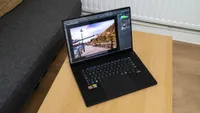
The first thing you’ll notice when taking the Predator Helios 18 out of its box is its weight. It’s got a definite presence, and once it’s on your desk you may find yourself rearranging your pen pot and mug to make room for it. If you’re used to a 14- or 15-inch screen it seems significantly larger, and you won’t be wanting to use it on your actual lap for very long. You’ll also need to make sure your transport arrangements are appropriate. Most laptop sleeves, and camera bags with a laptop compartment, are sized for a 15in model at most. You might need to look into a messenger bag, or just an enormous backpack, to hold it while you’re travelling.

It also has a light-up keyboard and logos, and makes a loud noise when you start it up - it’s not exactly a stealthy laptop - but both of these can be turned off, and with its mostly black exterior it won’t look too out of place in a sea of Macs and ultrabooks. The size makes it stand out - there's no disguising an 18in screen - but it’s not too garish.
One point in its favour as a mainly desktop-based machine is that the charging port (the charger is larger than some mini PCs, and will also need to be carefully placed in a bag if you’re taking it with you), HDMI and both Thunderbolt ports are along the back edge of the chassis. This makes for a tidier desk, as they’re not sticking out the side only to bend across to where they’re needed, but makes unplugging a more complicated process. The SD card slot is conveniently placed on the left of the machine near the front, so you can copy your footage easily without needing a card reader (unless you’re using CF Express or something else that’s not SD).


Being a large laptop means that the keyboard can be full-sized, and on the Helios 18 you find a numpad and arrow keys that haven’t been shrunk to fit them in, and the Copilot key to the right of the space bar is bafflingly large, like Acer was worried you might miss it. The trackpad also takes up a large area, though for the most precise edits you’re going to want an external mouse or even a graphics tablet. The 16:10 screen is extremely nice to look at, though using the HDMI or Thunderbolt port to output to something even larger and sharper is a constant temptation when you’re dealing with photos or videos. Acer claims it can display 100% of the DCI-P3 colour gamut, which makes it a pretty good choice for editing or design work, and the 240Hz refresh rate will please anyone who wants to play back their 120fps footage.
Performance
The specs list further up this page should give you a pretty good idea of what the Helios 18 is capable of. Little expense has been spared in the choice of components (and a version with an RTX 5090 is available if you have the cash).
The Core Ultra 9 275HX is a popular CPU for high-end gaming laptops, the 24-core chip made up of eight of Intel’s Performance cores, and 16 of its Efficient ones. This gives it enormous multi-core processing capability to accelerate batch operations in Lightroom, even though the Arrow Lake generation doesn’t support hyper-threading, and with a maximum turbo frequency of 5.4GHz it can blaze through tasks, such as many Photoshop filters, that are executed on a single processor core. As such, it scores well in Geekbench 6, with a single-core result that puts it in the company of the ASUS ProArt PX13 GoPro Edition, beating the likes of the HP Omnibook Flip 16. In the multi-core test it manages to beat the M5 version of the MacBook Pro, though pitting a 24-core chip against the Mac’s 10 cores hardly seems fair.

The RTX 5080 graphics card is Nvidia’s second-best laptop chip, but the enhanced cost of the 5090 will put it out of reach of all but the most deeply pocketed users. It’s a top choice if you want to play games, and with a Geekbench score that tops 200,000 points, it’s exceptional for all graphics tasks too. If you’re frustrated by the amount of time denoising in Lightroom or Adobe Camera Raw can take, especially on today’s 60MP+ raw files, then the ability of the 5080 to chew through that workload in the time it takes to get a glass of water can be nothing short of a revelation. Other AI tasks that offload to the GPU - there is also an NPU on the CPU die, but it only provides 13 TOPS against the Nvidia chip’s 1300 or more - are similarly accelerated.
Battery sadly life isn’t great: Acer claims five hours, but you’ll be lucky to reach that in normal use. Start pushing the GPU hard and it will fall quickly, making this a machine that needs to be regularly taken to a power socket for a top-up.
Verdict
If you’re in the market for a very large gaming laptop, this is a good choice. It’s a little cheaper than some of its competitors, while retaining the strong CPU and GPU choices that allow it to throw graphics and video around without breaking a sweat.
As a portable workstation, it’s large, heavy, and a bit intrusive, but it’s also very capable, and if editing high-res images or video footage on the move is what you want, it’s got the guts to get it done.
Features ★★★★☆ |
Everything you could need in a laptop, from Thunderbolt ports to an SD card reader and a screen that’s bright, sharp and colourful. |
Design ★★★☆☆ |
Big and black, with undeniable presence. The rainbow keyboard can be turned off, but its monolithic looks can’t. |
Performance ★★★★☆ |
Undeniable pixel-pushing power is balanced by the need to keep cool, and the battery life isn’t long. |
Value ★★★☆☆ |
Slightly less costly than some alternatives, with a good number of configurations if you don’t need the top model. |
Overall |
★★★★☆ |
Alternatives