Digital Camera World Verdict
Apple is displaying some remarkable gains with its in-house silicon these days, and its habit of throwing more processor cores at software really can pay off, especially where its GPUs are concerned. The M5 Max version of the Mac Studio is expensive, sure, but the way it’s capable of ploughing through Lightroom, Premiere and Photoshop work (as well as Apple’s newfound focus on AI) means it’s very much a dream machine for photographers and video shooters.
Reasons to buy
- +
+ Lots of processing power
- +
Small and unobtrusive
- +
Thunderbolt 5
- +
Quiet fans
Reasons to avoid
- -
Tremendously expensive as you add options
- -
Probably too much for most photo tasks
Why you can trust Digital Camera World Our expert reviewers spend hours testing and comparing products and services so you can choose the best for you. Find out how we test.
As the Mac Pro is still missing in action, the Studio sits at the top of Apple’s desktop computer range. It’s the same dumpy aluminium box it’s always been, but with an M5 Max inside, it becomes one of the most potent photo- and video-editing computers you can buy.
The only issue with it is its cost, as you add extras, particularly RAM, the price goes up and up, though the entry-level 36GB allocation should be generous enough for many tasks.
Specification
CPU |
Apple M5 Max (18-core) |
NPU |
16-core Neural Engine |
Graphics |
Integrated 40-core GPU |
Memory |
128GB LPDDR5 |
Storage |
4TB SSD, SD card slot |
Ports |
4x Thunderbolt 5, 2x USB-A, 2x USB-C, 1x HDMI, 1x 10Gb Ethernet, 1x 3.5mm audio |
Wireless connectivity |
Wi-Fi 7, Bluetooth 6 |
Dimensions |
95 x 197 x 197mm |
Weight |
2.7kg |
Price and Availability
The Mac Studio is available directly from Apple, and with the M5 Max processor starts at £2,499 or $2,499, which nets you an 18-core CPU and a 32-core GPU, 36GB of RAM and a 512GB SSD. The model reviewed here, with a couple of extra GPU cores and much more RAM and storage, is £6,899 or $6,899. There is also an M5 Ultra, which is literally two M5 Max chips joined together, that starts from £5,499 and comes with 96GB of RAM and a 1TB SSD. This model is also heavier, as the extra processing cores require a larger cooling system.
Design
The Mac Studio hasn’t changed the way it looks for many years, and there's really no need to. If you’re used to desktop PCs, it’s really small, though still larger than mini PCs or Apple’s own Mac Mini. It’s compact enough to sit under monitors or be tucked away in corners, and the cooling fan, which will come on when it’s working hard, is quiet enough that it doesn’t draw too much attention to itself.
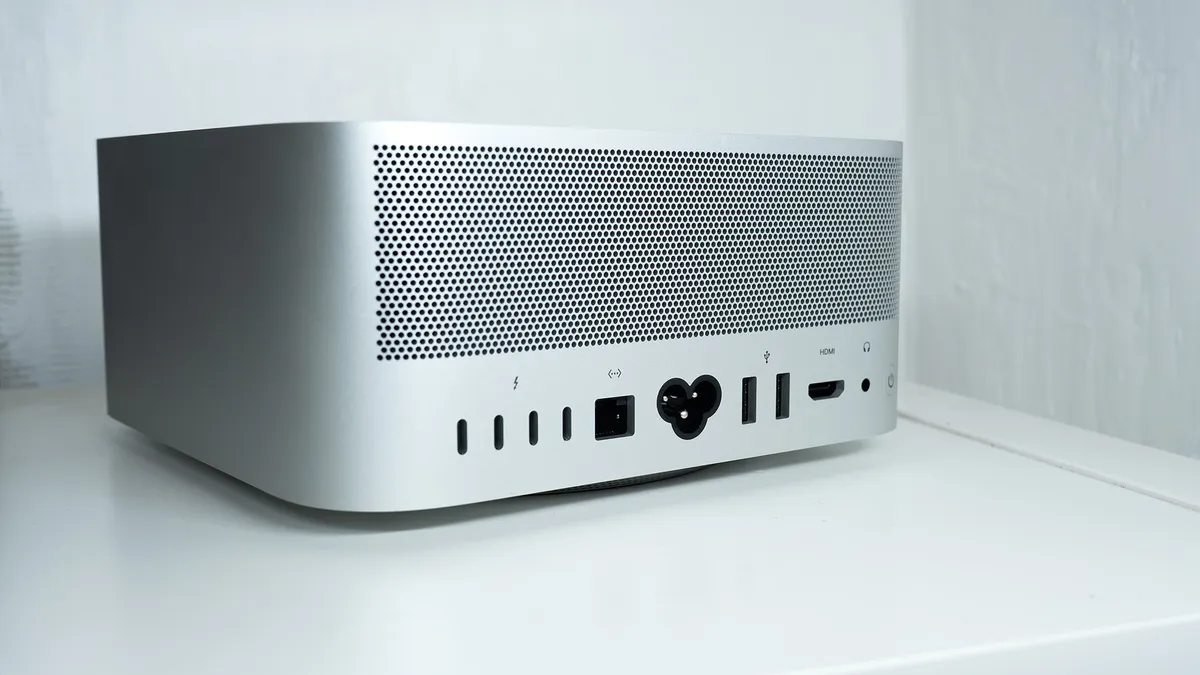
Unlike the Mac Mini, the Studio’s power button is easily accessible at the back, and there are plenty of front and back USB ports, including some incredibly fast Thunderbolt 5s, for peripherals, an SD card slot, 10-gigabit Ethernet for networking and a full-size HDMI for your monitor. With the latest versions of Bluetooth and Wi-Fi on board too, it’s well equipped to connect to just about anything.
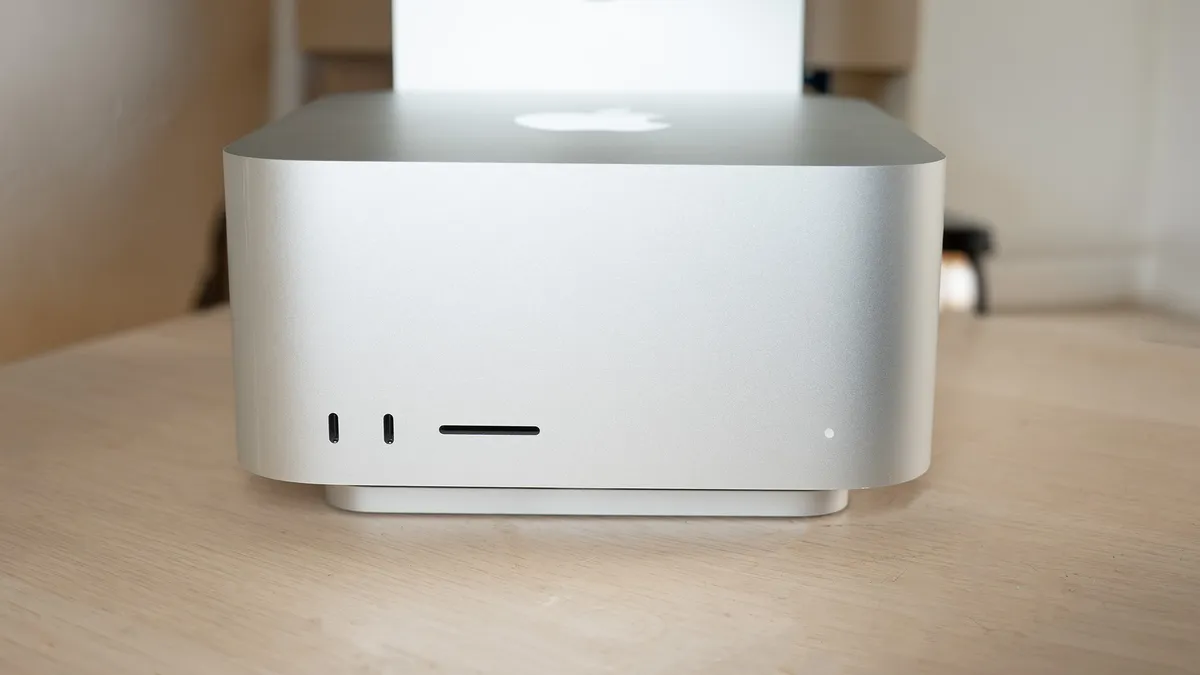
It’s also very well built. While it’s only about as heavy as an 18-inch laptop, it feels densely packed and the aluminium enclosure gives it a sense of solidity. The Mac Studio name is inscribed underneath, where you can’t easily see it, and there's an Apple logo on the top, but there's no indication as to which processor is inside or what any aspect of the spec is. One thing that stands out is the single LED that tells you whether the Mac is switched on, something that can be hard to ascertain if the screen isn’t active.
Otherwise, it’s not a computer design that can be upgraded after you’ve bought it, which means your choices on the build-to-order page matter. You can add more storage via Thunderbolt or USB, but you’re not going to be able to slip in more RAM in the same way you might with a desktop PC in a tower case.
Performance
The M5 has always been a good chip to build a Mac around, as the MacBook Pro and Air that share the same processor show. Beefing it up with extra processing cores doesn’t make it any faster at single-core tasks, but if a job can be split up into chunks and run on multiple cores simultaneously, then the more you have, the faster it can be.
The Mac Studio also has the advantage of having more space inside it than a laptop, and so its cooling system can be more efficient. In tests, the Studio’s M5 beats the laptop versions by a small amount in single-core tests, even besting the M5 MAx version of the MacBook Pro. It’s in the tasks that allow it to flex all its cores, especially the GPU’s, that it does its best work. Batch exporting in Lightroom, or just generating previews from a folder full of raw image files, becomes faster the more cores you can throw at it, while AI denoising is speeded up by the GPU and Neural Engine, though still isn’t quite as fast as on a PC with a top-end Nvidia or AMD graphics card - 60MP raw files can still take a while to get through.

The M5’s hardware-accelerated encoding engine means exporting or transcoding video is speedy, while the high single-core performance means timeline-scrubbing doesn’t show much lag. The high memory bandwidth sees the chip process even 8K video smoothly (helped no doubt by the 128GB of RAM in the version sent to us for review).
Apple is going very big on AI at the moment, and the M5 is the first generation of its processors to include neural accelerators in the GPU cores as well as in the Neural Engine. While less powerful than an Nvidia GeForce 5070Ti desktop card in AI benchmarks, the M5 Max nonetheless manages to leave many laptop GPUs (mostly other Nvidia chips, but including the AMD Ryzen AI Max in the Asus ProArt PX13 GoPro Edition) behind it. This means neural filters in Photoshop and locally run AI agents and LLMs will get a boost, but once again you’ll need to splash out on extra RAM if you’re experimenting with local AI.
Verdict
The Apple Mac Studio with M5 Max is an ideal desktop machine for photo and video editing, and it’s not even the best computer Apple produces (that would be the Studio with M5 Ultra). It may be expensive, especially compared to a desktop PC or lower-end gaming laptop, but it packs an enormous amount of pixel-pushing power into a small space, has the capacity to do any job you ask of it, and makes it look smooth and effortless in motion.
Features ★★★★½ |
Plenty of ports, the latest wireless standards, but not upgradable. |
Design ★★★★½ |
Looks the way Mac Studios have always looked. There's no reason to change it. |
Performance ★★★★★ |
Absolutely exceptional, especially for something so small and quiet. |
Value ★★★½☆ |
It starts expensive and only gets more so once you start adding extras. |
Alternatives