Digital Camera World Verdict
The Lomography DigitaLIZA Max is a clever and affordable way to start scanning your own film without investing in a dedicated film scanner or an elaborate camera-scanning setup. I found the kit easy to assemble and use, the built-in backlight is impressively even, and there is enough flexibility here to accommodate several film formats as well as both smartphones and digital cameras. There are some rough edges in the design, particularly with the slightly fiddly film masks and magnetic attachments. However, these are fairly small complaints considering the price.
Reasons to buy
- +
Very affordable
- +
Phone or camera scanning
- +
Even backlight
- +
Multiple film formats
Reasons to avoid
- -
Results depend heavily on your phone/camera
- -
Film masks can be fiddly
- -
Micro USB power
- -
No storage case
Why you can trust Digital Camera World Our expert reviewers spend hours testing and comparing products and services so you can choose the best for you. Find out how we test.
Scanning film at home can be expensive. Dedicated scanners can cost the same as dropping dozens of rolls off at the lab for scanning. However, the Lomography DigitaLIZA Max aims to make this a lot more affordable.
What separates the Max from the cheaper DigitaLIZA+ is the included smartphone stand, which means you can also turn your phone into a film digitizer. The kit supports 35mm, 120, 110, and 127 film, including less conventional formats such as panoramas and frames incorporating exposed sprocket holes. Lomography has also updated the backlight to a CRI 97 panel.
Getting quality film scans with a capable smartphone sounds like a dream, but is this setup actually good enough to earn a place in our best film scanners guide?

Specifications
Film formats |
35mm, 35mm with sprockets, 120, 110, 127 |
Capture devices |
Smartphone, DSLR, mirrorless camera |
Smartphone stand |
Included |
Backlight |
Built-in CRI 97 panel |
Power |
2x AA batteries / 5V Micro USB |
Price
The DigitaLIZA Max originally launched in 2022 for $99, but the current US price has risen slightly to $109.90. At the time of writing, Lomography lists it for £84.90 in the UK, €99 in Europe and A$159 in Australia.
I think that still represents very good value, particularly if you are curious about digitizing your own film but aren't quite ready to commit several hundred dollars to a more serious setup. Importantly, most of what you need is already in the box, with your phone providing the most expensive part of the system.
There is a cheaper DigitaLIZA+ if you know you only want to scan using a digital camera, although for the relatively modest extra cost I think the Max's smartphone stand makes the complete kit considerably more versatile.
Design & Handling
The DigitaLIZA Max arrives as a neat little package of components, and getting everything assembled is refreshingly straightforward. Nothing here feels particularly luxurious, and there is a fair amount of plastic, but everything feels sturdy and secure enough for what it needs to do and about right for the price.
I would have liked some kind of storage case or sleeve in the box, though. There are quite a few individual pieces once you include the masks and holders, and these are exactly the sort of things I can imagine slowly disappearing unless you keep everything together.

The film holder attaches magnetically to the base, which makes assembling and dismantling the setup quick, although I would have preferred slightly stronger magnets.
The film masks also sit on top of the lightbox underneath the holder, which then prevents the holder from attaching directly to the base magnetically, so it can slide around. I think a slot or some other method of fixing this mask directly into the holder would have made the whole arrangement feel much more secure.


The 35mm mask itself is also a fairly tight fit around a standard frame, which requires some careful positioning if you want to make sure you capture everything. The corners of the opening are slightly curved as well, and I had a few negatives where the image extended marginally farther than the mask allowed, meaning I had to make a decision about cropping during the scanning process rather than afterward.
Once the film is loaded, however, the wind-on mechanism works very well. It is smooth enough to make moving through a strip of negatives quick, but precise enough that lining an individual frame up with the mask never became frustrating.


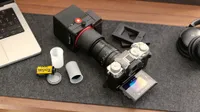
Mounting a phone is similarly simple. The clamp is built into the stand, and I had no trouble getting different phones securely positioned above the negative. If you would rather use a proper camera, the smartphone stand can be removed entirely, although you then need your own tripod or, preferably, a copy stand to keep the camera square with the film.
The backlight can be powered by two AA batteries, which makes the whole setup genuinely portable. I found that it really does need relatively fresh batteries, though, as the panel became noticeably dimmer when I tried using older cells.
You can alternatively power it over Micro USB, but that connection already feels somewhat antiquated in 2026, and there isn't even a cable supplied in the box. I suspect quite a few people have reached the point where finding a spare Micro USB cable involves digging through a drawer of long-abandoned wires.

Performance
There is no such thing as a universal "DigitaLIZA Max image quality". The DigitaLIZA Max itself is really only one half of the scanning equation, because the quality of the final image depends enormously on what you point at the negative.
I initially tried scanning with an iPhone, but I didn't have much success with its macro capabilities at the distance and framing required by the setup. I got considerably better results using the Oppo Find X9 Ultra, whose 50MP 3x camera gave me much stronger close-up images and allowed me to fill far more of the frame with the negative.
The backlight and film holder combo performs really well. It kept the film flat enough for me to achieve consistent images; illumination was even across the frame, and I couldn't see any meaningful shift in color from one part of the negative to another (this version uses a CRI 97-rated light source).
I experimented with photographing an entire 35mm frame, including the film borders, rather than cropping tightly to the image area. Even when allowing the surrounding lightbox into the shot, I was still able to get good results, with only a small amount of light bleed appearing around the edges of some particularly dark images.


The supplied 35mm mask does an excellent job of cutting that stray light when you don't want the border included, although its very tight opening and slightly rounded corners are a bit odd.


Using a smartphone isn't going to give you quite the same sharpness or fine detail as a good digital camera paired with a proper macro lens, but for images I wanted to post on Instagram or other social platforms, the better phone scans were easily good enough, and the convenience of being able to get an image from a negative so quickly is the biggest part of the DigitaLIZA Max's appeal.
If I were digitizing a negative because I wanted to archive it at the highest quality possible or make a large print, I would still get out my mirrorless camera, macro lens, and tripod. But the Max gives you that option as well.
Whichever device you use, I would also strongly recommend capturing RAW files wherever your camera or phone allows it. Negative conversion inevitably involves fairly significant adjustments to color, contrast, and exposure, and having the extra latitude of a RAW file makes that process considerably easier.
All the photos in this review were converted using Negative Lab Pro.


Verdict
I enjoyed using the DigitaLIZA Max because it takes something that can otherwise become very complicated and makes it very manageable. Loading and advancing film is straightforward, the backlight is excellent, and capturing with a smartphone is incredibly simple.
It isn't completely polished. I would like the film masks to lock into place more securely, stronger magnets would make the whole assembly feel more solid, and Micro USB really should have disappeared by now. A simple case to keep all the individual pieces together would also have been welcome.
Those issues don't undermine what the DigitaLIZA Max does well, though. For around $100, you can digitize several different film formats using equipment you already own, and with a capable phone I got results that I was more than happy to use online. When I need more, I can swap the phone for a proper camera.
Features ★★★★½ |
Excellent film-format support and the ability to use either a smartphone or digital camera make the DigitaLIZA Max versatile. |
Design ★★★½☆ |
The compact modular design works well, although loose masks, slightly weak magnets and Micro USB keep it from feeling completely polished. |
Performance ★★★★½ |
The backlight is even and reliable, and the film handling works well. The final image quality though is heavily dependent on the phone or camera used. |
Value ★★★★½ |
Considering the range of film formats included and the smartphone stand the DigitaLIZA Max represents excellent value, I just wish it had a storage case. |
Overall |
★★★★½ |

Alternatives