



Digital Camera World Verdict
ACDSee Photo Studio Ultimate 2027 leans heavily towards AI features and functionality with little else in the way of upgrades. These AI features are effective and work well generally, but the interface and standard functionality could still benefit from improvements. Photo management and Raw processing remain the software's most impressive aspects, and for beginners and enthusiasts, ACDSee Photo Studio Ultimate 2027 offers more features than you’ll need.
Reasons to buy
- +
AI features work well
- +
Great Raw processing
- +
Subscription or perpetual license
Reasons to avoid
- -
Update focuses on AI functionality rather than interface
- -
AI credits required for generative AI
- -
Windows-only software
Why you can trust Digital Camera World Our expert reviewers spend hours testing and comparing products and services so you can choose the best for you. Find out how we test.
ACDSee Photo Studio Ultimate once again sees its annual update with the release of ACDSee Photo Studio Ultimate 2027. This Windows-only photo editing software remains an enticing option for beginners and enthusiasts, not least thanks to it being all-in-one software where you can enjoy functionality similar to Adobe Photoshop and Adobe Lightroom rolled into a single interface.
This is undoubtedly an interesting way of presenting photo editing software, and ACDSee clearly believes it works because of the annual updates and consistency of approach. In reality, the single interface keeps editing simple and, indeed, streamlined. Of course, there is still a learning curve involved in the software alongside the need to develop familiarity, but the overall presentation remains as simple as ever.
A new version, annually, means more new features than with a generic software update, and this year, like last, sees a strong focus on AI features. But where ACDSee differs from competitors is that there is a strong belief that AI should “never come at the cost of privacy,” with many AI features run locally and others using ACDSee’s own servers where data is deleted after seven days.
The 2027 upgrades feel typical for software developers these days, with that heavier focus on AI functionality. The updates are a mixture of new features and a handful of improvements to existing functionality. And as always, some are more effective and more useful than others.
ACDSee Photo Studio Ultimate: System requirements
| Row 0 - Cell 0 | Windows |
Operating system |
Windows 10 (64-bit editions only), Windows 11 |
Processor |
Intel or AMD processor with 64-bit support, Intel i5 or better processor recommended |
RAM |
8GB RAM (16GB RAM or more recommended) |
VRAM |
2GB Video RAM (4GB or more recommended) |
Graphics |
DirectX 12 compatible graphics adapter |
Resolution |
1920 x 1080 recommended |
Memory |
5GB of available hard drive space |

ACDSee Photo Studio Ultimate: Price
ACDSee Photo Studio Ultimate 2027 is available as a subscription plan or a perpetual license. The former means updates during the subscription period, tech support, up to five installs, 10,000 AI credits, 500GB cloud storage, and exclusive tutorials. With the perpetual license, you get updates for a year, 20,000 AI credits, and 200GB of cloud storage (free for the first year). Additional AI credits for generative AI can be purchased.
Pricing has increased since last year, with the perpetual license coming in at $179.99 / £134.99. The subscription costs $9.99 / £7.49 per month or $99.99 / £74.99 per year, essentially giving you two months for free. Pricing is in US Dollars, so prices in Sterling are only approximate.
ACDSee Photo Studio Ultimate 2027: Features
ACDSee Photo Studio Ultimate 2027 is a Windows-only, all-in-one editing solution where you can manage your photos, process Raw files, and perform photo editing tasks like in Photoshop, all in a single interface. I’ll go into more detail about the workflow in the next section. Here, I'll focus on the new features of this most recent version of the software.
Previous versions of the software have seen increasing numbers of AI-powered features, but this year sees a significant uplift that brings ACDSee Photo Studio Ultimate 2027 in line with the competition. Do we need so many AI features in photo editing software? Probably not. Are we going to see more over time? Most likely.
One of the new headline features is Generative AI, which uses credits to perform tasks. AI Image Generation allows you to create images or add elements to existing photos using a text prompt or preset; Generative Fill fills space in crops, for example; Generative Edit allows you to describe an edit and/or use reference images, while AI Remove makes cloning easier.

These features work well sometimes and not so well other times; like all features of this type, success depends on the prompt, the image, and the complexity of the task. AI Face Edit has also improved with more adjustments available and, to be fair, it works well if you want to or need to change facial features in portraits.
There have also been improvements to organising and culling photos, which are useful updates in their own ways and can’t be faulted for being available. Whether or not Auto-Stack, Custom Stacking, AI Reverse Image Search and Group By AI Image Similarity are useful will very much be a matter of personal opinion. For me, they’re useful to a degree but not essential.

There have been some other improvements, including updated Raw support for newer cameras, although the features that stand out in the ‘other’ category are the new Develop Presets covering four new categories. These include Architecture, Bright & Airy, Cinematic, and Dark & Moody. These will be another area where personal taste is important, but presets can be useful for saving time.
System requirements remain modest compared to many photo editing programs, so you can potentially use this software on less powerful computers. The caveat, however, is that they must be running Windows 10 64-bit or Windows 11.
ACDSee Photo Studio Ultimate 2027: Interface & Usability
Photo Studio Ultimate 2027 is fairly easy to use if you have existing knowledge and experience of photo editing software. There is, as you’d expect, a learning curve, and you have to familiarize yourself with the layout of controls, user interface, and the available features. This is beginner and enthusiast-level software, so while it is packed with features, the all-in-one user interface helps to make it reasonably intuitive.
Thanks to the single user interface, the software offers a logical and intuitive workflow where you can do everything from reviewing images to processing Raw files to editing photos without moving from one program to another. That may not sound impressive, but it undoubtedly keeps the editing workflow under control.

The user interface is made up of Manage, Media, View, Develop, and Edit Modes. As I always say, Manage, Media and View could be combined into a single Mode, but it’s also far from the end of the world that they are separate Modes. The five modes, which could be three, do, however, provide a logical journey through the editing process.
Manage Mode allows you to view the folders on your computer using the file tree on the left to select the photo folder you would like to work on. In this Mode, you can organise your photos with the ability to search, move, delete, copy, rate, and keyword photos, etc.
Plus, there are new AI features within this Mode to manage your photos. You can even apply several editing functions to your photos in this Mode by right-clicking on thumbnails.

Within Manage, double-clicking a thumbnail opens the photo in View Mode, where you can view a larger version of the photo with a film strip of thumbnails below. Double-clicking the image in View takes you back to Manage. The Media Mode shows images from folders that have been previously opened. This is why these three Modes could be easily combined into a single mode to further simplify the user interface.
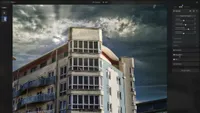
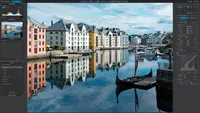
Develop Mode is for processing Raw files and other file formats, including JPEG and TIFF. Here you're presented with an interface and controls that are similar to Adobe Lightroom. To be fair, what’s on offer here is impressive, and you could easily use this Mode at a professional level for processing Raw files.
The final Mode in the line-up is Edit Mode, which is a pixel editor similar to Adobe Photoshop. It probably sits somewhere between the full version and Photoshop Elements in terms of the tools and functionality available. It’s certainly not up to professional use based on the extent of its functionality, but it’s almost certainly enough for beginners and enthusiasts.
ACDSee Photo Studio Ultimate 2027: Performance & Results
ACDSee Photo Studio Ultimate 2027 is a consistent performer with overall smooth operation despite having lower system requirements than some photo editing programs.
AI features appear to run as quickly as with competitor software, whether run locally or on the ACDSee servers, while the standard tools and functions work as well as they have with previous versions of the software, which is, in a nutshell, as well as you’d hope and expect.
The new generative AI features are processed on ACDSee servers, with results provided fairly quickly. The locally powered AI features work just as well as they did before. However, AI Face Edit works incredibly well, and the improvements to the controls and performance will be welcomed by portrait photographers who want to make changes to facial features and hair color.

Image quality and the software’s ability to produce pleasing and high-quality results are always key factors in a photo editing software’s success. It’s fair to say that Photo Studio Ultimate can produce great results, but the Edit Mode, which is a Photoshop equivalent, remains one of the weaker parts of the software.
Don’t get me wrong, it’s not a failure; it’s just not as fully featured or as intuitive as Photoshop or some other editing programs. That said, it undoubtedly offers plenty of functionality for beginners and enthusiasts; the Manage and Develop Mode for image management and Raw editing are still impressive.
ACDSee Photo Studio Ultimate 2027: Verdict
ACDSee Photo Studio Ultimate 2027 leans heavily towards AI features and functionality, with little in the way of upgrades to more standard features. This is typical of software in general these days, and the new features and upgrades to existing features are, to be fair, effective and work well. However, the interface and standard functionality could still benefit from improvements.
The photo management and raw processing functionality remain the most impressive aspects of the software, but the new AI features do help the software stand up against the competition. So, if you’re looking for an Adobe alternative, albeit Windows-only, ACDSee Photo Studio Ultimate remains a compelling option with subscription and perpetual license plans available. It’s not the best option for professional use overall, but you could get away with it. For beginners and enthusiasts, ACDSee Photo Studio Ultimate 2027 offers more than you’ll need.
Features ★★★★☆ |
Lots of new AI features and improvements at the expense of new standard features and upgrades. |
Design ★★★★☆ |
The all-in-one user interface remains intuitive, but it could be simplified further. |
Performance ★★★★☆ |
The software is stable overall, and the local AI features work well. Not to mention, the system requirements are modest. |
Value ★★★★☆ |
Having the option of a perpetual license or a subscription is great, but there are less expensive alternatives available. |
Alternatives