



Digital Camera World Verdict
While the Insta360 Wave isn't suitable for recording studio-quality music vocals, it performs very well with the conference room audio for which it's intended – even with ambient noise. And the AI transcription, while done in the cloud rather than locally, is very impressive. It isn't the easiest device to set up, and you'll want to pair it with a camera like the Insta360 Link 2 for a superior setup, but this is a very versatile piece of hardware that offers performance to match its high-end looks.
Reasons to buy
- +
Good range for conferencing
- +
Flexible connection options
- +
Beautiful motorized lifting design will impress
Reasons to avoid
- -
Wouldn't use for recording vocals
- -
Expensive subscriptions
- -
The webcam is an additional cost
Why you can trust Digital Camera World Our expert reviewers spend hours testing and comparing products and services so you can choose the best for you. Find out how we test.
The Insta360 Wave is an interesting concept – and quite a confusing one unless you know what you've actually bought. It is, in essence, an accessory to turn a webcam into a conference camera – the kind that sits in the middle of a meeting space and enables more people to get involved.
You can buy it alone, as a 'Professional Speakerphone with AI Recording Suite', but it makes more sense with the Link 2 webcam. The camera has an AI subject-tracking gimbal and, combined with the microphones in the Wave, it can sit on the top of the turret and point at whoever is speaking, turning it into a portable conference camera.
It has some very cool styling and also makes some promises about its audio quality, which appealed to me as a singer-songwriter. Could the Insta360 Wave even be a recording device for my vocals as well as all this other functionality? That is what I'm here to find out.
Insta360 Wave: Price
The Insta360 Wave is available for $299 / £279 and is also sold in bundles – one including the Link 2 webcam which gives you the visual option.
This represents good value compared to some combined 360° microphone cameras built with conferencing in mind.
Insta360 Wave: Specifications
Connectivity |
USB-C |
Sound |
8 MEMEs microphones |
Camera |
Optional (tested with the Insta360 Link 2) |
Audio |
48KHz |
Height |
198mm rising to 248mm when on |
Base diameter |
64mm |
Weight |
490g / 1lb |

Insta360 Wave: Build & handling
This is what sets the Insta360 Wave apart; it is a tall-standing black cylinder. It's reassuringly weighty at just over a pound (490g), but that makes it feel premium. So far, so similar to other table microphones built for conference calls.
Then you turn it on and the main column appears to hover above the base – a trick not magically achieved by magnets (pity) but with a thin motorized support that lifts it far enough to reveal the touchscreen display.
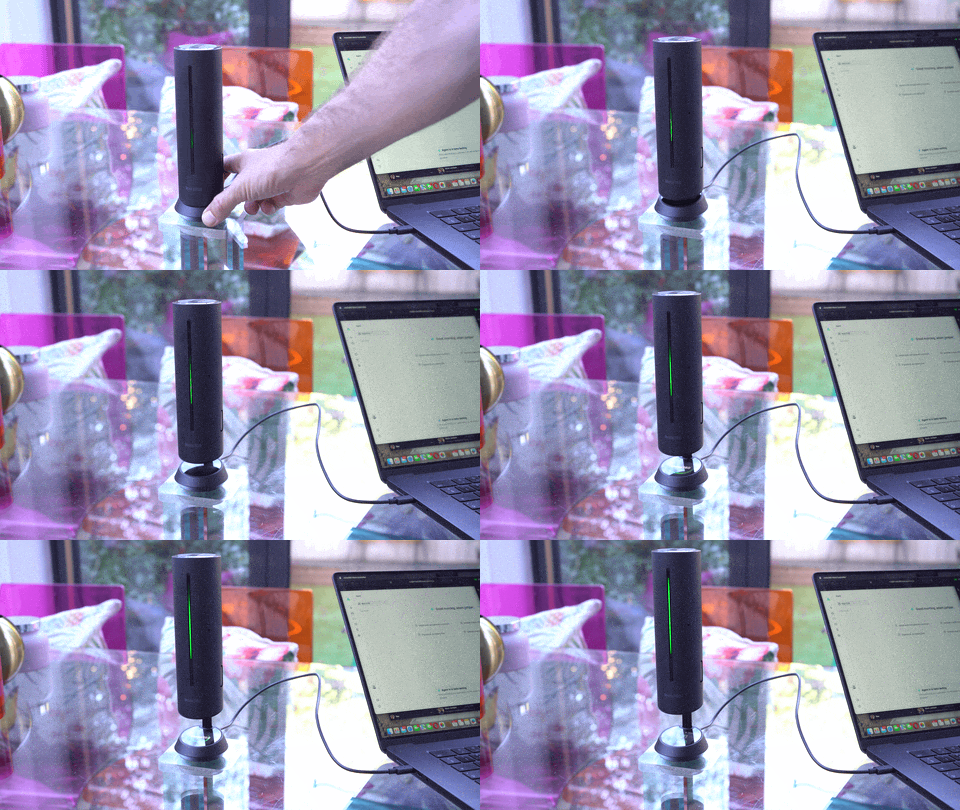
If you're worried about it falling over, you shouldn't be. The bottom is a suction cup and (especially on the glass table on which I tested it) it stayed very stable.

The microphone array – there are eight used to identify the speaker and adapt – has AIGC (Automatic Gain Control) and pickup. Usefully, you can choose between different recording arrangements depending on whether you want to record audio from all around or other patterns (omni, cardioid, supercardioid, figure-8, stereo).
The device also has a built-in 32GB of memory to record meetings, while the AI system can use the positioning to help provide transcripts of the meeting with summaries.

At the top a removable cap (also home to the magnetically-attached security dongle) reveals the connectors for the Link 2 webcam. This pops in easily, being guided magnetically.
Confusingly if you test it the first time, it'll pan and tilt around before looking straight down at the unit itself. It will immediately wake up, however, once the device is selected as the active camera in a meeting tool like Zoom or Teams.

The Link camera can pan, tilt and zoom using its AI, or be directed using either the Wave app for your computer or the on-screen controls if you prefer.
The app provides more or less the same controls and can connect via USB-C, Bluetooth 5.0 or an optional wireless dongle. USB-C seems easier, to be honest, though the 9,800mAh battery promises up to 12 hours of wireless use.
Another nice premium touch is the carry bag that was included in the bundle. Since this is smaller and more portable than many competitors, that makes sense.
Insta360 Wave: Performance
I struggled greatly to get this mic / speaker set up, but we can probably blame my lack of expertise in this field. My tech-savvy husband managed to set it up more quickly, though it still seemed to involve a few more software downloads than you'd expect for a simple mic or webcam.
I then tested it by connecting it to Logic Pro X on my laptop (perhaps I'm not so useless after all?) and singing into it (you can listen to the clip). I used my usual trusty Beats by Apple headphones, which were worse than useless because I could hear a loud distracting echo throwing me off. I had to take the cans off to record.
The result wasn't bad, per se, but it wouldn't be useful for recording vocals because there was a distinct tinny echo, like a sour aftertaste. However, singing wasn't the correct use case. I suspected the speaker would be better when recording the audio of a meeting, as that's what it was designed for, so I put it to the test. (It's also worth noting that I have a studio recorded version of I'll be there which isn't an entirely fair comparison!)
The singing test is tougher than the range expected for a meeting, though, and it performs very well in this context. And in that setting, my complaint was more that it took the camera a moment to decide that a different person at a different point on the table had begun speaking – usually over a second – before turning to center on them.
AI transcription in the meeting modes also impresses, even where there is background noise – though it is done on the cloud, not the device, and is available after a recording is made.

Insta360 Wave: Verdict
In a world of plug-and-play webcams and microphones, this is not the easiest device to get started with – which surprised me. Insta360 seems to have concentrated more on the immense possibilities of AI features than on the basics in that regard, but in fairness most conference cameras require a few moments to set up and the installation of dedicated software.
Once you have plugged the Insta360 Wave into a computer and found the power switch at the rear, things smooth out – but there are a few agreements that'll pop up on the touchscreen. Once that hurdle is behind you, simplicity starts to arrive. The menu is easy to navigate, yet extensive so that you don't need to resort to the laptop to change settings.
The hi-fi recording that Insta360 talks about is impressive for a conferencing device, but it won't replace a studio microphone. The system is excellent at cutting background noise, however, and the 3D mic array sits brilliantly at the center of a table.
In fact, it is the portability and the AI assistant that make the Insta360 Wave even more powerful for a small business. It isn't cheap on its own, but the price looks good compared to some dedicated alternatives (the Meeting Owl 3, for example) and it's noticeably more portable.
While technically this is a review of the Wave speakerphone, for most readers it's probably more rational to think of the Wave and Link combination – and in that regard I feel this – especially with its pricing – has earned a spot among the best conference room webcams.
Features ★★★★½ |
A wealth of features beyond the standard expectations including recording, access to AI and more make this a flexible device. |
Design ★★★★★ |
Slick and gorgeous, just the right weight, and seemingly designed to impress clients, this is a brilliant form and function combination (once you get past the first-time setup). |
Performance ★★★★½ |
Good quality and forms a good connection with a computer, though the Link camera (if attached) can lag by a moment. |
Value ★★★★ |
As a joint buy with the Link this is still noticeably cheaper than premium portable conference camera solutions, making it great value, but for small huddle meetings a good webcam might serve. |
Insta360 Wave: Alternatives