Digital Camera World Verdict
Petcube's Cam 360 is a compact and highly affordable camera that lets you pan, rotate, and zoom remotely straight from your smartphone for full-room coverage, although the camera doesn't have automatic motion tracking. The 1080p video is clear, and the night vision is sharp. The camera is excellent value, too, so what gives? What I'd call essential features, like recording clips and smart alerts, are only available with a subscription. Meaning without a Petcube Care plan, your Cam 360 is more of a basic, manually-controlled indoor security camera. It's a reliable pet sitter if you don't need treat dispensing, but I'd only recommend it to owners who are willing to pay extra for a monthly plan.
Reasons to buy
- +
Night vision is super sharp
- +
Neat and compact design
- +
Pan and tilt covers wide area
Reasons to avoid
- -
Few pet-centric features
- -
Doesn’t track your pet automatically
- -
Subscription required to record clips
Why you can trust Digital Camera World Our expert reviewers spend hours testing and comparing products and services so you can choose the best for you. Find out how we test.
When I brought our retriever puppy home for the first time several years ago, I wanted to make sure we got her (and us) comfortable with being left home alone. At first, I went out for short periods of time, and she’d mostly nap. But a few months in, when we’d leave the house for a few hours, I wanted to keep an eye on things.
That’s when I started testing the best pet cameras, products which are largely security cameras with pet-centric features and apps, and in some cases, treat dispensers. The Petcube camera 360 is the latest release from Petcube, one of the leading makers of pet monitors. The first pet cam I ever tested was the Petcube Bites 2 Lite, a tall, boxy device with a treat tosser but a static camera. The Petcube camera 360 doesn’t feature treats. It’s a combination of the affordable Petcube cam and the brilliant Furbo 360, as it can swivel on its axis and cover a full rotation as well as pan up and down.
On paper, the Petcube Cam 360 is a great solution if you want to record more of your room, or simply if it's a big room that a standard, static wide-angle lens can’t cover. It’s also very affordable, at around $50/£55 with an optional monthly subscription to unlock more features on the Petcube app.
Whether you're a new or experienced pet owner, you might have wondered whether a pet camera is a good investment. Will the Petcube camera give you the confidence to go out sooner or more often, knowing you can check in on your furry pal at any time? Maybe, but given it has no treat-tossing abilities or toys to attract your pet, would you do well enough with an indoor security camera on a shelf instead? I tested it for several months to find out.
Petcube Cam 360: Specifications
Resolution |
1080p HD video |
Lens |
105° wide-angle |
Connectivity |
2.4 GHz Wi-Fi |
Compatibility |
Amazon Alexa |
Night vision |
Yes (up to 30ft) |
Dimensions |
2.2 x 2.2 x 2.7 inches (5.6 x 5.6 x 6.9 cm) |
Two-way talk |
Yes (1 microphone) |

Petcube Cam 360: Price
The cost of pet cameras has come down considerably over the past few years, and the Petcube Cam 360 is what I'd call an affordably priced model, but not an entry-level one.
The camera is widely sold through Petcube's website and major retailers like Amazon, as well as John Lewis, Curry's, and Pets at Home in the UK. Its up-front cost hovers around the $47–$53/£45–£55 range, an RRP that looks much brighter than the Furbo 360° Pet Camera, which retails closer to $99 (but which regularly goes on sale to around £50/$60).
The cost is only half of the puzzle for pet owners, though. I really don't like having to pay monthly fees, but to get the full functionality out of the camera, I'd recommend an ongoing subscription to Petcube Care. Without a subscription, the Cam 360 won't record any clips, for starters, meaning you can view your pet live but won't review any mischief or mishaps.
There are two tiers of Care package: an Optimal plan starts at $5.99 a month ($47.88 a year), which includes 3 days of cloud video history, 30-second video clips, AI-powered Smart Alerts (being able to distinguish between pets and humans, barks/meows), and the 24/7 online vet chat – which I haven't tried, but wouldn't want to rely on for medical advice over my own vet.
Shelling out for the premium plan is $11.99/month, giving you three months of video history storage to 90 days, and covering unlimited Petcube cameras on the same subscription, along with a 2-year warranty.
It's worth saying that you don't have to pay for a subscription, and if you just want a reliable, pan-and-tilt camera for quick live check-ins, I think the camera-only cost is good value. That said, Furbo has recently launched the similarly small Furbo Mini 360 with 2K QHD video (double the resolution, in theory) at a slightly cheaper price.

Petcube Cam 360: Design & Handling
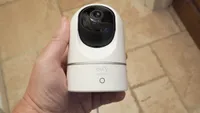
The Petcube Cam 360 is teeny tiny, and it arrived in a small cardboard box that fit in my palm. That Petcube has managed to squeeze everything into such a compact cubed unit (each side is around 2.2 inches) is impressive, and is helped by the fact that there’s no treat dispenser to house.
The original Petcube Pet Cam has a plastic base that attaches to the camera unit to allow it to rotate up and down. But here, a motorized, rotating base and pan-tilt turret allow the full movement of the camera. I love the look of the unit and think it’s sleeker than the original static camera.
It’s small and square, black and mostly white, and for that reason, easier to blend into light walls than dark. It was perfect for the largely minimalist design in my house, and it’s also nice how subtle the Petcube logo is when it could have been made more obvious on the body.

Petcube gives you the option (and fixings) to wall mount the device, but I think it’s far easier to position it on a flat surface so you can move it around if you (or your pets) swap rooms in the house.
There’s little setup required if you don’t want to wall-mount. You plug the camera in via a USB-C cable at the back of the unit, and, crucially, this included white cable is flattened widthways to ensure the entire unit sits flat and rotates effectively.
In terms of handling, I have few complaints or notes. The Petcube app is simple to use, and the interface is well-designed. Once you’ve downloaded the app and plugged in the camera, it’ll walk you through the steps for setup.
I found it a breeze to connect the Petcube to Wi-Fi thanks to the QR code on the bottom of the camera, and it took about five minutes from unboxing the camera to having a live feed.
It's easy to know when the camera is online, thanks to the small blue indicator light on its bottom, which blinks when recording footage or is solid when connected.

When you first log in, you're presented with a few setup options like motion sensitivity, which you can easily tweak later. Using the iOS app, I was able to open the live feed and start manually panning the camera in minutes.
Because the wide-angle lens captures so much, I immediately noticed that the shelf or table edge was dominating the frame. I'd recommend checking the coverage area on the live feed after setup and adjusting the camera's position to the very edge of the surface to avoid this. This is quickly done as it's so light and portable. And if you unplug the camera to move it, it doesn't take long for it to reconnect to the WiFi.

Petcube Cam 360: Performance
Above: Sample clip from the Petcube Cam 360 camera
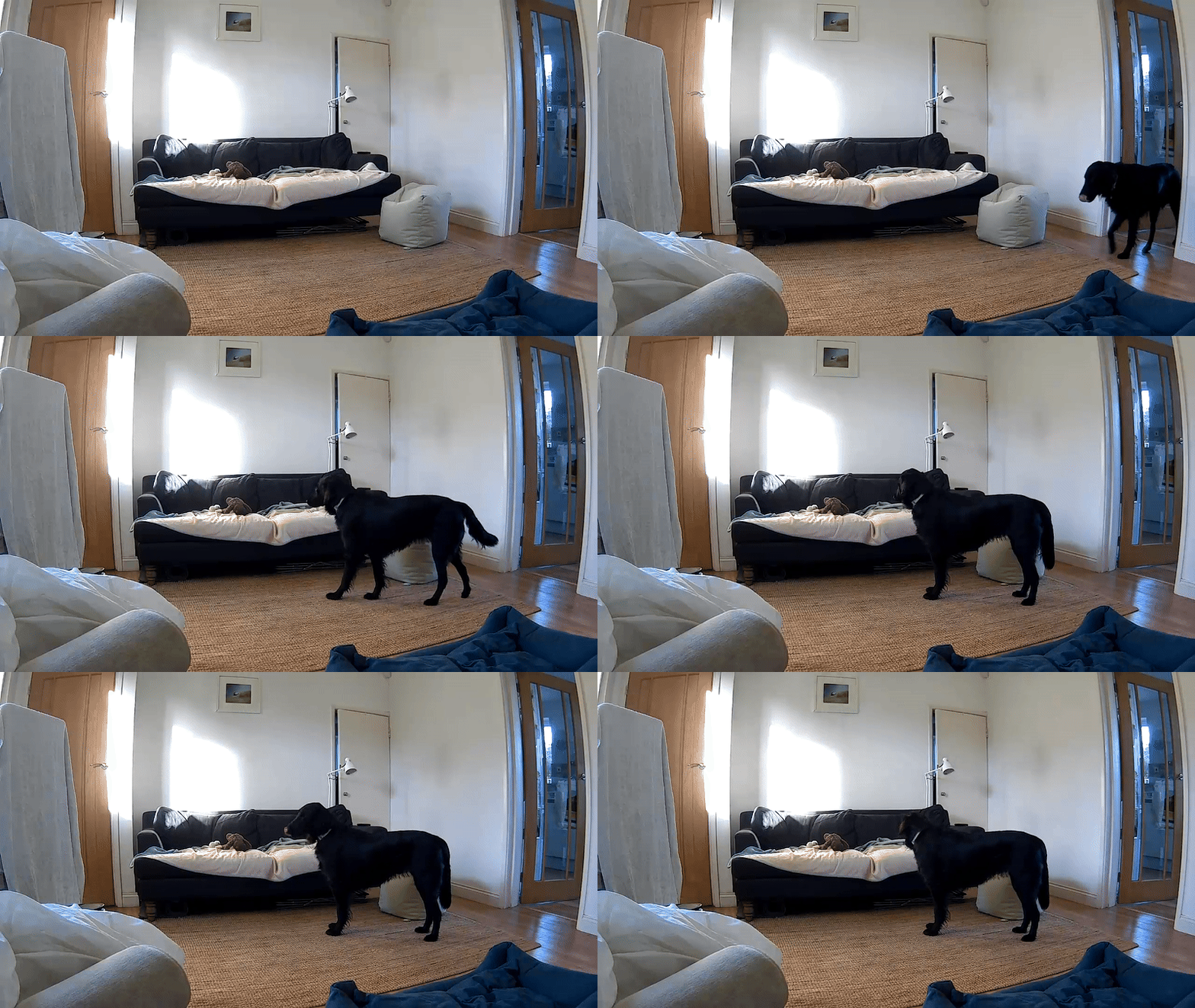
The Petcube Cam 360's 1080 camera captured footage that was clear and crisp in bright daylight (which we get little of in winter), but it gets very fuzzy as you zoom the picture in. At 8x zoom, the feed was usable for surveillance but definitely not at a shareable quality.
Having an all-black dog highlighted the limits of the camera's dynamic range, as it was often hard to tell her apart from our dark navy sofa in lower light. That said, even my expensive mirrorless camera suffers from this, and overall, I'd say the camera performed well under artificial lamps in the evening and morning, with little noise or distortion.
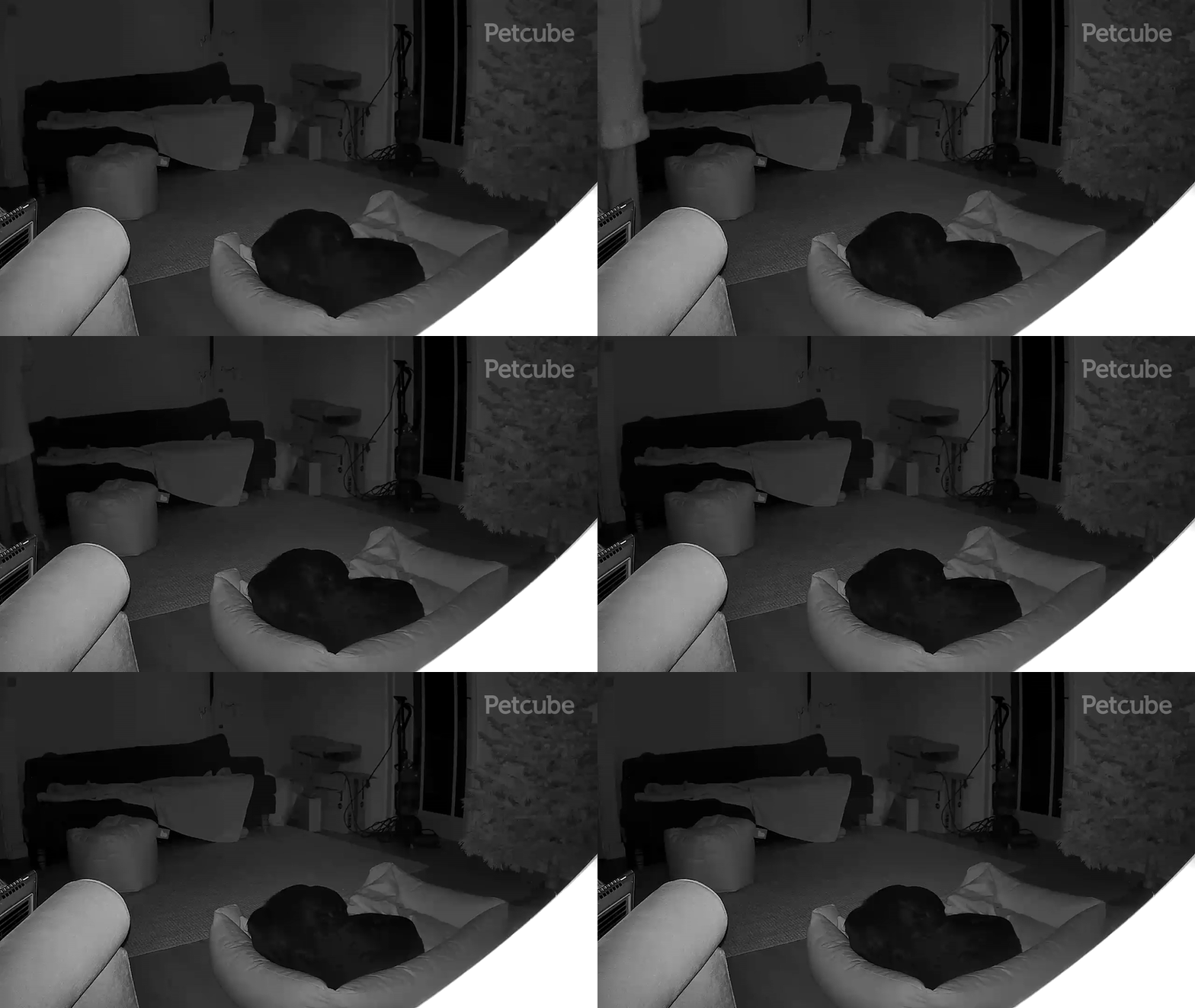
I was most impressed by the quality of the night vision camera, which I set to activate automatically depending on the light levels. It was easy to see Remy's eyes and outline (and my own while wandering about in pyjamas).
The camera reliably captures standalone clips for playback in the app, along with a fun 3-second daily diary, and it's easy to start recording manually from the live feed. You can also capture still images, or snapshots, by tapping the camera icon from the live feed – but only in wide-view and not at any level of zoom.
I had less success shooting images, because unless it was bright enough, to image came out with motion blur. But as this isn't the camera's main function, I'm happy enough with the image quality versus the price.
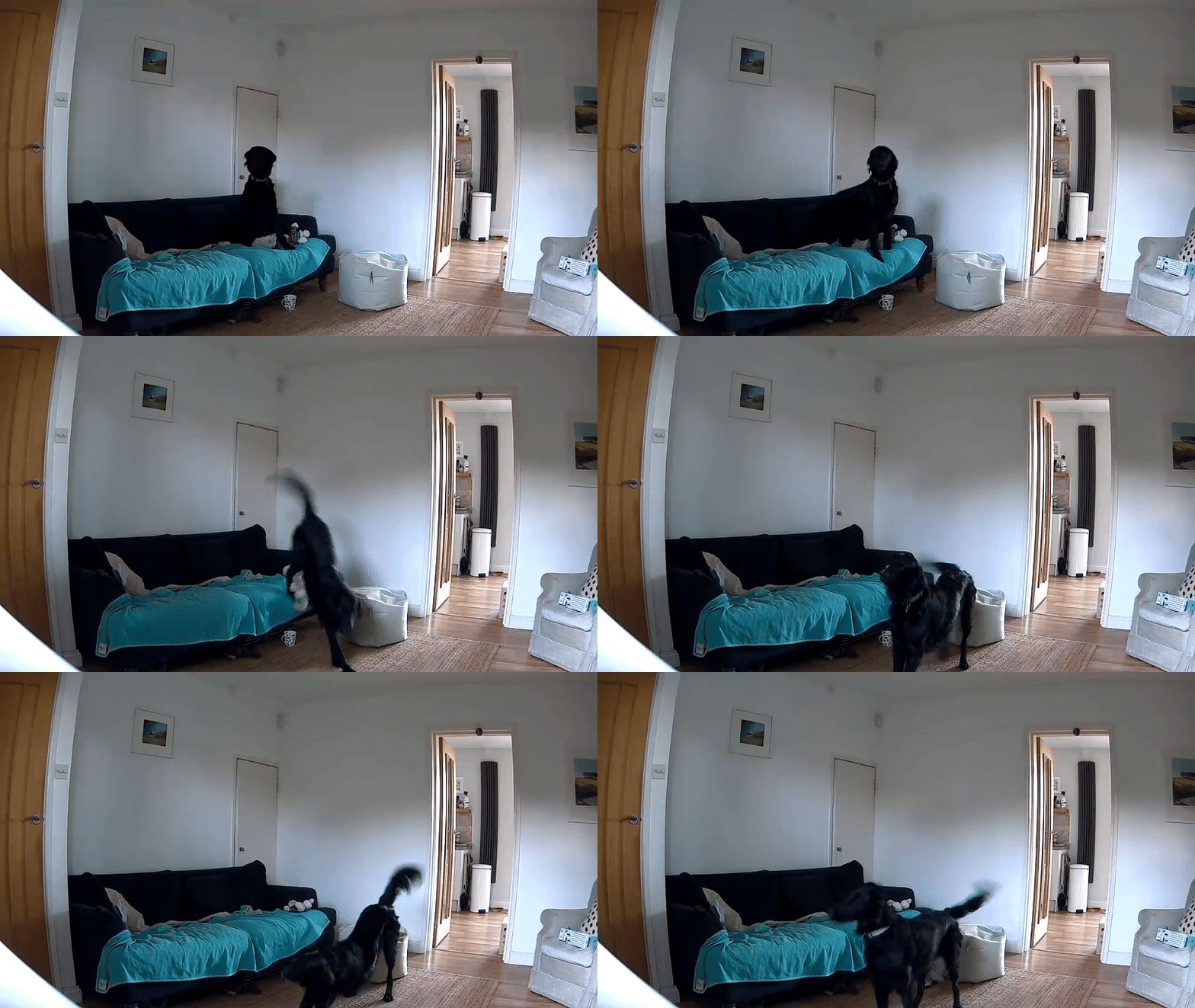
Petcube doesn't get carried away with hyperbolic claims when describing the Cam 360. It says that "Cam delivers a sharp 1080p HD live streaming video with a 105° wide-angle view for full-room coverage." That description is apt and true for the results I got during testing.
Having reviewed several security, bird feeder, and pet cams before, my expectations are never too high for the image quality – after all, I'm not looking to print these images, I just want to be able to clearly see what's going on.
I found Petcube to be mostly a set it and leave it alone sort of camera, which suits me perfectly. What I mean by that is that you don't have to actively record clips of your pet, but that Petcube will take the settings (recording times, motion sensitivity) you dial in and shoot clips automatically based on those.
It did a great job of recording my dog's movements, without capturing hundreds of clips every time she stretched or repositioned herself on the sofa. And I didn't get hundreds of phone notifications disrupting my day either.
What's great here is that you can customize Petcube for exactly how checked in or out you want to be on your pet's time at home, down to the specific notification frequency from immediate to every 4 hours. I found notifications reliable yet unintrusive when set to every hour.
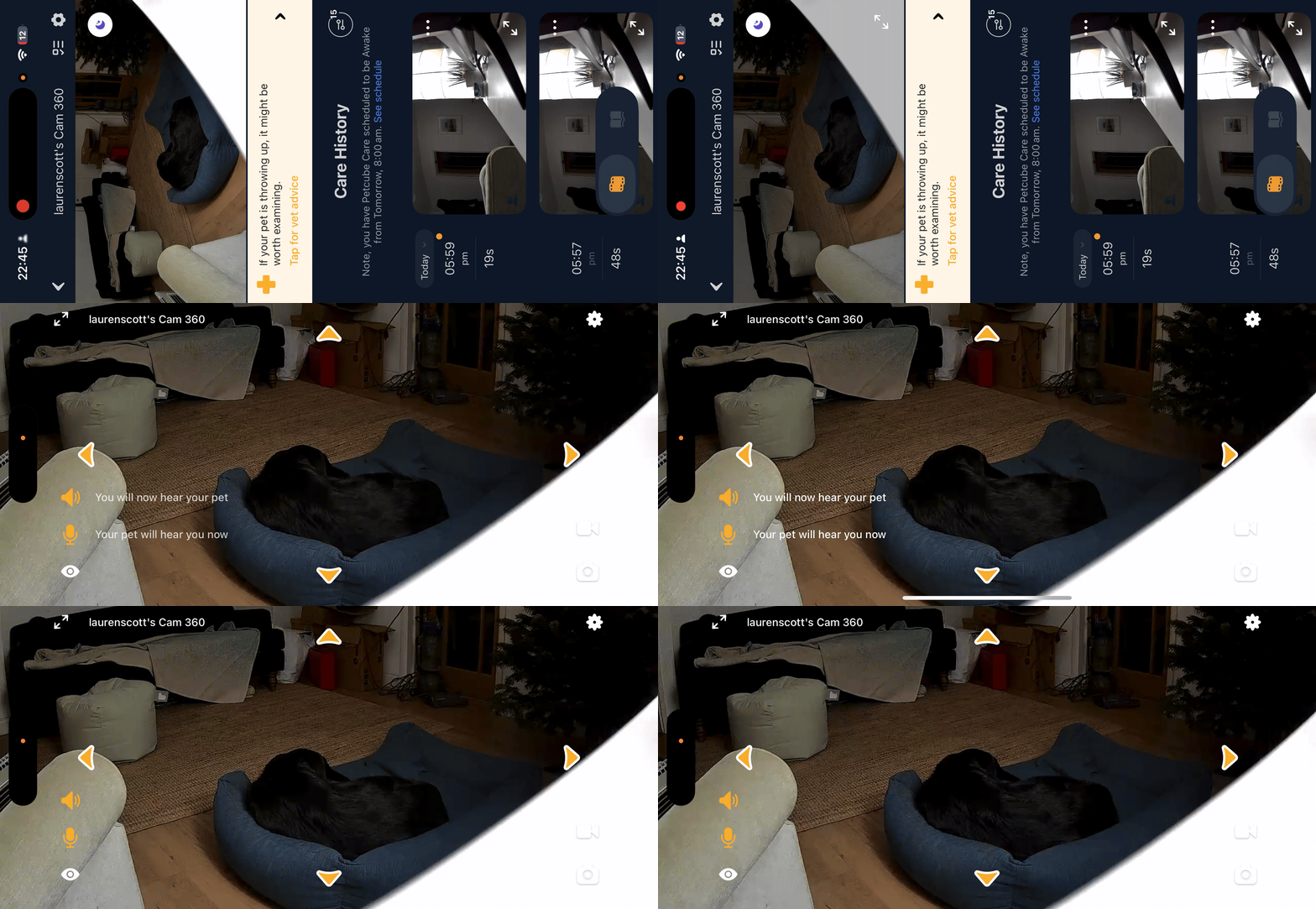
The main event for Cam 360 over static rivals is being able to move it around from the app to follow your pets. All the movements are made by tapping virtual arrow buttons on the live feed on the Petcube app interface – left, right, up, and down.
It's simple and effective. The motorized base gives smooth 360-degree rotational motion (perhaps a little slow for speedy pets), and it's quiet, too, which is crucial if you don't want to startle or wake your furry family members when using the camera remotely.
The panning motion up and down is just as gentle. I rarely needed to see as high or low as the Petcube Cam 360 could cover when monitoring my dog (who mainly just sleeps when I'm out), but I imagine owners of climbing cats will enjoy how much of a room you can cover. Position the camera in a hallway, and you'll also be able to cover the landing, the stairs, and the front door.
It's a shame that the camera's movement isn't automatic, and it can't track your pets without your manual input. But I expect Petcube is working on this for future, and likely more expensive, iterations.
The Petcube Cam 360 is designed for two-way communication with your pet, meaning there's a speaker and microphone built in to make things more interactive.
This isn't novel for pet or indeed security cameras, but it's helpful if you want to hear your pet barking, crashing about the house, or if you just want to make some reassuring noises or reinforce good behaviour when you're out.
It's easy to toggle the mic and speaker using buttons on the live feed screen. I rarely check in with my dog verbally when I'm out of the house, as it tends to confuse her more than comfort her.
But the microphone and speaker are both clear enough to deliver commands, and with less of a delay than I've encountered on rivals, and even the Petcube Bites 2 Lite.
There is some reverb and distortion from the microphone, especially when sounds aren't in the same room. But you can adjust the speaker volume and microphone sensitivity from the Video & Audio setting menu, which I found helpful for filtering out the number of clips captured by Smart Alerts.
Petcube also says that voice assistant integration is an option with the Petcube 360, but I don't have an Amazon Alexa to test this feature out.

Petcube Cam 360: Verdict
The Petcube Cam 360 is a camera I'd recommend to friends with dogs and cats who want peace of mind when they're away from home, and only have $50/£50ish to spend. Even though it doesn't have any pet-specific features (you don't get the hilarity of tossing treats to your furry pals while you're out, for example), it does have all the qualities of an affordable monitoring camera – clear visuals, clear audio, and a reliable feed sent to an easy-to-use app.
With the Cam 360, I loved knowing that I could check in and see my dog at any time while out (or when I was working in my garden and wanted to lazily check the living room without coming in). The camera's smooth pan and tilt, which lets you cover those hard-to-reach areas that are out of sight on even wide-angle static security cameras.
Unfortunately, what keeps it grounded is the way that Petcube has limited functionality to monthly subscribers and a premium plan. Once signed up to Petcube's monthly Care subscription, I got to record clips, see alerts for barking, and watch a cute rundown of my pet's daily diary. Without that, this is just a compact pan-and-tilt mini cam with a live feed. Albeit a very responsive one that loads quickly.
Without a subscription, I think I'd have been a bit frustrated by the limited use of the Petcube camera. But for owners on a budget who haven't tested any different options, the Cam 360 does what it needs to.
I'd really have liked to see this camera feature some automatic motion tracking, but that might be too big an ask for its low upfront price. Overall, it's great looking, easy to use, and clear to view – just don't expect too many pet-specific features.
Features ★★★☆☆ |
360 pan and tilt, night vision and two-way audio. Motion and sound alerts subscription-only. |
Design ★★★★★ |
A compact, discreet camera and a friendly app interface. |
Performance ★★★★☆ |
I found both the daytime 1080p footage and night vision clear. The app was mostly lag-free. |
Value ★★★★☆ |
Fairly priced but the subscription makes the long term value questionable. |
Overall |
★★★★☆ |
Should you buy the Petcube Cam 360?
✅ Buy this if...
- You want an affordable camera with clear video and night vision
- You've got a wide or big room and want to cover it all with the 360-degree rotation
🚫 Don't buy this if...
- You're after a way to treat your pet from afar
- You want a camera that can track motion automatically rather than manually
Alternatives