




Let's just get this out of the way – there's no objective best camera for video. Which video camera is right for you is going to depend on what you want to shoot it for, not to mention your own experience levels and budget. As such, we've compiled this list of eight very different options to give you as much choice as possible.
A mirrorless camera is a great choice for video, but an action camera can be too. So can a compact camera, a camera phone, or even a drone. Our expert reviewers have tested all of these, and I've aimed to pick the best of each type. They all work in different ways and serve different purposes.
Don't worry though – video doesn't have to be difficult. Don't be put off by all the accessories, technical terms, or complex-sounding techniques. Everyone has to start somewhere, and as long as you're shooting, you're learning. Check out our guide to the best cinema cameras if you want if you're looking for something more high-end – otherwise, let's get started!

Gareth is the Reviews Editor at Digital Camera World, and the person in charge of approving all the latest camera-related tech. With several years of experience as a photographer and videographer, shooting for some household names, he has learned a thing or two about working with cameras and the photography industry. Outside of this, expect to find him cycling around London, or deep in a Netflix binge.
Best camera for video
Why you can trust Digital Camera World Our expert reviewers spend hours testing and comparing products and services so you can choose the best for you. Find out how we test.
Best camera for professionals

The Sony FX3 isn't the newest camera in this guide – in fact, it first appeared back in 2021 – but that longevity says quite a lot about how well Sony got the fundamentals right.
The FX3 takes the excellent full-frame sensor technology of the A7S III and puts it into a body designed much more explicitly around filmmaking. There is no EVF taking up space on top, there are multiple mounting points built directly into the body, active cooling allows long recording sessions, and Sony includes a detachable handle with two full-size XLR/TRS audio inputs. It feels less like a mirrorless camera with a video mode and much more like a genuinely compact cinema camera.
Its 12.1MP sensor might sound laughably low-resolution next to modern stills cameras, but that resolution makes much more sense for video. The FX3 can record detailed 4K at up to 120p internally in 10-bit 4:2:2, with Full HD reaching 240p. If I need more from it, the full-size HDMI connection can output 16-bit RAW to an external recorder. Sony's S-Cinetone gives me attractive footage without much grading, while S-Log offers much greater flexibility for more serious post-production.
Autofocus is another major reason I still trust Sony for video. Face and eye tracking are fast and dependable enough that I can put the FX3 on a gimbal or operate it solo without constantly worrying about focus. The 5-axis stabilization isn't as astonishing as Panasonic's latest systems, but Active stabilization is useful for handheld shooting, albeit with a slight crop.
I also think its age has become less important because Sony has continued supporting it. Firmware version 7.02 arrived in March 2026, so this hasn't become one of those cinema cameras that was released, superseded and quietly forgotten.
There are drawbacks. The rear 3-inch display feels small by current standards, there is no built-in ND filter and stills capability is fairly rudimentary. The Panasonic S5IIX below also offers dramatically more hybrid functionality for less money.
But if I were buying primarily to shoot video and wanted something compact enough for solo work yet credible enough to build into a professional rig, the FX3 is still the camera I would trust most.
Best hybrid camera for video


The Lumix S5IIX used to sit at the top of this guide, and I still think it is one of the smartest video-camera purchases you can make. I've moved it down only because I think the Sony FX3 is the more complete choice for someone whose work is almost entirely video. If I wanted one camera to do everything, though, I would probably buy the Panasonic.
The S5IIX takes the already excellent S5II and adds the features that make far more sense in professional video workflows. It can record Apple ProRes internally, output RAW over HDMI, shoot ALL-I formats and – one of my favorite features – record directly to an external SSD over USB-C. That last option can make handling large video files considerably cheaper and easier than constantly investing in faster memory cards.
Video tops out at 6K from the full sensor width, and the ability to record open-gate footage makes the S5IIX particularly useful when I need to create multiple aspect ratios from one shoot. I can record a taller frame and decide later whether I need 16:9 YouTube footage, vertical 9:16 social content or something in between.
Panasonic's stabilization remains one of the biggest reasons to buy into Lumix. I have used plenty of cameras where IBIS makes handheld footage slightly steadier; the S5IIX gets much closer to changing how I can actually operate the camera. For documentary work, travel or anything where I'm moving quickly and don't want to build a full gimbal setup, that is hugely useful. The current guide rightly describes it as being in a class of its own.
Autofocus was historically the big caveat with Panasonic video cameras, but the move to phase-detection AF transformed the experience. The 779-point hybrid system is fast and reliable enough that I no longer feel I need to add an autofocus warning every time I recommend a Lumix camera.
The 24.2MP full-frame sensor is also far more useful for photography than the FX3's 12MP chip, while the EVF makes the Panasonic feel like a normal stills camera when I need one.
It isn't perfect. I would like CFexpress storage, cable placement can interfere with the flip-out screen, and a purpose-built cinema body still rigs more elegantly.
But at its price, I struggle to think of another full-frame hybrid that gives me this many genuinely professional video options without sacrificing still-image capability.
Best pocket gimbal camera

The Insta360 Luna Ultra is the camera I would pick when I want footage that looks polished without wanting to carry a camera bag, lenses, and a gimbal.
Pocket gimbal cameras have existed for years, but the Luna Ultra takes the idea considerably further by combining a 1-inch main sensor with a second telephoto camera. The main lens gives me a wide 20mm-equivalent field of view, while the 60mm-equivalent camera provides a much tighter perspective for details and more flattering shots of people. That makes it significantly more versatile than the single-lens pocket cameras I've used in the past.
The main camera can record up to 8K30p or 4K120p, and I think 8K is more useful here than it is on many conventional cameras. I don't necessarily want to deliver an 8K video, but the extra resolution gives me room to crop, stabilize or create multiple framing options for 4K output.
Mechanical gimbal stabilization remains the real advantage over shooting with a phone or conventional compact. I can walk while talking to the camera and get footage that looks considerably more controlled without having to think about balancing a separate stabilizer. Subject tracking is strong too, which makes the Luna particularly appealing for solo creators who need the camera to effectively operate itself.
One of Insta360's cleverest additions is the detachable remote, which incorporates a screen, controls and microphone. I can put the camera several feet away, check framing and operate it without returning to the device between takes. For filming myself, I find that much more useful than controlling everything through a phone app.
Build quality is excellent, but I wouldn't mistake this for an action camera. The exposed gimbal mechanism simply isn't designed to be thrown around like a GoPro, and the GoPro Mission 1 Pro further down this guide is the obvious choice for rough conditions.
Price is the main sticking point. At $769.99 at launch, the Luna Ultra costs considerably more than earlier pocket gimbal cameras, and if all I need is a straightforward wide-angle vlogging camera then that premium is difficult to justify.
But if portability matters and I want something capable of replacing a camera, lens and gimbal for a large portion of a shoot, the Luna Ultra is an impressively complete little filmmaking tool.
Best affordable mirrorless camera for video
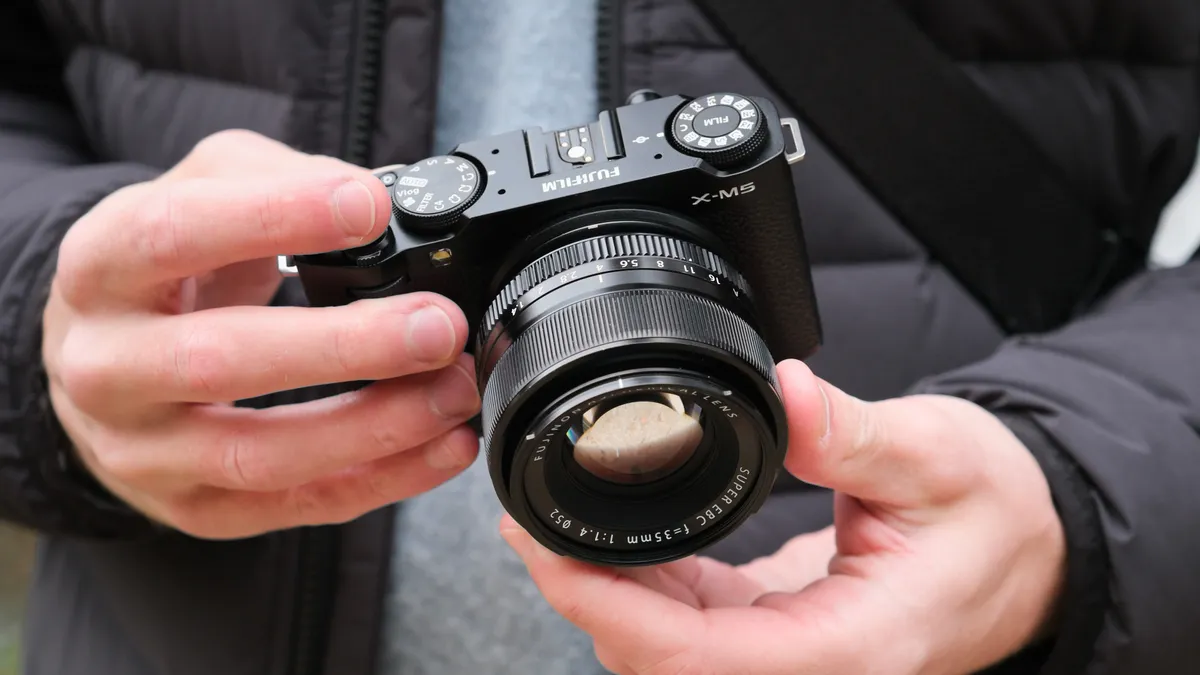
The Fujifilm X-M5 is the camera I recommend when someone tells me they want to get more serious about video but don't want to jump immediately into an expensive full-frame setup.
I reviewed the X-M5 when it launched, and what surprised me most was how little Fujifilm had held back despite the low price and tiny dimensions. It uses the familiar 26.1MP X-Trans CMOS 4 sensor, but pairs it with the newer X-Processor 5, which gives it modern autofocus and video processing rather than simply recycling an old entry-level specification.
For video, the headline feature is 6.2K30p open-gate recording. Open gate means the camera reads a taller portion of the sensor rather than immediately committing me to a 16:9 frame. If I'm creating content for several platforms, that's incredibly useful: I can frame fairly loosely, then crop a horizontal YouTube video and vertical Instagram or TikTok clip from the same source file.
There is also 4K60p, Full HD up to 240p, internal 10-bit recording and both F-Log and F-Log2. Those are specifications I would have associated with much more expensive cameras only a few years ago.
Autofocus is not class-leading, but it's good enough for most practical purposes. The X-Processor 5 adds recognition for people, animals, birds and vehicles, and in my own testing I found the AF fast and dependable. Fujifilm's color science is excellent too, and Film Simulations make the X-M5 particularly good when I want attractive footage without spending ages grading afterward.
The body itself is absolutely tiny. That's great for travel and gimbal work, although larger lenses quickly make it feel unbalanced. I also appreciate the separate microphone and headphone connections, something not every inexpensive creator camera manages to provide.
Its biggest omission is IBIS. Fujifilm offers digital stabilization, but that introduces additional crop. There is also no viewfinder, although for video I don't consider that nearly as significant as I would for stills.
If I'm building a professional rig, I want the FX3 or S5IIX. But if I'm buying a travel or vlogging camera, or looking for a simple B-camera, I think the X-M5 is difficult to beat.
Best phone for video

I don't think the iPhone 18 Pro Max is the best phone for stills photography, but for video Apple remains the standard I judge other smartphones against.
Plenty of rivals can record 8K, offer larger sensors or provide more adventurous camera hardware. What keeps bringing me back to the iPhone is consistency. The main, ultrawide and 4x cameras match one another very well for color and exposure, stabilization is excellent and autofocus rarely gives me anything to worry about. When I'm filming quickly, I can switch lenses during a shot without the image suddenly looking as though it came from a different device.
The iPhone 18 Pro Max records 4K Dolby Vision up to 120fps and supports ProRes, ProRes RAW and Apple Log 2. External recording opens up 4K120 ProRes, while Apple's increasingly sophisticated manual controls make the phone much easier to integrate into a serious production than the automatic camera app of older generations.
I also think people underestimate the value of the entire package. The phone is the camera, monitor, recorder, communications device and, in a pinch, editing workstation. There is almost no setup time. If I see something happening, I can be recording within seconds.
Apple's new variable-aperture main camera sounds much more revolutionary than it actually is. The 48MP main sensor can move between f/1.48 and f/4, but because the sensor is still small compared with a dedicated camera, the depth-of-field difference isn't dramatic. I find the wider f/1.48 setting more useful simply because it lets additional light in.
Low-light video is very good by phone standards, although physics eventually catches up with it. Likewise, the 4x telephoto is strong, but once I start pushing well beyond its native focal length, dedicated cameras and some Android rivals can produce better results.
At $1,299 / £1,299 for 256GB, it is also a serious investment, particularly if you already own an iPhone 17 Pro Max. I don't think last year's owners should upgrade purely for the camera.
But as a video camera I can genuinely carry every single day, with professional recording options when I need them, the iPhone 18 Pro Max is still the phone I would choose.
Best action camera for video

For several generations, I felt GoPro was being caught by DJI and Insta360. The Mission 1 Pro changes that dramatically.
This isn't intended to replace the familiar Hero Black line. Instead, GoPro has created a more premium camera aimed directly at filmmakers who want the rugged form factor of an action camera but don't want to accept quite so many image-quality compromises.
The biggest change is the 1-inch sensor. Larger sensors aren't magic, but they give the Mission 1 Pro substantially more image information to work with, particularly in low light and high-contrast situations. In our testing, footage looked impressively natural rather than heavily processed, and the reviewer found it much easier to intercut with footage from conventional cameras.
Resolution and frame rates are equally serious. The Mission 1 Pro records stabilized 8K at up to 60fps, 4K at up to 240fps and Full HD at extremely high frame rates for dramatic slow motion. It also records 10-bit GP-Log2 footage, giving me much more grading flexibility than older action cameras offered.
The new GP3 processor makes another surprisingly important difference. GoPro's older cameras could feel sluggish when navigating menus or waiting for processing to finish; the Mission 1 Pro feels much more responsive. The processor also drives subject tracking and improved low-light processing.
Physically, it retains the things GoPro has always done well. It feels tough, it's waterproof to 20m without an additional housing, the front display makes self-recording easy and the removable lens cover can be replaced if it gets scratched. GoPro's mounting ecosystem also remains enormous.
There is a size penalty. At 212g this is notably chunkier than a conventional Hero camera, and if I were mounting something to a helmet purely for casual POV footage I might prefer something smaller.
The bigger problem is price. At $699.99 MSRP, the Mission 1 Pro costs dramatically more than many very good action cameras, including some models from DJI with excellent low-light performance and built-in storage.
But the footage justifies much of that premium. If I simply want an action camera for holidays, there are cheaper choices. If I'm shooting footage I need to mix into a higher-end production, the Mission 1 Pro is the first GoPro in some time that I think genuinely earns the “Pro” part of its name.
Best camera for aerial video

The DJI Mini 5 Pro manages to squeeze a 1-inch image sensor, sophisticated obstacle avoidance, LiDAR and a physically rotating camera into a body around the crucial 250g mark.
For video, the 1-inch sensor is the most important upgrade. It records detailed 4K with HDR up to 60fps, with higher frame-rate options reaching 100fps, while 10-bit D-Log M and HLG give me much more room for grading than I would expect from something this small. The sensor also makes a meaningful difference in difficult light, particularly around sunrise and sunset when aerial footage often looks its best.
The gimbal can physically rotate the camera into portrait orientation. I much prefer that to simply cropping a horizontal frame when I know the final footage is destined for Instagram or TikTok, as I retain the full sensor area and therefore maximum quality.
DJI's automated flight features are another reason I recommend the Mini 5 Pro to creators who aren't specialist drone pilots. It can track subjects, orbit them and perform complicated-looking movements with relatively little input. Omnidirectional visual sensing and front LiDAR make the drone considerably harder to accidentally fly into something, although no collision system removes the need to pay attention.
The tiny size is a practical advantage beyond portability. Regulations differ by country, and drone rules need checking wherever you fly, but remaining around the sub-250g category can reduce restrictions in many regions.
The inevitable compromise is wind resistance. Physics still applies, and a very light drone gets knocked around more than a larger aircraft when conditions deteriorate. The quoted 36-minute battery life also depends heavily on how aggressively I fly and what the weather is doing.
Pricing is getting uncomfortably close to larger DJI models once I add a Fly More kit and screen-equipped controller, but I think the Mini 5 Pro's output largely justifies it.
If aerial footage is an important part of my videos, this is the drone I would buy first. Its image quality is good enough for serious work, yet the entire kit remains small enough that I'm much more likely to actually bring it with me.
Best 360 camera for video

A 360 camera asks me to think about filming differently. Instead of deciding exactly where the camera should point while recording, I capture everything around it and choose the framing later.
That used to involve a fairly significant image-quality compromise, but the Insta360 X6 pushes the format much closer to something I would comfortably mix into serious productions.
The X6 uses two larger 1/1.1-inch square sensors and can capture the complete 360-degree sphere at up to 8K50p. Larger sensors make a particularly noticeable difference in poor light, historically one of the weakest areas for 360 cameras, and the increase to 50fps at 8K gives action footage more fluidity than its predecessor could manage.
There is 10-bit I-Log recording for grading as well as Dolby Vision HDR, while still photographs can reach an enormous 120MP. Insta360 has also added 47GB of internal storage alongside the microSD slot, something I appreciate whenever I discover that the card I thought was in the camera is actually sitting on my desk.
The physical redesign works well too. The X6 is waterproof to 20m without a housing, its lens elements are now easier to replace and the 2.32-inch OLED screen is bright enough to use outdoors. Battery life reaches around 140 minutes under the company's testing conditions.
What continues to separate Insta360 for me is software. Shooting 360 video inevitably means reframing it later, but the company's mobile and desktop tools make that much less painful than it used to be. Subject tracking can follow a person around the 360-degree frame, and increasingly capable AI tools can create suggested edits automatically. Our reviewer found transferring and assembling clips unusually painless for a 360 camera.
The X6 can also operate more like a normal action camera, recording from a single lens at up to 5K60p. That's useful, but I wouldn't buy it solely for that. The GoPro Mission 1 Pro above produces stronger conventional action-camera footage.
The real reason to buy the X6 is that I don't have to know exactly where the important moment is going to happen. For skiing, cycling, travel, events or any situation where the action moves unpredictably, capturing everything and framing afterward can be incredibly powerful.
At $699 / £619 at launch it is expensive, particularly when Insta360's own cheaper models still capture 8K. But if I want the best 360 video camera rather than simply the cheapest way into 360, the X6 is the one I would choose.
Best camcorder

I sometimes feel slightly strange recommending a traditional camcorder in 2026. Mirrorless cameras have become so good at video that the old camcorder shape has almost disappeared from mainstream filmmaking. But I still think camcorders have a place, and the Canon HF G70 is the best of the remaining models.
Its biggest advantage is the built-in 20x optical zoom. It covers roughly 29.3-601mm equivalent while shooting 4K, and I can move smoothly through that entire range using a rocker under my fingers. Building the same coverage around a mirrorless camera would require several lenses, a much larger bag and considerably more money.
That makes the HF G70 particularly useful for sports, performances, wildlife, conferences, weddings and other situations where I don't know exactly how far away the next subject will be. I can go from a wide establishing shot to a tight close-up without stopping recording or swapping anything.
The body is purpose-built for video too. There is a proper hand strap, dedicated zoom control, a manual lens ring, a 3.5-inch articulating touchscreen, an electronic viewfinder and five assignable controls. Dual SD slots can provide either relay or backup recording, something I value much more when recording an event that can't simply be repeated.
Image stabilization is good and makes handheld shooting surprisingly practical at moderate focal lengths. Autofocus is straightforward to operate, and the HF G70 can also be connected to a computer over USB-C for UVC streaming.
The image itself is where modern mirrorless cameras pull away. The 1/2.3-inch sensor is tiny compared with APS-C or full frame, so low-light footage gets noisy and muddy much sooner. 4K tops out at 30p in the US version, and recording is limited to MP4 rather than the huge variety of Log, RAW and 10-bit formats offered by cameras like the S5IIX.
I therefore wouldn't buy the HF G70 if cinematic image quality or intensive color grading were my priorities. The Panasonic and Sony at the top of this guide are operating on a completely different level.
But that's not really the point. For sports, events, and straightforward documentary coverage, the simplicity of a camcorder still has real value.
How to choose the best video cameras
In this guide, we've elected to cover a broad range of camera types, and that's the first decision you're going to have to make when it comes to choosing a video camera. So, let's narrow it down:
Mirrorless cameras are the best general-purpose option for anyone who wants a flexible platform to shoot video. Our top pick, the Lumix S5 IIX is a mirrorless camera, as is the Fujifilm X-S20.
Action cameras excel at capturing footage in extreme conditions, whether underwater, on a muddy racing track, or at the mouth of a volcano! They also excel at capturing POV (point of view) footage as they can easily be mounted to a person or vehicle. The GoPro Hero13 Black is the best around, in our view.
360 cameras, as the name implies, can capture 360-degree footage, which is great for producing VR or interactive 360-degree video. However, their real appeal is that you are recording in two directions at once - so you can edit between the different views. For example, you can record yourself talking, and what you are looking at simultaneously.
Smartphones are perfectly capable of capturing brilliant footage these days, and if you're going to be uploading the majority of your content to platforms like TikTok and Instagram, a smartphone can be the ideal way to streamline your workflow.
Compact cameras offer a similar form factor to mirrorless cameras, but with a fixed lens that can't be changed. This means they tend to be simpler, more portable and often cheaper than the combined cost of a mirrorless camera and a lens, with the downside of reduced versatility. Some, like the Canon PowerShot V1, are optimised for vloggers.
Camcorders aren't as popular as they once were, but can still be a cheap and effective way to capture video footage without needing to rely on your phone – and the major appeal is that most have big zoom lenses.
Drones, of course, capture aerial footage. While it's unlikely that a drone will be your only or primary video camera, having the capacity to introduce airborne shots into your projects can be a real asset for any videographer.
What video resolution do I actually need?
For most people, 4K is still the resolution I would prioritize.
Almost every current display and online platform can make good use of 4K, it gives me enough resolution to crop slightly during editing, and it doesn't create files that are completely unreasonable to store and edit.
Higher resolutions such as 6K and 8K are useful, but usually because of what they let me do in post rather than because I expect anyone to watch the finished video at that resolution.
I particularly like 6K or 8K when I need to crop into a shot, stabilize footage or create both horizontal and vertical versions of the same clip. Open-gate recording, as offered by cameras such as the S5IIX and X-M5, can be even more useful because it captures a taller area of the sensor specifically for this kind of reframing.
Frame rate matters just as much as resolution. For normal video I usually shoot 24, 25 or 30fps depending on the project, while 50/60fps is useful when I want smoother motion or moderate slow motion. 100/120fps and above is mainly something I use when I deliberately want a slow-motion effect.
I wouldn't buy a camera simply because the box says 8K.
Do I need a full-frame camera for video?
No.
Full-frame sensors give me several useful advantages, including generally stronger low-light performance and easier access to very shallow depth of field. That is part of why the Sony FX3 and Panasonic S5IIX look so good.
But sensor size is only one part of a video camera.
The APS-C Fujifilm X-M5 produces excellent footage and offers 6.2K open-gate recording at a fraction of the cost of many full-frame cameras. The Insta360 Luna Ultra uses much smaller sensors but combines them with mechanical stabilization in a package I can carry in a pocket. Even the iPhone 18 Pro Max can produce excellent professional-looking footage despite its tiny sensors.
I would choose the camera whose complete feature set suits the work rather than buying full frame simply because it sounds more professional.
What else do I need for shooting video?
The camera is only one part of a video setup, and depending on what I shoot, it may not even be the most important part.
Audio is usually my first concern. Viewers will forgive slightly imperfect video much more readily than awful sound, so I would budget for a decent external microphone or wireless system where possible.
Lighting can make a bigger difference to perceived image quality than upgrading to a more expensive camera. Even one well-positioned LED light can transform an interview or piece-to-camera.
Then there is support. Good stabilization helps, but I still use tripods for locked-off shots, monopods when I need mobility and gimbals when the camera needs to move smoothly through a scene.
I would also budget for storage. High-quality 10-bit, ProRes and RAW video consumes memory extremely quickly, and fast memory cards aren't cheap. Cameras such as the S5IIX that can record directly to an SSD can make the economics considerably more manageable.
Finally, don't forget batteries. Video uses considerably more power than photography, particularly when recording high-resolution footage for extended periods. I would always rather own one fewer accessory and one more battery.
How we test the best video cameras
At Digital Camera World, we test video cameras in the situations they're actually designed to be used in.
For interchangeable-lens cameras such as the FX3, S5IIX and X-M5, that means looking at video quality across different resolutions, frame rates and recording formats, but also seeing how the camera behaves during extended recording. I pay attention to overheating, rolling shutter, battery consumption, autofocus reliability and how easy it is to change settings while the camera is actually rolling.
Stabilization is tested handheld rather than judged purely from manufacturers' claims. I want to know whether I can realistically walk with a camera, whether small movements are smoothed naturally and how much cropping digital stabilization introduces.
Autofocus is particularly important now that so many filmmakers work alone. Face and eye tracking need to stay locked when I move around the frame, and subject recognition needs to work reliably enough that I can concentrate on what I'm filming rather than constantly checking focus.
With phones and smaller cameras, usability becomes even more important. I look at how quickly I can start recording, how easily I can switch lenses or modes and whether footage from different cameras matches consistently.
Action cameras are used in motion and difficult conditions. Drones are flown and tested for image quality, control range, obstacle avoidance and real-world battery performance. With 360 cameras, I also spend significant time with the editing software because capturing the footage is only half of the workflow.
And I always consider value in context. A $700 action camera doesn't compete with a $4,000 cinema camera simply because both record video. What matters is whether each camera delivers the right combination of image quality, reliability and convenience for the job it is designed to do.

