Digital Camera World Verdict
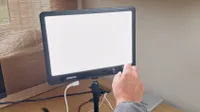
The Neewer PL60C is a powerful yet relatively portable flat-panel LED. By being both an RGB and a bi-color LED, it ticks two major boxes. You can set its 800 LEDs to mimic a wide range of industry-standard colour gels, or dial in a specific colour temperature on the Kelvin scale to make it complement other relight sources.
Pros
- +
Bi-colour and RGB
- +
Light and portable
- +
18 animated video effects
- +
Control via App or buttons
Cons
- -
Requires mains power
- -
Requires lots of knob twiddling
Why you can trust Digital Camera World Our expert reviewers spend hours testing and comparing products and services so you can choose the best for you. Find out how we test.
At the start of 2025, I tested and reviewed a couple of LED lights from Neewer. One of them – the Neewer AS600B 600W Bi-colour LED – was a very powerful and heavy 600W studio light, weighing in at 5 kgs (11 lbs). It was so heavy that it shipped with a wheeled carry case.
The subject of this review – the Neewer PL60C – is a much lighter, less powerful, and much more affordable 60W LED. Its lighter weight was fortuitous, as I couldn’t access my usual studio car parking space, so I had to carry the light and my camera gear for half a mile to the studio!
Like the Neewer AS600B, the PL60C is designed for studio use due to its requirement to be plugged into the mains (though you could buy a V-mount battery and a D-Tap cable if you did need to power it on location). For a more location-friendly Neewer LED, check out the Neewer HB80C, which has a more convenient internal battery for shooting outdoors.

Specifications
Color temperature range |
2500K~10000K |
Maximum luminous flux |
23000 lux |
Output |
60W |
Hue Range |
0°~360° |
Video lighting effects |
18 animated lighting effects |
Color Rendering Index |
CRI ≥96, TLCI ≥97 |
Battery Life |
N/A (mains powered) |
Main material |
Aluminum Alloy |
Dimensions |
380 x 342 x 86 mm / 14.9 x 13.4 x 3.3 in |
Weight |
2.4kg / 84.6oz |
Price
The Neewer PL60C 60W retails at $209.99 / £158.99, which is a reasonable and competitive price for an LED of this specification, especially as it can produce a wide range of colours at the twiddle of a knob. As a 60W light, it’s more than powerful enough to add a strong key light to your subject, with a 23,000 lux output that kicks out the equivalent of 23,000 candles!
If you want to use a key light and a fill light to add a more three-dimensional ‘modelled’ look to your portraits, then you can pick up a 2-pack PL60C set for £312.80 on Neewer’s site. The 2-pack costs $459.99 / £288.79 on Amazon at the time of writing.
Design & Handling
Unlike the heavier and chunkier COB (Chip On Board) Neewer AS600B I mentioned in the introduction, the Neewer PL60C is a flat-panel LED, so it takes up far less space in the studio (and it’s also much easier to transport thanks to a branded carry case which features foam inlays that have been shaped to keep the lamp safe in transit).
The PL60C’s panel has 800 LED bulbs inserted into it, which cast a strong, wide, and even key light source onto your subject. The flat-panel LED unit is attached to a metal U-bracket with a socket at the base. This enables you to pop the light onto a studio lighting stand’s bayonet mount. You can then tilt the LED up or down via the U-bracket to suit your subject’s position. The front of the light has a set of aluminium barn doors, which you can adjust for a wider or narrower field of illumination.

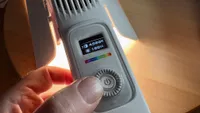
On the rear of the light is a control panel that sits below two cooling fans (plus there’s a little plastic button to toggle between the three fan modes – Auto, Mid, and Mute). At the base of the rear unit is a power socket, which I used to power the LED via its supplied power adaptor, which I plugged into a studio’s wall-mounted power socket.
A colour LCD TFT (Thin-Film Transistor) display screen on the rear of the PL60C enables you to view a range of properties (such as the LED brightness and colour hue). A small plastic Mode button enables you to toggle between the PL60C’s six different light modes - CCT, HSI, RGBCW, Gel Mode, and FX Mode (more on these in the Performance section). You can then use two main control knobs to adjust a wide range of properties, such as choosing a specific industry standard lighting gel (from the Lee and Rosco scales) or fine-tuning a green or magenta tint, for example. The control knobs can also be pressed as buttons to change the property that you’re adjusting.


As well as the two main control knobs, there are four plastic buttons that can be used to trigger user-defined lighting presets. You can also select one of four dimming curves - Exponential, Logarithmic, S-curve, and Linear for use with DMX-controlled professional lighting set-ups. Another way to control the PL60C is via the Neewer app - more on that in the Performance section.
The whole unit is solidly built and mainly constructed from an aluminium alloy, but the two main plastic knobs (and the smaller inserted buttons) do feel a bit cheap. I presume these plastic components help keep the price down.


Performance
To test the Neewer PL60C, I took it to a TV studio. Unlike the super heavy AS600B 600W Bi-colour LED that I reviewed in the same location at the start of 2025, I was easily able to carry the PL60C in its carry case in my favourite 18L backpack, including accessories such as mini tripods, plus the two iPhone 16s that I used to record this review’s supporting video.
At 600W, the bigger Neewer AS600B that I mentioned earlier was far too powerful for my filming needs, so I was much happier to test and review the smaller 60W PL60C, as this type of LED better suits my requirements as a videomaker and portrait photographer. Plus, at well under $200, the PL60C is much more within my price range!
And as the AS600B was only a bi-colour light, it could only be adjusted in the Kelvin scale (from warm to cool light). The cheaper and lighter PL60C is both a bi-colour and an RGB LED, so it can produce a far wider range of colours for more creative-looking results (as well as the usual bi-colour scale in degrees Kelvin). To be honest, I’d never consider buying an LED that didn’t have an RGB adjustable output!
I started my test by controlling the output of the tripod-mounted PL60C using the buttons and knobs on its rear control panel. Since I didn’t have a model on this shoot (they cost almost as much as I get paid for a review!), I popped a flower in a vase in front of the cameras so I could demonstrate how the output of the PL60C affected a subject.

The PL60C’s rear-panel two-knob system was easy to use. The left knob changed the intensity of the selected mode (such as CCT - colour temperature). I could see the intensity value in the nicely designed full-colour TFT display. The right knob enabled me to adjust colour temperature through an impressive range, from a warm 2500K to a much cooler 10000K.
By pressing the right knob to treat it like a button, you can jump to other properties in a mode, such as accessing a green and magenta tint counteracting slider in the CCT mode. In the HSI (Hue, Saturation, and Intensity) mode, you can use the knob/button system to choose a wide range of colours from a colour wheel and change their Intensity (brightness), Hue, and Saturation.
Now, while the combination of the PL60C’s TFT display and the button/knob control mechanism works well, you do have to rotate the buttons a lot to dial in your desired attribute (especially when choosing a colour from a 360º control wheel). So I found it relatively time-consuming to set up a specific lighting scenario compared to doing the same thing via the Neewer app.
By using the Neewer app to remote control the PL60C, I was able to replace the potted plant model with me! I could then adjust a host of properties from in front of the light (and the camera) in a much faster time. Thanks to the app, I could instantly choose a specific colour from the GELS mode by tapping on it (rather than twiddling a knob to dial it in). The app also gave me more control over the FX mode’s 18 animated lighting effects.
For example, I could customise the flashing cop car effect to match the lighting pattern of various countries’ police cars (such as blue, red and blue or red, white and blue). A very useful FX setting is HUE Loop. This causes the light to cycle through a range of colour hues, which I find very useful when adding variety and atmosphere to a model shoot. Check out this review supporting video to see the Neewer app (and the light’s rear panel control knobs) in action. The app also enables you to toggle the lamp’s fan between Auto, Mid, and Mute modes, though I couldn’t hear the fan noise even when filming close-up on the sea of the unit.
As you’ll see, I enjoyed using the app, and having each mode’s properties available to adjust with a tap or a swipe made it far easier and more convenient for me to control the impressive output of the Neewer PL60C than by using the LED’s physical knobs and buttons.
Verdict
The Neewer PL60C offers a balance between affordability, portability, and power. At 60W, I found it more than powerful enough to light a typical studio subject, but it was also light enough for me to carry to the location over a distance. Indeed, I didn’t need to push the Intensity much above 50% to illuminate my subject in the studio around 10 feet away, so there’s plenty of power available to illuminate more distant subjects in larger locations.
The PL60C’s rear-panel physical control knobs work well (though they do take a lot of rotating to dial in specific colours or intensities), but the free Neewer app gives you more control from in front of the light and camera, making this a very useful accessory for solo shooters.
Personally I prefer using LEDs with a built-in battery for on location portrait shoots and street photography (such as the Harlowe Avant Mini Max, but if you do work indoors or in a studio then the Neewer PL60C will add effective drama, atmosphere and key (or fill) lighting to your clips and stills (plus the PL60C is hundreds of pound cheaper than the Avant Mini Max). Don’t forget to check out the supporting video in the Performance section to see me put the Neewer PL60C through its impressive paces.
Features |
A flat-panel of 800 LEDs provide a strong widespread key (or fill) light. 6 lighting modes enable you to change a host of properties such as hue, saturation and intensity. 5 |
Design |
Built mainly of aluminium alloy (including sturdy metal barn doors). Plastic knobs feel a bit cheap and need lots of rotating. TFT screen well designed and makes it easy to adjust a host of LED properties. 4 |
Performance |
The 60W power was more than enough to key light my subject and it was an easier matter to adjust colour, hue and saturation for a range of looks, especially remotely via the app. 4 |
Value |
Very reasonably priced for a versatile 60W studio flat-panel RGB and bi-colour LED, and a two-pack kit is available if you need a key and fill light set-up. 4 |
Overall |
★★★★☆ |
Alternatives