Digital Camera World Verdict
The versatile Shure MV88 USB-C enables you to use your smartphone to capture a wide range of audio scenarios, such as a two-person podcast-style interview, a journalist doorstepping an interviewee, or a musician recording a rehearsal using an adjustable stereo field. It’s suitable for audio newbies thanks to presets and auto level control, but pros will be able to take manual control over a host of properties. The Shure MV88 USB-C gives you studio-quality features in a portable smartphone-compatible design
Reasons to buy
- +
No battery required
- +
No dropout
- +
24-bit audio
- +
Auto level and noise cancellation
- +
Four polar patterns
Reasons to avoid
- -
Some handling noise
- -
Windshield not completely effective
Why you can trust Digital Camera World Our expert reviewers spend hours testing and comparing products and services so you can choose the best for you. Find out how we test.
Shure have been successfully designing and selling microphones for a century now, which indicates that they know what consumers of audio equipment require and meet those needs. With smartphones increasingly serving as video and audio recording tools for journalists, vloggers, and content creators, Shure has dedicated their efforts to creating a microphone tailored to this demographic. In 2015, they unveiled the first iteration of the MV-88 - a directional condenser mic that plugged straight into an iPhone via a built-in Lightning plug.
To enable Android users to enjoy using a version of the MV88, Shure then released the MV88+ Video Kit. This enabled Android users to attach the mic to their devices via a USB-C cable, while the mic sat in a cradle above their mini tripod-mounted smartphone. In 2025, Shure released a wireless version of the MV88 - the MoveMic 88+. This versatile mic’s Bluetooth connectivity removed any need to physically connect the MoveMic 88+ to any brand of smartphone, making it compatible with both iPhone and Android devices.
In 2026, Shure has come full circle with the release of the MV88 USB-C Stereo Mic. The 2015 version was only compatible with Apple’s iPhone, but the 2026 version’s USB-C connector means that any smartphone user can plug the MV88 into their device and instantly enjoy using a wide range of pro mic features, such as four polar patterns, auto level control, and AI-powered audio denoising.

Specifications
Polar patterns |
Adjustable stereo (60 - 135 degrees), Mono cardioid, Mono bi-directional, Raw mid-side |
Adjustable Gain Range |
0dB - 36dB |
Sample Rate / Bit Depth |
48 kHz / 24-bit |
Signal-to-Noise Ratio |
> 85 dB |
High Pass Filter |
75 Hz / 150 Hz |
Max SPL |
120 dB SPL (At Minimum Gain, Flat Mode) |
Noise Cancellation |
Yes - optimised for spoken word. |
Dimensions |
Height: 67.84 mm / 2.670 in Width: 26.41 mm / 1.040 in Depth: 35.41 mm / 1.394 in |
Weight |
40g |
Price
The official price for the Shure MV88 USB-C is $159 / £145 / €169. This is an excellent price for a pro-specced plug-and-play mic, especially as it has four adjustable polar patterns to suit a range of recording scenarios (such as an interview or a live music recording). The mic’s auto level control and real-time Denoiser also enable you to capture a better quality audio recording without requiring you to have professional sound engineering skills.
The MV88 USB-C is also much cheaper than its similarly specced wireless sibling, the Shure MoveMic 88+ (which will cost approximately $100/£100 more), so it offers a more affordable way to capture pro-level sound recordings from your smartphone.
Design & Handling
As I mentioned in the intro, the Shure MV88 USB-C is similar in design and specifications to the other three incarnations of this mic (which began with 2015’s lightning-only MV88), with pro features such as adjustable polar patterns - more on those later. One key design improvement in 2026’s incarnation of the MV88 is the extra-long USB-C prong that enables you to plug the mic straight into your smartphone while it is still wearing a case, and this works with cases up to 2.1mm thick. I’ve encountered kits before where I needed to take the phone out of the case every time I wanted to plug a mic (or a receiver) into my smartphone, so this is a very useful and welcome design feature.
As the Shure MV88 USB-C is designed to record audio in a wide range of ‘on the go’ locations, the addition of an auto level control is a very welcome design feature. This means audio levels will be adjusted automatically on the fly so that quiet subjects will sound louder and noisy ones will be less likely to add distorting peaks to the recording. This makes the Shure MV88 USB-C an excellent choice for entry-level sound recordists who just want to plug-and-play, while pros can manually adjust the sound levels (and EQ) using the Shure MOTIV Audio for Video apps.

One thing the MV88 USB-C lacks compared to some predecessors is a headphone monitoring connection. This means you need to play back a recording to check for issues like wind noise (unlike the MV88+ Video Kit, which allows you to monitor audio live through headphones plugged into the mic). The absence of a headphone monitoring socket enables the more compact MV88 USB-C to be small enough to plug directly into your smartphone.
Indeed, when the MV88 USB-C was zipped into its rugged and compact carry case, I could carry it in my jeans pocket, though it did create a noticeable oval bulge. This brought a potential slogan to mind - “Is that a Shure MV88 USB-C in your pocket or are you just pleased to see me!” Sorry. Couldn’t resist!

2015’s original MV88 was an Apple-only device, so the MV88 USB-C is a response to meeting the needs of Android users as well as Apple fans. Talking of Apple, the MV88 USB-C has been designed to be a plug-and-play device for modern iPhones and it is fully Apple certified, as the Made For Apple logo on the box attests.
The MV88 USB-C is small, but it’s made from a reassuringly sturdy aluminium, which is a refreshing change from the many plastic mics and receivers that I’ve tested in the last few years. When plugged into your smartphone, a reassuring green light indicates that the mic is being powered by your device, so there’s no issue of you turning up to a shoot with a flat battery on your mic.
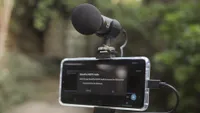
A really cool design touch is that the mic can be rotated on a hinge so that it’s pointing directly at your mouth if you’re using a mono-cardioid polar pattern to treat it like a mini shotgun mic. Or you can stand the mic vertically so that it will record both you and an interviewee when set to the bi-directional (figure of eight) polar pattern. A helpful L and R on the MV88 USB-C enables you to point the mic at a subject, such as a band, and capture an accurate left and right stereo field. You can also rotate the mic so that the stereo recording field is set up horizontally. This attention to design detail is a hallmark of a company that knows the needs of its sound recording customers.

Performance
To test the Shure MV88 USB-C, I took it to a local park where there was plenty of background noise, such as running water, wind, and barking dogs. Check out this section’s supporting video to hear how the various polar patterns adjusted the sound captured by the mic when it was plugged into my iPhone 17.
To set up the MV88 USB-C, you can use the free MOTIV Audio smartphone app. This enables you to choose one of the four polar patterns: Stereo (adjustable between 60 and 135º), Mono Cardioid (perfect for talking straight to the camera without picking up unwanted sounds from behind your smartphone), or Mono bi-directional (for listening to both sides of the mic during a two-person interview or podcast). There’s also the RAW mid-side polar pattern, which is more like a combination of the Mono Cardioid and the Mono bi-directional polar patterns, giving audio professionals more to create a custom stereo image in a post-production audio editing app. For the average user, the first three polar patterns will be the most useful.

What’s great about using the MV88 USB-C and the MOTIV Audio app is that every setting that you choose is then stored in the mic. So if you’ve set up the mic in the morning to record using a Mono bi-directional polar pattern, then it will still be set up that way when you plug it into your smartphone to record your interview later in the day. If you’ve set it up to record a gig, then the precise stereo angle that you’ve dialled in will still be set on location. Nice touch! The app also has five audio presets to help you quickly choose suitable settings for various scenarios: Speech, singing, flat, acoustic, and loud. Audio pros can dive deeper with advanced controls such as microphone gain, five-band EQ, limiter, compression, and a high-pass filter.
As well as choosing a polar pattern, the app also enabled me to turn on auto level control and the real-time Denoiser during my test shoot. As you’ll hear from my supporting video, the Denoiser did a great job of reducing the presence of consistent background ambient noise (such as wind and running water), but short loud sounds, such as a barking dog, did break through the denoising threshold (which is to be expected with any real-time noise reduction). The 24-bit 48 kHz audio quality recordings sounded rich, full, and clear. Denoising on many mics can make the voice sound a little thin, flat, and electronically distorted, but on the MV88 USB-C, my voice was nice and clear with minimal noise reduction artefacts.
Verdict
I’ve reviewed dozens of smartphone mics for Digital Camera World, and these tend to be wireless kits, with a transmitter that broadcasts your voice wirelessly to a receiver plugged via a USB-C connector into your phone. The Shure MV88 USB-C is more unusual in that you plug the mic directly into your device, so you don’t have to worry about pairing it via Bluetooth or suffering from signal drop-out.
Unlike a wireless mic, you do need to be relatively close to your smartphone-mounted mic to capture a strong, clear voice recording via the MV88 USB-C, so this will suit vloggers who want to chat straight to a handheld smartphone or journalists who need to perform an interview where they can sound as loud and clear as their interviewee.
Musicians will also enjoy using the stereo polar pattern to capture an orchestra or band rehearsing (as this will be loud enough to be recorded from a distance). So for certain types of content creators, this portable and professionally specced plug-and-play mic will certainly elevate the quality of your audio production values, but if you need to record your voice from a distance, then consider the wireless version of this mic, the Shure MoveMic 88+.
Features ★★★★★ |
In conjunction within the free MOTIV Audio app you can choose one of four polar patterns to change the way the mic ‘listens’. Presets enable you to instantly set up the mic for various scenarios. Pros can take full manual control. |
Design ★★★★★ |
A rotatable and hinge-able head combines with four polar patterns to make this mic suit a wide range of recording scenarios (and no battery required!) |
Performance ★★★★★ |
The Denoiser and auto level control (plus the 24-bit/48 kHZ pedigree) captures consistent great quality audio. The adjustable stereo field is also impressive. |
Value ★★★★★ |
It costs more than many mic kits, but you get a quality build, a great design and more control for your money. |
Overall |
★★★★★ |
Alternatives