Digital Camera World Verdict
The Xinbaohong Selfie Ring Light AJ-19 is a durable, compact, and highly portable accessory that you can whip out of your pocket and clamp onto your smartphone to improve the quality of your selfies. It’s designed to surround the front-facing camera so that you can capture a 'catchlight' reflection that brings your eyes to life, but as a result, the ring light’s sturdy clip will cover the rear-facing cameras at the back of your smartphone. If you’ve yet to invest in a ring light and are on a tight budget, then the Xinbaohong Selfie Ring Light AJ-19 is worth considering (and you can clamp it to a laptop too to improve the quality of your streaming footage).
Pros
- +
Lightweight and durable
- +
Very affordable
- +
Clips onto smartphone or laptop
Cons
- -
Only three CT presets
- -
Clip covers rear-facing lenses
Why you can trust Digital Camera World Our expert reviewers spend hours testing and comparing products and services so you can choose the best for you. Find out how we test.
I’ve reviewed a few smartphone ring lights for Digital Camera World, including the Godox Litemons LR30Bi. Like the LR30Bi, the AJ-19 Selfie Ring Light is a ring of LEDs (light-emitting diodes) designed to physically clip onto the top of your smartphone and illuminate your face while you snap a selfie or present a 'talking head' video sequence for your YouTube channel, for example. The extra illumination provided by a ring light enables you to fill in harsh shadows caused by available light (such as the sun shining through a window). More light means that your smartphone can use a faster shutter speed and avoid motion-blurred selfies. Extra light also minimizes artifacts such as noise in smartphone-captured clips and stills. A ring light also produces a characteristic circular reflection (or catchlight) that helps add life to your eyes.
The AJ-19 Selfie Ring Light is made by Xinbaohong, a China-based company that has a track record of producing affordable LED selfie lights and video conferencing lights. I tested the device with an iPhone 17, though as it attaches via a large sprung plastic clip, it should fit onto any smartphone.

Xinbaohong Selfie Ring Light AJ-19: Specifications
Dimensions |
3.5 x 3.5 x 1.2 in (90 x 90 x 31mm) |
Material |
ABS |
Adapter |
Micro USB (USB-C) |
LED |
20 x white LEDs, 20 x yellow LEDs |
Colour Temperature (CT) |
3500K – 6000K |
Max smartphone width |
0.6 in (16mm) |
Weight |
1.6 oz (45g) |

Xinbaohong Selfie Ring Light AJ-19: Price
The Xinbaohong Selfie Ring Light AJ-19 is widely available via Amazon worldwide, in countries including the USA, UK, and Australia, for under £20 / $20 / AU$30. At that price, it falls in the entry-level of the smartphone ring light price spectrum, but as you’ll see from the footage and stills accompanying this review, it can make a difference to the quality of your smartphone-captured assets. Sure, it’s not the brightest LED on the market, but for the low cost, it provides a device that can make you look better on a Zoom call or capture a less blurry portrait while on the go.

Xinbaohong Selfie Ring Light AJ-19: Design & Handling
The first thing that struck me as I took the Selfie Ring Light AJ-19 out of its box was how light it was. I couldn’t find the weight on any specifications, but by popping it on my kitchen scales, it weighed in at a super light 1.6 oz (45g). This meant that its weight was completely negligible when I mounted it on my iPhone 17. I’d previously tested the Godox Litemons LR30Bi, another smartphone ring light, which was a relatively heavier 2.9 oz (83g). I preferred the lighter weight of the Selfie Ring Light AJ-19; plus, as it overlaps your smartphone, it’s less top-heavy than the Godox Litemons LR30Bi.
The Selfie Ring Light AJ-19’s lack of weight is down to the ABS (Acrylonitrile Butadiene Styrene) material from which it is constructed. ABS is the type of plastic used to create Lego bricks, so it’s fairly tough and durable. Despite the durability of the casing, the manual warns you not to vigorously shake the product, or it might fail. This could be down to the fragility of internal components such as the circuit board or the LED beads inserted into the ring. I didn’t treat the device vigorously during the test just in case of failure.

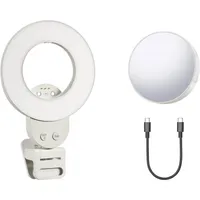
Inside the opaque ring on the front of the ring light that acts as a flattering diffuser, there are 40 LED beads. Twenty of these produce a white light. The other 20 produce a yellow light. A single switch enables you to toggle between a mixture of white, yellow, or white and yellow LED activation, which changes the color temperature output of the ring light.
The rear of the LED ring consists of an identically sized clip. Strong springs ensure that the clip will cling onto your smartphone securely (fitting smartphones up to a width of 0.6 in [16mm]). The Selfie Ring Light AJ-19 fitted onto my iPhone 17 even when it was encased in its Apple-branded protective case.

Xinbaohong Selfie Ring Light AJ-19: Performance
Once I’d clipped the Selfie Ring Light AJ-19 to my iPhone 17, it was a simple matter to press the single button on the edge of the ring to toggle between three color temperature settings. The device’s official specifications give a color temperature range between 3500K and 6000K. In practice, this means you can emit a warm light, a cool light, or use a combination of both white and yellow LED beads to create an intermediate, more neutral wash of light.
The specification sheet also claims that you can have three levels of brightness, which I found wasn’t accurate. You can change the brightness by long-pressing on the single button, but in practice, all this seemed to do was gradually dim the illumination to a less-than-useful light level. Therefore, most people will use the standard illumination setting that the device defaults to, rather than the super-dim alternative.

If you double-tap the button on the side, this causes the LEDs to flash in a repeating sequence. This sequence consists of three short flashes followed by three long flashes, followed by three short flashes – SOS in Morse code. This could be a useful tool in certain situations, but luckily I didn’t need to send out any distress signals during my test. The Selfie Ring Light AJ-19’s publicity material suggests you could clip it onto a bike to make yourself more visible as you cycle. This could be a situation where the flash mode might be useful.
The Selfie Ring Light AJ-19 slides over the top of your smartphone so that it encircles the selfie camera on the front of your device. As you can see from my test footage and stills, this adds a fill light to your face and a catchlight to your eyes when using your smartphone’s front-facing camera.
However, when clipped to the top of your smartphone, the large circular clip at the rear of the LED overlaps your smartphone’s superior rear-facing lenses. So you can’t use those lenses when the light is attached to your device in its selfie deployment. I found that when I wanted to film using the rear-facing cameras, I was able to clip the light onto the side of my iPhone 17. This made it able to illuminate products that I wanted to film with the rear-facing cameras, without the clip getting in the way of the lenses. I was also able to clip the ring light onto my Apple MacBook Air. This made my face look brighter and clearer when making video calls, and the catchlight reflecting in my glasses indicated that I’d spent money on some third-party lighting!

Xinbaohong Selfie Ring Light AJ-19: Verdict
So, for less than $20 / £20 / AU$30, the small and portable Selfie Ring Light AJ-19 is an accessory that won’t break your budget, but it will improve the image quality of your photo and video selfies. It’s not the brightest LED ring light on the market, but when clipped to your smartphone and held at arm’s length, it’s bright enough to make a difference (and add a sparkle to your eyes). It’ll also brighten up your face when clipped to a laptop.
It only offers three CT (color temperature) settings, but at this price, I would not expect you to be able to dial in specific settings in the Kelvin scale. The main downside to the design of the unit is that the large clip obscures the rear-facing cameras. If you want a selfie ring light that enables you to illuminate your face when using front-facing or rear-facing cameras, then check out our review of the slightly more expensive Godox Litemons LR30Bi.
Features ★★★★☆ |
The Selfie Ring Light AJ-19 provides three color temperature presets and an SOS flash mode. Its plastic opaque ring diffuses the light for a more flattering look. |
Design ★★★★☆ |
The Selfie Ring Light AJ-19 has a durable plastic casing. A sturdy spring clip will keep it safely attached to your smartphone. One button changes intensity and color temperature. It should fit most smartphones (up to 0.6 in [16mm] in width). |
Performance ★★★★☆ |
Despite being a cheap and basic LED ring light, the AJ-19 filled out the shadows caused by location light and added a catchlight to bring life to the eyes. The battery performed well and lasted the duration of my testing. |
Value ★★★★☆ |
At under $20 / £20 / AU$30, this is an entry-level price for a ring light, so expect entry-level specifications. Despite the price, it does make a difference to your clips and stills. |

Alternatives