
DSLRs aren't as popular for shooting video as they once were, but thy can still be a great choice for budget-conscious vloggers and videographers. I'm an old hand with DSLRs, having started my photography journey with a Canon EOS 6D and used almost every DSLR released since, and I've used my experience to pick out the DSLRs that I still rate for video in 2026.
Sure, mirrorless cameras offer high resolutions and better autofocus. However, Canon and Nikon DSLRs (I'd steer clear of Pentax for video) benefit from huge ranges of great-value lenses, as well as their rugged build, long battery life, and knock-down prices. Many also still receive firmware updates, helping them stay competitive
I've aimed to cover the best DSLRs for video at every level, so this guide includes beginner options, mid-range models and top-tier DSLRs for pros. For other video options, check out our guides to the best cameras for filmmaking, which mostly covers mirrorless options.

Lauren has previously served as the Managing Editor at Digital Camera World, Editor of Digital Photographer and a features writer for the likes of TechRadar, Canon Europe and Stuff magazine. With over ten years of experience in the photo industry, she started her professional career shooting with the Canon EOS 5D Mark III and Nikon D800 DSLRs.
The Quick List

If you’re making video content for the first time, on a tight budget or just don't need a high-end camera, the Rebel EOS SL3 / EOS 250D is an excellent option. I like the guided interfaces to help beginners get to grips with the camera's tools and features.

The D7500 is the second-cheapest DSLR for video in this guide. With an APS-C-sized sensor and 4K crop applied to video footage (with also a maximum frame rate of 24p), its top level of performance comes from Full HD video at 60fps. It's not the best that money can buy, but an affordable, sensible all-rounder for enthusiasts.

Costing just a fraction more than the D7500, the EOS 90D shares its APS-C sensor and up to 120fps in Full HD for slow motion, but also gives you uncropped 4K video. Canon's vari-angle touchscreen is a joy to use and makes creative angles and vlogging very easy.

The Nikon D850 was a landmark camera when released, and its 45.7MP sensor and low-light capabilities are still impressive today. If you're upgrading from a basic Nikon DSLR or coming to the system from scratch, it offers stupidly good 4K full-frame video for advanced creators.

The EOS 5D Mark IV is a classic professional full-frame body and a camera I still use today for its versatility. As the 4K footage is subject to a 1.64x crop, it's better for photographers who occasionally shoot video. But it's a pleasure to use, and always reliable.

Blend the best of mirrorless and DSLR cameras, and you get the Canon EOS-1D X Mark III. Its deep learning AF gets better the more you use it, and I was blown away by its 5.5K RAW video footage. It offers the best DSLR video specs for serious filmmakers, but it comes at a considerable cost.
The best DSLRs for video
Why you can trust Digital Camera World Our expert reviewers spend hours testing and comparing products and services so you can choose the best for you. Find out how we test.
Best beginner DSLR for video
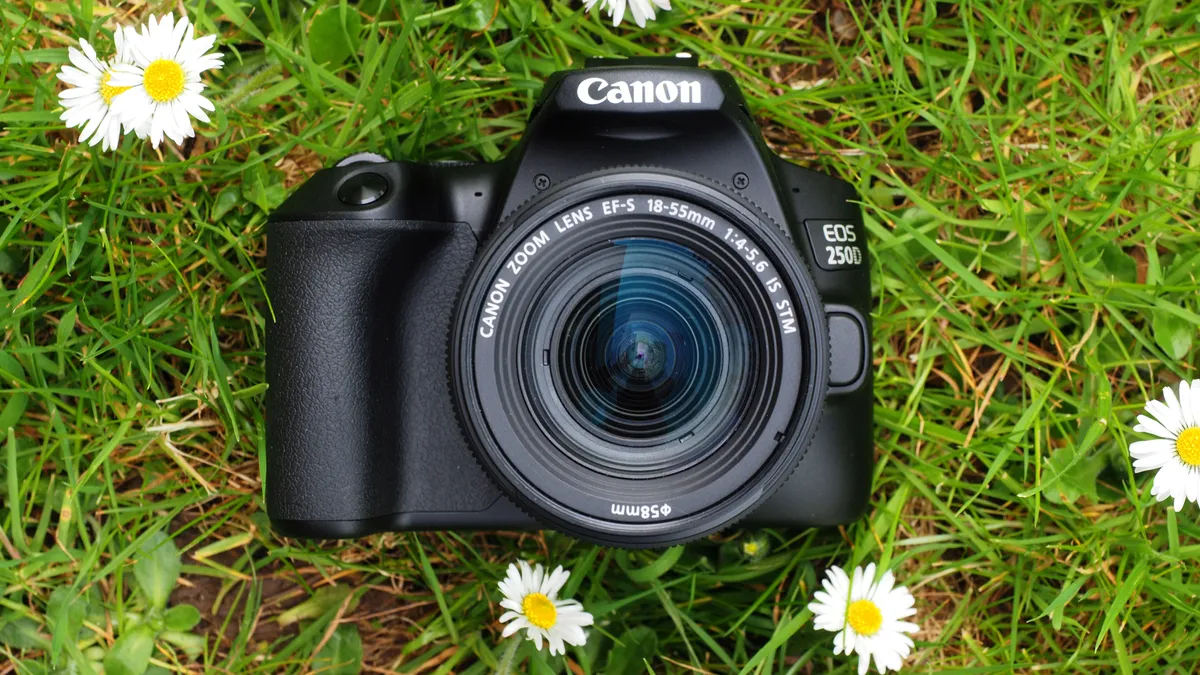
✅ You're a total beginner: with guided menus for newbies, the 250D offers an intuitive interface that will help you get to grips with the tools, modes, and functions if you're not sure where to start.
✅ You're on a tight budget: the EOS 250D / Rebel SL3 is the cheapest DSLR in this guide. If price is the most important factor to you, you won't find a better offer for a 4K-capable DSLR.
❌ You rely on autofocus: the 9-point AF system is dated, and with so few points coverage across the frame isn't very comprehensive. It won't keep up with moving targets.
❌ You'll be outdoors a lot: unlike the D7500 above, the Canon 250D doesn't have any weather sealing. Although its polycarbonate outer shell feels well-built, the camera could get damaged in a real downpour.
If you’re just starting out with making video content, then you’ll probably have a restricted budget. For that reason, the Canon EOS 250D is an excellent option for beginners. You get a decent degree of video specs, in a very wallet-friendly model.
4K video is available, but this has a fairly big crop (on top of the already cropped sensor), meaning your angle of view becomes narrower. At up to 60fps available in Full HD, you’ve got enough flexibility for recording vlogs. I did quickly get used to this when I tried the camera, but you will have to recompose your shots if you’re used to uncropped footage.
As we also mentioned when we reviewed the camera, it's not the cheapest Canon DSLR, but it is in our opinion the cheapest one that's actually worth buying, especially for video. Focusing isn’t instant, but the camera is surprisingly zippy at following subjects around the frame, but that’s once autofocus has found its target.
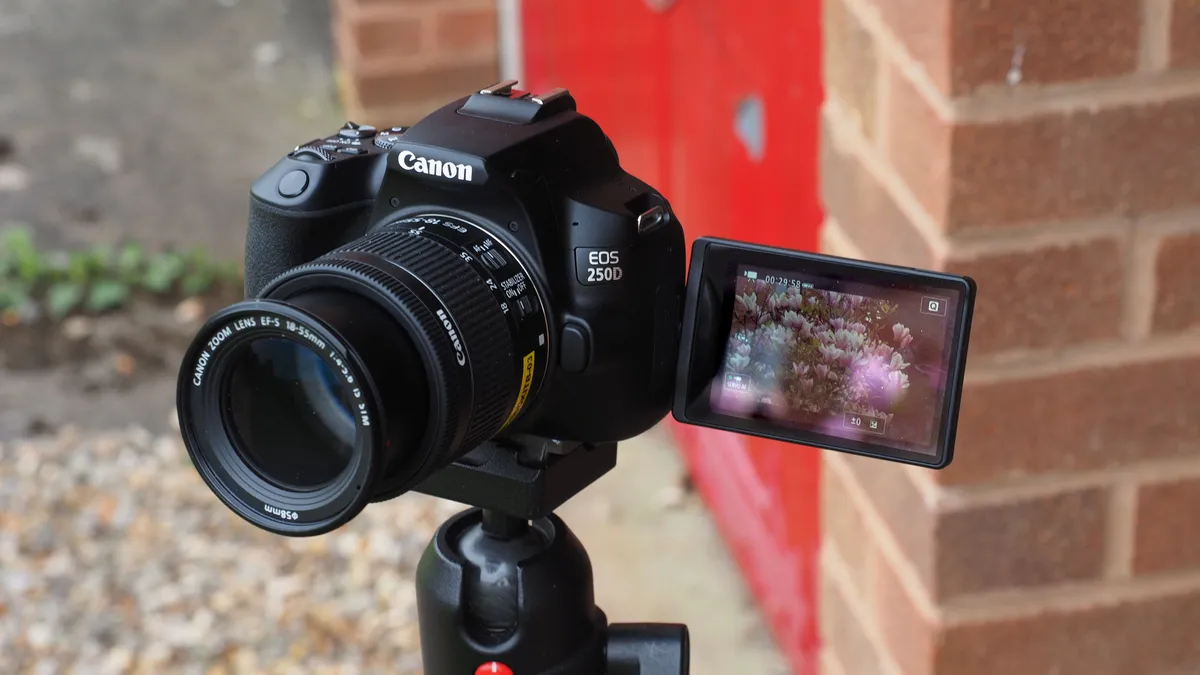
The fully articulating screen puts a lot of versatility at your disposal and makes it easy to record pieces to the camera, while the small size of the camera also means it's well-suited for travel vlogging. If you’re upgrading from a smartphone, or you’re a first-timer and want a DSLR that’s easy to use, the 250D’s guided interface and compact dimensions will make it a great fit.
Read our full Canon Rebel EOS SL3 / EOS 250D review for more details
Features |
Small DSLR squeezes in 4K video (although cropped), and a 24MP sensor for snapping photos too |
★★★★ |
Design |
A very small and lightweight DSLR, with a articulating screen and an intuitive menu system for beginners |
★★★★★ |
Performance |
4K performance is good although heavily cropped, and the dated 9-point AF system makes autofocus slow |
★★★★ |
Value |
One of the cheapest DSLRs around for video, it offers great value for those starting out and even rivals mirrorless models on cost |
★★★★★ |
The Canon EOS 250D remains a standout option for budget-conscious videographers looking for a reliable DSLR that offers solid video performance. With its 4K recording, Dual Pixel autofocus, and 24.1MP sensor, the 250D provides sharp, detailed footage with smooth focusing transitions, making it an excellent choice for vloggers and content creators.
While it may not offer all the high-end features of more expensive models, its compact design, easy-to-use interface, and solid video capabilities make it one of the best budget-friendly DSLRs for video in 2025.
Best all-rounder DSLR for video

✅ You want a reliable build: the D7500 is weather-sealed all over and built like a tank. Even after years of use, you won't have to worry about handling it too gently, or in poor weather conditions.
✅ You shoot in low light: the D7500 has decent low-light capability for stills and video, which is ideal if you like to shoot during the golden hours.
❌ You want full 4K footage: the D7500 offers 4K video but at a 1.5x crop. You get faster frame rates in full HD (60, 50, 30, 25, 24p), but if you need high-res video and fast frames you'll be disappointed.
❌ You need two card slots: there's only one SD card slot, which prevents you from recording simultaneously. Impressively, you can record uncompressed, 8-bit 4:2:2 4K UHD files to an external drive via the HDMI port.
The Nikon D7500 is an ageing DSLR, but it's still a good all-rounder and ideal if you record both stills and video – or if you're a photographer who's just starting to experiment with content creation. With its APS-C-sized sensor and 4K crop applied, the camera's best performance comes from staying in Full HD resolution, where you can capture a maximum of 60fps.
The D7500 marked the first time that Nikon introduced 4K video in a non-professional DSLR. Our reviewer felt the results were mixed, noting that the camera doesn't have on-sensor phase detect autofocus, and when using live view mode for 4K video, it relies on slower contrast-detect autofocus. Still, they were reasonably impressed with the contrast-detect AF in Live View mode, which is what you'll mostly be using as a video shooter anyway.
In terms of design, the D7500 has a carbon-fiber rather than metal alloy body, which is slightly less durable but also lighter as a material. It's still a chunky, weatherproof build, which is perfect for traveling and outdoor adventures. Handling-wise, I found the tilting touchscreen helpful for awkward angles, but it's hard to use for vlogging or presenting as you can't face it toward you.
Our reviewer was particularly impressed by the high-ISO performance of the D7500, which is excellent for a camera at this price point and gives the camera more versatility in low light. The D7500 doesn’t offer anything new for the DX format, but it strikes a good balance between high-end performance, versatile uses and affordability.
Read our full Nikon D7500 review for more details

Features |
4K video in an APS-C DSLR but slow frame rates and contrast-detect autofocus hold it back |
★★★★ |
Design |
Weather sealed body with a good grip and tilting screen, but the touchscreen doesn't spin around for vlogging |
★★★★ |
Performance |
Good video performance and excellent in low light shooting, although contrast-detect AF now dated |
★★★★ |
Value |
A very affordable price point if you like DSLRs, but there are much more modern cameras for the same cost |
★★★★ |
The Nikon D7500 strikes an excellent balance between performance and value for videographers seeking a versatile DSLR. Its 4K UHD recording, 20.9MP sensor, and fast autofocus system deliver smooth, high-quality video with impressive detail and clarity.
The D7500’s ergonomic design, excellent low-light performance, and 8-bit 4:2:2 HDMI output make it a solid choice for both hobbyists and semi-professionals looking for a dependable video camera.
Best enthusiast DSLR for video

✅ You want to go handheld: the 90D is chunkier than most equivalent mirrorless cameras, but the bigger surface area, rounded corners and grip work in its favor for ergonomics and comfort.
✅ You take audio seriously: the 90D has an external mic socket as well as a headphone port for monitoring your audio levels. It's a camera designed specifically for videography, rather than being an afterthought.
❌ You want the best autofocus: Canon’s mid-range 45-point AF system is fine for static subjects but lacks the speed and accuracy for fast-moving targets.
❌ You shoot fast: the 90D is a stills camera first, but it loses textural detail even at medium ISO settings. The 10fps frame rate is impressive on paper, but also let down by the limited buffer capacity.
There’s a lot to like about the Canon EOS 90D if you’re looking for a video-centric DSLR. It effectively combines mirrorless video and live view AF with classic DSLR handling. And although it's got an APS-C sensor, you still get uncropped 4K video and a range of frame rates – up to 120fps in full HD for delectable slow-motion footage.
There were a few things that disappointed me about the EOS 90D; notably the single memory card slot (SD / SDHC / SDXC) and average buffer capacity. But I found that the camera does a lot, very well, for an enthusiast price. Let’s start with handling. The fully articulating touchscreen makes it ideal for capturing all sorts of angles, including presenting to the camera, while the Dual Pixel CMOS AF puts in a good performance when shooting video.
When you switch the camera to live view mode for filming, there’s no autofocus disadvantage in comparison to a mirrorless camera. If anything, it’s on par, yet you still have the advantage of an optical viewfinder. I was impressed with how well the AF system tracked me around the frame, and with the quality of the in-built microphone. Although the headphone and microphone ports do allow you to get serious about sound quality with external peripherals.
While we did have to dock it points in our full review for the fact that continuous AF is not available when shooting 120p video, the fact remains that the Canon EOS 90D is a full-featured DSLR. Even now the EOS 90D is popular with YouTubers who haven’t yet moved to mirrorlress, and there's a reason for that.
Read our full Canon EOD 90D review for more details

Features |
Offering 4K footage, an articulating screen, solid modern autofocus, and with ports for external mics and headphones |
★★★★★ |
Design |
A bit chunkier than other APS-C DLSRs, this works to your advantage in gripping the camera in handheld shots |
★★★★★ |
Performance |
Canon's DPAF makes this a quick focusing DLSR for video with uncropped 4K and excellent internal and external audio |
★★★★★ |
Value |
While good value, mirrorless rivals offer newer features for around the same price, so you have to appreciate the DSLR build |
★★★★ |
The Canon EOS 90D offers a compelling package for videographers, combining 4K recording without a crop, a 32.5MP sensor, and fast, reliable autofocus. Its ability to capture high-quality video with crisp detail, along with excellent color rendition and versatile shooting modes, makes it a top choice for content creators. With a solid build, long battery life, and dual pixel autofocus in live view, the 90D delivers pro-level features in a user-friendly package
Best professional Nikon DSLR for video

✅ You need big battery life: if you've got a long day of filming and don't want to keep swapping for spares, the EN-EL15a battery is impressive (I got 1600 shots on a single charge).
✅ You've got big hands: the D850 has a slightly chunkier grip than the D810 before it, and that allows even large hands to cradle the body and reach the shutter button comfortably.
❌ You like SD cards: the D850 has memory slots for one SD and one XQD card. XQDs aren't widely available and have become expensive to buy.
❌ You use live view to focus: unlike the EOS 5D Mark IV's on-chip phase detection, you only get contrast-detection for autofocus in Live View which isn't as effective for moving subjects.
The Nikon D850 has been the DSLR to beat for several years with its blend of a high-resolution sensor, excellent handling, and a range of features. On release, I remember it being passed around the office with a sense of reverence and awe. In truth, some of its specs may have been eclipsed by mirrorless models – take the Nikon Z9 with its market-first 8K 60p maximum footage – but if you’re serious about both video and stills, it’s arguably still a king of the sector.
For video users, you get uncropped 4K and a diverse range of frame rates in both 4K and Full HD resolutions. Unlike many professional/advanced-level full-frame DSLRs, the screen tilts. Although that’s not super-handy for vlogging and social content, it’s very helpful for recording from other awkward angles.
We gave the Nikon D850 the highest score possible in our review – there was no other choice. The 45.7MP sensor offers rich, detailed RAW files, the likes of which can be cropped heavily and still maintain their quality. Although you’d never want to push ISO to the maximum of 102,400, noise control is excellent thanks to the EXPEED 5 processor. Our reviewer tested the camera’s resolution in lab tests, and called it “off the scale”.
The D850 outclasses the Canon EOS 5D Mark IV for full-frame 4K video, plus continuous shooting speed. It's a superb DSLR, one of the best made, and the full-sensor-width 4K video it shoots is gorgeous. I think that many videographers (apart from those shooting sports or journalism) could happily shoot with this camera for several years without feeling short-changed. If you need higher video resolution still but want to stick with Nikon, I’d recommend the Nikon Z9 with its market-first 8K 60p maximum footage.
Read our full Nikon D850 review for more details

Features |
Nikon's top pro DLSR has it all with 4K full frame video and huge 45MP stills as well |
★★★★★ |
Design |
This is a big hefty camera which makes it heavy for video, but it has all the controls and dials you will need for quick settings changes |
★★★★ |
Performance |
A true all-rounder with some of the best quality 4K video you are going to get from a DSLR camera and incredible 45MP images |
★★★★★ |
Value |
Reasonable value when you look at its still very respectable flagship DSLR spec sheet |
★★★★ |
The Nikon D850 continues to be a standout for video creators seeking a blend of high-resolution stills and impressive video capabilities. With its 4K UHD recording, 45.7MP sensor, and exceptional dynamic range, the D850 captures stunning video with remarkable detail and clarity.
Its robust build, excellent autofocus, and superior low-light performance make it a versatile option for both videography and photography. While it may be overkill for casual users, the D850 remains one of the best DSLRs for serious videographers in 2025, offering professional-grade video and stills in one powerful package.
Best professional Canon DSLR for video

✅ You rely on autofocus: thanks to the camera's Dual Pixel CMOS AF for live view and video, subject acquisition is good, albeit miles behind the EOS-1D X Mark III.
✅ You still love that DSLR design: the 5D Mark IV is part of a beloved series of pro cameras, and it will appeal to you if you appreciate its classic DSLR camera build (which is exceptional).
❌ You want 4K options: there's only one format for recording 4K video. 4K DCI(4096 x 2160) is arguably better than 4K UHD (3840 x 2160) but there's no log/flat gamma profile for greater recovery in post.
❌ You want a vari-angle screen: I love the Mark IV, but I've always felt creatively stifled by its fixed screen. It's touch-sensitive, but you won't be able to vlog or record at low angles easily.
Canon’s classic 5D series started the trend for video in DSLRs, the legacy of which we still see today in modern DSLRs and even mirrorless cameras. I started out with video on the 5D Mark III, but at that point, video features on the camera were a nice-to-have rather than a serious hybrid feature.
The 5D Mark IV now offers more high-quality DCI 4K video capture at 30fps, but it's subject to a heavy 1.64x crop of the sensor which means you’ll struggle to get wide-angle shots. Compared to the D850 which offers fully uncropped 4K footage, it’s a limiting factor. You do get a range of different frame rates – 30/25/24fps (approx 500Mbps) – and it’s possible to extract 8.8MP JPEGs from 4K video thanks to the Motion JPEG file format built-in. In Full HD the 5D Mark IV also shoots up to 60fps, although you have to drop down to 720p HD to record slow-motion at 120fps.
The fixed screen may annoy some wanting flexible shooting compositions. Otherwise, the camera handles well and is built superbly with the weather-sealing you’d expect from a pro body. Our reviewer found the customizable button just below the joypad on the rear of the body helpful for assigning a multitude of functions.
Other useful video features include a microphone and headphone sockets, time-lapse video recording, HDR Movie, and the ability to record in Canon Log Gamma. In our full review, we found that the Canon EOS 5D Mark IV is an all-rounder camera and a tempting option for many videographers.
Read our full Canon EOS 5D Mark IV review for more details

Features |
4K video (although cropped) and Canon's Dual-Pixel AF make a great team for video, audio inputs and C-Log also add some pro features |
★★★★ |
Design |
Canon's easy to use camera layouts are legendary, but for video the fixed screen is a very limiting factor |
★★★★ |
Performance |
While of great quality, 4K video is quite heavily cropped with only a select few frame rates, which severely limits its use for pros |
★★★★★ |
Value |
Pales in comparison to the specs you can get for much cheaper prices from Canon's mirrorless cameras |
★★★ |
The Canon EOS 5D Mark IV remains a trusted workhorse for professionals seeking a DSLR that excels in both video and photography. With its 4K video recording, Dual Pixel autofocus, and 30.4MP sensor, the 5D Mark IV delivers sharp, high-quality footage with smooth focusing transitions, making it a solid choice for filmmakers.
Its robust build, wide lens compatibility, and exceptional image quality in both video and stills solidify its place as one of the best DSLRs for video in 2025, especially for those looking for reliability in demanding production environments.
Best resolution DSLR for video

✅ Your subjects move a lot: the EOS-1D X Mark III's Dual Pixel CMOS AF is lightning fast for sports and wildlife stills, and super smooth for video.
✅ You need endurance: with a high-capacity battery capable of lasting over 2500 shots, and a high-speed gigabyte ethernet connection to blast through video transfers, you won't find a better workhorse DSLR.
❌ You're not a professional: only the best video resolution will do for commercial clients. If you're a hobbyist, it's not worth paying for the advanced features and 5.5K RAW (60p) footage.
❌ You've got small hands: this camera is big, and it's heavy. At over 1.4kg without a lens, it's not one you can carry around for hours or pop in a small bag.
The Canon EOS-1DX Mark III has a huge wealth of video features, but I'll start by saying you’ll likely need huge wealth if you want to buy one. If you shoot video for a living, or if money is no object, it’s the camera to go for, just on the autofocus performance alone.
When it comes to resolution, the camera gives you a lot of format options. They include 4K RAW (5.5K), 4K DCI, 4K UHD, and 4K DCI Cropped at 23.98, 24, 25, 29.97, 50, 59.94fps, plus Full HD with the same frame rates plus 120fps.
Smooth focusing is provided thanks to Dual Pixel CMOS AF (though it’s to be noted that this is not available in uncropped 4K/RAW at 60/50p), while there’s also a host of manual focusing controls, such as focus peaking, that professionals can use to their advantage when checking the focal point of footage.
The 1DX Mark III is built solidly, but it lacks a tilting touchscreen, presumably to keep the construction bombproof in challenging conditions. Canon hasn't included image stabilization either, despite the age of the camera.
If video is at the forefront of your workflow, the 1DX Mark III is an excellent choice. As we said in our review, it does bridge the gap between DSLR and mirrorless shows that DSLRs can continue to be an exciting format, even if fewer of them are being made.
Read our full Canon EOS-1D X Mark III review for more details

Features |
The best spec'd DSLR camera for video offers a wealth of uncropped 4K options and fantastic AF |
★★★★★ |
Design |
With a built in grip this is a very big camera for using on gimbals or rigs, but the extra space allows big battery life |
★★★★ |
Performance |
Canon's DPAF system works incredibly well at tracking, and the multitude of resolution and frame rate options give creative options to editors |
★★★★★ |
Value |
While this camera offers a heck of a lot, it is still a silly price compared to better mirrorless options |
★★★ |
The Canon EOS-1D X Mark III is a powerhouse designed for professional videographers who demand exceptional performance under extreme conditions. With its 5.5K video recording, outstanding autofocus, and robust build quality, it delivers flawless video in even the most challenging environments.
The 1D X Mark III’s fast frame rates, excellent low-light performance, and advanced video features like 10-bit 4:2:2 recording make it a top-tier choice for high-end sports, wildlife, and action filmmakers.
Best DSLR for video with a tough build

✅ You want mirrorless features: the D780 was the first DSLR to offer on-sensor phase-detection AF, for the same live view video and stills performance as the Nikon Z 6, but with the handling of a DSLR.
✅ You loved the Nikon D750: the D780 is a premium version of Nikon's classic DSLR, with the same 24MP full-frame sensor, plus fast live view autofocus, 4K video, and 12fps bursts.
❌ You want to travel light: the D780 is superbly built, but heavier than the Canon EOS 90D and Nikon D7500 enthusiast models. It's even heftier when you add a zoom lens.
❌ You want to shoot handheld: given the camera's lack of stabilization (like many of the DSLRs on this list) I'd recommend recording with a tripod or gimbal.
Using a full-frame DSLR for video makes a lot of sense, but if you’re keen not to overspend, the D780 is a good intermediate option that gives you a lot of value for money. Another Nikon camera that earned full points in our review, it's a reminder of just how good a modern DSLR can be for videographers.
It offers pretty advanced 4K video features for the price, with a range of frame rates if you step down to Full HD, including slow-motion recording. Nikon has added a range of professional video specs that might also come in handy such as N-Log recording, Hybrid Log Gamma (HLG), and Timecode output. Microphone and headphone sockets round out the spec sheet to make this appealing to serious movie shooters.
The Nikon D780 is built extremely well, and our reviewer tested the camera for several days in Iceland, where its size, heft and weatherproofing were welcome when shooting and making adjustments in extreme cold and wearing gloves. It's not a small camera, but it's great for travel where you need a rugged design.
Once again though, the D780 has a tilting screen – rather than fully articulating – so it’s best suited to video content creators rather than vloggers. Overall, we thought the video quality was fantastic, but without in-built stabilization, it's a camera you'll get the most from by using a tripod or a gimbal.
Read our full Nikon D780 review for more details

Features |
4K video, phase detect AF, N-Log and sockets for microphones and headphones, this ticks all the boxes for a video DSLR |
★★★★★ |
Design |
A rugged and weather sealed design for outdoor shooting, although quite large and heavy for small gimbals |
★★★★ |
Performance |
Excellent quality video with uncropped 4K output and a range of frame rates |
★★★★★ |
Value |
This is one of the most modern DSLRs, and is a competitive price, but again is undercut by better mirrorless models |
★★★★ |
The Nikon D780 offers a versatile and well-rounded solution for videographers who need both solid stills and video performance. With its 4K UHD recording, 24.5MP full-frame sensor, and exceptional autofocus in live view, the D780 delivers clear, detailed video footage with smooth focus transitions.
Its hybrid design, combining DSLR durability with mirrorless video capabilities, makes it an excellent choice for content creators who need reliable performance across both photo and video.
How to choose the best DSLRs for video
Choosing the best DSLR for video comes down to your budget, experience level, and creative goals. Resolution is a key factor—most DSLRs offer Full HD or 4K, but while 4K is the industry standard, some models apply a heavy crop in this mode, reducing usability. We’ve highlighted cameras that avoid this limitation.
Ergonomics and design also matter. A fully articulated LCD touchscreen, like the one on the Canon EOS 90D, makes shooting from different angles or filming yourself much easier—an essential feature for vloggers.
Autofocus performance, particularly in Live View mode, is another crucial consideration. Since video relies heavily on Live View, checking autofocus reviews can help you choose a camera that delivers smooth, reliable focus.
Finally, frame rates impact your creative options. Higher frame rates, such as 120fps, allow for fluid slow-motion shots, while 24fps offers the classic cinematic look of traditional film. The best choice depends on your style and project needs.
Which DSLR is best for videography?
The best DSLR for videography depends on your specific needs—what you’re filming, your shooting style, and whether you value portability or advanced features.
If resolution and pro-level features are your priority, the Canon EOS-1D X Mark III is a standout choice. While it doesn’t have built-in image stabilization, using a gimbal or sturdy tripod ensures sharp, professional-quality footage.
Are DSLRs good for video?
Absolutely! DSLRs can be great for video production, offering full manual control over settings and access to an extensive lineup of interchangeable lenses for creative flexibility. While they may lack some of the advanced video-centric features found in dedicated cinema cameras—such as unlimited recording times or ultra-fast autofocus—they still deliver impressive image quality.
For beginners and enthusiasts, DSLRs remain a solid choice, balancing affordability with strong performance. They work well for everything from YouTube content and short films to interviews and travel videos. Plus, with accessories like external microphones, stabilizers, and even external recorders, you can push their capabilities even further.
Even as mirrorless technology advances, DSLRs still have a place in the video world, especially for those who value a traditional shooting experience and access to a vast library of high-quality lenses.
Which DSLRs are best for 4K?
Plenty of DSLRs are listed in their specs as offering 4K video – however, this isn't always the whole story. In many cases, the 4K video offered by a DSLR is cropped, meaning it uses only a portion of the sensor rather than the whole width. This is done in order to reduce the load on the camera's processing power, and it has the effect of reducing the effective field of view of lenses. This can make it genuinely difficult to get wide-angle shots.
If you're going to be shooting specifically in 4K, it's best to get a DSLR that shoots in uncropped 4K, meaning it uses the whole width of its sensor. DSLRs from our list that do this include: the Nikon D850, the Canon EOS-1D X Mark III and the Nikon D780 (note that even the video-friendly Canon EOS 5D Mark IV imposes a crop on 4K footage).
Which DSLRs shoot video at high frame rates?
Being able to shoot at frame rates above bog-standard 30p is hugely important for creating professional-looking video, and all the DSLRs on our list can shoot at up to 60p. If you want to create footage with ultra-fluid motion, or capture slow-mo effects, then you'll need frame rates higher than that. The pro DSLRs on this list like the EOS-1D X Mark III can shoot at high frame rates, but I'd say for most users, the Canon EOS 90D is going to be the best choice.
This enthusiast-level DSLR can shoot at up to 120p in Full HD, allowing you to capture super-smooth footage at a high enough level of quality that it still looks professional.
Can any DSLRs shoot in 6K or 8K?
No. The top level of video resolution for most DSLRs is 4K, with only the Canon EOS-1D X Mark III pushing up to 5.5K. If you want to capture video in 6K or 8K, you'll need to look at other formats of camera, such as mirrorless. We have a dedicated guide to the best 6K and 8K cameras that lists our top picks among these high-resolution monsters.
How we test the best DSLRs for video
We evaluate the best DSLRs for video through a combination of real-world testing and controlled lab analysis. This approach allows us to assess both practical usability—how the camera performs during extended filming sessions—and technical performance, including sharpness and resolution.
Each DSLR in this guide has been tested by an experienced reviewer over weeks (or longer) in various filming conditions. We tailor our shooting techniques and subjects to the camera’s intended use, thoroughly testing every video mode, capturing sample footage, and assessing the built-in microphone’s audio quality.
Beyond image and video performance, we also consider handling, battery life, storage options, and connectivity, ensuring a complete picture of the camera’s usability. Price is always factored in, as we ask: Does this DSLR justify its cost? How does it compare to competitors?
In the lab, we measure resolution, dynamic range, and noise performance. Resolution is tested using ISO resolution charts, while dynamic range and noise analysis are conducted using DxO Analyzer equipment to evaluate performance across the camera’s ISO range.
Find out more about how we test and review at Digital Camera World.
Compare prices

