
With the best camera accessories, you can push your photography much further. Whatever types of images you shoot, you're going to get a huge amount of use out of the likes of tripods, monopods, bags, filters, memory cards, laptops, software. This big, comprehensive guide is designed to help you find the right ones.
It can definitely be tricky to keep up with all the camera accessories that are out there, let alone figure out which ones you need and which you don't. Fortunately, we have a team of dedicated reviewers who spend their days testing the latest and greatest accessories, and we use their findings to keep this guide bang up to date with everything that's out there.
You can scroll to the bottom of this page for more on how we test accessories, as well as some advice on how to choose the ones that are right for you. We've covered photo and video kit, and have split our guide into sections to help you hone in on the right kit for you. If you don't want to browse all fifty, we also have a quick list below, including what we reckon are the best and most essential items from each section. So, let's dive in.


Rod is an independent photography journalist and editor, and a long-standing Digital Camera World contributor, having previously worked as DCW's Group Reviews editor. He has been using, testing and reviewing all sorts of photo accessories for more than two decades.
The quick list

Tripods/supports
A tripod is a photographer's best friend – so goes the refrain, and there is a good deal of truth to it. Manfrotto's take-everywhere tripod is an excellent choice.

Best camera bag
A dedicated camera bag is a high-priority purchase, allowing you transport your gear safely. Peak Design's Everyday Messenger is popular for a reason.

Best flashgun
A good flashgun is a brilliant first step to controlling your own light, and we can unhesitatingly recommend the Hahnel Modus 600RT Mk II, which offers great value for money.

Best filter
A polariser allows you to intensify blue skies and subdue reflections, for a brilliant effective not easily replicated in post. Hoya's HD filter is a high-quality choice.

Best video accessory
For producing great video, clean audio is a must. The RØDE VideoMic Go II is a simple, expensive directional mic that gets the job done in exemplary fashion.

Best storage media
You can't capture digital images without somewhere to store them, and so the humble SanDisk Extreme PRO SDXC UHS-I could well be the most essential purchase you make.
Load the next products ↴

Best editing laptop
Post-processing is a hugely important part of digital imaging workflow, and a good laptop lets you take it everywhere with you. We recommend the Dell XPS 15.

Best editing software
While it's subscription-only and increasingly stuffed with AI features, Photoshop CC is still the best photo editing program around for most people.

Best cleaning product
Keeping your camera and lenses clean is hugely important, and the best way to do it is to always have something useful about your purpose, such as these Zeiss Lens Cleaning Wipes.
The best camera accessories
Why you can trust Digital Camera World Our expert reviewers spend hours testing and comparing products and services so you can choose the best for you. Find out how we test.
Tripods and supports
Every photographer needs a tripod. Not for every shot maybe, but for night shots, time-lapses, long-exposure seascapes, macro shots and more, a tripod will give you pin-sharp shots and a stability you can't get from handheld exposures. A regular tripod will give you good stability at an affordable price, while a travel tripod will pack down small for easy portability.
• See also: Best tripods | Best travel tripods

Every photographer needs a tripod, and this Manfrotto is one of the best all rounders in this price bracket. The four-section Manfrotto 190XPro4 ball head kit (MK190XPro4-BHQ2) is a full-sized tripod that reaches a lofty operating height of 175cm, yet shrinks to a fairly modest folded height of 57cm.
Read more: Best tripods for photographers


The Peak Design travel tripod is not exactly cheap, but its design is a revelation. It folds down really small but opens out to provide a good working height and excellent stability. There are clever design touches everywhere, from the ultra-compact ball head to the smartphone clamp tucked away in the center column.
Read more: Peak Design Travel Tripod review


You can buy tripods and heads separately, and if you are looking to upgrade your tripod head, the Manfrotto's XPRO ball head is a great choice. The magnesium construction is rated to support 10kg, with grease-free polymer housing for exceptionally smooth movement, even with a lot of friction applied. The XPRO ball head can be specced with several mounting plate designs, including an Arca-Swiss compatible Top Lock system.
Read more: Best ball heads for tripods

Vanguard’s baby three-way head weighs just 680g. The rated maximum payload is a modest 5kg, with only two locking handles, with a selector that allows you to set the longitudinal tilt handle to lock only the tilt axis, or both tilt and pan simultaneously. It’s a neat trick that works well. Up top is a traditional Arca-Swiss style QR system.
Read more: Best 3-way pan and tilt tripod heads

Sometimes a mini-tripod is all you need, and they are so easy to pack in any camera bag. Manfrotto’s Pixi mini tripods have been with us for several years, and this version is one of the most affordable and portable, though with a payload limit of 1kg, it's best for smartphones or very small cameras. The push-button ball head is useful and easy to get to grips with. If you want a tiltable ball head, consider the more advanced Pixi Evo version
Read more: Best mini table top tripods

Monopods are super-useful for supporting heavy telephoto lenses or just for a little added camera support for slower shutter speeds. Made from durable and lightweight carbon fiber, Benro’s Adventure MAD38C is also equipped with a round, vari-angle, rubberized foot. Quick-flip leg locks for its four leg sections make the monopod fast to deploy and simple to pack down.
Read more: Best monopods

For smooth run and gun style video with a smartphone, you need a stabilised gimbal. The Osmo Mobile's spring-loaded clamp effortlessly accommodates even the largest phones, and its gimbal arm can rotate through 90 degrees for seamless switching between landscape and portrait orientation. You can choose between modes like Walk and Sport to adjust the intensity of the stabilisation. There’s even an option called Active Track, whereby the gimbal will automatically track a moving subject for you, with customizable tracking sensitivity.
We tested it using the iPhone 14 Pro Max and despite it being one of the heavier smartphones now available it was able to keep up with some aggressive movements from us and still maintain incredibly smooth footage.
Read more: Best gimbals for smartphones and cameras

Smartphone clamps are ten-a-penny, but much of what's out there is cheap, plasticky garbage. The Manfrotto Twistgrip sets itself apart with its premium aluminium construction, ensuring much greater longevity and robustness than you'd get from buying some no-name brand from Amazon. With a 1.4-inch universal tripod thread, it can be attached to basically any camera support, mini or otherwise, providing a stable platform for smartphone photography.
Read more: Best camera phone tripods and supports

Maybe you don’t need more than a metre of selfie stick in your life – but on the other hand, maybe you do? The Andoer 54-inch selfie stick is quite a whopper when fully extended, but it does retract to a pleasingly short 18.5cm. All this girth makes it one of the heavier selfie sticks you can get, weighing more than half a kilo, but there’s a hell of a lot of functionality. It’s compatible with smartphones, action cameras and smaller cameras, and there’s also a handy Bluetooth remote that comes included. It also converts into a handy mini desktop tripod! Versatility really is the name of the game here.
• Read more: Best selfie sticks
Camera bags and straps
You've got all the gear, so now you need something to carry it around with that keeps it protected and accessible all at the same time. Or maybe you prefer a strap to a bag? Here's a selection of camera-carrying options:

The Peak Design Everyday Messenger is a bit of an icon in the world of camera messenger bag design. It looks as smart as a briefcase, but it packs in as much camera gear as any regular shoulder bag. There are so many clever design touches it's hard to take them all in straight away. So is it the best bag ever? Nearly, but not quite, though we gave it plaudits in our review
Read more: Best shoulder/messenger bags for photographers

The Lowepro backpack can be easily modified for all kinds of scenarios. The Velcro dividers inside can be moved to accommodate specific gear (including a drone) or dumped in favour of open space, while the rear-opening lid contains a zipped compartment for a 13-inch laptop. However, as we found in our review, the real genius is the front’s succession of loops that can be used to attach accessories such as a neoprene flash holder, a tripod toe-cup and straps, and a phone case, making this a truly versatile camera backpack.
Read more: Best camera backpacks

Camera holsters are really handy for carrying a single camera and lens combo, and this Think Tank holster is packed with clever features and comes in no fewer than seven different sizes, to suit everything from a medium-sized CSC right up to a pro-style SLR with a 150-600mm super-telephoto zoom attached. The 10 model here has a removable strap, a grab handle on the top, plus an over-sized belt loop which has a Velcro fastening so it’s easy to attach to a belt or other strap. A slip-over rain cover is also supplied.
Read more: Best camera holsters

A sling, shoulder, and neck strap in one, the Slide exudes quality with a seatbelt-style strap and premium fittings, including clever quick-release buttons to detach the strap. The Peak Design is neither small to pack away nor cheap to buy, but the materials, attachments, and adjustments are brilliantly designed.
Read more: Best camera straps
Lighting
Sometimes you need to supplement the ambient light with a little lighting of your own, either for creative effect or just because it's too dark to shoot otherwise. Here are some lighting options for both photographers and videographers, whether you need light that's big and powerful or small and portable.

You can buy a dedicated flash from your camera's maker, but the Hähnel Modus 600RT flashgun matches or beats the features of camera manufacturers’ own-brand flagship models, but at a fraction of the price. Three different options are available, so you can buy the flashgun on its own, or as a wireless kit that includes a hotshoe mounting Viper RF (Radio Frequency) transmitter. There’s also a pro kit that comprises two flashguns and a Viper trigger, enabling the versatility of dual-flash lighting setups – and power comes from a lithium-ion cell for high capacity and fast recycle times.
Read more: Best external flash/strobe

Continuous LED lighting has become ever more practical as camera ISOs get higher and lenses get faster, and the Rotolight NEO 3 is the latest and greatest version of one of the best LED lights ever made. Delivering a range of colours in both continuous and flash modes, with full RGBWW options, we reviewed this light and praised it as a brilliant solution for video shooters and anyone else who needs a little constant light. It's available in various kits and options; make sure you check and get the one you want, as you may need a wireless trigger or mains power adapter, and these don't come as standard.
Read more: Best LED lights for photography and video

Looking for a traditional studio lighting setup that includes everything you will need? The Elinchrom D-Lite RX 4/4 To Go is a range-topping kit that includes a pair of 400Ws flash heads, sturdy stands, a 66cm square softbox, a 56cm octagonal softbox, and a translucent deflector that enables a beauty dish effect. Elegant and intuitive, the push-button control panel offers easy adjustment of power output through a 5-stop range, in 1/10th stop increments. Selecting proportional, full, low, and no modeling lamp output is similarly simple, using a conventional 100W bulb. An auto-sensing cooling fan is built into the head.
Read more: Best studio lighting kits

A light tent can be a quick and efficient way to photograph smaller subjects with smooth, even lighting – as such, they tend to be favoured by product photographers. If this is something you might find useful, the Godox LST80 is a good option, so named because its inner space measures 80cm by 80cm. It's got its own built-in LED lights that can manage an output of up to 14,500 lumen, and while it takes a little figuring out at first, it's highly portable and easy to transport.
Read more: Best light tents for photography

Reflectors may seem like super-simple tools – they're really just for bouncing light back on to your subject. However, the humble reflector is such a versatile means of controlling and shaping light that it can be one of a photographer's best friends, and as such, it pays to make sure you get a good one. The Manfrotto TriFlip 8:1 Kit boasts eight colorways in one, including warm gold tones as well as standard diffuser and white. Its size of 75cm makes it good for bouncing both natural and artificial light.
Read more: Best reflectors
Filters
Photo editing software has revolutionized the creative effects we can apply to photos on our computers, tablets and smartphones, but there are still some things only a physical camera filter can do, and here are some examples.

Polarizers are perfect for intensifying blue skies and subduing reflections off glass, water, painted or glossy surfaces.
This HD nano Mk II filter is a simply superb circular polarizer. Build quality is epic, the glass is toughened and the nano structure coatings are hard as nails. In our tests we found that there’s actually less of a darkening effect than usual. Compared with most circular polarizers, this Hoya delivers 25 per cent more light transmission, which equates to about half an f/stop.
It’s not only a bonus when using the optical viewfinder of a DSLR, but also when you need to retain speedy shutter speeds under low lighting. It’s available in a wide range of popular sizes, overall performance is spectacular and it’s well worth the investment.
Read more: Best polarizing filters

Graduated filters are a standard tool for landscape photographers, who frequently need to reduce the intensity of bright skies. Lee’s grads are made from polycarbonate resin rather than optical glass, and Lee claims this makes it easier to dye the tinted portion, resulting in a more accurate density across the filter and greater precision when controlling the transition line. This filter set comprises three densities - 1, 2 and 3 stops - so they'll cater for a wide variety of lighting conditions – and come with a choice of transitions (soft, medium, hard and extra hard).
Read more: Best ND grad filters

ND filters are used to reduce the amount of light passing through the lens, to allow ultra-long exposures which blur water and skies in landscape shots. Cokin’s Nuances Extreme ND filters come in 6-stop and 10-stop densities, which is an ideal choice for long exposure photography. They can also be had in three sizes: P-size (84x100mm), Z-Pro (100x100mm), and X-Pro (130x130mm).
Read more: Best ND filters

Variable ND filters are used mostly by videographers, who need to control the amount of light without changing the shutter speed or altering the lens aperture – both will change the 'look' of the footage. With its ND2-ND400 density range, Marumi’s filter enables between one and eight stops of light reduction.
Read more: Best variable ND filters for video

Astrophotograhy is difficult near to centers of population because of the light pollution from artificial lighting. This filter aims to deliver more clarity, contrast and natural looking colors when shooting at night in urban areas, this double threaded K&F Concept branded round filter features double-sided nano coating to help stop yellow and orange wavelengths of light from entering the lens.
Read more: Best light pollution filters for astrophotography

Some filters attach directly to the lens's filter thread, but most are designed to fit square filter holders where they can be used in combination. Filter holders come in different sizes, but 100mm is the most common. The LEE100 Holder is one of the best and features a multi-function locking dial that not only securely locks the holder in place, but also locks the angle of the filter holder to protect your composition.
Read more: Best filter holders
Video accessories
Almost any camera phone or camera can shoot video these days, but to get the best results you need to be using the right accessories. Here are some gadgets and add-ons to take your video to the next level.

Video isn't just about video! You need good quality audio too, which almost always means using an external microphone. The RØDE VideoMic Go II is arguably the ur-example of a simple, high-quality shotgun mic – it's a straightforward directional mic that you point at the thing you want to record. Mount it to your camera's hotshoe, and it'll record the audio from whatever you're filming. Couldn't be simpler. What's more, this updated version has a USB output, making it much more versatile in terms of the devices you can plug it into.
Read more: Best microphones for video

You don't have to use an external microphone when recording video – you can use a separate audio recorder and merge the audio with the video later. The bargain Zoom H1n portable recorder is a great choice, featuring an onboard stereo microphone that lets you easily record two tracks of high-resolution audio in the palm of your hand. Filmmakers will enjoy the H1n's ability to capture clean, distortion-free speech. And like other H-series products by Zoom, you can hold it in your hand, attach it to a mic stand or tripod, and even mount it to a camera via the shoe mount (sold separately).
Read more: Best audio recorders for video

There will be times when transporting a bigger LED light around is simply not an option and in these situations, the Manfrotto Lumimuse 8 could well prove to be your saviour. The tiny light can attach to the hotshoe mount of your camera and can be controlled over Bluetooth by your iOS smartphone. Eight LED lights produce illumination of 550 LUX (at 1 metre), making the Manfrotto unit suitable for vlogs or product videography.
Read more: Best video lights

If you shoot run-and-gun style video, you will almost certainly need a gimbal. DJI's Ronin-SC has been specifically designed for mirrorless camera setups up to 2.2kg in total weight. That’s plenty for a camera like a Canon EOS R10 or Fujifilm X-T5, but it’s best to steer clear of bulky and heavy lenses, as these can be tough and sometimes impossible to balance properly. Each axis can be individually locked, making initial balancing much easier, and, and the RS 3 Mini folds surprisingly compact. In fact a lot about the DJI Ronin-SC is surprising, as we noted in our review, it's both cheaper and more capable than you first expect - offering many of the features of much more expensive options in the DJI gimbal range.
Read more: Best gimbals for video

Serious filmmakers will need a bigger tripod, but for vlogging, a smaller tripod like this Manfrotto may be all you need. The BeFree Live Lever-Lock tripod kit uses three-section aluminum legs that are clamped down using lever locks. There is a different version available using twist-lock legs, too. And even a lighter carbon fiber version but that costs significantly more.
Read more: Best video tripods

For serious video work it's likely you'll need a bigger screen than the monitor on the back of the camera and higher-powered capture and storage capabilities. The Atomos Ninja V is the gold standard in on-the-go external monitors that double up as video recorders, earning the highest possible score in our review for its ability to improve the quality of footage captured. It’s particularly suited to videographers, with support for 4K capture at up to 60fps, ProRes HQ, 422, DNxHR to name a few codecs.
Read more: Best on-camera monitors and recorders
Storage
You need a way of storing your digital images and video, both in your camera during capture, on your computer or while you're travelling from one location to another. Here are some of our top recommendations.

There are A LOT of SD cards on the market, but we think this one offers a great combination of speed, capacity, and affordability. This SanDisk comes in capacities ranging from 64GB to a staggering 1TB and an impressive UHS Speed Class 3 rating. However, the most impressive aspect of the Extreme PRO SDXC card is its write speeds of up to 90MB/s, which allows your camera to handle rapid-fire sequential shooting in both JPEG and RAW with ease and also makes it suitable for 4K video capture.
Read more: Best memory cards

CFexpress is the latest, best and fastest memory card format, and SanDisk has hit the ground running with its new Extreme Pro CFexpress cards. These offer the kind of transfer speeds up to a frankly astonishing 1700MB/s read and up to 1400 MB/s write. The Type B card format is found used on many flagship mirrorless cameras launched in the last few years.
Read more: Best CFexpress cards

Portable hard drives are perfect for storing images and video when you are on the move, and for boosting the often limited capacity of a laptop computer. This latest WD My Passport design comes in black, white, red, blue, orange and yellow colour options. It’s about as light and compact as a conventional portable hard drive gets. Value is the My Passport’s biggest selling point, with the 4TB version being especially enticing thanks to its incredible price per gigabyte.
Read more: Best portable hard drives

Portable SSDs are much more expensive than regular hard drives, but they are also smaller and lighter and WAY faster. This is not SanDisk's top-of-the-range portable SSD - that honor currently goes to the Extreme Pro Portable SSD V2, but this cheaper non-Pro version is still the one to go for. That's because almost no computer currently available can fully exploit the extra speed offered by the Extreme Pro, so in real-world use it's barely faster than this SSD. Capacities come in 250GB, 500GB, 1TB and 2TB, but it's the 500GB option that makes most sense unless you definitely need more space, as prices pretty much double in line with capacity.
• See also The best portable SSDs

If you just need a backup or storage disk for your desktop computer, you don't need to pay a fortune. Seagate's no-frills desktop hard drive comes in capacities from 4TB to 16TB, with the 6TB and 8TB options currently being best value and spacious enough for around 1.6 million JPEG images. The drive's fast USB 3.0 connection gives you speed as well as easy plug-and-play compatibility with most computers. Just bear in mind the included USB Type-A cable may need a cheap adapter to convert it to a Type-C plug that'll fit a modern MacBook.
Read more: Best external desktop drives

NAS drives make your images available online via your own private Internet connection. Some NAS drives can be intimidating, but the beauty of the WD My Cloud EX2 Ultra is how easy it is to set up and use, with no unnecessary or confusing initial settings to navigate. The My Cloud EX2 Ultra is already equipped with hard drives, so there are no unpleasant extra costs to be incurred. The deals we've got are for the base 4TB capacity, which is plenty for most users, but you can spec up to 16TB of space if you're a heavy user. The built-in software allows you to use the drive as an FTP server, and the drive can also be set to make automatic backups.
Read more: Best NAS drives
Computing
As photographers and videographers, we spend half as much time in front of our computers as we do behind the camera! Here are some kit suggestions to make this computing time faster, more effective and more efficient.

The Dell XPS 15 range is huge, but we reckon the best config for photographers is one which includes Dell’s best 4K+ (3840 x 2400) 16:10 screen, which boasts 500-nit brightness and touch sensitivity. The only issue with that is few XPS 15 configs come with this display, and they're inevitably at the pricier end of the range.
The extra cash does also buy you plenty of performance courtesy of a 11th-gen, 8-core Intel Core i9 processor, and you can choose from 16GB right up to a whopping 64GB of RAM, though we'd only recommend the latter if you'll be editing high res video as well as images. 16GB or 32GB should be ample amounts of RAM for image editing.
The selection of ports is also pretty good, with Thunderbolt 4, USB-C 3.2 Gen 2, plus adapters for USB-A and HDMI. There's even a built-in full-size SD slot; something that’s sadly becoming a rarity in premium laptops.
Read more: Best laptops for photo editing

We dinged it a little in our review for being a fairly minor upgrade over its predecessor, but the Apple MacBook Air 13in (M3, 2024) is still one of the best laptops for most creatives, and is definitely a great choice for serious photo and video editing. Part of this is due to its powerful performance, and part thanks to its stunning 13.6-inch LED-backlit display, however one thing we have to give particular props to is the battery life. The MacBook Air just keeps on going and going.
Read more: Best laptops for video editing
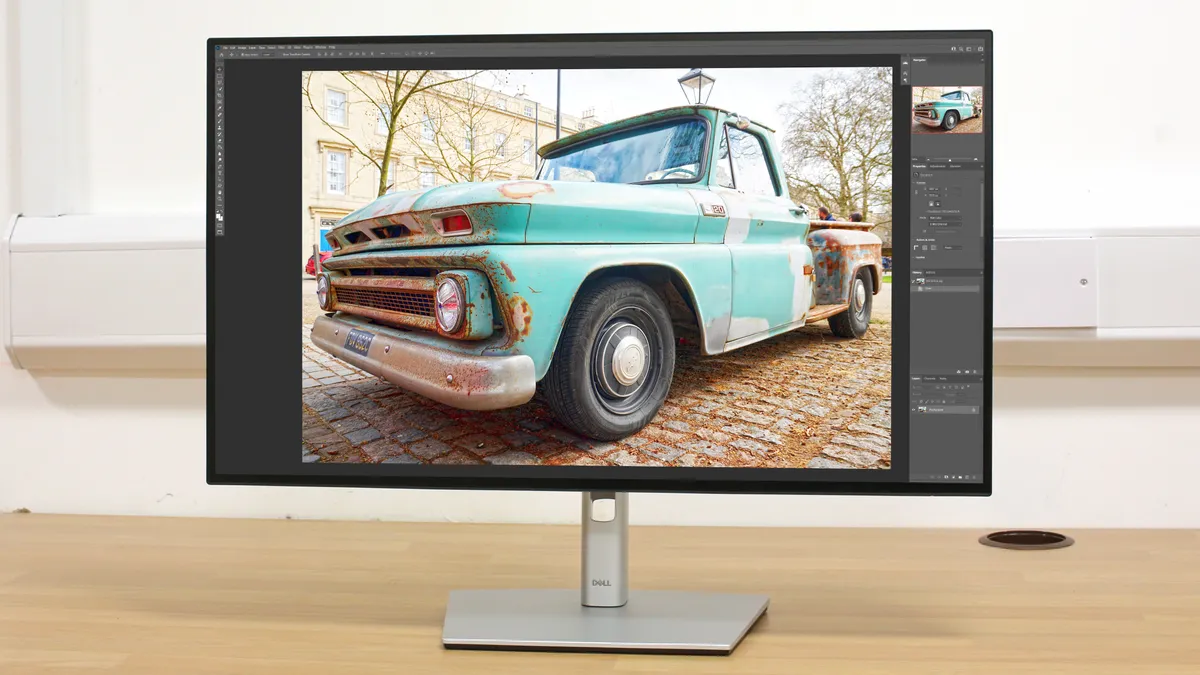
Your monitor is how you judge the colour, contrast and sharpness of your images as you edit them, so it has to be good. The Dell UltraSharp U2723QE is one of the best all-rounder monitors we've tested, with truly impressive colour accuracy that benefits from Dell's IPS Black technology, designed to deliver "true" deep blacks and a higher contrast ratio (2000:1). Also, while monitors can get staggeringly expensive, we consider this one to be pretty fairly priced.
Read more: Best monitors for photo editing

For many, the Apple Studio Display seen as a long-awaited replacement to the previous 27” Apple Cinema Display. To some, it’s the perfect partner to their latest Apple Mac Studio or M1 Mini purchase. For others, it’s a way of extending the desktop of their new MacBook Pro setup. Whichever way you look at it, the latest 27” 5k Apple Studio Display is a well designed product, at a competitive price-point (given its professional specifications). Its multimedia features make it an ideal primary display for most creatives, while true and consistent color and brightness across the entire panel mean in some ways the Studio Display is on a par with that of Apple's Pro Display XDR. It’s a little frustrating that the ability to raise or lower the display comes at an additional cost and that the built-in camera isn’t quite so ground-breaking. But as a companion to any recent Mac, the Studio Display is hard to beat.
Read more: Best monitors for video editing

The best monitors come with their own calibration systems, but for other monitors you might need a separate calibration tool. SpyderX is the successor to Datacolor’s popular Spyder5 monitor calibrator series and uses a brand new lens-based sensor system rather than the old honeycomb baffle on the Spyder5. The result is a claimed increase in calibration accuracy, especially in the lightest and darkest image regions, and a sub-2-minute calibration time, making this the fastest Spyder calibrator ever.
Read more: Best monitor calibration tools

Every computer needs a mouse (unless you are happy with your laptop's trackpad), so you might as well make it a good one! The MX Master is the flagship of Logitech's office mouse range, with a highly ergonomic sculpted shape and twin thumb buttons placed directly beneath a secondary thumb-operated scroll wheel. The primary scroll wheel uses Logitech's clever MagSpeed Electromagnetic scrolling to provide precision when rotated slowly, or hyper-fast scrolling when flicked at speed. A 4000DPI laser sensor gives supreme pointer precision.
Read more: Best mouse for photo and video editing
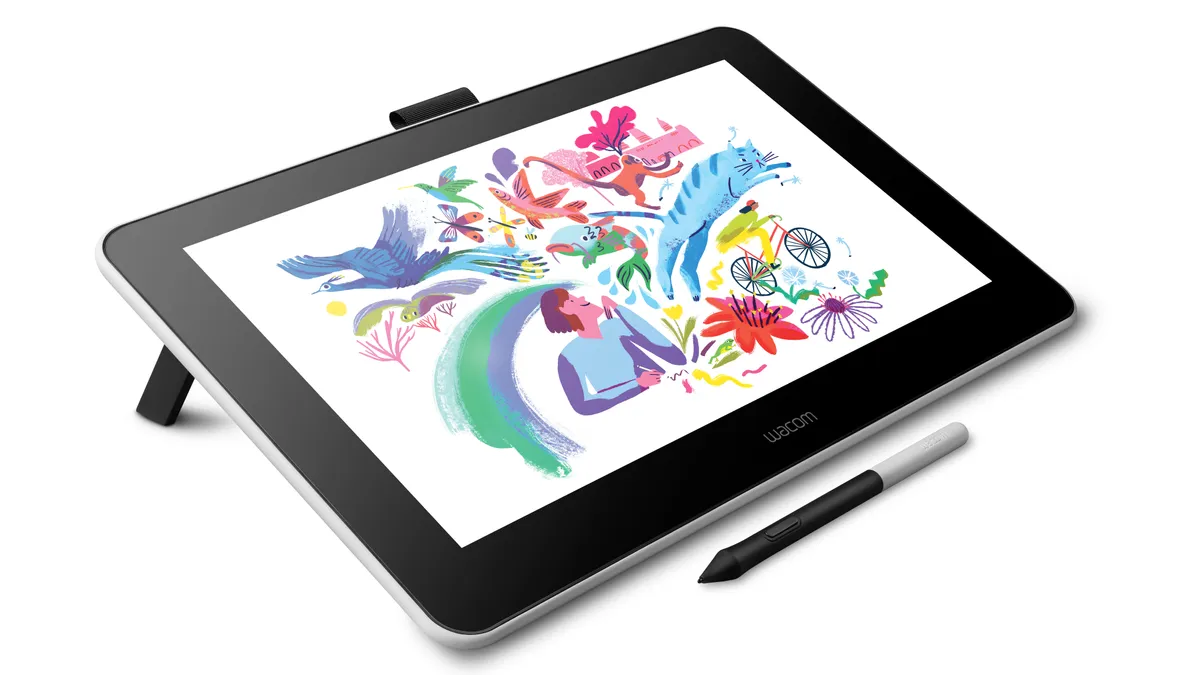
If a mouse seems an unnatural way to paint selections and strokes, consider using a graphics tablet instead. The Wacom One was launched right at the start of 2020, and is the best all-round entry-level graphics tablet that Wacom has ever produced. With a 13-inch surface area, it is a long way for being the biggest graphics tablet you can get – but that does mean that this is an peripheral you can take along with your laptop when away from the home or office. Built-in feet allow you to place the surface at a slight angle, if you don't want it flat on your desk.
Read more: Best drawing tablets

As a photographer, you can rely on online print services, or you can make your own prints yourself with a photo printer like this one. The Pro-200 uses dye rather than pigment inks, aiming for exceptionally smooth output on glossy paper. The Pro-200 is well suited to creating black & white photo prints as well as color output, with the inclusion of grey and light grey cartridges.
Read more: Best photo printers

If you still like to shoot film, or you've got drawers full of old slides and negatives, you'll need a film scanner that can do them justice. The OpticFilm 8200i SE costs more than the company's 8100 model but has in infra red scanning channel for dust removal – highly recommended! There is also a Plustek OpticFilm 8200i Ai available, a flagship model that adds color calibration software into the package, that is useful for color transparency scanning - albeit at a higher cost.
Read more: Best film scanners
Software
We all know when we need to upgrade our kit, but what about our software? You may already have what you need, but if you're still trying to find the perfect program, here are some ideas.
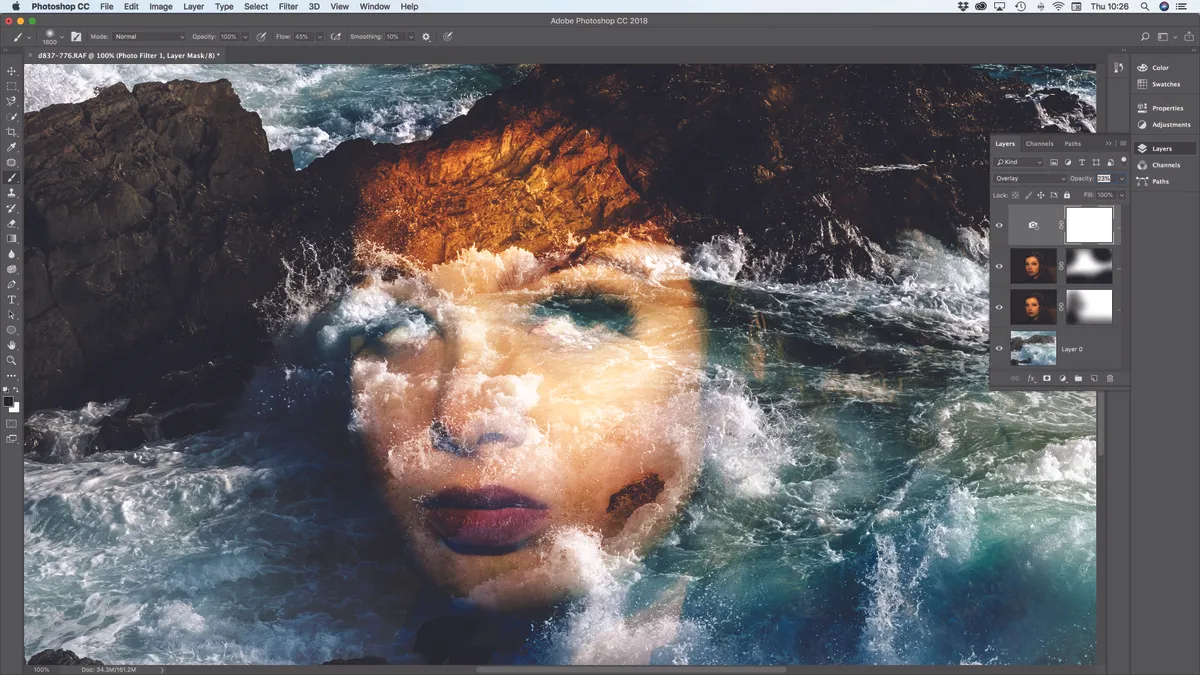
Adobe’s decision to make Photoshop CC a subscription-only product remains controversial, but for just $9.99 per month you get access to both Photoshop and Lightroom, and you can cancel your subscription if you change your mind. Photoshop is slick, powerful and constantly improving, and despite its reputation for complexity, Photoshop actually offers a very clean, slick interface.
Read more: Best photo editing software

Professional videographers will use a program like Adobe Premiere Pro, but for amateurs or those just starting out, Premiere Elements is much cheaper and simpler – and doesn't come with a subscription. Premier Elements can be bought as a standalone product or bundled with Adobe Photoshop Elements as a twin pack. Its Guided Mode can even teach you the basics of video editing and act as a personal instructor, but you can switch between Guided Mode and Expert Mode at any time.
Read more: Best video editing software

Designed to complement Moment’s range of smartphone lenses, Pro Camera by Moment offers control over aspects such as shutter speed, ISO, exposure compensation, focusing and white balance, which you won't get with your phone's default camera app.
Read more: Best camera apps for smartphones and tablets
Cleaning and maintenance
It's not the most glamorous side of photography, but camera kit does need periodic cleaning and maintenance, and here are some bits and bobs to make this easier.

Sensor spots are the downside of interchangeable lens cameras, and sometimes you have to resort to manual sensor cleaning. There isn’t much to this kit; just 4 swabs, a tiny 1.15ml phial of cleaning liquid, and the SwabLight itself. This is a tiny torch that slots on to the top end of a swab and shines downward, so wherever you clean, the light always follows. Plus, the SwabLight’s grippy casing is much easier to hold than a spindly swab handle.
Read more: Best camera sensor cleaning tools

You could clean your lenses with the tried and tested combo of a microfibre cloth and specialist cleaning spray, but there’s a risk the cloth will pick up dirt in your kit bag, while the spray takes up valuable space. These pre-moistened lens wipes, on the other hand, are extremely handy. Each wipe comes in a small 5cm-square sealed sachet and unfolds to 15x12cm – just the right size for cleaning a front or rear lens element.
Read more: Best camera lens cleaners
How to choose the best camera accessories
First off, we should stress that no single photographer is going to need to buy all fifty of these accessories. Everyone's needs are different, and depending on what genre you work in and how serious you are about your image-making (in terms of professional, enthusiast or amateur), different accessories are going to be more or less useful to you.
As such, the best thing to do is think about the type of photography you want to achieve, and then from there build up a selection from the list of items that are likely to be useful to you. Going to be taking a lot of photographs of people? Then lighting is going to be a priority, meaning flashguns and reflectors. Planning on taking your kit around the world? Then a good camera bag is your best friend, and you'll also need to think about which items you can reasonably fit inside it. Shooting video as well as stills? A good computer to handle to the editing is vital.
Every photographer's accessory profile will be different. Think carefully about your needs, and you'll be able to pick our the right accessories for your shooting,
How we test camera accessories
At DCW, we test camera accessories of all types. Our team of expert photographers and videographers look at how photo gear performs out in the field, as well as in controlled lab setting where applicable, and measure how well the product's performance measures up to the manufacturers' claims. We use their findings to inform our comments in buying guides. Learn more about how we test and review on Digital Camera World.
Read more:
• The best cameras
• Best point-and-shoot cameras
• Best bridge cameras
• Best travel cameras
• Best portrait lenses for Canon users
• Best portrait lenses for Nikon users
• Cheapest full-frame cameras
• The best full-frame DSLRs
• Best cameras for enthusiasts
• The best camera battery
• The best camera lenses
• The best student laptops

