Digital Camera World Verdict
Vintage classics don’t come much more retro-chic than a pair of Ray-Ban Meta Gen 2 Headliner shades. I love the 1960s look and feel of these glasses and that, because one size really doesn’t fit all, they’re available in high-bridge and low-bridge versions. But what I love best is the Meta AI powered technology that makes them so very smart as a daily companion. And they also happen to take very pleasing 3K UHD video and 12MP still photos, along with high-quality audio. My only disappointment is that I can’t shoot landscape orientation video and stills while wearing them, unless I lie down on the job.
Pros
- +
Smart hands-free tech
- +
High-quality video, stills, audio
- +
Iconic design
- +
Great build quality
Cons
- -
No landscape orientation shooting
- -
Can’t disable privacy light
- -
Pricey to buy
Why you can trust Digital Camera World Our expert reviewers spend hours testing and comparing products and services so you can choose the best for you. Find out how we test.
There’s retro, and then there’s classic retro. Ray-Ban Wayfarer shades were launched back in 1952, their trapezoidal shape becoming the iconic look of the rock-and-roll decade. The rounder Ray-Ban Headliner specs were a worthy follow-up, a defining facet of 1960s hippy chic. Both of these vintage Ray-Ban designs and more besides have been given a new lease of life for the 21st century, with what would have been regarded as unbridled sci-fi in those yesteryear.
As with others in the Ray-Ban range, the Headliners that I’m reviewing here are now in their second generation of smartness, bristling with the latest technology and powered by Meta AI for a fully rounded experience (rounded regardless of frame shape). As such, they aim to be among the best camera glasses on the planet, as well as the most hip and trendy.

Ray-Ban Meta Gen 2 Headliner: Specifications
Photo Resolution |
12MP 3024x4032 |
Video Resolution |
3K, 2203x2938 30p |
Audio |
5x mic, 2x speakers |
Connectivity |
Wi-Fi 6e, Bluetooth 5.3 |
Compatibility |
iOS 15.2 / Android 10 or higher |
Smart functions |
Meta AI |
Memory |
32GB |
Battery life |
8 hours |
Charging |
USB charging case |
Weather resistance |
IPX4 |
Dimensions (WDH) |
150x50x150mm / 6x2x6" |
Weight |
51-53g / 1.8-1.9oz |

Ray-Ban Meta Gen 2 Headliner: Price
Out with the old, in with the new. Financially, however, the old first-generation Ray-Ban Meta specs have started to look relatively good value, with the price dropping to around £225 / £245 / AU$337. But that’s mainly because these new Gen 2 shades leave them for dead in terms of tech, with 3K UHD video recording instead of just 1080p FHD and a host of other enhancements.
You have to pay for those upgrades though, as is usually the way with new tech, and the Gen 2 specs start at $379 / £379 / AU$599 for standard options, rising to $459 / £459 / AU689 for fancier versions that include the likes of Polaroid or transition lenses. Services are also widely available to have prescription lenses fitted.
Ray-Ban Meta Gen 2 Headliner: Design & Handling
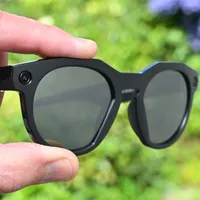
Ray-Ban Meta Gen 2 Headliner glasses have a distinctive ‘Phantos’ shaped frame, setting them apart from the previous Wayfarer design. While the Wayfarer is available in two different sizes (standard and large), the Headliner comes in a single medium size but with standard-bridge and low-bridge options, to accommodate variations in the size and placement of the nose on your face. They can be a better fit if, for example, you find that standard glasses have a habit of sliding down your nose.
Color options are primarily shiny or matte black for the frames, with various varieties of lenses, including polarized and transitions, the latter taking just a few seconds to darken in bright sunlight, and between two and five minutes clear again in lower lighting conditions. As with other Meta AI glasses, you can generally get all manner of prescription lenses as corrective options but naturally, anything above standard fare comes with a hike in the purchase price.

On the face of it, so to speak, these Ray-Bans follow the time-honored tradition of sitting on you your nose with side arms that rest on your ears, while endeavoring to protect your eyes from bright sunlight. As such, they work perfectly well as regular sunglasses. They’re also comfortable to wear and not overly weighty at just under a couple of ounces. Even so, build quality feels very sturdy and robust, and the finish is of an impeccable standard. Suffice it to say that they look and feel every bit as good as a pair of Ray-Bans should do.

While these Ray-Bans (mostly) look like standard sunglasses and do serve that purpose, eye protection is the tip of the technological iceberg. Beneath the surface, there’s a whole lot of tech packed into the frames, from front to back. For starters, there’s an array of five microphones, picking up on everything you say, as well as everything that’s being said by those around you. Indeed, one of the enhancements in the Gen 2 glasses is a conversation focus, amplifying the voice of somebody that you’re facing in a group of people. The sound, as with music or anything else that you’re listening to through the glasses is delivered by high-quality, open-ear speakers built into the side arms, which have the particular boost of a 50 per cent increase in bass response.
Of course, a main attraction of any pair of camera glasses is the actual camera to which they play host. This is another key upgrade over the first generation, which could only record video in 1080p FHD. The Gen 2 captures video at up to 3K UHD at 30fps, with further options for 1080p at up to 60fps and 720P at 120fps. For stills, there’s wide-angle 12-megapixel capture on offer. However, you’re limited to portrait (upright) orientation capture for both stills and video, and there’s no option to change to landscape orientation shooting in the settings. The only real workaround for landscape orientation capture is to take the glasses off, rotate them through 90 degrees and hold them in your hand while filming. Alternatively, you could just lay your head on one side.

The smartest thing about these smart glasses is arguably the Meta AI system that empowers them. Once paired to your phone, you can give voice commands for whatever you want to do or whatever is on your mind. In addition to hands-free operation of your phone, including calls and messaging, the continually growing range of clever tricks includes things like asking your glasses to tell you information about notable landmarks that you’re looking at in real time, or ‘remembering’ where you parked your car. If you’re traveling further afield, another AI option is real-time translation that currently features several languages.
For a more physical, hands-on approach, there’s a button on the top of the right-hand arm at the front, that you can tap to capture a still photo, or hold down to initiate video recording, tapping the button again to stop.

There’s more feelgood factor packed into the right-hand arm of the glasses, this time with a tactile touchpad. As well as tapping it to apply various functions, you can slide your finger or thumb along it in either direction, for example to increase or decrease the volume of the built-in speakers.

All this clever AI malarkey on top of the ‘simple’ business of hands-free phone operation, listening to music via Bluetooth, capturing video and shooting stills, plus faster processing than in the original version, requires a lot of power. That power is supplied by a built-in battery that should last for up to 8 hours after a full charge, depending on usage. That’s twice as long as with the original version of the glasses.

It turns out that the case is pretty smart as well as the glasses. As well as using the case to charge up the glasses, you can charge up the case itself and it’ll deliver power to your glasses whenever you’re out and about and they’re stashed away. Again, the overall longevity of the glasses plus case stretches from 32 hours in the original version to 48 hours in the Gen 2. And if the glasses run out of juice and you need them in a hurry, another upgrade is that you can recharge them to 50 per cent capacity in as little as 20 minutes.

One thing to bear in mind is that the glasses can only be paired with one phone. If you want to change to a different phone, you need to do a factory reset, which involves closing the arms (as in the photo below), pressing the operating button on the top of the right-hand arm five times, then long-pressing the button to reset everything. The glasses will then automatically restart and go into pairing mode, for connection to a new phone.

Naturally, you can’t review photos or video clips on the sunglasses themselves, as they don’t have an LCD screen. However, media is automatically saved on your paired phone, as well as in the cloud service of your choosing as an additional option. The gallery below contains a few example screenshots from the Meta AI app.

Image credit: Future

Image credit: Future

Image credit: Future

Image credit: Future

Image credit: Future

Image credit: Future

Image credit: Future

Image credit: Future

Image credit: Future

Image credit: Future

Image credit: Future

Image credit: Future
Ray-Ban Meta Gen 2 Headliner: Performance
There’s often a concern when you’re buying a product made by a famous brand, that you’re paying for the name rather than for the quality of the goods themselves. There’s no denying that the Ray-Ban Meta Gen 2 Headliner is an expensive option but, as I’d fully hope, they’re a whole lot better than a relatively cheap alternative, like the OHO Sunshine Camera Glasses, in terms of build quality, finish and outright performance.

More than just a pair of camera glasses, these Ray-Bans are more like an immersive, wraparound, multi-sensorial experience. They sound great, the improved Gen 2 audio quality doing more justice to the auditory side of things, whether you’re having a phone conversation or playing music. Microphone quality is similarly excellent, the hands-free, 5-mic array working great in its own right, even better in that it can automatically block 90 per cent of background noise.

As for photo and video quality, stills look sharp with pleasing brightness, contrast, color rendition and dynamic range. Video is even better, compared with the Gen 1 edition, thanks to the new and improved 3K UHD capture instead of just 1080p.

Ray-Ban Meta Gen 2 Headliner: Sample Images
The gallery of example shots below were taken in variable weather conditions around the Floating Harbour in the English city of Bristol.


Ray-Ban Meta Gen 2 Headliner: Video
The sample video shown here is a joined-up selection of clips, captured in the Somerset village of Pensford and at Bristol Docks, both in the south west of England.
Ray-Ban Meta Gen 2 Headliner: Verdict
I feel like I’m putting on a little piece of history when I wear the Ray-Ban Meta Gen 2 Headliner shades. The original Ray-Bans were so much an iconic star of popular culture that they feature in song lyrics and are a symbol of all things ‘cool’. From a technological standpoint, the new smart glasses are in a different universe to the original sunglasses. What’s more important as far as I’m concerned, is that the tech simply works, and works simply. Hands-free control and access to a myriad of functions is empowered by the supporting Meta AI app, keeping life simple but interesting.
From a performance perspective, the Ray-Bans look fabulous, work perfectly as sunglasses, and sound superb for listening to anything from phone conversations and AI chat, to music that you want to be the soundtrack of your day. And most important of all for ‘camera glasses’, they capture sharp stills and richly detailed video. I still feel it’s a bit of a shame there’s no landscape-orientation shooting option, short of taking the glasses off and holding them on their side, or laying your head down.
I can also appreciate that some users with Mission Impossible aspirations or perhaps attitudes of a more dubious nature might like the option of disabling the privacy lamp for secret filming, but that’s not available. It’s also the basis of a pretty major social discussion all of its own. Either way, these Ray-Bans are definitely one of the coolest pair of smart glasses on the market.
Features ★★★★★ |
The rich feature set includes a 5-mic array, stereo open-ear headphones, 12MP stills and 3K UHD video capture, all brought together by a powerful Meta AI interface. |
Design ★★★★★ |
The Headliner design is iconic, and then some. But these camera glasses are no case of style over substance, as the design is seriously high-tech and that even extends to the case itself. |
Performance ★★★★☆ |
Performance is very good indeed, from picture and audio quality to the extended battery life of the Gen 2, but there’s still no option for landscape orientation stills and video. |
Value ★★★½ |
Couple an iconic design with a famous name and top-end performance, and it’s never going to come cheap. Even with that in mind, these Ray-Bans aren’t exactly great value. |
Alternatives