Digital Camera World Verdict
The Meeting Owl 5 Pro is a more powerful, improved version of the portable huddle camera known for its iconic owl eyes, and the extra features really do add value (and cost). The extra image quality is evident, and serious users will find it a better proposition than its predecessors. Smaller, more mobile customers, however, might prefer the more compact non 'Pro' models.
Reasons to buy
- +
64MP optics retain clarity when AI crops on a face
- +
"One-Cable" docking makes setup straightforward
- +
Daisy chain option (connect multiple Owls) for bigger meeting rooms
Reasons to avoid
- -
The price tag is a leap for small businesses
- -
It's still necessary to get power to the middle of the table, which can lead to unsightly cables on tables without a hole
- -
Weight makes it better suited to fixed place use
Why you can trust Digital Camera World Our expert reviewers spend hours testing and comparing products and services so you can choose the best for you. Find out how we test.
The original Meeting Owl, and its successors, are iconic products for huddle meetings – able to be simply placed in the middle of a meeting room and provide a live AI video feed concentrating on the active speaker.
This can be connected to platforms like Google Meet and Zoom to deliver a more personal view from a room than having a ton of separate cameras all delivering postage-stamp sized images, mostly of people not talking.
The concept is based on a single lens at the top which is fish eye and sees 360-degrees around the room, while AI (and in this case an arrangement of 8 microphones) detects the active speaker and zooms in.
This new model brings more features, at a higher price. Is it worth the upgrade?
Meeting Owl 5 Pro: Price
Coming in at $2,599 / £2,399 this is significantly more expensive than the smaller, more portable Meeting Owl 3 ($999) – and quite a hike above the Meeting Owl 4+ ($1,999). That price premium buys features that will matter in some enterprise environments and large conference rooms, but perhaps not all.
Meeting Owl 5 Pro: Specs
| Row 0 - Cell 0 | Meeting Owl 5 Pro |
Meeting Owl 4+ |
Meeting Owl 3 |
Video |
4K UHD |
4K UHD |
1080P |
Camera Resolution |
64MP |
64MP |
16MP |
Mic Array / Range |
8 mics / 18ft (5.5m) |
8 mics / 18ft (5.5m) |
8 mics / 18ft (5.5m) |
Speaker |
dual – 80db |
dual – 83db |
tripple – 80db |
Weight |
Weight: 4.4lb (2.0kg) |
Weight: 3.3lb (1.5kg) |
Weight: 2.61lb (1.2kg) |
Features |
Daisy Chain, HDMI, Ethernet, Single cable BYOD |
Row 6 - Cell 2 | Row 6 - Cell 3 |

Meeting Owl 5 Pro: Build and Handling
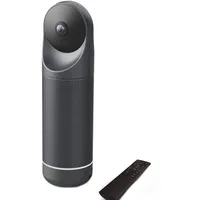
The Meeting Owl 5 Pro looks like what it is, a robust speaker with a fisheye camera at the top. The wide base is where much of its significant 2Kg heft sits, building confidence in the meeting room once you've plopped it in place.
The cute special feature, seen on other Owl conference cameras, is that – when it is in use – eyes "appear" from behind the all-round speaker grille which combine with the logo strip to give the stylistic impression of an owl. To reinforce this, the startup sound is a 'twit-twoo' owl noise.
The buttons at the base are mute, volume up and down, and a customisable button (it can be configured in the app), but by default cycles through different views.

The mute is made clear all the way around the device with a red light that sits between the speaker and base. The buttons (and owl face) are repeated opposite each other, so it ispossible for participants of a meeting either side to reach them easily and see the visual feedback.

It's not just a speaker, of course. It also conceals an array of eight microphones, which the system uses to detect the active participant, as well as to capture the sound and apply the on-board processing to deliver clear audio.
This all happens very simply, although I was a little surprised that the maximum volume of the speaker didn't impress as much as I'd hoped it would.
What the system did do very well, however, was detect when there was speech in the meeting room and turn down the speakers; it wasn't harsh or jarring but it was enough that the conversation in the room was always audible.

Meeting Owl 5 Pro: Performance
The video performance is notably better than the Meeting Owl 3, with the system clearly benefiting from a a more powerful image sensor.
The system also had no trouble detecting us in one of our meeting rooms which can comfortably accommodate 6 people, which was reassuring.

I used the settings menu to turn on and off the optional 'whole room panorama' effect at the bottom of the video, but regardless of the resolution we chose, the result still didn't seem to handle the admittedly mixed light in our meeting room. We have natural light from both sides and artificial light from above.

The quality beats everyone having to sit next to each other and face a laptop, but probably doesn't beat a dedicated PTZ camera, which would (I'd hope) be better able to handle the dynamic range and tone.
To my mind the resulting images were not sharp enough for 4K either, although it's fair to say that many conferencing platforms would reduce the video to 1080P anyway, and at least it has more detail to work with.

Meeting Owl 5 Pro: Overall verdict
The Meeting Owl does a fine job of identifying the participating speaker, and the video quality of the output stream, at a full 4K where available, is
On the downside, this is physically bigger and less portable than its brethren from the Meeting Owl range, as well as more expensive, so it's important to decide whether you actually want the boosted processing power and imaging. I'd absolutely make sure that your preferred conferencing platform is
If you're looking for a device you don't move too often, and has premium capabilities like daisy-chaining, then this seems a fine option. If you're more
Features ★★★★☆ |
The ability to connect to a secondary device to handle large rooms, as well as the display options are all great features. It still communicates through a single light. |
Design ★★★★☆ |
The Meeting Owl series have a cute design, but this model slightly offsets that with sheer weight and size. In some cases that might be a benefit, but it hacks at portability. |
Performance ★★★★½ |
While the device was quick to respond to controls, and the audio quality was excellent (if not as loud as a rock fan would like), the video of individual faces was only really average. |
Value ★★★☆☆ |
If there are features here you want, great. As a stand-alone device, there are cheaper offerings which might also prove more useful on the go. |
Alternatives