Digital Camera World Verdict
Since the COVID era, we’re all more familiar with presenting ourselves online through a webcam. Yet even on mainstream TV, we see people on the news being interviewed via poor-quality laptop webcams. Their footage looks noisy (grainy) due to low light and often lacks detail and contrast. The Emeet SmartCam S600L combines a larger 1/2” CMOS sensor than some other webcams, enabling it to perform better in low light. The addition of an LED ring light built into the body of the S600L gives it an extra quality boost. The Emeet SmartCam S600L provides an affordable way to make you look better when streaming via Zoom or recording footage for a YouTube presentation. And we all want to look our best!
Reasons to buy
- +
Good low light performance
- +
Crisp, smooth video quality
- +
Built-in ring light
- +
Fast re-focus
Reasons to avoid
- -
Not the brightest ring light
Why you can trust Digital Camera World Our expert reviewers spend hours testing and comparing products and services so you can choose the best for you. Find out how we test.
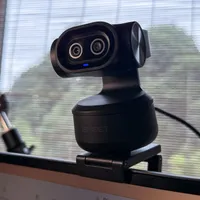
Founded in 2016, Emeet has produced a wide range of webcams, some of which have picked up awards for design. I reviewed the Emeet Pixy for Digital Camera World back in July 2025, giving it 5 stars - so it was no surprise to me that the Pixy won the Red Dot Design Award in 2026. The innovatively designed Pixy was a dual-lensed laptop-mounted webcam that could pan and tilt to keep you in the frame, even if you stood up from your laptop and walked about. I was therefore very keen to test out a more recent offering from Emeet - the SmartCam S600L.
The Pixy’s PTZ (Pan, Tilt, Zoom) key design innovation was the mini-gimbal that it was mounted on. The SmartCam S600L’s design innovation is that it combines a webcam with a ring light, enabling you to capture or stream better quality video than you can with your laptop’s built-in webcam.
The Emeet SmartCam S600L enables you to stream high-quality footage in 4K. For our recommendations on other 4K-capable laptop webcams, check out our buying guide.
Specifications
Sensor Size |
1/2” CMOS Sensor |
Field of view |
73º |
Resolution and frame rate |
1080P at 60fps, 4K at 30fps |
CRI (Colour Rendering Index) |
≥90 |
Connectivity |
2m USB-C |
Mounting options |
Monitor mounting via clip, tripod mounting via 1/4” threaded hole. |
Colour Temperature Presets |
Cold - 6200LK, Warm - 2600Kº, Mixed - 4000Kº |
Brightness |
5~60Lux@0.5m |
Brightness control |
10 Brightness Presets |
Weight |
124g |
Price
The Emeet SmartCam S600L officially retails at $104.99 / £71.99. I use a 2023 15-inch MacBook Air with an M2 chip, and its built-in FaceTime HD camera produces 1080p footage that looks soft, lacks contrast, and can look a bit noisy in low light. I can’t afford to upgrade to a newer M4 MacBook Air with its 12MP Centre Stage camera, so an outlay of £72 for the Emeet SmartCam S600L is a much more attractive and affordable way to stream sharper-looking footage from an old MacBook! Check out my supporting video in the Performance section to see the difference between my MacBook’s camera and the Emeet SmartCam S600L.
Design and handling
It’s always interesting to handle an Emeet product, as they tend to be well-built and have innovative design features. The Emeet SmartCam S600L lacks the built-in gimbal and dual lenses of the award-winning Emeet Pixy, but it also lacks the Pixy’s higher price tag (which officially retails at nearly twice the price). The Emeet SmartCam S600L also boasts a feature the Pixy lacks: a built-in LED ring light. The ring of LEDs encircles the webcam’s lens, so when you look directly at the camera, it creates a subtle catchlight in your eyes (or less subtle if you wear glasses!) — adding a sparkle that helps bring your face to life on video calls.

Even though it is made of plastic, the Emeet SmartCam S600L doesn’t feel cheap and nasty. It has a solid build and feels surprisingly heavy for such a small device, weighing in at 124g on my kitchen scales. Fortunately, it was not too heavy to sit comfortably on the top of my MacBook Air’s display. It has an adjustable hinged clip that grips the top of the display. Rubber inlays on the inside of the hinged grip ensured that the SmartCam had a tight and secure grip on my MacBook’s thin screen. At the base of the grip is a 1/4” threaded hole, so you could pop the S600L on a tripod if you wanted to film yourself from an angle. If the tripod has an adjustable ball head, you could flip the camera at an angle and stream vertical footage instead of horizontal. So this tripod thread is a welcome design touch.

You can slide a switch to activate the Emeet S600L’s privacy shield, which is basically like sticking on a lens cap.
Image credit: George Cairns / Digital Camera World

The distinctive red colour lets you know that you’re in privacy mode.
Image credit: George Cairns / Digital Camera World
The Emeet SmartCam S600L has a single circular knob on its side. This also functions as a dial. Press the knob to turn on the LEDs, press it again to toggle between different colour temperatures, and rotate the knob to adjust brightness. The ball joint connecting the camera to its clip enables you to rotate the light through 360º. You can also tilt it by a 15º angle to fine-tune your position in the frame.
One useful and welcome design touch is the privacy switch. If you’re having a bad hair day and want to listen and talk in a Zoom meeting without being seen, then simply slide the switch to activate a built-in lens cap. The cap is a vivid orange, so it’s very clear when you’re using the SmartCam in privacy mode.

Performance
When I unboxed the S600L, I was a little concerned to see that the end of its cable had a large USB-A connector. My MacBook Air only has USB-C inputs, so I thought I’d have to hunt out my USB hub to get the camera to talk to my MacBook. Fortunately, I realised that I could remove the camera cable’s USB-A adaptor to reveal a USB-C plug. I popped this plug into my MacBook’s USB-C socket and the SmartCam S600L’s ring light began to display an animated pattern that cycled through all of the colours in the spectrum. This indicated that it was active and ready to stream/capture footage.

The ridged edges of the SmartCam’s single control knob enabled me to easily adjust the brightness of the LEDs mounted in the ring around the lens. This sounds like a useful option, but to be honest, I can’t imagine a scenario where I’d want to reduce the brightness of the LEDs, as they are only capable of a maximum 60 lux from a distance of half a meter. For the duration of my test, I kept the brightness to maximum. At the brighter end of my kitchen (it’s less messy than my home office to film a review), the side-angle key light from a window caused half of my face to appear in shadow. By activating the S600L’s LEDs, I was able to summon a fill light to make the lighting look a little bit more even. The LED lighting was more effective and noticeable when filming at the darker end of the kitchen, as you’ll see from my supporting video.
I was able to press the control knob to cycle through lighting presets - cool (6200K), warm (2600K), mixed (400K) and ambient. By default, the ambient lighting is a cold blue, but if you open the supporting Emeet Studio app, you can change the ambient preset to more creative colours such as Pink, Purple, Blue, Cyan, Yellow and Orange. I found the creative ambient colours to be less bright than the more subtle colour temperature presets, plus the cool 6200K preset best suited and complemented the similar lighting streaming in from my test location’s windows.
I started my test by recording a QuickTime sequence using my MacBook’s FaceTime HD camera and then recorded a sequence using the S600L. The S600L’s 4K footage was much sharper than my MacBook’s native camera, and there was a wider tonal range with stronger shadows and brighter highlights. The MacBook footage looked a little warm, whereas, thanks to a more accurate white balance reading, whites looked white in the S600L footage, creating cooler, more natural-looking skin tones.


The spec of the Emeet S600L indicates that it is fast to focus (in 0.2s), keeping you nice and sharp at all times. I tested this claim by placing my iPhone 17 close to the lens and then removing it. It did indeed keep the nearby iPhone looking nice and sharp and then quickly refocussed on my face when I removed the iPhone from the shot.
The S600L also had two built-in microphones, so I tested those too, of course. My MacBook’s built-in mics captured more bass in my voice, but they were also slightly muffled. The audio captured by the Emeet S600L was much sharper and clearer, but at the cost of sounding a bit too thin. Have a listen to my test video. The Emeet S600L’s audio also sounds a little quieter. I’ve tweaked the levels a bit, but I haven’t adjusted loudness or EQ, as I want to give you an accurate comparison between the S600L’s mics and my MacBook’s built-in ones.

Verdict
An affordable way to make my 2023 MacBook Air’s built-in webcam video footage look better would be to use my iPhone 17 as a Continuity Camera. This would enable me to stream much better-looking footage from the iPhone’s superior camera. However, using an iPhone for this purpose means popping it on a mini tripod and then removing it from the tripod if I needed to use it to take a call.
The advantage of the Emeet SmartCam S600L is that it’s a dedicated webcam. It takes seconds to clip it onto my laptop, and it sends a superior video feed through a wide range of applications such as Zoom for streaming or QuickTime for recording ‘talking to camera’ movies. The built-in ring light can be triggered with a tap, and its integrated design means that I don’t need to faff about trying to align a separate ring light with my webcam.
At a maximum of 60 lux (that’s around 60 candles), the ring light isn’t the most powerful LED available, but in bright conditions it will fill in harsh shadows on your face, and in darker locations it helps the Emeet SmartCam S600L’s 1/2” CMOS sensor reduce the presence of noise in your footage.
Features ★★★★☆ |
1/2” CMOS sensor enables the Emeet S600L to capture better quality in low light. Presets enable you to change colour temperature in a tap of a button. Built-in mics capture sharp (but thin) audio. |
Design ★★★★☆ |
The integration of a ring light around the lens is an innovative touch, though you do need to keep brightness set to max. The privacy slider is a nice touch. |
Performance ★★★★☆ |
The Emeet S600L is a plug and play webcam, but you can fine-tune properties via the Emeet Studio app and trigger a range of more creative LED colours. |
Value ★★★★☆ |
The Emeet S600L is reasonably priced (and you don’t have to pay extra for a separate ring light). |
Alternatives