







Digital Camera World Verdict
DJI has created a near-perfect pocket gimbal camera, with striking dynamic range and creative capability, while compromising very little on portability from the single-lens alternative. There are some minor usability issues but ultimately adding that second camera provides so much flexibility (while not seeming to push the price too far either).
Reasons to buy
- +
Dual camera system brings 60mm lens
- +
Brilliant color science (especially for the 20mm EFL lens)
- +
Surprisingly portable with solid battery life
- +
Thoughtful accessories like the fill lamp and Mic compatibility.
Reasons to avoid
- -
Remote control is a separate accessory (unlike Insta360 Luna series)
- -
Distinct 'jump' when zooming all the way from 1x to 12x (as with all multi-lens systems)
Why you can trust Digital Camera World Our expert reviewers spend hours testing and comparing products and services so you can choose the best for you. Find out how we test.
DJI did something rare with the Osmo Pocket series – created a new kind of camera. The company fused the lightweight gimbal technology used to keep cameras steady on its dominant range of drones with a simple 'wand' so it could be used handheld, essentially creating a compact camera that was akin to a serious professional Stedicam setup.
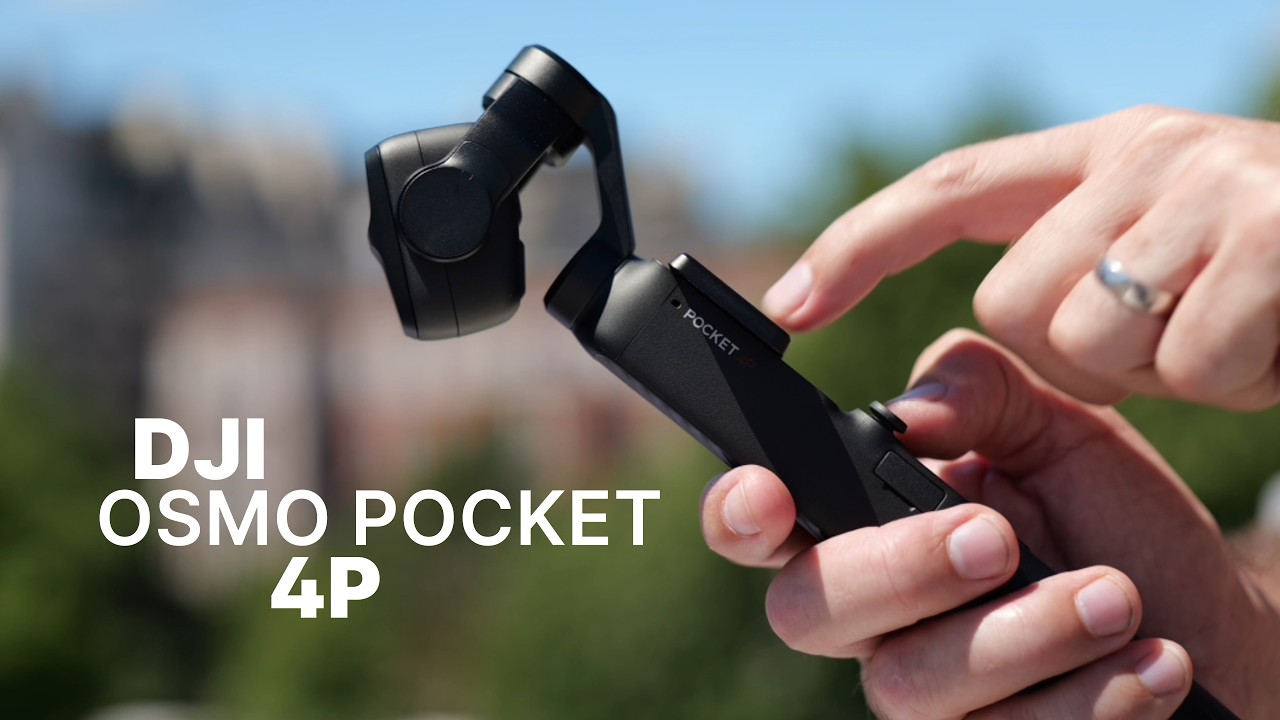
Almost inevitably, the world went crazy for what we've called the 'pocket gimbal camera', and DJI company kept refining their offering – the DJI Pocket 3 sold by the millions. The recently released Pocket 4 added a raft of refinements, but stuck to the single camera system and same sized image sensor. For those already equipped with a Pocket 3 there wasn't a "big thing" to upgrade for.
The Pocket 4P, though, is another matter. It brings all the refinements of the Pocket 4 and, crucially, a second camera. mimicking the multi-camera approach used by premium phones to improve telephoto range. Is it the "pocket cinema camera" that is suggested? How does it hold up against the new competitor in town (the Insta360 Luna Ultra)? I've been testing both and here is my verdict...
DJI Pocket 4P Value
When released globally on July 30 (except the USA because of legal issues), the Osmo Pocket 4P had a starting price of £529 (around $710), which represents solid value, considering that the Pocket 4 comes in at £445.

DJI Pocket 4P Specs
| Row 0 - Cell 0 | Pocket 4P |
Pocket 4 |
Pocket 3 |
Sensor |
1-inch CMOS + 1/1.28 CMOS |
1-inch CMOS |
1-inch CMOS |
Video (max) |
4K / 240fps 10-Bit D-Log 2 |
4K / 240fps 10-Bit D-Log 2 |
4K / 120fps HLG D-Log M |
Stills (max) |
37MP (7680 x 4320) |
37MP (7680 x 4320) |
9.4MP |
Photo formats |
JPEG / DNG |
JPEG / DNG |
JPEG / DNG |
Battery |
1545 mAh / 240 mins |
1545 mAh / 240 mins |
1,300 mAh |
Screen |
2-inch / 1,000 nits |
2-inch / 1,000 nits |
2-Inch |
Storage |
103GB + MicroSD |
107GB + MicroSD |
MicroSD only |
EFL |
20mm + 60mm |
20mm |
20mm |
Filters |
Beauty Filters + App Glamour Effects |
Beauty Filters + App Glamour Effects |
App Glamour Effects |
Weight |
230g |
190.5g |
179g |

DJI Pocket 4P Build and handling
The DJI Pocket 4P feels a lot like its predecessors, which is to say that the handle is superbly well-built of tough plastics with a very convincing grip.
Atop it is a new feature for DJI – a dual camera system with a 20mm EFL camera boasting a 1-inch CMOS sensor with LOFIC (this is a system which adds capacitors to capture additional highlight detail, reducing the chance of over-exposure). The 60mm one is a more standard 1/1.28-inch.
The screen is on a rotating mechanism that also serves as the on-off switch, an elegant piece of design on the Pocket 3, which has been stepped up a level with the arrival of two customisable buttons that are revealed when the camera is active. The left of these is a 'zoom' button by default, quickly switching from the 20mm to the 60mm view (though with a half-second 'zoom' rather than an instant jump).

You can also turn the screen back to vertical and tap the screen before it powers off to easily switch to vertical shooting. This won't actually rotate the camera – but will give you a larger view (at the expense of hiding those two new buttons!)
Control is by those physical buttons, a '5D' thumb joystick, and that OLED touchscreen, the 1,000 nits of brightness serving well even in bright daylight.
The size of the screen is just big enough that it's possible to put a button in each corner and for them to be easy to press. In addition, swiping from the sides reveals features like playback (from the left), settings, resolutions, or the Pro options.

Described like this, it might sound overwhelming, but they are neatly categorised and relatively soon become second nature. For me there was one exception: the thumbstick is switched between operating the camera direction and the zoom level with an icon on the screen. A separate physical zoom slider (as seen on the Luna Ultra) would be a lot easier, ergonomically.
Much of the time, too, you can rely on the camera's ActiveTrack 8.0 feature to keep your subject in shot; it can recognise people and other objects and keep them in frame with the gimbal. This is the true appeal to a solo operator.
Using the same grip makes it compatible with most of the same accessories, but it does mean that it is notably 'top-heavy'. To be honest, I think this is fine, and since I found myself using the battery handle (an added accessory, but one I'd recommend) that is completely offset anyway.

A nice touch is that DJI has stuck to the handle dimensions of the Pocket 3, so if you have the battery handle accessory from that generation, it'll work. It won't deliver quite as much power as the new one, but it'll fit, and it'll work.
The battery life is a solid 210 minutes, about half an hour less than the Pocket 4 standard because of the heavier gimbal, though it will come down if you move around more.

DJI Pocket 4P Performance
Image quality from the Pocket 4P is striking, and I have no complaints about the mechanical stabilization.
The 4K video quality is excellent with natural colors, and I shot in D-Log, D-Log 2 (the new color profile which takes advantage of the LOFIC sensor) and the normal modes.
It was a little irksome that the camera's new D-Log 2 color profile is only available for some of the shooting modes, easily explained by the fact only the 1-inch sensor on the 20mm camera has the LOFIC tech, but less so by some of the other modes that won't play ball, like slo-mo.
Regardless the 60mm telephoto lens is perfect for achieving the background compression from real depth of field, not the horrible simulated alternative offered digitally by phones, and it looks great.
Paired with the camera's ability to act as a receiver for a DJI Mic (all part of the ecosystem), it takes seconds to set up an on-location piece to camera which is then recorded with synced sound.

Battery life is impressive, and the refinements to the newer battery handle are appreciated, That said, I did a lot of my testing in 4K60fps and it will plough through the power notable faster. Hyperlapse and slow-mo had similar issues.
On a long days shooting I found myself topping up the charge with my portable power station, but it wasn't an issue – it fast-charges to 80% in under 20 minutes. Copying files from the device is also pleasingly painless thanks to DJI's Wi-Fi 6 and USB 3.1 support so even 200kbps videos flow off very quickly.


DJI's default shooting modes produce very natural color, and significantly better image quality than a phone. The 60mm lens is f/1.8, so it's very much like a classic portrait lens, but it's also worth remembering that 2x is effectively lossless at 4K (as is 6x zoom). There is even 12x zoom and that does show signs of digital zoom but I was impressed that not only is it 'good enough' when needed, but the subject tracking was still easily able to cope at this distance.

While the D-Log and D-Log 2 confusion is an irritation, it isn't a tragic loss. The camera makes very sensible choices if you shoot in normal mode. If you are determined to use the best possible color science for each shot as you'll need to switch between them in the menus, and ideally a different LUT for each.
The other crucial factor, focus, is generally pretty reliable, too. The camera generally stays on the selected subject or main face in the shot which is crucial for a pocket gimbal camera as it isn't a control you'd want to be handling, given how much movement can be going on. I was genuinely surprised how rarely the camera focused on anything other than my choice of subject – meaning it'd probably make a great choice for product photographers too.

DJI Pocket 4P Overall Verdict
As soon as I knew there was a 4th generation of DJI's Pocket coming along, this was the camera I wanted. First came the Pocket 4, though, and I found myself complaining: "Where is the other lens, from all the rumors?" As someone who wants to be able to put the camera a little way away, trust the camera's subject tracking, and shoot pieces to camera while out alone, this was the upgrade I was waiting for.
So here it is and, honestly, there are very few frustrations. Admittedly, I'd prefer the new Log 2 mode to be available across the lenses, and I still find the 5D joystick somewhat fiddly (especially now I've used the Luna Ultra and know there is an alternative approach).
And I still don't fully understand why there isn't a tripod thread on the standard camera – just a USB-C socket in the base and a plug-in box/handle extension (I get that USB is also the means to connect to accessories, but why not use something like the pogo-pin contacts on the gimbal head, leaving room for a tripod thread?
This, though, was not an issue for the success of the previous generation and, to be honest, if your hands are the size of mine, leaving the handle extension on all the time (except when you have the battery handle) improves the ergonomics anyway.
Would I upgrade for the extra dynamic range and the Log-2? No. But that doesn't matter – the 60mm lens is reason enough.
Features |
Adding a second camera and further improvements to DJI's 10-Bit video recording, not to mention generous built-in storage, simple microphone connection, and so much more this can feel like a mobile creator's studio. |
Design |
There is a refinement to DJI's Pocket that I like, but the experience is not without its quirks – especially the 5D approach to zoom. |
Performance |
Strictly within the terms the camera sets itself, the performance is excellent. The dynamic range is striking and the subject tracking is solid. |
Value |
To me, someone interested more than just a walk-and-walk, the Pocket 4P feels like better value for money than the Pocket 4 thanks to the significantly broader range of creative options the extra camera allows for. |
Alternatives
How I test?
I've tested multiple generations of this camera and other gimbal cameras, and many drones and gimbals, so have built up years of expertise. I've found that the best thing to do is to use it in 'real life' circumstances, so, for the Pocket 4 series, that involved taking the device out into the world and shooting videos, some of which you can see cut into the video at the top of this piece.
I tested with a device DJI loaned me before the release, giving me something of a head start. In that time I was also able to I compare it to the Pocket 3, the Pocket 4 and the Insta360 Luna Ultra.

