
This is just my opinion, sure, but I don't think I'm alone in saying that the world of vlogging has changed a little! Suppose you're looking to get out there and make an impression. In that case, the starting point now shouldn't be lenses, locked-off camera quality and everything a classically trained creator would tell you – it should be about being there, in the moment, yet mysteriously having slightly better-looking video than everyone who just holds their phone in their hands. Here is the solution... A gimbal stabilizer - and I recommend this one from DJI:
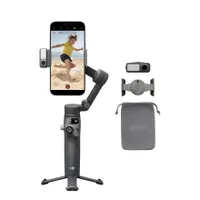
The thing is either you or someone you know is trying to make it big on TikTok, YouTube shorts or Instagram – or even one of the more classic horizontal-format platforms – and the way to create video that stands out is likely to be shooting on a phone (most phones, these days, take pretty good 4K video and people edit in the apps that belong to the platform).
Where things tend to fall down is that people also hold their phones in their hands and are let down by the length of their arms or other artistic constraints. Wouldn't it be great to be able to put the camera down and have it follow you? Or hold it a little further away and know that any shake and wobble would be compensated so the video looks just a bit more pro (but not so professional that fans woudln't think you authentic... it's a fine line).

That's what makes this a great gift for the vlogger in your life (even if that's you) – because it can handle so much and it does so with the camera that, frankly, is probably the most convenient for the platform you're trying to break out with.
The files you shoot will go straight to your phone. That's where you edit for TikTok or YouTube shorts.
There is a lot of capacity for growth too, but the investment is relatively low, and the quality jump from hand-held is massive and noticable. It's also noticeable in a funny kind of way, because the video is still shot on a phone, so people will see your work as deeply authentic, yet also perceive that it is of better quality because of the reduced shake. Sure, phones do have software to correct this a little, but this is done digitally, and the result is never as good as when mechanics like this are involved.
It's a simple thing, but it'll also likely make it easier to hold the camera at a more flattering angle to your face. The controls are simple and natural, easily reached with a thumb if you're holding the device, and there is a well-designed app with a tutorial, so it will not be a difficult transition to level up your work, and increase your likes!
Check out all the best gimbals for iPhones and smartphones

