Digital Camera World Verdict
ON1 Photo RAW 2026 has some quirks and rough edges, and it’s not the best at everything, but its sheer scope is a joy. It’s available both on subscription and as a perpetual license, and if you pick your moment you can often get it for half price or less. ON1 Photo RAW certainly scores on its broad feature set and value, but the MAX edition goes even further with plug-ins to use alongside Lightroom and other photo editors and an amazing new Restore AI for fixing up old photos. It’s hard not to like this affordable, do-it-all photo-editing program.
Reasons to buy
- +
Excellent creative presets and filters
- +
Huge range of tools
- +
Sophisticated AI and conventional masking
- +
Restore AI in MAX edition is uncanny
- +
Subscription or perpetual license
Reasons to avoid
- -
Muddled browsing vs cataloguing
- -
New Home screen overly simplistic
- -
Masking options can be baffling
Why you can trust Digital Camera World Our expert reviewers spend hours testing and comparing products and services so you can choose the best for you. Find out how we test.
ON1 Photo RAW does a little bit of everything. Actually, it does quite a lot of everything. It’s a pretty competent photo organizer offering live folder browsing as a catalog option for more advanced searches – though it’s a bit confusing having both side by side – and it uses AI tools extensively, including within the organizer, where it can automatically generate keywords for your photos.
It’s also a pretty decent RAW processor, offering local adjustments, a choice of profiles, AI noise reduction, lens and perspective corrections, tone and color adjustments, and many of the RAW adjustments you get in Lightroom and Adobe Camera Raw. You can create AI subject and background masks, sky masks, luminosity masks, new depth masks and more. And I'm still only on the Develop panel!
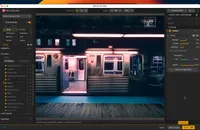
The real jewel in the crown is ON1 Photo RAW’s Effects module, where you can browse and apply a wide range of striking and inspirational preset effects or mix and match around 50 individual filters to make your own. Keep in mind that this is all part of a non-destructive workflow, so you can rework or replace effects at any time, including things like borders, textures and blur effects.


ON1 Photo RAW can also carry out sky replacements using a large selection of replacement skies organized into categories, and there’s also a dedicated Portrait mode with AI-powered tools for enhancing skin tones, face shape, eyes, lips, teeth and more. As if that’s not enough, you can create Photoshop-style layered images with masks and blend modes, and even though this does mean the creation of a new file, it’s still within ON1 Photo RAW’s non-destructive workflow.
In fact, the list of things this program can do is so long, it’s embarrassing. This alone surely makes it one of the best photo editing software applications on the market. I’m here to determine whether it’s a case of quantity over quality or quantity and quality. Let’s find out…
ON1 Photo RAW 2026: Specifications
Windows |
macOS |
|
Operating system |
Windows 11 x86 or ARM |
macOS 13 and above; macOS 15 and above recommended |
Processor |
Four-Core processor with 64-bit support, 2 GHz or faster processor with SSE 4.2 or Neon,;Eight-Core processor with 64-bit support, 2 GHz or faster processor with SSE 4.2 or neon or better recommended |
Four-Core Intel processor or Apple Silicon; M2 Apple Silicon or better recommended |
RAM |
8GB (16GB if shared with the GPU); 32+ GB recommended |
8GB (16GB if shared with the GPU); 32+ GB recommended |
Graphics |
DirectX 12, DirectML, Vulkan 1.1, and OpenGL 4.2 compatible video card with 4GB VRAM; DirectX 12, DirectML, Vulkan 1.1, and OpenGL 4.2 compatible video card with 8GB VRAM, NVIDIA RTX 3xxx or AMD Radeon RX 6xxx or better recommended |
Metal, Vulkan 1.1, and OpenGL 4.2 compatible video card with 4GB VRAM |
Storage |
6GB for installation |
6GB for installation, SSD recommended |
Monitor resolution |
1920 x 1080 |
1920 x 1080 |
ON1 Photo RAW 2026: Price
The regular edition of ON1 Photo RAW 2026 costs $99/£92.86 (about AU$141), while the MAX edition costs $199/£157.87 (around AU$283). At the time of writing, it was being sold at half price or thereabouts, though that may have changed by the time you read this.
Even at retail price, ON1 Photo RAW 2026 is less than half the cost of one year on the Adobe Photography Plan, and even the MAX edition, with its Lightroom- and Photoshop-compatible ON1 Resize AI, ON1 NoNoise AI, ON1 Portrait AI and ON1 Effects plug-ins and its remarkable Restore AI tool, is cheaper than the Adobe alternative, and with the added benefit of a perpetual license.
ON1 also sells subscription packages including both programs, additional content and cloud storage. You don’t have to choose this option, but options are not always easy to navigate on the ON1 site, so you might need to do a little digging. Given what it can do, ON1 Photo RAW 2026’s pricing is extremely competitive, even without discounting.
ON1 Photo RAW: Design & Handling
In a bid to make the ON1 Photo RAW experience simpler, ON1 has added a Home screen, which is displayed when you first launch the program. There are buttons for opening photos, browsing folders or importing from a device, and sections showing recent folders and albums, recent edits and a learning hub. Is it useful to new users? Perhaps.
You can also swap straight to the regular Browse view, which has tabs for Browse, My Catalogs and Presets. What’s the difference between Browse and Catalogs? You can browse folders and create albums in both, but with catalogued folders you can create Smart Albums and drill down through the dates your photos were taken on.

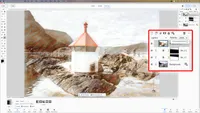
To edit a photo, you just double-click on it, and this is where the tools in the right sidebar come into play (also ON1’s selection of presets in the left sidebar). The Develop tab is where you fix up your RAW files and make general adjustments. The Local tab is for local adjustments and masking. The Effects tab is for viewing and adjusting the filters used by ON1 presets. While the Sky and Portrait tabs are for dedicated sky-replacement and portrait-enhancement workspaces.
It’s all logical enough, once you figure it out. A key distinction is that the Develop tab is for regular image adjustments, while the Effects tab is for ON1 Photo RAW’s effects filters. There is a lot of crossover in the tools, and you can apply both at the same time.

The masking options can be powerful but confusing. There’s a set of AI masking tools at the top of the right sidebar and a Mask button in the left tool panel that displays masking controls on a top bar, but these are regular non-AI masks.
You can use masks in the Local tab for overall image adjustments, but you can also create masks for individual filters in the Effects tab and for layers when you’re working on composite images. Yes, it’s a powerful set of masking options, but you need to keep your wits about you. ON1 Photo RAW 2026 crams a lot of functionality into an interface that’s very well managed overall but can sometimes feel crowded and confusing.
ON1 Photo RAW 2026: Performance
ON1’s RAW processing is not bad. I wouldn’t put it on a par with Capture One or DxO PhotoLab 9, but it’s not hard to extract decent image quality from your RAW files, especially with ON1’s NoNoise AI and Tack Sharp AI processes.
Two things really stand out in ON1 Photo RAW 2026. The first is its catalog of preset effects. These are easy to browse; they’re previewed directly on the image you’re working on and they can be applied with a single click. Once that’s done, you can inspect the filters and settings used in the right sidebar and modify as necessary.
ON1 Photo RAW’s effects make an interesting comparison with the DxO Nik Collection, as they cover the same range of effects but within a single module rather than spread across several plug-ins.


The new Restore AI process deserves a special mention, too. It’s available only in the MAX edition, and it does appear to use cloud-based processing, but the results are outstanding. It’s in a completely different league to the rather weak photo restore tool in Photoshop Elements 2026, for example.
Restored images are upscaled to 4K UHD resolution, even from lower-resolution scans; creases and spots are removed as if by magic, detail is restored very convincingly and the face recovery is amazing. Sometimes the likeness isn’t quite right, mostly when the original is small or blurred, but you can adjust the strength of the restoration for each face to help recover a proper likeness.

The results from ON1 Photo RAW 2026 are not always great without a little more work, and some of the presets are just way over the top for sharpening, saturation and ‘hyper-reality’, but at other times the preset effects can transform your images or give you ideas you might never have had. The range of effects and the scope offered by this program are pretty extraordinary.
ON1 Photo RAW 2026: Verdict

ON1 Photo RAW does so much that you might be wondering what the catch is. It's true that not all of the processes are best-in-class. DxO’s AI noise reduction is better, Lightroom and Capture One are slicker and faster at RAW processing, and while ON1’s masking tools are effective, they can also be pretty confusing. The standout features here are the creative effects and presets on offer, the easy image browsing and the fully non-destructive workflow. You can even create virtual copies to try out different effects on the same image.
The regular ON1 Photo RAW 2026 version is the best value, but if you have a lot of old photos you want to restore or you want to use ON1’s tools as plug-ins for Lightroom or Photoshop, the MAX edition is the one to go for.
Features ★★★★★ |
Is there anything this photo editor can’t do? If you want genAI there’s always Adobe, but for organizing, editing, effects and even layered composites, ON1 Photo RAW 2026 has it covered. |
Design ★★★★☆ |
It does so much that the interface inevitably gets quite crowded. It would be better if ON1 could merge the browsing and cataloging options and get the multiple masking panels under control |
Performance ★★★★☆ |
ON1’s RAW processing is decent, and its effects and filters are excellent. These, and the MAX version’s Restore AI, are the standout features. Sky replacement is also very good. |
Value ★★★★★ |
Even at its full asking price, ON1 Photo RAW 2026 is outstanding value for money. The MAX version costs more, but for many users it will be worth it. |
Alternatives