Taking home office duties in their stride, the best all-in-one printers do more than just print documents and photos. They also enable you to scan and copy documents and other paperwork, some even send and receive faxes as well, plugged directly into a phone socket. I've reviewed many of them to help you choose the best all-in-one printers, also known as multifunction printers or MFPs, which you can check out in my following guide.
It's an important buying consideration to remember that the initial purchase price of a printer is just the start. Historically, most conventional inkjet printers have been sold with 'installation' cartridges, which can run dry quite quickly. The latest vogue is for the likes of Canon MegaTank and Epson EcoTank printers, which are more expensive initially but use a bottle-based ink system that can work out much cheaper in the long run, especially in the context of a busy home office.
Whether you’re setting up a full-time home office, or if you’re from the growing ranks of hybrid workers, splitting your time between the home and office, space is always at a premium. After all, working at home has to fit around actually living there. If you only want to scan and don’t need to print, see our guide on the best scanners instead. Conversely, I’ve included a particularly small printer in this guide, even though it’s not a multi-function device, for reasons that will become apparent. Compared with laser printers, inkjet printers tend to take up less room and are generally more affordable, but I’ve included a budget-friendly color laser printer as one of the best options, especially if you really need to output smudge-proof pages.
The best all-in-one printers…
Why you can trust Digital Camera World Our expert reviewers spend hours testing and comparing products and services so you can choose the best for you. Find out how we test.
Best all-in-one printer overall


We’ve all been complaining about the exorbitant price of ink cartridges for years. Sure, this Canon printer costs more to buy than many inkjet printers but, with its ‘MegaTank’ bottle-fed inks, it can reduce the total cost of ownership by around 85 per cent. That has to be a good thing for your bottom line when working at home.
Capable of fast, crisp output, its 600x1200dpi print engine is fed by no less than three separate paper input options. There’s a 250-page main tray that slots in underneath, a rear upright tray for specialist media and a flat rear tray that enables printing banners of up to 1.2m long. Meanwhile, a 1200x2400dpi scanner up top enables not only scanning and copying, but also direct faxing, complete with a 35-page ADF unit and storage for up to 100 speed-dial numbers and group dialing for up to 99 locations.
Build quality feels really good and the printer is easy to use, either hooked up to a computer or standalone via its color touchscreen interface. A full range of connectivity includes USB, Ethernet, Wi-Fi and fax. Helping to keep tabs on a busy lifestyle, it’s also compatible with Canon’s mobile printing apps for Apple and Android, as well as cloud-based services and can work with Amazon Alexa and Google Assistant.
Read our full Canon MAXIFY GX4020/GX4050/GX4060 review
Best all-in-one laser printer
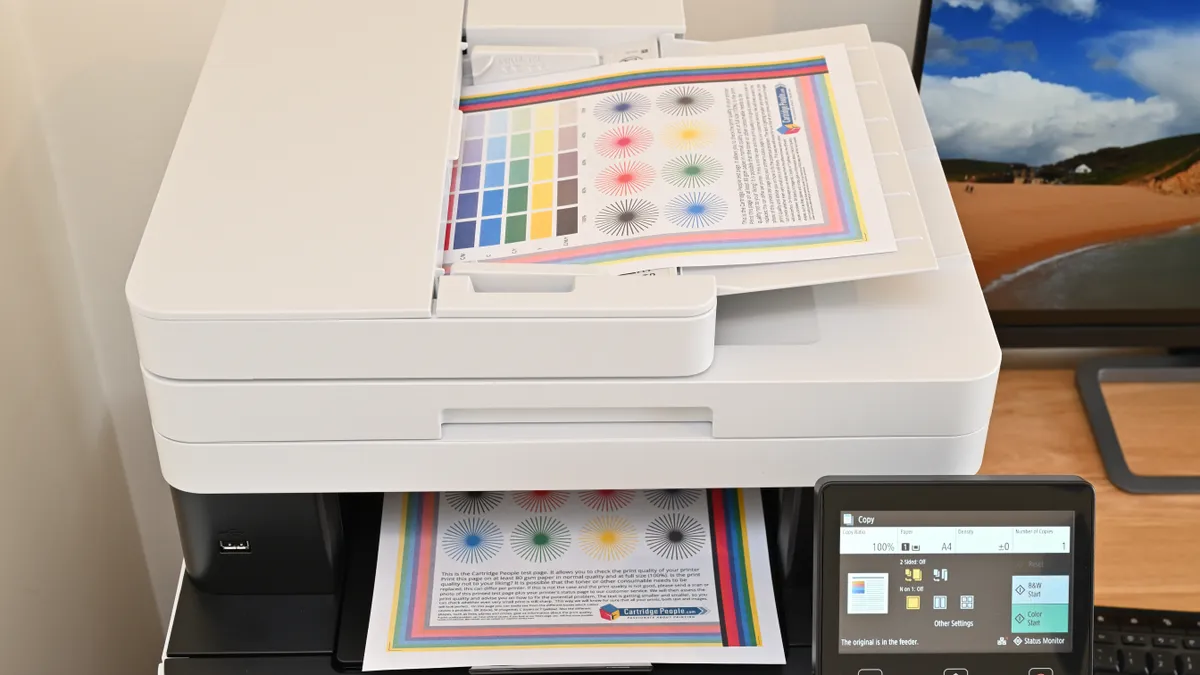
I've mainly recommended inkjet printers in this guide, since I think they produce better images. However, a laser printer might be better for you if you want to print high volumes of text documents, because they're faster and produce sharp type.
If you're going to use all the functions on your printer (printing, scanning, and copying) on a regular basis, I think this color multifunctional laser printer is ideal. I was pleased with the speed of printing, including in automatic duplex (double-sided) printing, and I liked the intuitive color touchscreen interface. In my review, I also highlighted the excellent connectivity options. There are the usual USB 2.0, Ethernet, Wi-Fi and Wi-Fi direct, but an additional USB 2.0 port allows scanning/printing and directly to/from a memory stick and there's support for cloud platforms like Google Drive, OneDrive and DropBox.
Scanning double-sided documents takes longer than with some more expensive printers, as the paper is fed twice (once for each side) but the scan quality is good. Competitively priced and with reasonable running costs, I think this is smart and relatively compact color laser printer for the busy household.
Read our full Canon i-SENSYS MF655Cdw / imageCLASS MF653Cdw review.
Best Epson all-in-one printer

Having been working from home for 25 years, I’ve generally favored Canon printers for quality and reliability but Epson runs a close second. I like that the ET-4950 ticks all the right boxes for hybrid/home workers, combining quick mono and color document printing with quick and easy scanning, copying and even direct fax facilities. That’s all taken care of with a built-in auto document feeder and a neat color touchscreen interface.
I also like that, unlike some of Epson’s first ‘EctoTank’ bottle-fed printers, the ET-4950 has a reasonably affordable up-front purchase price, backed up by super-cheap running costs that make for a great bottom line in the long run. My only slight complaints are that it only has one paper input tray, which can be a pain if you use different sizes of paper or letterheaded stationery, and glossy photo output could be better and faster. All in all though, the ET-4950 is a very sound purchase at the price.
Read our full Epson EcoTank ET-4950 review
Best for photos

If your hybrid working requires glossy photo output on a regular basis, the Canon MegaTank G620 (G650 in Europe and G660 in Australia) is a cartridge-free machine that has relatively high-volume ink tanks, topped up by 60ml bottles of ink. With my money-saving head on, that works out to about an eighth of the cost of most cartridge-based printers. I also like that the printer itself is very affordable to buy, compared with many bottle-fed printers.
The photo-friendly line-up of six dye-based inks includes CMYK plus red and grey inks, aiming for a wide color space and enhanced mono photo quality. The individually keyed, squeeze-free bottles ensure simple, mess-free top-ups and make it impossible to pour any color of ink into the wrong tank. There’s no color touchscreen but the small mono LCD enables an intuitive pushbutton interface. It makes short work of creating mono or color photocopies, courtesy of the built-in scanner. Connectivity is good too, with USB and Wi-Fi, the latter enabling PIXMA Cloud Link for smartphones and tablets, Apple AirPrint, Mopria for Android and Wireless Direct.
A set of ink bottles is sufficient for 3,800 6x4-inch photos, or around 3,700 mono documents, or 8,000 color documents. Despite lacking a pigment-based black ink, mono text is pretty crisp. I find that print speeds are a little pedestrian, taking around 47 seconds to create a 4x6-inch glossy photo, but a borderless A4 photo print only takes a couple of minutes in standard photo quality mode. Color rendition is impressively accurate, tonal range is very good and the printer makes a good stab at black & white photo printing. In the long run, it’s great value for a highly capable and compact photo printer.
See our full Canon PIXMA G620/G650/G660 review
Best A3+ / 13-inch printer

For most home-office needs, an A4/letter-sized printer will suffice. However, if you need to create larger output, or maybe fold a larger sheet of paper in half to effectively make a four-page A4/letter-sized pamphlet, there are some all-in-one printers capable of that, and I think this 13-inch Epson printer is the ideal solution.
A major frustration of most large-format printers is that you can find yourself perpetually running on empty, for at least one or more of the ink cartridges. However, typical of Epson’s EcoTank range, this printer has high-volume ink tanks instead of cartridges. This is similar to the Canon Maxxify system that I mentioned earlier, and it reduces long-term costs considerably.
The printer comes supplied with sufficient ink to create thousands of mono and color documents, or up to 3,400 6x4-inch photos, with correspondingly smaller amounts of larger sizes. Speaking of photos, although this printer has a relatively limited color space for photo printing, I found it capable of producing rich and vibrant A3+/13x19-inch photo prints.
The images I produced using the default ‘Photo Enhance’ feature looked way oversaturated and unnatural for my taste, but when I switched to the ‘Custom’ setting and turned Photo Enhance off, results were much better. The definition and tonal range in the black-and-white photos I tested were also impressive for a printer of this kind. Printing speed is somewhat slow compared with most dye-based, cartridge-fuelled printers, but for if you're looking for an all-in-one that can print at big sizes, I don't think there's a better option for long-term value.
Read our full Epson EcoTank ET-8550 review
Best mobile printer
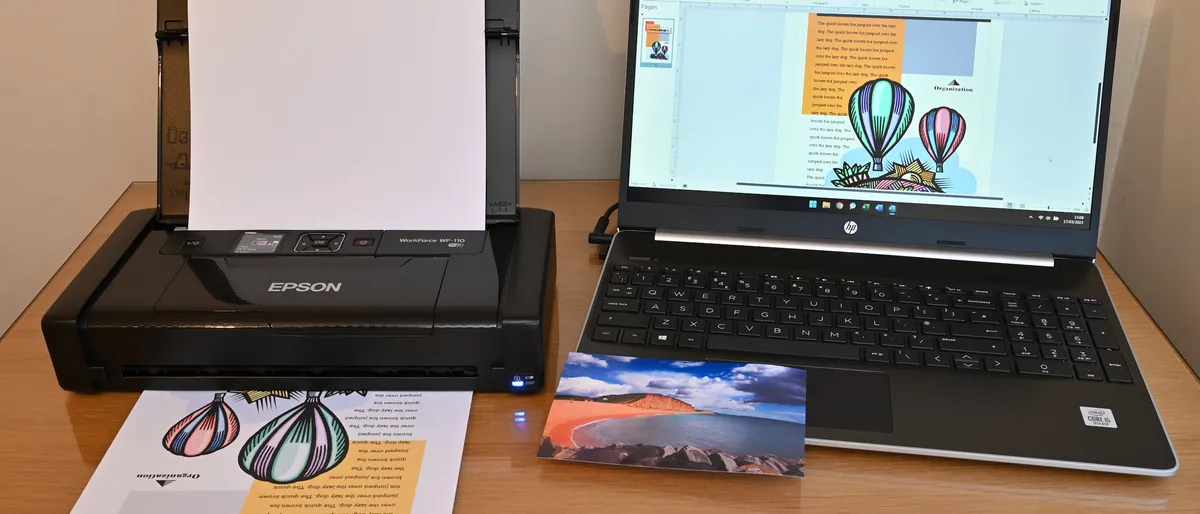
If your ‘hybrid’ working extends to sitting on the train or in a coffee shop, or you need to print output to share with clients on the road, this Epson printer is ideal. Built as a fully mobile printer, it’s small enough to pop into your daily bag and can run on its own rechargeable battery so you can use it anywhere and everywhere. The only real downside is that, unlike all of the other printers in this guide, it’s a single-function device that can’t scan or copy.
When I tested it, I found it very easy to set up and get started with. I also liked the results of the pigment-based inks on plain paper, with smudge-resistant crisp black text and vibrant color in graphics. However, while they can print on glossy paper, the results for photos are less impressive. Pigment inks in general are less suited to glossy paper, and the total of four inks isn’t enough for the best photorealistic output. The printer is also a little slower than some other compact printers, and its inkjet cartridges are on the pricey side, so it can work out expensive if you're going to be printing in large quantities.
Read our full Epson WorkForce WF-110W review
How to choose the best all-in-one printer?
The best multifunction printer for you will depend on what you want to print and scan, how often, in what quantity and at what size. For general office use, to print text documents, you may want to go for an economical inkjet printer option: either one that's economical to buy, or one that costs more upfront but is cheaper to supply with ink, such as the Canon Maxify range.
Be aware the initial price of buying a printer is not the only cost consideration. Most inkjet printers are sold with standard-capacity or 'installation' cartridges, which can run dry surprisingly quickly. Canon Maxify and Epson's EcoTank printers are quite expensive initially but use a more efficient bottle-based ink system that's cheaper in the long run.
Photographers looking to make prints will have much higher demands in terms of print quality, and will benefit from an option with more inks, such as the Canon PIXMA TS8320 / TS8350, since this allows for much smoother gradations.
I generally recommend inkjet printers for general use, especially if you want to print images. However, if you need to print large volumes of text documents, you might want to consider an all-in-one laser printer. These are more expensive initially, but they print large quantities faster. Finally, most all-in-one printers print at up to A4 size. If you're looking to print at larger sizes, the number of multifunction options is much smaller, but I have included a large-format A3 all-in-one printer in my list.
How we tested the best all-in-one printers
We test as many all-in-one printers as we can get our hands on, and we look at the speed and quality at which they can print documents and photos. We test using a range of printing jobs, from monochrome A4 documents to full-color photographs, and assess the level of detail and color rendition the printer achieves.
We also look at the running cost of the printer – how quickly it burns through ink, and how much its cartridges cost to replace – to get an idea of how it will perform in the long term. Plus we assess how easy the printer is to use – how easy its menus are to navigate, and the options it provides for connectivity (USB, Wi-Fi, Bluetooth, etc).
FAQs
What is an all-in-one printer?
An all-in-one printer, or a multi-function printer, is a machine that does more than prints. Functions can vary, but typically they serve as scanners and photocopiers as well as printers, and some can also fax.
What are the advantages of an all-in-one printer
The main benefits of an all-in-one printer are economy and space. While many multi-function printers are larger than simple compact printers, they have a much smaller footprint than what a separate printer, scanner and copier would have. That means less desk space taken up, and few cables trailing around. And while they're often more expensive than buying a printer alone, they are much cheaper than buying all of those devices separately.
Do all-in-one printers have any disadvantages?
As you'll see in our guide above, there are a lot of different multifunctional printers around, each with its own pros and cons. Like with any device designed to serve various functions, it can sometimes be the case that it doesn't do any of the jobs as well as a dedicated device.
Some all-in-one printers do not offer the best quality printing for photos, for example, especially for black-and-white photos since they tend to have only one black ink. However, some do a good job for images, at least for colour, and we have included an option above that we think is particularly good for printing images.
Another potential image is if one function of the device fails, the other features could also fail. In some multifunctional printers, an issue with the ink will prevent you from being able to scan or copy. Some all-in-one printers will allow you to scan documents when there is no ink cartridge or no ink in the cartridge but some do not.
Compare prices