Digital Camera World Verdict
The myFirst Frame Clario is a specialized smart hub that aims to bridge the gap between a digital photo frame and a family communication tool. Its 7-inch display with 1024 x 600 resolution lacks the crispness of modern HD screens, but the device excels in providing a safe and fun social experience where parents can moderate contacts for video calls and photo sharing.
Reasons to buy
- +
Large 7-inch touch display
- +
Built-in video calling
- +
Interact with your family's memories
- +
Includes smart hub features
Reasons to avoid
- -
Low-resolution display
- -
All family users need the app
- -
No internal battery
- -
Risks notification overload
Why you can trust Digital Camera World Our expert reviewers spend hours testing and comparing products and services so you can choose the best for you. Find out how we test.
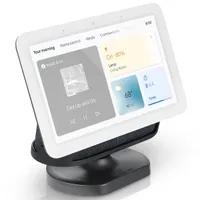
Most of the best digital photo frames are exactly and only that: digital photo frames. But every so often we come across something like the Google Nest Hub or, in this instance, the myFirst Frame Clario, which supercharges the photo display experience and adds in smart home features such as video calling and calendar interaction.
The Frame Clario is a family hub designed to connect generations through photos, comments, birthday reminders, and video calls. The goal of the frame is to make daily sharing and communication simple for everyone. Having tested it for several weeks, I can testify that myFirst has created a fine-tuned, well-engineered device that is as easy to use for adults as it is for children.
For the purposes of this review, I have focused testing first on its photo display capabilities and second on its video-calling feature. And as it's designed for the whole family, I've drawn in my young children to get first-hand thoughts from the frame's primary target demographic.
Specifications
Price |
$89.99 / £89.89 / AU$149.00 |
Display |
7-inch IPS touchscreen |
Resolution |
1024 x 600 px |
Inbuilt storage |
16GB local storage |
Connectivity |
Wi-Fi (2.4 GHz) |
Aspect Ratio |
16:9 |
Sound |
Built-in speaker |
App |
myFirst App (Available on iOS and Android) |
Dimensions |
7.19 x 5.43 x 1.30 in (182.6 x 137.8 x 33 mm) |
Weight |
1 lb (455g) |

Price
The Frame Clario costs $89.99 / £89.89 / AU$149.00 and is therefore priced almost identically to the similar, although more well-known, Google Nest Hub. Compared to 7-inch digital photo frames, it sits at a very premium price point, but considering most of those offer zero smart features, you can see what you're paying the extra money for.
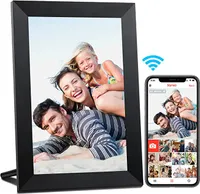
If you're not concerned about video calling or interacting with your calendar, then a traditional-featured digital photo frame is a much better bet. You'll be able to get a much larger and higher-resolution display for less money with the Aeezo Portrait, taking pride of place as our favorite budget option in our guide to the best digital photo frames.

Design & Handling
The most obvious thing about the myFirst Frame Clario is that it looks nothing like a traditional photo frame. At 1.30 inches deep and with large rounded corners, it looks more like a mini-monitor or a smart hub than a device to beautifully "frame" your photos. If you're looking for a frame that will blend in with your other photo frames on the mantelpiece or side table, you'll need to look elsewhere.
The display is also much smaller than traditional digital frames, featuring a 7-inch IPS touch display rather than a much more standard 10- or 11-inch screen. The resolution is also lower than I was expecting, maxing out at 1024 x 600 px. These specs mirror the Google Nest Hub exactly. I think 1920 x 1080 px should be the minimum on a device like this, especially when you're wanting to avoid any "low-res" blurring of your photos and videos.

More positively, the build is sturdy and lightweight, utilizing high-quality matte polymers that are designed to resist fingerprints and withstand the hands-on nature of a device meant for children. Despite my children using it to navigate menus, type comments, and interact with photos, the device was weighty enough to remain in place most of the time. And even when it didn't, its robust build quality meant it didn't suffer any damages.
One of the defining design features of the Frame Clario is the dedicated Magic Button located on the top of the frame. This large, friendly physical button provides a tactile way for children to instantly trigger actions like starting a slideshow or making a video call. Other essentials, like the 2MP camera, built-in speaker, and dual noise-canceling microphones, are integrated into the front and side panels to facilitate clear, face-to-face communication.
At the rear, I was pleased to find a USB-C charging port rather than USB-A. That means I can make use of any USB-C cable I have laying around for my plethora of other devices. I would also love to have seen an additional USB port or two for charging other devices that's probably too much to expect at this price point.

Performance
Getting the Frame Clario set up was as easy as it could be, especially given the familiarity of the interface, which is almost identical to iOS pre-Liquid Glass. After connecting to my WiFi, dialing in a few settings, and pairing it with the myFirst Circle app, I was ready to give the features a try.
I began with photos and was able to quickly post one to my group of pre-approved contacts, with a notification popping up immediately on the Frame Clario. Photos can be shared with different 'circles', including family, besties, friends, and acquaintances, with each category containing a pre-defined set of people. The parents are completely in control of these 'safe lists', so children can only interact with the family or friends that you've approved.
Interacting with photos centres around adding an emoji or typing a short comment using the built-in keyboard. Accessing this functionality felt a little clunky and unintuitive compared to a modern social media platform. I think work could be done to better position the social elements and thereby improve engagement with them. My children struggled a little with this, and the long tap for emojis was a little tricky for my youngest child. I also felt that the 16-character limit on ShoutOut comments was rather restrictive.

With the rudimentary photo functionality taken care of, I moved on to setting up a video call with one of my pre-approved contacts. Each person that you want to video call also requires the myFirst Circle app, so you'll need to get your family members and friends on board before you can connect with them.
As expected, the image quality could be better. Despite only being a 7-inch display, the 1024 x 600 pixel resolution wasn't quite sufficient to eliminate a slight pixelation and blurriness, especially around text. Pushing it up to Full HD (1920 x 1080 px) would be a great step in elevating the experience of viewing media as well as taking part in video calls.

The Frame Clario is also capable of playing music (via the microSD card) or built-in soundscapes such as Forest Stream and Fireside Calm. These could be used as white noise to help children get to sleep at night or as ambient noise while relaxing. It's even possible to create your own soundscapes by choosing a blend of elements such as Bird, Cafe, and Footsteps. That was really fun for my children to play with, but there hasn't been much interest in it beyond the initial excitement.
In general, the Frame Clario is a relatively well-set-up hub for interacting with family and friends through photos, video calling, and music. I wouldn't say it's the most streamlined of experiences, though, and more work could be done on the social elements. That said, it's not a bad attempt at replicating the Google Nest Hub experience, but for families with young children.

Verdict
The myFirst Frame Clario sets itself apart from traditional digital frames by being a kid-friendly smart hub. You could think of it as a Google Nest Hub but for children. The device is built well and even has a playful and fun aesthetic which will appeal to families. With that in mind, the Frame Clario excels in providing safe list functionality so children are only able to interact with preapproved family members and friends.
Unfortunately, its technical specifications leave room for improvement, particularly regarding its 7-inch, 1024 x 600 px display. Most of us will have better definition on our smartphones, and the lack of resolution is noticeable during video calls and photo viewing.
The setup is straightforward, but the restrictive character limits are a problem, and clunky emoji menus can feel unintuitive. Ultimately, if you are looking for a high-resolution digital photo frame for your mantel, you should look elsewhere, but if you need a sturdy, secure family portal, the Frame Clario is a commendable, albeit lower-res, contender.
Features ★★★★★ |
An abundant set of features with everything you'd expect from a smart hub. |
Design ★★★★☆ |
A durable and robust design that is only let down by the low-resolution 7-inch display. |
Performance ★★★★☆ |
An easy-to-use hub with excellent controls for protecting children. Unfortunately photos and videos lack definition. |
Value ★★★★☆ |
A premium price for a 7-inch photo frame, but when you throw in all the smart features, it becomes much more reasonably priced. |
Alternatives