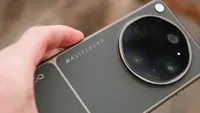
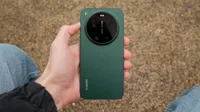
Digital Camera World Verdict
In the right hands, the X300 Ultra is a serious video powerhouse with arguably the best video seen on an Android phone, offering clean, cinematic footage with extensive manual control and rock-solid image stabilization. But that’s not to take away from its photo capabilities; the cameras are excellent for stills, particularly the 35mm main camera, while the 14mm is one of the best ultrawides I have used on any phone. Combined with the optional 200mm and 400mm teleconverters, it's less of a phone and more of a complete camera system. There are a few minor things I don’t like: the camera bump is huge, Vivo still loads too much bloatware onto a premium device, and the camera kit color and fit aren't very premium. But judged as a creative tool, the X300 Ultra is exceptional.
Reasons to buy
- +
Outstanding video tools
- +
Best-in-class stabilization
- +
Strong battery life
- +
Optional telephoto adapters are excellent
Reasons to avoid
- -
Optional camera kit feels cheap
- -
Bloatware
- -
Camera bump is huge
Why you can trust Digital Camera World Our expert reviewers spend hours testing and comparing products and services so you can choose the best for you. Find out how we test.
Despite making some of the best camera phones over the last several years, Vivo still might not be a name familiar to many in the Western hemisphere. Vivo’s previous top-end phones have rarely made it outside of Asia, with the brand focusing on more budget devices in Europe. However, that is on its way to improving with the Vivo X300 Ultra, which will be launching in select European markets.
And the X300 Ultra arrives as another serious best camera phone contender. It brings a top-end 35mm main camera, a 14mm ultrawide, an 85mm telephoto, 8K video, 4K up to 120p, 10-bit Log recording, Dolby Vision, powerful stabilization, and optional 200mm and 400mm telephoto adapters that make the whole setup feel closer to a camera system.
That does not mean it is an easy recommendation. The price is high, and the full setup only gets more expensive once the optional accessories are added. But in stills, it is one of the most enjoyable camera phones I have used this year, and when it comes to video, it might be the first Android phone I have tested that feels like a genuinely convincing iPhone rival.

Specifications
Processor |
Snapdragon 8 Elite Gen 5, plus Vivo Pro Imaging Chip VS1+ |
RAM + Storage |
16GB+512GB, 16GB+1TB |
Display |
6.82-in LTPO, 3168 x 1440, 1-144Hz, 510ppi |
Main Camera |
200MP, 35mm, 1/1.12-in, f/1.85, OIS – CIPA 6.5 |
Telephoto Camera |
200MP, 85mm, 1/1.4-in, f/2.67, OIS – CIPA 7.0 |
Ultrawide Camera |
50MP, 14mm, 1/1.28-in, f/2.0, OIS – CIPA 6.0 |
Front Camera |
50MP, 1/2.75-in, f/2.45, AF |
Video |
8K 30p or 4K up to 120p with 10-bit Log, Dolby Vision |
Battery & Charging |
6600mAh battery, 100W wired or 40W wireless charging |
Operating System |
OriginOS 6, based on Android 16 |
Size |
Black: 162.98 x 76.81 x 8.19mm | Green / White: 162.98 x 76.81 x 8.49mm |
Weight |
Black: 232g | Green / White: 237g |
Price & Availability
Despite this being the widest release yet for a Vivo Ultra phone, that still doesn't include the US or the UK; however, European buyers can get their hands on the phone. The kicker is that it is almost certainly too expensive to really recommend. The phone is launching for €1,999, which is a huge premium over devices like the excellent Xiaomi 17 Ultra and Oppo Find X9 Ultra.
It’s not like the price is completely unjustified. The 35mm main camera, 85mm telephoto, and 14mm ultrawide are all serious modules that produce fantastic photos and the best video I have seen from a phone.
But as good a phone as the Vivo X300 Ultra is, I am just not sure I can justify paying the same as a decent camera system, which, try as it might, the X300 Ultra does not outcompete. Optional accessories like the photography case and telephoto lenses that make this phone a truly great alternative to cameras push the full creator setup considerably higher.
Design
The Vivo X300 Ultra is a good-looking, if very minimalist, phone. I tested the black version, and while it is clean and understated, it is also a little too simple for a flagship Ultra phone. Other colors and finishes, particularly the green and white options, look more interesting, but even then, I am not convinced the X300 Ultra has the kind of design identity that immediately screams “top-tier camera phone.”
Overall, the design feels a little uninspired. But that is not to say it feels uninteresting – it does not. The phone has a very premium finish, feels really nice and solid in the hand, it has IP68 and IP69 dust and water resistance, and a large 6.82-inch flat display, but visually it does not feel as special as its camera hardware deserves.

The camera bump is very large, around the same diameter as the Oppo Find X9 Ultra and Xiaomi 17 Ultra, but it is noticeably deeper. The phone is slightly top-heavy with that big camera bump, but it is still relatively well balanced. A minor complaint, but the hard edge and overall size of the camera island also meant it caught slightly on my jeans pocket. A more tapered edge would help it slide in and out more easily.
Vivo has not added a dedicated camera button, which I don’t mind at all, as I rarely, if ever, use them. I think they often exist more for chasing Apple than for practical shooting. You can double-tap volume down to open the camera, which is enough for me. I would, however, have liked a separate action button for a quick setting such as alerts, translate, or flashlight, as we have seen on Apple, Oppo, and Honor phones recently.

The display is a beautiful display; it’s a 6.82-inch 2K Zeiss Master Color Display that sports a 144Hz refresh rate, Dolby Vision, HDR10+, SGS Low Blue Light certification, and TÜV Rheinland flicker-free certification. It is a large, sharp, smooth screen, and Vivo’s eye comfort features are welcome for long editing or shooting sessions.

Accessories
The real design interest comes from the optional camera kit. I am really not a fan of the shiny silver finish. It is certainly eye-catching, but I would much rather it were more discreet while I am shooting. The disappointment is that the case itself feels a bit plastic and cheap, especially compared with Oppo’s new Find X9 Ultra camera case. There was also some minor wobble on the case’s ring mounts and handgrip, which adds to the slightly less premium feeling. At this kind of level, I would like a little more polish.
So Oppo and Xiaomi’s cases might look and feel better, but I think Vivo’s is the most functional. The diamond-pattern grip is nice and grippy, and the deep handle makes the phone feel far more like a real camera. The manual controls are also genuinely useful, with zoom, flash, exposure compensation, record, and a two-stage shutter button all available.

I tested both the second-generation 200mm and new 400 lenses; both the teleconverter lenses themselves feel much more premium than the case they slot into, with solid metal bodies and mounts. I do wish, like the case, they came in black option as well as the silver. They are large, especially the 400mm equivalent lens, but still nowhere near the size of a real 400mm camera lens and smaller than Oppo’s new 300mm accessory.
The 67mm filter attachment is a major plus; it makes the X300 Ultra much easier to take seriously as a video phone, because ND filters are essential for controlling shutter speed in bright conditions with camera lenses fixed apertures. Vivo has also partnered with SmallRig to produce a Pro Video Rig Kit with control buttons, a grip handle, a back plate, a cooling fan, cold shoe mounts, and 1/4-inch mounting – although I unfortunately don't have this to test out.
Camera Performance
The Vivo X300 Ultra’s camera system is unusual because it does not follow the standard phone camera formula. Instead of a very wide main camera around 23mm or 24mm, Vivo has gone for a 35mm main camera. I actually like 35mm as a native focal length. It can be a little harder to work with in tight spaces, and it is a big jump from the 14mm ultrawide, but it gives photos a more natural and pleasing perspective.
The 35mm lens is dubbed by the marketing department as the “Zeiss Documentary Camera”. With 1-inch sensors in phones seemingly falling out of fashion again, it uses a 200MP Sony LYTIA 901 sensor, with a still pretty large 1/1.12-inch format paired with an f/1.85 aperture. The lens also gets a Zeiss T* coating to reduce ghosting and flare.
In practice, the main camera quality is very good. Sharpness is strong, there is lots of detail, and the 50mm and 70mm equivalent crop options hold up really well, with no perceptible loss in quality to my eye anyway. I like the look of Vivo’s images in the Zeiss natural color mode; lighting is well balanced with colors looking true-to-life. If you are looking for a little more pop, then there is also a vivid mode (which is actually the default camera style), as well as numerous other styles to stylise images or attempt to mimic film with some mixed results.


However, Vivo’s processing is still a little too sharp and HDR for my taste. Vivo does include a Raw Lighting setting, which, when switched on, should reduce some of the sharpening, HDR, and other processing that makes phone images look, well, processed. Raw lighting does make a welcome difference; I do prefer the overall feel of images with this setting on, although it doesn’t magically make images look any less like they are shot on a phone. I think Xiaomi's Leica Authentic profile or Oppo's Hasselblad Master Mode both do a better job of making photos look a little more camera-like.
Night photos are very good. The X300 Ultra retains lots of detail and rarely needs to kick into long exposure mode to produce a usable result. That said, night images can show slight oversharpening, and Vivo’s processing tries a little too hard to brighten the scene rather than allowing natural depth in the shadows. I often found myself dragging exposure compensation down to make my photos a little more atmospheric.


I am never really a fan of an ultrawide camera, but the 14mm ultrawide is one of the best I have used on any phone. This is made all the more important as the jump from 14mm to 35mm is significant, and on a weaker ultrawide, that would leave a real gap. Here, the 50MP sensor gives enough quality that you can crop into ultrawide images somewhat without losing too much detail – although don’t expect miracles.
The lens also controls aberrations and color casts really well, which is also not usually a strength of most ultrawides, and it is one of the cleanest I have seen on a phone. Vivo says the ultrawide uses Zeiss T* coating, Multi-ALD low-reflection coating, and Super Blue Glass.


The 85mm telephoto lens is outstanding, and despite the 35mm giving it a very good run, it's the standout stills camera for me. It features a 200MP sensor, with a 1/1.4-inch size, APO optics, and what Vivo says (and I’m inclined to agree with) is gimbal-grade stabilization. All this translates into images that are sharp and detailed, with great lighting and color.


Macro is excellent too. Vivo uses the 3x lens for macro rather than the ultrawide, which gives the right perspective for close-up work. The blur looks pretty genuine, more like a proper camera than the distorted ultrawide macro modes used by some rivals.

Image credit: Gareth Bevan / Digital Camera World

Image credit: Gareth Bevan / Digital Camera World
Portrait mode is one of the best on any phone right now; it did really well cutting out subjects, although it still had some minor issues with flyaway hair. The results looked natural, and what I liked most was that Vivo softened the edges in a way that made the transition to the background look more like natural falloff rather than a computational cutout that can make the subject look composited onto the background.

Standard telephoto
Image credit: Gareth Bevan / Digital Camera World

Portrait mode
Image credit: Gareth Bevan / Digital Camera World
Zooming in, the 170mm crops are excellent and look optically close to lossless. Beyond 170mm, the X300 Ultra relies on in-sensor cropping and then generative AI to boost longer-range images. Vivo’s SuperZoom is among the best in the business; up to around 600mm images without too much complication are sharp and natural-looking, although lots of detail does start to look squiggly. After this, you can see the effects of AI kicking in with a more smoothened texture and loss of fine detail. It is very good, although it is still outclassed by the optical power of the Oppo Find X9 Ultra’s 10x lens.
Where the Vivo fights back is with its teleconverter accessories; it's not the only brand to be pushing these add-on lenses, but as one of the first to really go hard on these accessories, it has the most developed system. Oppo’s new telephoto lenses is good, but the brand has yet to settle on a mount that works across phone models, and in the camera, the telephoto can’t be used in all modes, which are two frustrating limitations that thankfully the Vivo doesn’t share.
The 200mm (2.35x) and 400mm (4.7x) equivalent lenses are excellent. The optics from both are outstanding, and they make the X300 Ultra feel much more like a modular camera system than a normal phone. You can go to 800mm using in-sensor cropping, and the results are still impressive, although there is some minor sharpening detail visible in textures such as fur and hair. Stabilization with the telephoto adapters is excellent. I do not have the steadiest hands, but even at 800mm, I was getting sharp and shake-free photos.

Shot with the 400mm telephoto adapter
Image credit: Gareth Bevan / Digital Camera World

Shot with the 400mm telephoto adapter and in-sensor zoom
Image credit: Gareth Bevan / Digital Camera World
The camera app is one of my favorites, although it might be a little overwhelming to some. There are a lot of modes, and some of them have varying levels of usefulness, but most are tucked away in the “more” menu (or can at least be moved there to clean up the clutter).
I really like how many shortcuts Vivo lets you keep on the screen, with four icons at the top and three on the side for quick settings. You can also have none if you prefer a clean viewfinder screen. The AI will occasionally pop up with suggestions to change modes, which can be useful, though it also adds to the sense that there are perhaps too many options.
Video
Video performance is where the X300 Ultra really comes into its own. This is the best Android phone I have used for video, and it is finally a real challenger to the iPhone’s dominance. Video is clean and crisp, dynamic range is excellent, and footage from the sensors looks genuinely professional. You do not get the same depth as a larger-sensor camera, of course, but results can still look cinematic.
The Pro Video mode is packed with useful tools, including LUTs, full manual controls, audio levels, waveforms, and histograms. You can even use Pro Video mode with the telephoto adapters. The X300 Ultra is capable of 4K 120p 10-bit Log video across the rear cameras, as well as APV 422 encoding, ACES workflow support, and custom 3D LUT monitoring. The one caveat from my use is that LUTs are preview only in-camera, with no option to burn them directly into final footage, so this needs to be done in post.
Stabilization for video is outstanding. The X300 Ultra has additional modes with horizon lock and an ultra-steady mode, and both are very effective. It gets closer to gimbal-level stabilization and is on par with a lot of action camera stabilization I have used for heavy action. Panning is smooth, without the jerkiness you get from systems trying too hard to fight the movement, and static handheld shots are rock steady.
There are also a couple of minor modes and options I want to shout out. The built-in teleprompter is a great addition, and I wish more phones did this. I also really like how easy it is to see and swap which microphone you are using to record; not every brand makes this clear, and it can be a huge annoyance.
Phone Performance
The X300 Ultra uses the latest and greatest Qualcomm Snapdragon 8 Elite Gen 5, supported by Vivo’s Pro Imaging Chip VS1+. The VS1+ imaging chip is designed to handle image pre-processing, raw processing, noise, sharpness, dynamic range, and faster image output.
In my own testing, the X300 Ultra scored 3632 single-core and 10619 multi-core in Geekbench, with 3DMark scores of 6620–4299, which puts it among the best Android flagships right now.
More importantly, it feels extremely fast in real use. The Snapdragon processor flies through day-to-day tasks, but more relevant is that it is excellent for video editing and photo editing. I noticed no meaningful slowdowns when scrubbing through video or exporting 4K footage.
OriginOS 6 is slick, enjoyable to use, and easy to navigate – and a bonus for MacBook owners who use Android; it is also now compatible with AirDrop. OriginOS still has a bit of its own identity, but the big negative, though, is bloatware. There was a lot installed out of the box, and while I can forgive that on budget phones, it cheapens the experience on something this premium.
The AI Suite is very comprehensive, with AI retouch, expand, re-color, eraser, and UHD tools. Most do a good job. The eraser is particularly good at recognizing people, and for quick edits, it is genuinely useful. There are still some obviously AI-looking artifacts, especially when using Gen Expand, where the generated content does not quite match the resolution of the cameras. In a way, it’s a compliment to the imaging hardware that the cameras are so good that the AI fill has a hard time keeping up.

Original
Image credit: Gareth Bevan / Digital Camera World

AI Eraser
Image credit: Gareth Bevan / Digital Camera World

Original
Image credit: Gareth Bevan / Digital Camera World

Generative expand, note the lower quality around the edges
Image credit: Gareth Bevan / Digital Camera World
Battery life is excellent. The 6600mAh BlueVolt battery got me through around a day and a half with normal use, although heavy video shooting cut into that quite a lot. Vivo says the battery supports 100W wired FlashCharge and 40W wireless charging, and that the phone includes bypass charging with smart temperature control for intensive use. In my charging test, the phone reached 37% in 15 minutes and 61% in 60 minutes using PD charging.
Final Verdict
The Vivo X300 Ultra is not the most ultra-looking phone, but it is one of the most compelling ultra phones I have used. Vivo has built something that ticks nearly every box on my wishlist. The main camera is excellent, the ultrawide is one of the best around, the 85mm telephoto is outstanding, and the teleconverter system gives it a practical reach that most phones cannot touch.
What really separates it, though, is video. The X300 Ultra is not just good “for an Android phone”; it is a genuine contender for best video on any phone full stop. The stabilization, Pro Video mode, LUT support, 4K 120p options, teleprompter mode, and accessory compatibility make it a phone designed for pro video workflows. As a video-first phone, the X300 Ultra is exceptional and the strongest contender to an iPhone for serious video creators.
There are still a few frustrations. I think Vivo’s image processing still leans slightly too sharp and bright, the design is generic, the camera bump is huge, the bloatware is unwelcome, and the shiny silver camera kit isn’t to my tastes – but mostly the lack of availability and exceptionally high price make it so difficult to recommend when options like the Oppo Find X9 Ultra and Xiaomi 17 Ultra are so so good.
Design ★★★★½ |
The phone itself looks a little generic, but the optional grip, controls, filters, and teleconverters make it feel more camera-like than any rival. |
Camera Performance ★★★★★ |
Excellent across stills and video, with outstanding telephoto reach, superb stabilization, and the strongest Android video toolkit I have used. |
Phone Performance ★★★★½ |
Fast, smooth, and long-lasting, although bloatware slightly undermines the premium experience. |
Value ★★★★☆ |
The hardware, video tools, and accessory ecosystem make a strong case, but limited global and a sky-high price make it hard to recommend over similar rivals. |
Overall |
★★★★½ |

Alternatives