Digital Camera World Verdict
The three things I like most about the Yashica Tank are that it’s small enough to slip into a spare pocket, it’s cheap to buy, and it has a flip-over screen that’s ideal for vlogging and selfies. It’s also quite stylish with a vaguely retro aesthetic and comes in four colorway options. I’m less enamored with its actual image quality, which isn’t as good as from my mid-range mobile phone. It’s also hard to beat the shakes when shooting handheld video, limiting its vlogging potential.
Reasons to buy
- +
Flip-over screen
- +
Simple to use
- +
Cheap to buy
- +
Four colorway options
Reasons to avoid
- -
Mediocre image quality
- -
Small image sensor
- -
No optical zoom
- -
No video stabilization
Why you can trust Digital Camera World Our expert reviewers spend hours testing and comparing products and services so you can choose the best for you. Find out how we test.
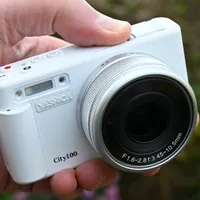
I’m old enough to remember ‘proper’ Yashica cameras and they actually predate me, the first twin-lens reflex camera landing in 1953 and the legendary Yashica FX-3 35mm SLR pitching up in 1979, when I was turning 20. Only the name remains, bought up by a Chinese company that has set about making a slew of compact cameras. They include relatively cheap, retro styled copies of the FX-3, in the somewhat similar shape of the Yashica FX-D 100, 200, 300 and S300 digital cameras, and there’s also the more modern point-and-shoot style ‘City’ line-up, including the Yashica City 100, 200 and 300 slimline compacts.
Going one better, at least in the affordability stakes, there’s the super-cheap Yashica DigiPix 100, which only packs a 5MP image sensor and has a 2.4-inch fixed screen.
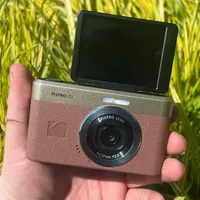
e Yashica Tank that I’m reviewing here is less expensive than City and FX-3 ranges, but a bit pricier and better equipped than the DigiPix, with a 12MP image sensor and flip-over 3-inch screen. As such, it goes into direct competition with the likes of the highly popular Kodak PixaPro C1, in a hotly contested battle to be one of the best point-and-shoot cameras.

Yashica Tank: Specifications
Photo Resolution |
12MP (24, 36, 48 interpolated) |
Video Resolution |
4K, 1080p, 720p |
Image Sensor |
12MP, 1/2.8" CMOS |
Selfie mirror |
Flip screen |
Display |
3.0-inch flip LCD, 640x360 |
Touchscreen |
No |
Battery |
Removeable Li-ion |
Connections |
USB-C |
Size (WHD) |
100x20x55mm / 3.9x0.8x2.2in |
Weight |
105g / 3.7oz |
Yashica Tank: Price
Like the Kodak PixaPro C1, the Yashica Tank launched at $100 / £79 / AU$190, aiming to sell big off the back of a relatively small price tag. For the sake of comparison within Yashica’s own stable, the bottom ends of the City and FX-D lines comprise the Yashica City 100 at $209 / £220 / AU$300 and the Yashica FX-D 100 at $342 / £259 / AU$455. Both of these cameras are therefore considerably more expensive than the Tank, although the more basic Yashica DigiPix 100 undercuts it at just $89 / £67 / AU$119.
Yashica Tank: Design & Handling
Yashica says that the design of the Tank intends to blend retro spirit with modern spontaneity, enabling you to capture moments that happen naturally rather than being planned. With that in mind, the camera has a slimline build of less than an inch thick (20mm) and weighs next to nothing at 3.7oz, a smidge over 100g. Suffice it to say that this Yashica is very small and very light, which makes me think that the name ‘Tank’ is perhaps a little ironic.
Aiming to add style to the camera’s lightweight substance, the Tank comes in four colorway options, mixing a silver strip along the top front panel and a silver lens housing with a faux leather covering in any one of Sky Blue, Pink Marshmallow, Brown and Black varieties. I went to the dark side and landed a black one.

The physically small nature of the camera extends to its little 1/2.8-inch CMOS image sensor. I’m glad that Yashica has been up front about the sensor’s 12 megapixel native resolution, rather than claiming a bonkers 72MP or something similarly outlandish, based on a maximum interpolated resolution. Either way, upscaled image sizes are on the menu, so you can select 24, 36 and 48 megapixel shooting options, in addition to the native 12MP.
At this sort of price I wouldn’t expect an optical zoom lens and sure enough the Tank has a fixed focal length 4.05mm, f/1.8 lens. However, that’s backed up by an 8x digital zoom facility which, like higher megapixel options, relies on software interpolation. Autofocus drives a focusing range that stretches from a very short 10cm (about 4 inches) to infinity. Various different metering modes are available, including central, matrix, average and spot, along with the provision of up to +/-3 stops of exposure compensation.

You can choose white balance options of Auto, Daylight, Cloudy, Tungsten and Fluorescent, and the camera has a sensitivity range of ISO 100-6400, plus a default Auto ISO setting which is the preferred option for letting the camera adjust automatically to lighting conditions.
When the going gets tough, or rather dark, a couple of useful features are on hand, including a red AF-assist lamp and a small LED lamp. Naturally, the latter is nowhere near as powerful as a built-in or pop-up flash module, but is just about worth having nonetheless. There’s also a built-in speaker and microphone, but no socket for an external mic.

For connectivity and charging, the camera features a USB-C socket on the left hand side. This comes complete with a status lamp just above it. I’m pleased that I can transfer photos and video clips to a computer via the USB-C port, rather than needing to remove the microSD card, as I always find them rather small and fiddly. The camera isn’t supplied with a memory card, so you’ll have to buy your own if you don’t have one already. A U3, Class 10 or above microSD card is recommended, with a capacity of between 8GB and 256GB. Again, unsurprisingly considering the price point, the camera doesn’t feature Wi-Fi or Bluetooth.

The thin top panel of the camera accommodates three important controls, plus a hinge for the flip-over screen. The controls in question (when viewed from the rear) comprise a sliding stills/video shooting mode switch on the left, a power on/off pushbutton in the middle, and the shutter button on the right. The last of these comes with the time-honored light-press facility for activating autofocus and light metering.

All of the other shooting, playback and setup controls are situated on the rear panel. Up top there’s a rocker switch for the digital zoom function – left for wide-angle, right for telephoto, which is entirely what I’d expect. Less intuitive is the joystick controller that’s positioned about halfway down the right hand side.
I was expecting the joystick to shift the autofocus area around the frame but that remains fixed in the middle. If you nudge the joystick to the left, you find yourself cycling through self-time delay options, nudge it to the right and you cycle through multiple-shot options, ranging to as many as 10 consecutive shots. Nudge the joystick upwards and you cycle between the LED lamp being forced on, disabled or put into Auto mode. All in all, a slight, accidental nudge can easily take you somewhere you didn’t want to go.

A major advantage of the Yashica Tank over its Yashica DigiPix 100 stablemate is that it has a flip-over screen. It’s a big bonus for creative, ultra-low-level shooting without having to get down on your knees, and an even bigger bonus for snapping selfies and for vlogging. The hinge for the tilt mechanism is at the top, so the screen flips up over the top of the camera when you need to view it from the front. At this point, the image is automatically inverted so that you don’t get an upside down view of what’s going on. It’s also a mirror image when shooting, so if you move left you don’t appear to move right in the screen image.

Another thing I’m pleased about is that the Tank comes with a separate Yashica BL-5B 3.7V, 800mAh Li-ion battery, rather than having a fixed internal battery (like some cameras and other electronic gadgets). The plus point is that you can buy additional spare batteries so, if you’re having a grand day out and want to shoot loads of photos or video clips, you can simply swap out the battery if it goes flat, rather than having to wait for an opportunity to recharge the camera later on.

Yashica Tank: Performance
The 12MP Yashica Tank won’t win any prizes for ultra-realistic photo fidelity but, on the plus side, light metering, auto white balance and the standard color treatment combine to give well exposed, natural-looking results in most shooting conditions. Unlike with some Yashica cameras that I’ve used, the lens does a pretty good job of suppressing any color fringing. If you’d rather have something that looks less ‘natural’, there are 11 filter effects on the menu including the likes of Lomo, Warm Hugs, High Saturation, Binary, Retro and more besides.

Getting back to basics, fine detail is rather lacking and images can often take on a slightly blotchy looking appearance with diagonal lines becoming a little jagged. These unwanted artifacts get rather worse if you bump up the resolution from its native 12MP setting, and when applying digital zoom rather than sticking with the most wide-angle option. Typical of cheap cameras, the Tank also works best under strong lighting conditions.

Yashica Tank: Sample Images
The following gallery of sample images was captured on a sunny day on the south-west English coast, majoring on West Bay and Charmouth in the county of Dorset.


Yashica Tank: Video
Video is captured in MP4 format, with a range of resolutions on offer comprising 4K30fps, 2K 30fps, 1080p 60fps, 1080p 30fps, 720p 60fps and 720p 30fps. The default setting is 1080p, 30fps. Audio is recorded via the camera’s internal microphone and there’s no jack socket for connecting an external mic instead.
The quality of both sound and vision is pretty basic. As with other cameras that lack optical or digital image stabilization for video capture, it can be enormously difficult to shoot steady handheld footage, which is a limiting factor if you’re wanting to use the Tank for vlogging. The above video clip, shot at the most wide-angle zoom setting, is the steadiest I could manage when panning handheld across the harbor at the Dorset town of Lyme Regis.
Yashica Tank: Verdict
Sticking with the retro theme behind the design of the Yashica Tank, Cyndi Lauper famously sang Girls Just Want To Have Fun, and they’re not the only ones. Photography can often get a little too serious, as we set up our expensive cameras and agonize over the myriad factors behind ‘getting the shot’. I like that the Yashica Tank offers a more fun-filled, point-and-shoot experience, so I can just snap away to my heart’s content while I’m enjoying a day out or a social get-together.
The camera is simple to use and mostly very intuitive, apart from that tricky joystick controller. Outright image quality isn’t great, and rather worse than I’m used to getting from a half-decent mobile phone nowadays. But the quality is good enough for casual snapshots, before and after which the camera is wonderfully slim and lightweight for popping into a spare pocket. All in all, the Yashica Tank is a bit of fun that’s good value at the price.
Features ★★★½ |
The feature set is fairly basic but the camera does include a flip-over screen which seriously adds to its versatility. |
Design ★★★½ |
The Yashica Tank looks nicely styled and is available in four different colorway options. Build quality feels reasonably good for a low-budget camera. |
Performance ★★★☆☆ |
Image quality is somewhat mediocre at best, and deteriorates at higher megapixel settings and when using digital zoom. |
Value ★★★★☆ |
Let’s be positive. This entire camera costs less than some memory cards and camera batteries. It’s good value at the price. |

Alternatives