Digital Camera World Verdict
The TourBox Elite Plus is the top-of-the-range model that provides the ability to use the device with an iPad or Android tablet. The latter is much more limited, but iPad compatibility is much more baked in. The Elite Plus can be connected via Bluetooth or USB cable when used with a computer, while the device as a whole brings tactile control to your fingertips. Haptic feedback and a good weight to the device make it feel both high-quality and solid.
Reasons to buy
- +
Tactile controls
- +
Excellent build quality
- +
Computer and tablet compatibility
Reasons to avoid
- -
It’s expensive
- -
Takes getting used to
- -
Few Android presets
Why you can trust Digital Camera World Our expert reviewers spend hours testing and comparing products and services so you can choose the best for you. Find out how we test.
The TourBox controller models have been around for a while now, since 2018, and these compact devices are aimed at photographers, videographers and digital artists. There is a range of different models available, with some coming in at entry-level prices, while others, such as the top-of-the-range TourBox Elite Plus, are much more expensive.
The TourBox Elite Plus is identical to the TourBox Elite in that it provides tactile control over creative software settings, providing precise adjustments using buttons, wheels and dials rather than clicking and dragging your mouse. The TourBox software allows you to use TourBox software presets; you can download user-created presets and/or create your own.
Where the Elite Plus differs from the Elite is that the former can also be connected to iPads and Android tablets via Bluetooth, making it the obvious option of the two if you use a tablet for creative tasks. Compatibility is much greater with iOS, with more app presets available, although you can create your own if you need to.
The TourBox Elite Plus can be connected to your computer wirelessly via Bluetooth while being powered by two AA batteries, or it can be connected and powered with a USB-C cable. As previously mentioned, it can also be connected to iOS and Android tablets via Bluetooth.
The TourBox Console software is easy to use and makes it easy to set up the device. There is both a desktop app and a tablet app version of the software available.

TourBox Elite Plus: Specifications
Controls |
One wheel, one knob, one dial, 14 buttons (wheels and dial can be pressed) |
Compatibility |
Multiple software |
Connectivity |
USB-C / Bluetooth |
Power supply |
USB-C / AA batteries |
OS compatibility |
macOS 10.13 and above / Windows 10 and above / Android / iOS |
Dimensions |
4.57x3.98x1.73in / 116x101x44mm |
Weight |
13.26oz / 376g (excluding batteries) |
TourBox Elite Plus: Price
The TourBox Elite Plus can be purchased directly from the TourBox website, Amazon and other online retailers. You can buy the individual device for $297 / £297, while the Accessory Package, which includes a carry case and a USB cable, costs $55 / £55. This is sometimes on sale for $30 / £30. This is more expensive than lower-level models, and the Elite is a better option if you have no plans to use the TourBox with a tablet.
The Elite Plus is available in Frost White, Glacier Blue, Ice Translucent and Midnight Indigo. The optional carry case, part of the optional Accessory Package, is a great addition if you plan to travel with the TourBox, as it keeps it safe during transport.
TourBox Elite Plus: Design & Handling
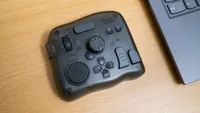
The TourBox Elite Plus is a fairly compact device that’s not much larger than a mouse, but is almost a square shape. This makes it fit well on even smaller desks, and when you power it with batteries and connect to your computer via Bluetooth, being cable-free makes it a great-looking and unobtrusive device.
The Elite Plus is just 4.57x3.98x1.73in / 116x101x44mm, with a weight of 13.26oz / 376g without batteries. This weight, alongside the rubber feet on the bottom, keep it firmly in place on your desk, with no slipping and sliding during use. If you choose to use battery power and connect via Bluetooth, batteries are claimed to last up to two months.
Battery life depends on the haptic feedback setting selected and whether or not you switch it off after use. It does, however, go into sleep mode when not in use to conserve batteries. The USB connection is also useful if you’d prefer not to risk running out of batteries, although this does mean a less tidy desk.

Build quality is excellent throughout, with every control feeling solid, tactile and built to withstand years of regular use, although only long-term testing can truly confirm its durability. The Elite Plus also benefits from a UV antibacterial, fingerprint-resistant coating that helps keep the controller looking clean despite extended use.
The controller itself offers an impressive selection of inputs, including a wheel, knob, dial and 14 buttons. The wheel, knob and dial also function as clickable buttons, while four of the buttons form a convenient D-pad. This generous layout provides plenty of assignable controls without making the device feel cluttered or intimidating to use.

None of the controls feature printed labels, which makes perfect sense given that the TourBox is designed for use across a wide range of creative applications rather than a single program. TourBox supplies an extensive library of software Presets, while custom Presets allow the controller to work with virtually any application.
Remembering every assignment may seem daunting at first, but this quickly becomes second nature with regular use. Alternatively, optional HUD overlays display each control's current function on-screen, providing a clear visual reference that's especially helpful when learning new layouts or switching between applications.

TourBox Elite Plus: Performance
The Elite Plus, just like the Elite, is a great creative software controller that does exactly what it says on the tin. There is a small learning curve, or should I say, you need to get used to it, but once you do, it’s one of those devices that makes you wonder how you managed without it. What makes all the TourBox models so useful is that when combined with keyboard shortcuts, you can drastically speed up your editing workflow.
The haptic feedback on the wheel, knob, and dial is fantastic and adds another layer of tactility to the device. It just feels so much better when you have a sense of resistance and movement rather than a smooth rotation. There are two levels of intensity available, as well as the option to switch it off.
The TourBox is controlled through the TourBox Console software, which is intuitive and easy to use. It includes ready-made Presets for many popular creative applications, while also allowing you to create your own from scratch or download user-created versions from the TourBox website. Presets define what every button, dial and wheel controls, with assignable functions including shortcuts, macros, mouse actions and the TourMenu.

The TourMenu is an on-screen menu that provides quick access to software controls, making frequently used functions much faster to reach. One slightly confusing aspect of the software is that the wheel, dial and knob speed and haptic feedback settings are located within individual Presets rather than the global settings menu. Although this initially suggests they're application-specific, any changes are actually applied across all Presets.
TourBox Console also automatically switches Presets as you move between supported applications, creating a seamless workflow when using multiple creative programs. While you can disable this feature, there's little reason to. Then there’s Dynamic Panel V2, which makes using TourBox models with Lightroom Classic even more intuitive.

Dynamic Panel V2 makes editing in Lightroom Classic a much more refined editing experience by replacing Adobe's side panels with a floating, fully customisable control interface. This gives instant access to essential tools at the touch of one of four buttons to settings including Tone controls, the Tone Curve, Crop, Colour Grading, Presets and Masking. This is an impressive update and makes Lightroom editing more fluid than ever before when paired with TourBox.
As previously mentioned, the Elite Plus can also be used with iOS and Android tablets, with more presets available for iOS apps than Android. In fact, the only preset available on Android is for Clip Studio Paint. You can use it with other apps, but you have to create your own custom presets. iPad owners have many more app presets available and, of course, also have the ability to create custom presets.

TourBox Elite Plus: Verdict
The TourBox Elite Plus is the top-of-the-range model that provides the ability to use the device with an iPad or Android tablet. The latter is much more limited, but iPad compatibility is much more baked in. Whether you opt for the Elite Plus or the Elite will depend on whether you’ll use it with a tablet.
The Elite Plus can be connected via Bluetooth or USB cable when used with a computer, while the device as a whole brings tactile control to your fingertips. Haptic feedback and a good weight to the device make it feel both high-quality and solid.
The TourBox is designed in such a way, and thanks to the Tourbox Console software, that you don’t have to look at it while editing, and that’s incredibly useful. The on-screen HUDs across all compatible software and the Dynamic Panel V2 for Lightroom Classic make using the device a breeze.
Features ★★★★★ |
Wired or Bluetooth connectivity, haptic feedback and the control HUDs can’t be faulted. |
Design ★★★★★ |
Fantastic build quality, great looks and there’s a decent weight to the device. |
Performance ★★★★☆ |
The device provides precise control of creative software and speeds up your workflow. |
Value ★★★★☆ |
This is the most expensive TourBox model available and offers little over the Elite. |

✅ Buy this if...
- If you would like tactile control for photo editing, video editing, or digital drawing on both tablets and computers.
- Buy it: If you find editing with a mouse too slow and clumsy because will make working much more intuitive.
🚫 Don't buy this if...
- If you don’t intend to use it with an iPad or Android tablet because the TourBox Elite is slightly cheaper.
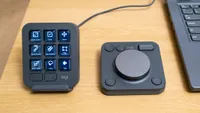
- If you need on device visual guidance like that provided by the buttons on the Logitech MX Creative Console.
Alternatives